If you no longer need a bucket, you can delete it to stop all billing. Because Object Storage Service (OSS) fees are charged for the resources inside a bucket, you must clear all resources before deleting it. Deleting a bucket is the most reliable way to prevent unexpected fees from overlooked billable resources. Note that data cannot be recovered after a bucket is deleted, and another user can claim its name after it is released. To completely stop using OSS, you must delete all buckets in your account.

Assess risks before deletion
Risk of irreversible data loss
This action is irreversible and permanently removes all objects, their previous versions, and parts. Back up your data beforehand.
Risk of service disruption
Deleting a bucket immediately disrupts any websites, applications, or CDN services that depend on it. Ensure that no services are actively accessing the bucket.
Risk of bucket name squatting
After a bucket is deleted, its name enters a 4 to 8-hour cool-down period before it is released. If you need to reserve the name, we recommend emptying the bucket instead of deleting it.
Risk of synchronous deletion
If you have enabled cross-region replication or same-region replication, the delete operation might also clear data from the destination bucket. Check your configuration.
Cost and time estimate
Cleaning up many objects may incur API request fees and can take several hours or longer, depending on the data volume.
Check for resources that must be deleted
If you try to delete a bucket containing resources like objects, parts, access points, accelerators, or RTMP ingest URLs, the system reports a "The bucket is not empty" error. We recommend using the deletion wizard in the OSS console, which automatically scans for and lists all items that need to be cleaned up.
Log on to the OSS console.
In the left-side navigation pane, click Buckets. On the Buckets page, find and click the desired bucket.
In the left navigation pane, scroll to the bottom and click Delete Bucket.
On the Delete Bucket page, click Delete Bucket. You can then view the items that must be cleaned up.

Clean up the required resources
To delete a bucket, you must first clear all its resources. Clean up the resources identified by the system. If the bucket contains many objects, we recommend using a lifecycle rule to automate the cleanup.
Objects
If the status column for the objects resource indicates that the HDFS feature is enabled, you must clean up the HDFS objects first. If versioning is enabled, the Objects page displays both the current and all previous versions. Therefore, selecting all objects and deleting them will remove all versions.
OSS objects
OSS console
On the Delete Bucket page, click Delete Bucket, find the objects resource, then click Delete.
Select all objects and click Permanently Delete at the bottom of the page.
In the dialog box that appears, click OK.
ossutil
Deletes all objects from the bucket, including current and previous versions.
ossutil rm oss://examplebucket/ -rFor more examples, see rm (delete).
HDFS objects
OSS console
In the Status column of the object resource, click Pause Now to stop the HDFS background task.
Click Delete to go to the HDFS tab.
Sequentially click Permanently Delete until all HDFS files are deleted.
HDFS shell commands
hdfs dfs -rm -r -skipTrash oss://examplebucket.cn-hangzhou.oss-dls.aliyuncs.com/*For more information, see Perform common operations for the OSS-HDFS service by using HDFS shell commands.
Parts
Parts are object fragments generated by incomplete multipart uploads.
OSS console
On the Delete Bucket page, click Delete Bucket, find the Parts resource item, and click Delete.
On the Objects page, click Part Management.
In the Parts panel, click Delete All.
In the dialog box, click OK.
ossutil
Deletes all parts from incomplete or canceled multipart uploads.
ossutil rm oss://examplebucket -m -r -fFor more information, see rm (delete).
Access points
In the left navigation bar, click Access Point.
For each access point, click Delete Access Point.
Follow the on-screen instructions to delete the corresponding access policy.
After you delete the access policy, return to the access point list. Enter the access point name as prompted and click OK to complete the deletion.
Accelerators
Note that deleting an accelerator only clears its cached data. The data stored in the OSS bucket is not affected.
In the left navigation bar, click Bucket Settings > Accelerator.
In the OSS accelerator list, click Delete in the Actions column.
Enter the accelerator name as prompted on the page, and click OK to complete the deletion.

RTMP ingest URLs
You cannot view or delete a bucket's LiveChannels with the OSS console or tools. Instead, use an SDK or call the API. For more information, see the DeleteLiveChannel API documentation. The following sample code shows how to delete a specified LiveChannel.
import com.aliyun.oss.ClientBuilderConfiguration;
import com.aliyun.oss.OSS;
import com.aliyun.oss.OSSClientBuilder;
import com.aliyun.oss.OSSException;
import com.aliyun.oss.common.auth.CredentialsProviderFactory;
import com.aliyun.oss.common.auth.EnvironmentVariableCredentialsProvider;
import com.aliyun.oss.common.comm.SignVersion;
import com.aliyun.oss.model.LiveChannelGenericRequest;

/**
 * This code provides an example of how to delete a specified LiveChannel.
 * This program demonstrates how to delete a LiveChannel in Alibaba Cloud OSS.
 */

public class Demo {

    public static void main(String[] args) throws Exception {
        // The OSS endpoint. Select an endpoint based on your region. This example uses the endpoint for the China (Hangzhou) region.
        String endpoint = "https://oss-cn-hangzhou.aliyuncs.com";
        // Obtain access credentials from environment variables. Before you run this code, make sure that the OSS_ACCESS_KEY_ID and OSS_ACCESS_KEY_SECRET environment variables are set.
        EnvironmentVariableCredentialsProvider credentialsProvider = CredentialsProviderFactory.newEnvironmentVariableCredentialsProvider();
        // Specify the bucket name. For example, examplebucket.
        String bucketName = "examplebucket";
        // Specify the LiveChannel name.
        String liveChannelName = "yourLiveChannelName";
        // Specify the region where the bucket is located. For example, set Region to cn-hangzhou for China (Hangzhou).
        String region = "cn-hangzhou";

        // Create an OSSClient instance.
        // When the OSSClient instance is no longer needed, call the shutdown method to release resources.
        ClientBuilderConfiguration clientBuilderConfiguration = new ClientBuilderConfiguration();
        clientBuilderConfiguration.setSignatureVersion(SignVersion.V4);
        OSS ossClient = OSSClientBuilder.create()
                .endpoint(endpoint)
                .credentialsProvider(credentialsProvider)
                .clientConfiguration(clientBuilderConfiguration)
                .region(region)
                .build();

        try {
            // Create a request to delete the LiveChannel.
            LiveChannelGenericRequest request = new LiveChannelGenericRequest(bucketName, liveChannelName);
            // Execute the delete operation.
            ossClient.deleteLiveChannel(request);
        } catch (OSSException oe) {
            // Handle exceptions returned by the OSS server.
            oe.printStackTrace();
            System.out.println("Caught an OSSException, which means your request made it to OSS, "
                    + "but was rejected with an error response for some reason.");
            System.out.println("Error Message:" + oe.getErrorMessage());
            System.out.println("Error Code:" + oe.getErrorCode());
            System.out.println("Request ID:" + oe.getRequestId());
            System.out.println("Host ID:" + oe.getHostId());
        } catch (Exception e) {
            System.out.println("Caught an unexpected exception:");
            e.printStackTrace();
        } finally {
            if (ossClient != null) {
                // Release OSSClient resources.
                ossClient.shutdown();
            }
        }
    }
}
Delete the bucket
After you confirm that all resources in the bucket have been cleared, you can delete the bucket.
OSS console
Return to the Delete Bucket page for the target bucket.
Click Delete Bucket, enter the bucket name as prompted, then click OK to complete the deletion.
ossutil
The following command deletes the bucket named examplebucket.
ossutil api delete-bucket --bucket examplebucketFor more information, see delete-bucket.
OSS SDK
The following sections provide code examples for deleting a bucket by using common SDKs. For information about other SDKs, see SDK overview.
Java
import com.aliyun.oss.*;
import com.aliyun.oss.common.auth.*;
import com.aliyun.oss.common.comm.SignVersion;

public class Demo {

    public static void main(String[] args) throws Exception {
        // In this example, the endpoint of the China (Hangzhou) region is used. Specify your actual endpoint.
        String endpoint = "https://oss-cn-hangzhou.aliyuncs.com";
        // Obtain access credentials from environment variables. Before you run the sample code, make sure that the OSS_ACCESS_KEY_ID and OSS_ACCESS_KEY_SECRET environment variables are configured.
        EnvironmentVariableCredentialsProvider credentialsProvider = CredentialsProviderFactory.newEnvironmentVariableCredentialsProvider();
        // Specify the name of the bucket. Example: examplebucket.
        String bucketName = "examplebucket";
        // Specify the region in which the bucket is located. For example, if the bucket is located in the China (Hangzhou) region, set the region to cn-hangzhou.
        String region = "cn-hangzhou";

        // Create an OSSClient instance.
        // Call the shutdown method to release associated resources when the OSSClient is no longer in use.
        ClientBuilderConfiguration clientBuilderConfiguration = new ClientBuilderConfiguration();
        clientBuilderConfiguration.setSignatureVersion(SignVersion.V4);
        OSS ossClient = OSSClientBuilder.create()
                .endpoint(endpoint)
                .credentialsProvider(credentialsProvider)
                .clientConfiguration(clientBuilderConfiguration)
                .region(region)
                .build();

        try {
            // Delete the bucket.
            ossClient.deleteBucket(bucketName);
        } catch (OSSException oe) {
            System.out.println("Caught an OSSException, which means your request made it to OSS, "
                    + "but was rejected with an error response for some reason.");
            System.out.println("Error Message:" + oe.getErrorMessage());
            System.out.println("Error Code:" + oe.getErrorCode());
            System.out.println("Request ID:" + oe.getRequestId());
            System.out.println("Host ID:" + oe.getHostId());
        } catch (ClientException ce) {
            System.out.println("Caught an ClientException, which means the client encountered "
                    + "a serious internal problem while trying to communicate with OSS, "
                    + "such as not being able to access the network.");
            System.out.println("Error Message:" + ce.getMessage());
        } finally {
            if (ossClient != null) {
                ossClient.shutdown();
            }
        }
    }
}
Python
import argparse
import alibabacloud_oss_v2 as oss

# Create a command-line argument parser and describe that this script is used to delete a specified OSS bucket.
parser = argparse.ArgumentParser(description="Delete a specified OSS bucket.")

# Add the --region command-line argument, which specifies the region where the bucket is located. This argument is required.
parser.add_argument('--region', help='The region in which the bucket is located.', required=True)

# Add the --bucket command-line argument, which specifies the name of the bucket. This argument is required.
parser.add_argument('--bucket', help='The name of the bucket to delete.', required=True)

# Add the --endpoint command-line argument, which specifies the domain name that other services can use to access OSS. This argument is not required.
parser.add_argument('--endpoint', help='The domain names that other services can use to access OSS.')

def main():
    """
    The main function, which is used to parse command-line arguments and delete the specified bucket.
    """

    args = parser.parse_args()  # Parse command-line arguments.

    # Load credentials from environment variables for identity verification.
    credentials_provider = oss.credentials.EnvironmentVariableCredentialsProvider()

    # Use the default configurations of the SDK and set the credential provider and region.
    cfg = oss.config.load_default()
    cfg.credentials_provider = credentials_provider
    cfg.region = args.region

    # If the endpoint parameter is provided, set the endpoint in the configuration.
    if args.endpoint is not None:
        cfg.endpoint = args.endpoint

    # Create an OSS client based on the configurations.
    client = oss.Client(cfg)

    # Construct a request to delete the specified bucket.
    request = oss.DeleteBucketRequest(bucket=args.bucket)

    try:
        # Send the request and obtain the response.
        result = client.delete_bucket(request)

        # Print the status code and request ID of the response.
        print(f'status code: {result.status_code},'
              f' request id: {result.request_id}')
    except oss.exceptions.OssError as e:
        # Catch and print possible exceptions.
        print(f"Failed to delete bucket: {e}")

if __name__ == "__main__":
    main()  # The script entry point. The main function is called when the file is run.
Go
package main
import (
"context"
"flag"
"log"
"github.com/aliyun/alibabacloud-oss-go-sdk-v2/oss"
"github.com/aliyun/alibabacloud-oss-go-sdk-v2/oss/credentials"
)
var (
region string
bucketName string
)
func init() {
// Define command line parameters to specify the region and name of the bucket.
flag.StringVar(®ion, "region", "", "The region in which the bucket is located.")
flag.StringVar(&bucketName, "bucket", "", "The name of the bucket.")
}
func main() {
// Parse command line parameters.
flag.Parse()
// Check whether the name of the bucket is specified.
if len(bucketName) == 0 {
flag.PrintDefaults()
log.Fatalf("invalid parameters, bucket name required")
}
// Check whether the region is specified.
if len(region) == 0 {
flag.PrintDefaults()
log.Fatalf("invalid parameters, region required")
}
// Load the default configurations and specify the credential provider and region.
cfg := oss.LoadDefaultConfig().
WithCredentialsProvider(credentials.NewEnvironmentVariableCredentialsProvider()).
WithRegion(region)
// Create an OSS client.
client := oss.NewClient(cfg)
// Create a request object for deletion.
request := &oss.DeleteBucketRequest{
Bucket: oss.Ptr(bucketName),
}
// Call the DeleteBucket method.
result, err := client.DeleteBucket(context.TODO(), request)
if err != nil {
log.Fatalf("failed to delete bucket %v", err)
}
// Display the result.
log.Printf("delete bucket result:%#v\n", result)
}
PHP
<?php

require_once __DIR__ . '/../vendor/autoload.php'; // Automatically load objects and dependency libraries.

use AlibabaCloud\Oss\V2 as Oss;

// Specify command line parameters.
$optsdesc = [
    "region" => ['help' => The region in which the bucket is located.', 'required' => True], // (Required) Specify the region in which the bucket is located. Example: oss-cn-hangzhou.
    "endpoint" => ['help' => The domain names that other services can use to access OSS.', 'required' => False], // (Optional) Specify the endpoint that can be used by other services to access OSS.
    "bucket" => ['help' => The name of the bucket, 'required' => True], // (Required) Specify the name of the bucket.
];
$longopts = \array_map(function ($key) {
    return "$key:"; // Add a colon (:) to the end of each parameter to indicate that a value is required.
}, array_keys($optsdesc));

// Parse the command line parameters.
$options = getopt("", $longopts);

// Check whether the required parameters are configured.
foreach ($optsdesc as $key => $value) {
    if ($value['required'] === True && empty($options[$key])) {
        $help = $value['help'];
        echo "Error: the following arguments are required: --$key, $help"; // Specifies that the required parameters are not configured.
        exit(1);
    }
}

// Obtain the values of the command line parameters.
$region = $options["region"]; // The region in which the bucket is located.
$bucket = $options["bucket"]; // The name of the bucket.

// Use environment variables to load the credential information (AccessKey ID and AccessKey secret).
$credentialsProvider = new Oss\Credentials\EnvironmentVariableCredentialsProvider();

// Use the default configurations of the SDK.
$cfg=Oss\Config::loadDefault(); // Load the default configurations of the SDK.
$cfg->setCredentialsProvider($credentialsProvider); // Specify the credential provider.
$cfg->setRegion($region); // Specify the region.
if (isset($options["endpoint"])) {
    $cfg->setEndpoint($options["endpoint"]); // Specify the endpoint if an endpoint is provided.
}

// Create an OSSClient instance.
$client = new Oss\Client($cfg);

// Create a request to delete the bucket.
$request = new Oss\Models\DeleteBucketRequest($bucket);

// Use the deleteBucket method to delete the bucket.
$result = $client->deleteBucket($request);

// Display the returned result.
printf(
    'status code:' . $result-> statusCode. PHP_EOL . // The HTTP response status code.
    'request id:' . $result->requestId // The unique identifier of the request.
);
Node.js
const OSS = require('ali-oss');

const client = new OSS({
  // Set region to the region where the bucket is located. For example, if the bucket is in the China (Hangzhou) region, set region to oss-cn-hangzhou.
  region: 'yourregion',
  // Obtain access credentials from environment variables. Before you run the sample code, make sure that the OSS_ACCESS_KEY_ID and OSS_ACCESS_KEY_SECRET environment variables are configured.
  accessKeyId: process.env.OSS_ACCESS_KEY_ID,
  accessKeySecret: process.env.OSS_ACCESS_KEY_SECRET,
  authorizationV4: true,
  // Set bucket to the name of your bucket.
  bucket: 'yourBucketName',
});

async function deleteBucket() {
  try {
    // Specify the bucket name.
    const result = await client.deleteBucket('yourbucketname');
    console.log(result);
  } catch (err) {
    console.log(err);
  }
}

deleteBucket();
.NET
using System;
using Aliyun.OSS;
using Aliyun.OSS.Common;


namespace Samples
{
    public class Program
    {
        public static void Main(string[] args)
        {
            // Set endpoint to the Endpoint of the region where your bucket is located. For example, if your bucket is in the China (Hangzhou) region, set the Endpoint to https://oss-cn-hangzhou.aliyuncs.com.
            var endpoint = "https://oss-cn-hangzhou.aliyuncs.com";
            // Obtain access credentials from environment variables. Before you run this sample code, make sure that the OSS_ACCESS_KEY_ID and OSS_ACCESS_KEY_SECRET environment variables are set.
            var accessKeyId = Environment.GetEnvironmentVariable("OSS_ACCESS_KEY_ID");
            var accessKeySecret = Environment.GetEnvironmentVariable("OSS_ACCESS_KEY_SECRET");
            // Set bucketName to the name of your bucket. Example: examplebucket.
            var bucketName = "examplebucket314";
            // Set region to the ID of the region where your bucket is located. For example, if your bucket is in the China (Hangzhou) region, set the region to cn-hangzhou.
            const string region = "cn-hangzhou";
            // Create a ClientConfiguration instance and modify the default parameters as needed.
            var conf = new ClientConfiguration();
            // Set the signature version to V4.
            conf.SignatureVersion = SignatureVersion.V4;

            // Create an OssClient instance.
            var client = new OssClient(endpoint, accessKeyId, accessKeySecret, conf);
            client.SetRegion(region);

            try
            {
                client.DeleteBucket(bucketName);

                Console.WriteLine("Delete bucket succeeded");
            }
            catch (Exception ex)
            {
                Console.WriteLine("Delete bucket failed. {0}", ex.Message);
            }
        }
    }
}
Android
DeleteBucketRequest deleteBucketRequest = new DeleteBucketRequest("bucketName");

// Asynchronously delete the bucket.
OSSAsyncTask deleteBucketTask = oss.asyncDeleteBucket(deleteBucketRequest, new OSSCompletedCallback<DeleteBucketRequest, DeleteBucketResult>() {
    @Override
    public void onSuccess(DeleteBucketRequest request, DeleteBucketResult result) {
        Log.d("asyncDeleteBucket", "Success!");
    }
    @Override
    public void onFailure(DeleteBucketRequest request, ClientException clientException, ServiceException serviceException) {
        // The request failed.
        if (clientException != null) {
            // Client exceptions, such as network exceptions.
            clientException.printStackTrace();
        }
        if (serviceException != null) {
            // Service exceptions.
            Log.e("ErrorCode", serviceException.getErrorCode());
            Log.e("RequestId", serviceException.getRequestId());
            Log.e("HostId", serviceException.getHostId());
            Log.e("RawMessage", serviceException.getRawMessage());
        }
    }
});
iOS
OSSDeleteBucketRequest * delete = [OSSDeleteBucketRequest new];
// Specify the bucket name. For example, examplebucket.
delete.bucketName = @"examplebucket";
OSSTask * deleteTask = [client deleteBucket:delete];
[deleteTask continueWithBlock:^id(OSSTask *task) {
    if (!task.error) {
        NSLog(@"delete bucket success!");
    } else {
        NSLog(@"delete bucket failed, error: %@", task.error);
    }
    return nil;
}];
// Block the current thread until the task is complete.
// [getdeleteTask waitUntilFinished];
C++
#include <alibabacloud/oss/OssClient.h>
using namespace AlibabaCloud::OSS;

int main(void)
{
    /*Initialize the OSS account information.*/

    /*Set yourEndpoint to the Endpoint of the region where the bucket is located. For example, if the bucket is in the China (Hangzhou) region, set the Endpoint to https://oss-cn-hangzhou.aliyuncs.com.*/
    std::string Endpoint = "yourEndpoint";

    /*Set yourRegion to the region where the bucket is located. For example, if the bucket is in the China (Hangzhou) region, set the region to cn-hangzhou.*/
    std::string Region = "yourRegion";

    /*Specify the bucket name, for example, examplebucket.*/
    std::string BucketName = "examplebucket";

    /*Initialize network resources.*/
    InitializeSdk();

    ClientConfiguration conf;
    conf.signatureVersion = SignatureVersionType::V4;
    /*Obtain access credentials from environment variables. Before you run this sample code, make sure that the OSS_ACCESS_KEY_ID and OSS_ACCESS_KEY_SECRET environment variables are set.*/
    auto credentialsProvider = std::make_shared<EnvironmentVariableCredentialsProvider>();
    OssClient client(Endpoint, credentialsProvider, conf);
    client.SetRegion(Region);

    /*Delete the bucket.*/
    DeleteBucketRequest request(BucketName);

    auto outcome = client.DeleteBucket(request);

    if (outcome.isSuccess()) {
    std::cout << "Delete bucket successfully." << std::endl;
    } else {
    std::cout << "Failed to delete bucket. Error code: " << outcome.error().Code()
              << ", Message: " << outcome.error().Message()
              << ", RequestId: " << outcome.error().RequestId() << std::endl;
    }

    /*Release network resources.*/
    ShutdownSdk();
    return 0;
}
C
#include "oss_api.h"
#include "aos_http_io.h"
/* Set yourEndpoint to the endpoint of the region where the bucket is located. For example, if the bucket is in the China (Hangzhou) region, set the endpoint to https://oss-cn-hangzhou.aliyuncs.com. */
const char *endpoint = "yourEndpoint";

/* Set the bucket name. Example: examplebucket. */
const char *bucket_name = "examplebucket";
/* Set yourRegion to the region where the bucket is located. For example, if the bucket is in the China (Hangzhou) region, set the region to cn-hangzhou. */
const char *region = "yourRegion";
void init_options(oss_request_options_t *options)
{
    options->config = oss_config_create(options->pool);
    /* Use a char* string to initialize the aos_string_t type. */
    aos_str_set(&options->config->endpoint, endpoint);
    /* Obtain access credentials from environment variables. Before running this sample code, make sure that the OSS_ACCESS_KEY_ID and OSS_ACCESS_KEY_SECRET environment variables are set. */
    aos_str_set(&options->config->access_key_id, getenv("OSS_ACCESS_KEY_ID"));
    aos_str_set(&options->config->access_key_secret, getenv("OSS_ACCESS_KEY_SECRET"));
    // Configure the following two additional parameters.
    aos_str_set(&options->config->region, region);
    options->config->signature_version = 4;
    /* Specify whether to use a CNAME to access OSS. A value of 0 indicates that a CNAME is not used. */
    options->config->is_cname = 0;
    /* Set network parameters, such as the timeout period. */
    options->ctl = aos_http_controller_create(options->pool, 0);
}
int main(int argc, char *argv[])
{
    /* Call the aos_http_io_initialize method in main() to initialize global resources, such as network and memory resources. */
    if (aos_http_io_initialize(NULL, 0) != AOSE_OK) {
        exit(1);
    }
    /* A memory pool (pool) for memory management, equivalent to apr_pool_t. Its implementation code is in the APR library. */
    aos_pool_t *pool;
    /* Create a new memory pool. The second parameter is NULL, which indicates that the pool does not inherit from other memory pools. */
    aos_pool_create(&pool, NULL);
    /* Create and initialize options. This parameter includes global configuration information, such as the endpoint, access_key_id, access_key_secret, is_cname, and curl. */
    oss_request_options_t *oss_client_options;
    /* Allocate memory for options in the memory pool. */
    oss_client_options = oss_request_options_create(pool);
    /* Initialize the client options oss_client_options. */
    init_options(oss_client_options);
    /* Initialize the parameters. */
    aos_string_t bucket;
    aos_table_t *resp_headers = NULL;
    aos_status_t *resp_status = NULL;
    /* Assign the char* data to the aos_string_t bucket. */
    aos_str_set(&bucket, bucket_name);
    /* Delete the bucket. */
    resp_status = oss_delete_bucket (oss_client_options, &bucket, &resp_headers);
    if (aos_status_is_ok(resp_status)) {
        printf("delete bucket succeeded\n");
    } else {
        printf("delete bucket failed\n");
    }
    /* Release the memory pool. This releases the memory allocated for resources during the request. */
    aos_pool_destroy(pool);
    /* Release the previously allocated global resources. */
    aos_http_io_deinitialize();
    return 0;
}
Ruby
require 'aliyun/oss'

client = Aliyun::OSS::Client.new(
  # The China (Hangzhou) region is used as an example. Specify the actual Endpoint for your region.
  endpoint: 'https://oss-cn-hangzhou.aliyuncs.com',
  # Obtain access credentials from environment variables. Before you run this sample code, make sure that the OSS_ACCESS_KEY_ID and OSS_ACCESS_KEY_SECRET environment variables are set.
  access_key_id: ENV['OSS_ACCESS_KEY_ID'],
  access_key_secret: ENV['OSS_ACCESS_KEY_SECRET']
)
# Specify the bucket name. For example, examplebucket.
client.delete_bucket('examplebucket')
Automated cleanup for large volumes
If a bucket contains a massive number of objects (millions or more), configuring a lifecycle rule is the most efficient and cost-effective cleanup method. This approach involves setting an "expire and delete" rule that instructs the system to automatically delete all data in the bucket after a specified period. If you are unfamiliar with lifecycle rules, we recommend testing them in a non-production bucket first.
Note: Object deletion is an irreversible action. Proceed with caution.
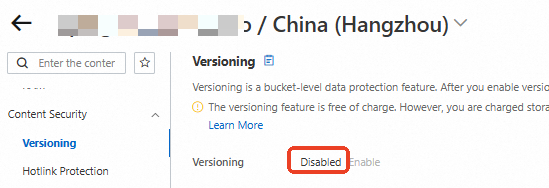
Versioning disabled
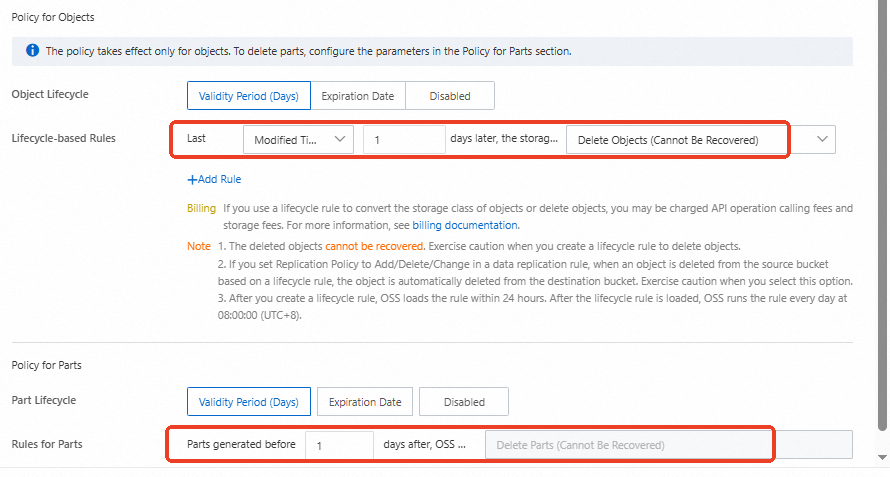
For a bucket with versioning disabled, you only need to configure a single lifecycle rule to automatically and quickly clean up all objects and parts (unmerged parts from multipart uploads).
Log on to the OSS console, go to the Buckets page, then click the name of the target bucket.
In the left navigation pane, choose and confirm that versioning is disabled for the bucket.
In the left navigation pane, choose Data Management > Lifecycle. Configure a lifecycle rule to automatically delete all objects in the bucket 1 day after they are last modified, and to automatically clean up parts that were created more than 1 day ago.
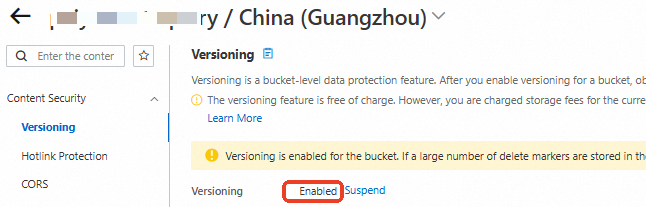
Versioning enabled
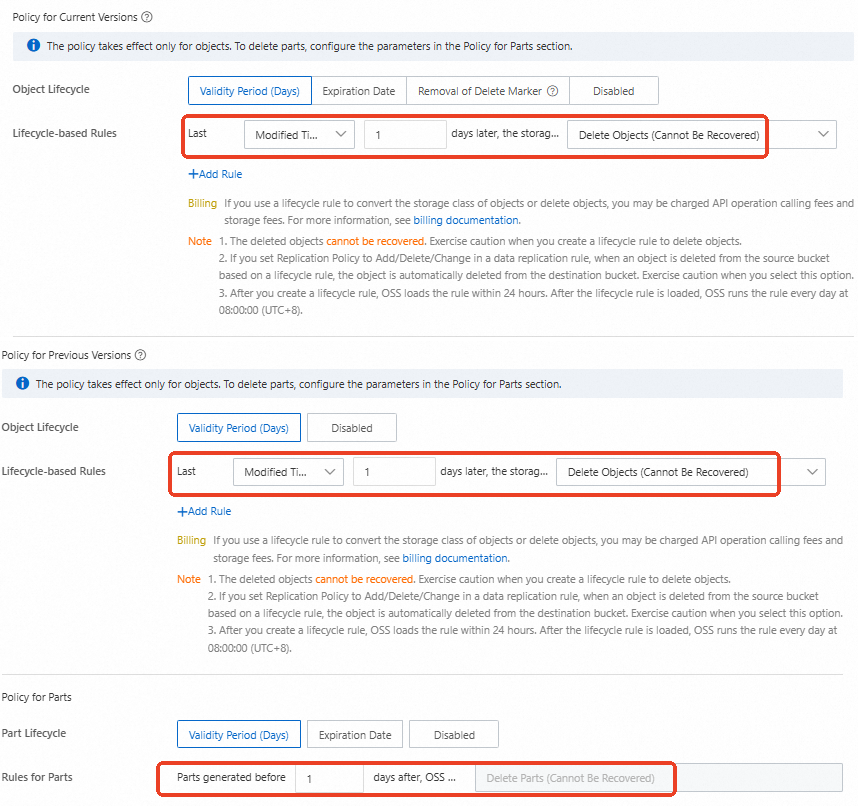
When versioning is enabled for a bucket, it can contain current object versions, previous object versions, parts, and delete markers. You only need to configure a single lifecycle rule to automatically and quickly clean up all these items.
Log on to the OSS console, go to the Buckets page, then click the name of the target bucket.
In the left navigation bar, select , and confirm that versioning is enabled for the bucket.
In the left navigation bar, select , and configure a lifecycle rule to automatically delete all current and previous version objects in the bucket 1 day after their last modification and to automatically clean up parts that were created more than 1 day ago. This rule also cleans up delete markers.
FAQ
"Bucket not empty" error
This error indicates the bucket still contains resources. We recommend using the OSS console to identify and clean up the remaining resources as described in Clean up the required resources. Then, try deleting the bucket again.
Recreating a bucket with the same name
After a bucket is deleted, its name enters a cool-down period of 4 to 8 hours. During this time, no user can create a new bucket with that name. If you need a bucket immediately, use a new name.
After the cool-down period ends, the name becomes available to all users. If you do not recreate the bucket promptly, another user may claim the name before you do.
Batch deletion of multiple buckets
Batch deletion is a high-risk operation that can cause permanent data loss. Before you proceed, carefully verify the list of buckets to be deleted and ensure that all necessary data is backed up.
The OSS console does not support batch deletion. However, you can write a script that uses ossutil to perform this operation.
The core logic is as follows:
Prepare a list: Create an accurate text file or list that contains the names of all the buckets that you want to delete.
Execute in a loop: Your script must iterate through this list and perform the following two key steps for each bucket name.
Empty the bucket: For the current bucket, call the ossutil command to empty it.
Delete the empty bucket: After you confirm that the previous step is successful, call the ossutil command to delete the bucket.
"Insufficient permissions" error
Before you delete a bucket, you must clear all resources within it. This process requires multiple permissions, such as list and delete permissions. To prevent deletion failures due to missing permissions, we recommend contacting an administrator to grant the AliyunOSSFullAccess permission to your RAM identity.
How to stop OSS billing
To stop all Object Storage Service (OSS) charges, you must delete all buckets in your account. You may still incur charges as long as any bucket exists, even if empty, or if you have outstanding bills.
Recovering a deleted bucket
No. Deleting a bucket is an irreversible operation. Always back up your data before you delete a bucket.