You can instrument your Go application with Jaeger and report traces to Managed Service for OpenTelemetry. After the traces are reported, Managed Service for OpenTelemetry starts to monitor your application. You can view various monitoring data, such as application topology, call stacks, abnormal transactions, slow transactions, and SQL analysis. This topic describes how to use the Jaeger SDK and Jaeger Agent for instrumentation and to report Go application data.
For richer features, advanced tracing capabilities, and a better experience, connect your application to Managed Service for OpenTelemetry by using the OpenTelemetry protocol. For more information, see Preparations.
ARMS provides a commercially supported, self-developed agent for Go applications. This agent enables non-intrusive instrumentation and provides a richer feature set and greater stability. For more information, see Monitor Go applications.
Prerequisites
New console
-
Log on to the Managed Service for OpenTelemetry console. In the left-side navigation pane, click Integration Center.
-
On the Integration Center page, click the Jaeger card in the Open Source Frameworks section.
-
In the Jaeger panel, click the Start Integration tab, and then select a region in which you want to report data.
NoteWhen you access a region for the first time, resources are automatically initialized there.
-
Configure the Connection Type and Export Protocol parameters and copy an endpoint.
-
Connection Type: If your service is deployed on Alibaba Cloud and resides in the region that you selected, we recommend that you set this parameter to Alibaba Cloud VPC Network. Otherwise, set this parameter to Public Network.
-
Export Protocol: Set this parameter to HTTP (recommended) or gRPC based on the protocol that is supported by the client.

-
Old console
-
Log on to the Managed Service for OpenTelemetry console.
-
In the left-side navigation pane, click Cluster Configurations. On the page that appears, click the Access point information tab.
-
In the top navigation bar, select a region in which you want to report data. In the Cluster Information section, turn on Show Token.
-
Set the Client parameter to Jaeger.
In the Related Information column of the table, copy an endpoint.
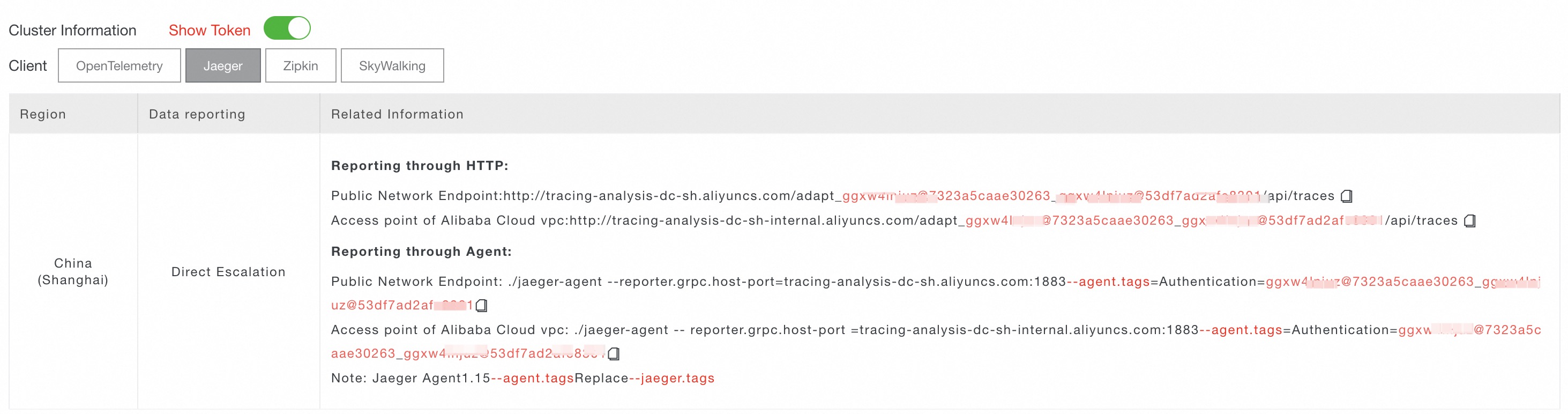 Note
NoteIf your application is deployed in an Alibaba Cloud production environment, use a VPC endpoint. Otherwise, use a public endpoint.
Background information
-
The following figure shows how to report data without using the Jaeger agent.

-
The following figure shows how to report data by using the Jaeger agent.

Method 1: Report data using the Jaeger SDK
This section uses the Go Modules dependency management tool as an example. You can use the Jaeger SDK for instrumentation to directly report data to the Managed Service for OpenTelemetry server side. If you use other dependency management tools, perform the required operations.
Import jaeger-client-go.
go get github.com/uber/jaeger-client-goCreate a Tracer object.
NoteReplace
<endpoint>with the endpoint for your client and region. You can obtain the endpoint from the Endpoint Information page in the Managed Service for OpenTelemetry console. For more information about how to obtain the endpoint, see the Prerequisites section of this topic.func NewJaegerTracer(service string) (opentracing.Tracer, io.Closer) { sender := transport.NewHTTPTransport( // Set the gateway. The gateway varies based on the region. "<endpoint>", ) tracer, closer:= jaeger.NewTracer(service, jaeger.NewConstSampler(true), jaeger.NewRemoteReporter(sender)) return tracer, closer }Create a span instance object and enable data pass-through.
If no parentSpan exists:
// Create a span.
span := tracer.StartSpan("myspan")
// Set a tag.
clientSpan.SetTag("mytag", "123")
// Pass through the trace ID.
tracer.Inject(span.Context(), opentracing.HTTPHeaders, opentracing.HTTPHeadersCarrier(req.Header))
...
defer  span.Finish()
If a parentSpan exists:
// Parse spanCtx from the HTTP/RPC object.
spanCtx, _ := tracer.Extract(opentracing.HTTPHeaders, opentracing.HTTPHeadersCarrier(r.Header))
span := tracer.StartSpan("myspan", opentracing.ChildOf(spanCtx))
...
defer  span.Finish()
For more information about how to use the SDK, see Go Doc.
Method 2: Report data using the Jaeger Agent
Start the Jaeger Agent. For more information, see Install Jaeger Agent.
Import jaeger-client-go.
go get github.com/uber/jaeger-client-goCreate a Tracer object.
func NewJaegerTracer(serviceName string) (opentracing.Tracer, io.Closer) {
   sender, _ := jaeger.NewUDPTransport("",0)
   tracer, closer:= jaeger.NewTracer(serviceName,
        jaeger.NewConstSampler(true),
        jaeger.NewRemoteReporter(sender))
    return tracer, closer
}
Create a span instance object and enable data pass-through.
If no parentSpan exists:
// Create a span.
span := tracer.StartSpan("myspan")
// Set a tag.
clientSpan.SetTag("mytag", "123")
// Pass through the trace ID.
tracer.Inject(span.Context(), opentracing.HTTPHeaders, opentracing.HTTPHeadersCarrier(req.Header))
...
defer  span.Finish()
If a parentSpan exists:
// Parse spanCtx from the HTTP/RPC object.
spanCtx, _ := tracer.Extract(opentracing.HTTPHeaders, opentracing.HTTPHeadersCarrier(r.Header))
span := tracer.StartSpan("myspan", opentracing.ChildOf(spanCtx))
...
defer  span.Finish()
For more information about how to use the SDK, see Go Doc.
Examples
Report data directly using the Jaeger SDK
Obtain the endpoint. For more information, see the Prerequisites section of this topic.
Run the following command to download the sample file.
wget https://arms-apm-cn-hangzhou.oss-cn-hangzhou.aliyuncs.com/demo/tracing-demo.zip && unzip tracing-demo.zipOpen the examples/settings.go file in the sample folder and configure the parameters as described by the comments in the code block: set TracingAnalysisEndpoint to the endpoint that you obtained in Step 1.
package examples

// Required for SDK reporting: set the Tracing Analysis gateway (the value varies by region; obtain it from the configuration view at http://trace.console.alibabacloud.com/)
const TracingAnalysisEndpoint = "http://tracing-analysis-dc-hz.aliyuncs.com/adapt_xxxxxx_xxxxx/api/traces"

// Agent reporting: true (requires a locally started jaeger-agent)  SDK reporting: false (default)
const AgentSwitch = false

// Application names in the Tracing Analysis console
const (
	CliTracerServiceName = "cliDemo"

	GrpcServerName = "grpcServer"

	GrpcClientName = "grpcClient"

	HttpServerName = "httpServer"

	HttpClientName = "httpClient"
)
Run the
go mod tidycommand to manage dependencies.Run the
go run tracingdemocommand to run the sample.
Report data using the Jaeger Agent
Obtain the endpoint. For more information, see the Prerequisites section of this topic.
Run the following command to download the sample file.
wget https://arms-apm-cn-hangzhou.oss-cn-hangzhou.aliyuncs.com/demo/tracing-demo.zip && unzip tracing-demo.zipStart the Jaeger Agent. For more information, see Install Jaeger Agent.
Open the examples/settings.go file in the sample folder, configure the parameters as described by the comments in the code block, and change the value of
AgentSwitchtotrue.package examples // Required for SDK reporting: set the Tracing Analysis gateway (the value varies by region; obtain it from the configuration view at http://trace.console.alibabacloud.com/) const TracingAnalysisEndpoint = "http://tracing-analysis-dc-hz.aliyuncs.com/adapt_xxxxxx_xxxxx/api/traces" // Agent reporting: true (requires a locally started jaeger-agent) SDK reporting: false (default) const AgentSwitch = false // Application names in the Tracing Analysis console const ( CliTracerServiceName = "cliDemo" GrpcServerName = "grpcServer" GrpcClientName = "grpcClient" HttpServerName = "httpServer" HttpClientName = "httpClient" )Run the
go mod tidycommand to manage dependencies.Run the
go run tracingdemocommand to run the sample.
FAQ
Q: Why does the following error occur during runtime?
2021/06/28 21:11:54 ERROR: error when flushing the buffer: error from collector: 403A: This error indicates that the endpoint is incorrect. Correct the endpoint and try again.