When you encounter an error while calling an OpenAPI, copy the error message to the OpenAPI Troubleshooting page to automatically obtain a solution.
Get the error message
API online debugging page

SDK call

CLI call

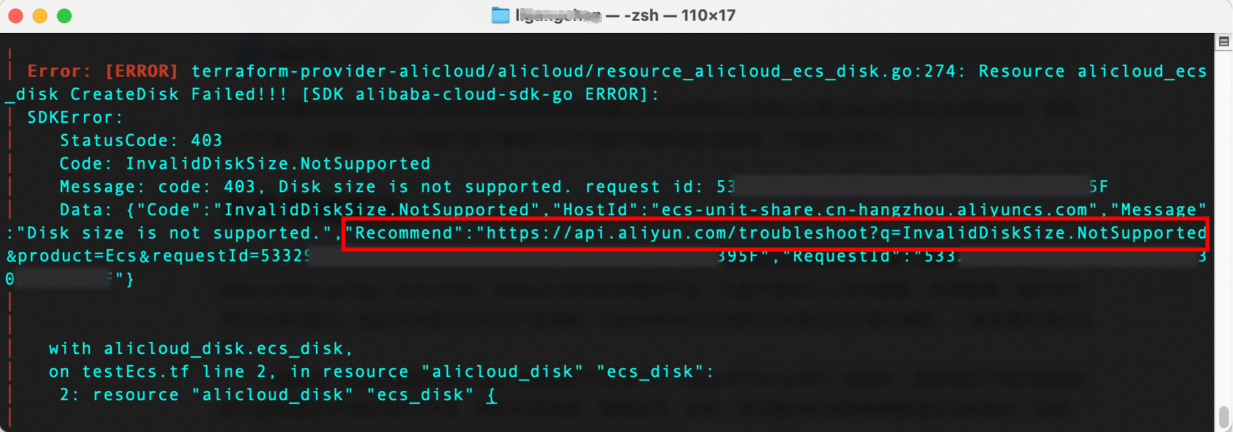
Terraform call
Alibaba Cloud Developer Toolkit

Diagnose OpenAPI issues
To query error messages across Alibaba Cloud accounts or between different Resource Access Management (RAM) users under the same account, first complete authorization, then try again.
After obtaining the error message, copy the full JSON content or just the RequestId, Code, or Message field into the page to automatically obtain a solution.
For example, when calling the RunInstances API of Elastic Compute Service and receiving an error, the error message looks like this:
{
  "RequestId": "6BE56E05-XXXX-XXXX-XXXX-FD90C4FFD581",
  "HostId": "ecs.ap-southeast-3.aliyuncs.com",
  "Code": "InvalidImageId.NotFound",
  "Message": "The specified ImageId does not exist.",
  "Recommend": "https://api.alibabacloud.com/troubleshoot?intl_lang=EN_US&q=InvalidImageId.NotFound&product=Ecs&requestId=6BE56E05-XXXX-XXXX-XXXX-FD90C4FFD581"
}
The parameters mean the following:
RequestId: A unique identifier for the request. Copy this value to the page to automatically obtain a solution.
HostId: The service endpoint for the API request.
Code: The error code.
Message: Detailed error information. Use this to check your request parameters. In this example, the error occurs because an invalid image ID was passed as ImageId. Fix the issue using a valid image ID.
Recommend: A direct link to the error diagnosis page. Copy this field to go directly to the troubleshooting solution.

In real-world scenarios—such as when using an SDK—you might not receive the full JSON error response. In that case, copy just the RequestId, Code, or Message to the page to obtain a solution. Using the RequestId yields the most accurate result.
The solution retrieved using a RequestId appears as shown below:

View the diagnosis solution
As shown above, the page displays two tabs at the bottom: Diagnosis Solution and Log Information. The Diagnosis Solution tab shows the matched solution. For example, if the error message is The specified ImageId does not exist., the provided solution is:
The specified image does not exist under this account. Check whether the image ID is correct.Follow the instructions in the solution to verify that the ImageId parameter value is correct.
Check request parameters
In real-world scenarios, you might not have saved the original request body when the error occurred. You can still use OpenAPI Troubleshooting to retrieve the request parameters, response, and other details.
Take the error with RequestId: 6BE56E05-XXXX-XXXX-XXXX-FD90C4FFD581 as an example. Click the Log Information tab. As shown below, you can view the visual analytics of the call chain, the full error message, and the original request content. Use these logs to pinpoint and resolve the issue more precisely.
