This topic describes how to upgrade or downgrade the configurations of an OpenSearch Vector Search Edition instance and provides the related precautions.
Usage notes
Configuration item | Description |
Number of Query Result Searcher (QRS) workers | You can increase or decrease the number of QRS workers. If you want to decrease the number of QRS workers, make sure that the number of QRS workers after the decrease is greater than or equal to the number of QRS workers that are being used. This will be verified in the console, and related information will be displayed after the verification. For example, if your instance contains 10 QRS workers and four QRS workers are being used, you can decrease the number of QRS workers by six at most. |
Specifications of QRS workers | You can upgrade only specifications for QRS workers. The number of CPU cores and memory capacity of an upgraded QRS worker must be greater than or equal to those of the original QRS worker. Important
|
Number of Searcher workers | You can increase or decrease the number of Searcher workers. If you want to decrease the number of Searcher workers, make sure that the number of Searcher workers after the decrease is greater than or equal to the number of Searcher workers that are being used. This will be verified in the console, and related information will be displayed after the verification. For example, if your instance contains 10 Searcher workers and six Searcher workers are being used, you can decrease the number of Searcher workers by four at most. |
Specifications of Searcher workers | You can upgrade only specifications for Searcher workers. The number of CPU cores and memory capacity of an upgraded Searcher worker must be greater than or equal to those of the original Searcher worker. |
Availability edition | You can switch the availability edition of an instance between Standard Edition and High-availability Edition.
|
Table storage mode
Data storage and queries in different tables share the resources of Searcher workers, such as CPU, memory, and disk resources.
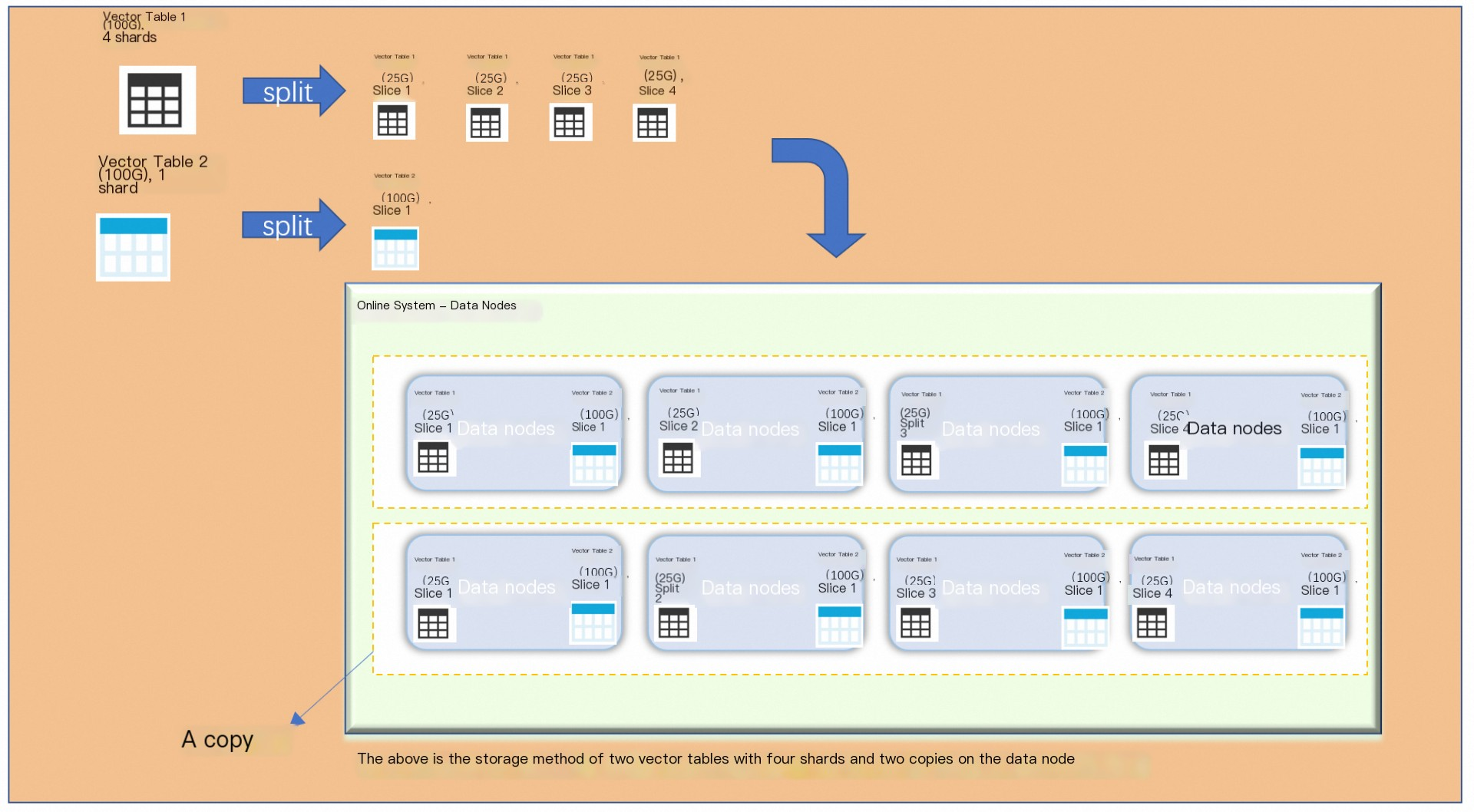
The preceding figure shows two vector tables: Table 1 with four shards and Table 2 with only one shard. Data for Table 1 is evenly distributed across its shards based on the index. Table 2, having only one shard, acts as a broadcast table and stores a full index data set on each Searcher worker.
Precautions
The upgrade or downgrade takes effect immediately, and you are charged based on new configurations. If the status of QRS workers and Searcher workers changes to 100% on the instance details page, the service becomes available.
Each time you change the configurations of an instance, you can only upgrade or downgrade the configurations. You cannot upgrade some configurations and downgrade the other configurations at the same time.
For example, your instance contains two QRS workers and two Searcher workers.
You cannot decrease the number of QRS workers to one and increase the number of Searcher workers to three.
You can decrease the number of QRS workers to one and decrease the number of Searcher workers to one.
You can decrease the number of QRS workers to one and retain the number of Searcher workers.
You can increase the number of QRS workers to three and increase the number of Searcher workers to three.
-
After you change the number of Searcher workers, you must navigate to the Instance Details page to adjust the number of replicas or edit the table to reallocate resources by modifying the shard count.
The number of QRS workers in a single cluster is equal to the number of QRS workers per replica multiplied by the number of replicas. The number of Searcher workers in a single cluster is equal to the number of replicas multiplied by the number of shards. When you increase the number of QRS workers or Searcher workers, specify an integer multiple of the number of shards. A shard is the minimum unit for data blocks.
When you increase the number of workers for a single-worker instance, the instance is unavailable during the upgrade. Make sure that no query traffic is sent to the instance during the upgrade.
After you switch the availability edition of your instance from High-availability Edition to Standard Edition, the second cluster of the instance is deleted by default. If the configurations of the two clusters for the instance are inconsistent, the service may be affected after the switch. Therefore, proceed with caution.
After an upgrade or downgrade, the number of Searcher workers in a single zone must be greater than or equal to the number of Searcher workers that are being used in a single zone.
Procedure
-
On the Instances page, find the target instance, and in the Actions column, click Upgrade/Downgrade.
-
On the modification page, select the desired availability edition, number of QRS workers, QRS worker specifications, number of Searcher workers, and Searcher worker specifications. After you configure the settings, select the Service Agreement checkbox and click Buy Now.
The page also includes other configuration items, such as Searcher worker specification family (choose from Cloud Disk, Local SSD, or GPU types), QRS worker specification family, Free storage per Searcher worker, and Total storage per Searcher worker.
-
Wait until the change is complete. This indicates that the status of QRS workers and Searcher workers changes to 100%. In this case, the service becomes available.