The natural language to SQL (NL2SQL) feature in the query analysis service transforms natural language queries into SQL statements. This topic describes how to configure the NL2SQL service.
Examples
|
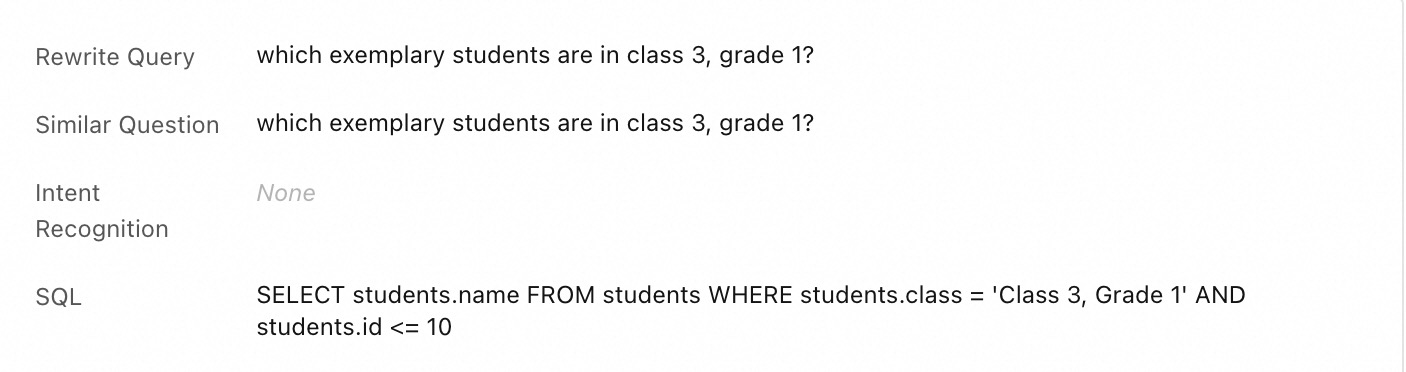
Query: Who are the model students in Class 3, Grade 10?
|
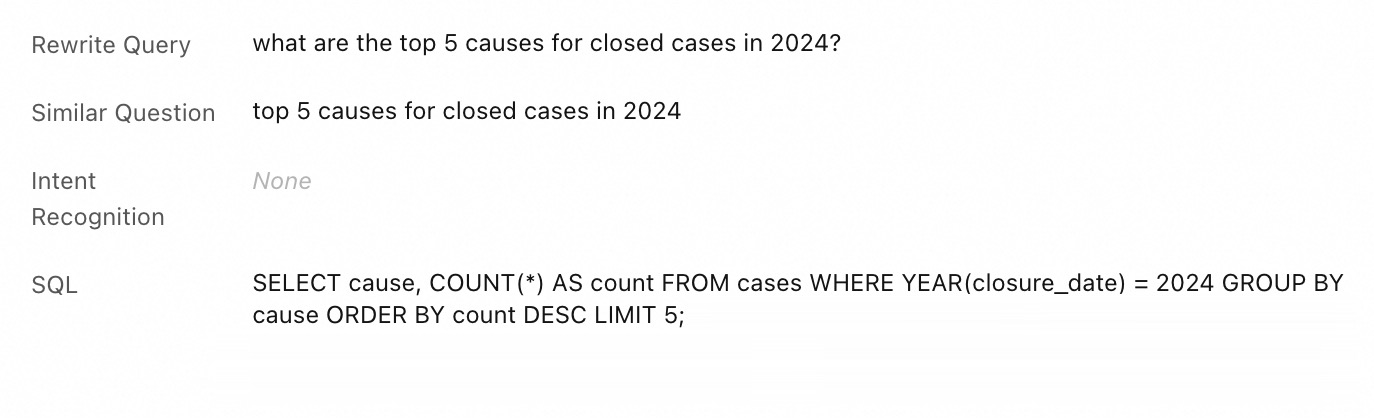
Query: What are the top 5 causes of action with the most closed cases in 2024?
|
How to configure
The NL2SQL feature transforms natural language queries into SQL statements. To use the NL2SQL service, you must configure the following information:
-
Basic table information: Configure the business data tables that the NL2SQL service uses. This configuration includes field names, field types, enumeration values, field descriptions, field mappings, and table joins.
-
Training samples: Add frequently asked questions, complex queries, and their corresponding SQL statements to improve the accuracy of NL2SQL. If a generated SQL statement is not what you expect, you can also add the query and the correct SQL statement here.
-
Custom rules (Glossary): User queries often include business-specific terms and concepts. To help the model understand these queries, you can add the terms, concepts, and their definitions to the glossary.
For example:
-
What is the status of water accumulation administration for the past week? Related information: Water accumulation administration includes events related to manhole covers and road water accumulation.
-
"Model students" are students with an ID less than or equal to 10, and "student athletes" are students with an ID greater than 11.
-
Steps
-
In the AI Search Open Platform, choose Model Service > Service Configuration, and then click Create.
Keep the default settings for Service Category and Configuration Type. Enter a Configuration Name, such as student_info_analysis (for student information data analytics).
-
Click Save and Next and configure the data table information for the NL2SQL service using the following format.
-
Basic table configuration
[
  {
    "table":"schools",
    "columns": [
      {
        "column": "class",
        "description": "Class",
        "type": "string",
        "example": ["Grade 10 Class 3", "Advanced Class"],
        "value_mapping": []
      },
      {
        "column": "school",
        "description": "School",
        "type": "string",
        "example": ["City A No. 1 B Middle School", "AA No. 5 Middle School"],
        "value_mapping": []
      }
    ]
  },
  {
    "table":"students",
    "columns": [
      {
        "column": "id",
        "description": "Student ID",
        "type": "int",
        "example": [1, 2],
        "value_mapping": [
          [1,"Zhang San"],
          [2,"Li Si"]
        ]
      },
      {
        "column": "class",
        "description": "Class",
        "type": "string",
        "example": ["Grade 10 Class 3", "Advanced Class"],
        "value_mapping": []
      }
    ]
  }
]
The table name in
tablemust start with a lowercase letter, contain only lowercase letters, digits, or underscores (_), and be no more than 30 characters long.The field name in
columnmust start with a lowercase letter, contain only lowercase letters, digits, or underscores (_), and be no more than 30 characters long.The field type in
typecan be one of the following: text, string, int8, uint8, int16, uint16, int32, int, uint32, int64, uint64, float, double, location, date, time, and timestamp. -
Table join configuration
["students.class=schools.class"]
-
-
Click Next. Configure custom rules and training samples to improve the accuracy of NL2SQL.
-
Training sample configuration: Add frequently asked questions, complex queries, and their corresponding SQL statements to improve the accuracy of NL2SQL. If a generated SQL statement is not what you expect, you can also add the query and the correct SQL statement here.
[ { "query":"Which class is Zhang San in?", "sql" : "SELECT class FROM students WHERE name = 'Zhang San'" } ] -
Custom rule configuration (Glossary): User queries often include business-specific terms and concepts. To help the model understand these queries, you can add the terms, concepts, and their definitions to the glossary.
For example: "Model students" are students with an ID (id) <= 10, and "student athletes" are students with an ID (id) > 11.
[
  {
    "key":"Model student",
    "value":"students.id <= 10"
  },
  {
    "key":"Student athlete",
    "value":"students with an ID greater than 11"
  }
]
-
-
Click OK, and then click Activate Now. You are redirected to the service configuration list, and the activation status changes to Activating while the system validates your configuration format.
When the activation status changes to Activated, the service configuration is ready. You can then test the NL2SQL service in the Experience Center.
What to do next
For more information about how to integrate the NL2SQL service into your application, see NL2SQL API.