Integrate Agentic Memory API as a cloud-based memory backend for OpenClaw to enable persistent long-term memory, cross-device synchronization, semantic retrieval, and skill management. Supported OpenClaw versions: v2026.3.22 and later.
Overview
This solution builds a multi-layered memory system for OpenClaw that includes long-term, short-term, episodic, and semantic memory. Through vector-based hybrid cloud storage, it enables cross-session information persistence and intelligent retrieval, providing Agents with personalized long-term memory that improves interaction coherence.
Quick Deployment
Enter the following prompt in the OpenClaw (or compatible Agent products such as Alibaba Cloud JVSClaw) dialog box to install the plugin:
Please install the plugin according to the documentation at https://www.alibabacloud.com/help/zh/open-search/search-platform/use-cases/best-practice-agentic-memory-openclawSolution Architecture
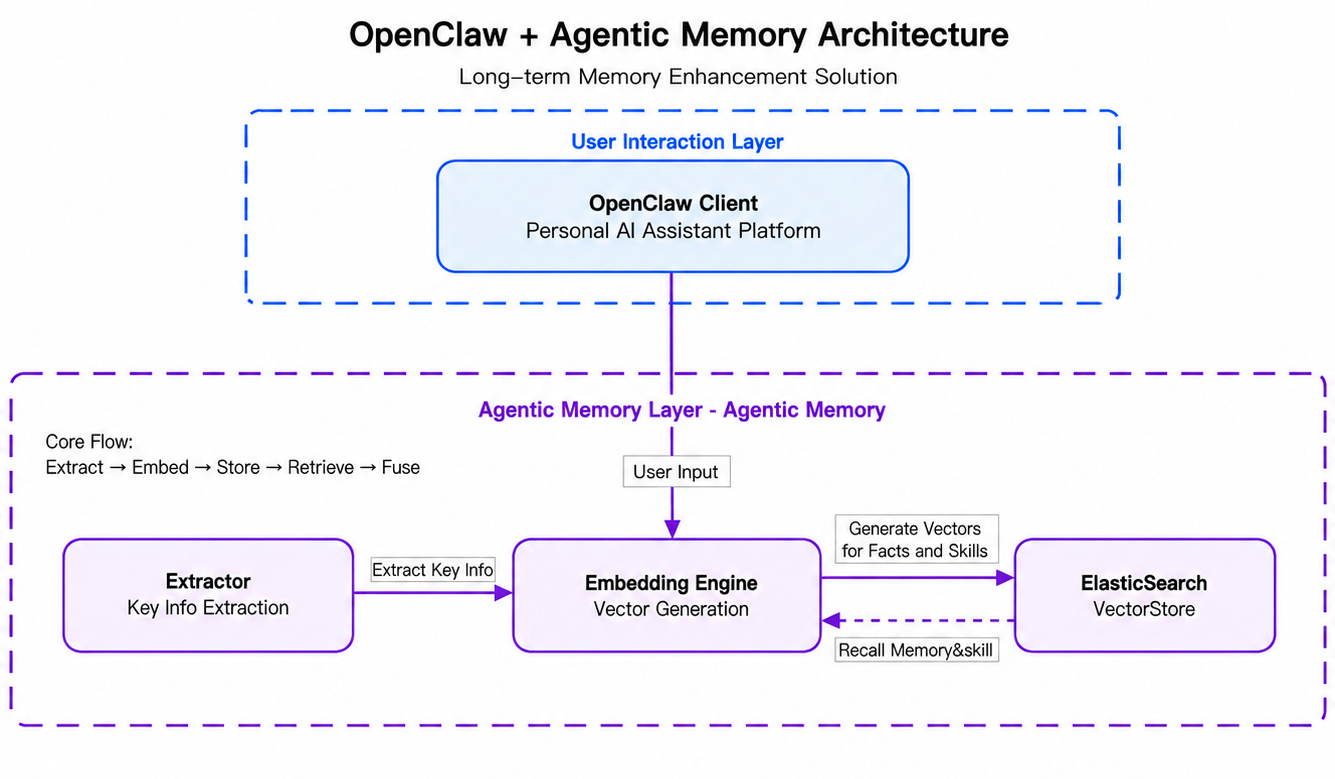
The architecture includes the following core processes:
-
Extract: Agentic Memory extracts key information from user input and identifies content that needs to be memorized (Facts, Skills).
-
Embed: Uses text embedding models to convert extracted information into high-dimensional vectors.
-
Store: Writes vector data and text information to Elasticsearch.
-
Retrieve: When a user initiates a new request, retrieves relevant Facts and Skills from Elasticsearch.
-
Fuse: Fuses retrieved memories with the current context to enhance the quality of LLM responses.
Comparison of Solution Advantages
|
Dimension |
OpenClaw Native Solution |
Agentic Memory Solution |
|
Storage Backend |
Local SQLite/LanceDB |
Agentic Memory API cloud service |
|
Data Persistence |
Local files |
Cloud persistence |
|
Cross-Device Sync |
Not supported |
Supported |
|
Cross-Session Memory |
Not supported |
Supported |
|
Fact Extraction |
Requires local LLM processing |
Server-side automatic extraction |
|
Vectorization and Retrieval |
Requires local embedding model |
Automatically completed on the server side |
|
Skill Management |
Not supported |
Supports search, retrieve, upload, and update |
|
Async Storage |
Not supported |
Supports async tasks with status query |
|
Local Dependencies |
Requires native dependencies |
Only requires Node.js built-in fetch |
Practice Steps
Procedure
Step 1: Activate the Agentic Memory API service and obtain connection information
-
Log on to the AI Search Open Platform console, and activate the Agentic Memory API service (automatically activated when you activate the AI Search Open Platform).
-
In the left-side navigation pane of the AI Search Open Platform console, choose API Keys, and obtain the following information:
-
API service address (baseUrl): The format is
http://<workspace-id>.platform-cn-shanghai.opensearch.aliyuncs.com, where<workspace-id>is the workspace identifier (such asdefault-xxx). You can view it on the API Key management page of the console. -
API Key: The Bearer Token used for API authentication.
-
Workspace Name: Used for API authentication. You can obtain it from the workspace management in the upper-right corner.
-
-
Verify the service status through the health check endpoint:
curl -H "Authorization: Bearer <YOUR_API_KEY>" http://<baseUrl>/v3/openapi/workspaces/<workspace_name>/memory/agentic-memory/healthExpected response:
{
  "request_id": "...",
  "latency": 0,
  "status": "OK",
  "result": {
    "status": "healthy"
  }
}
Step 2: Install the plugin
Run the following command to install the OpenClaw memory plugin. OpenClaw must be installed and Node.js version must be >= 18.
openclaw plugins install @alicloud-ai-search/openclaw-memoryStep 3: Configure plugin parameters
Edit ~/.openclaw/openclaw.json to complete the following two configuration parts:
-
Add
openclaw-memoryunderplugins.entriesto configure automatic recall/capture behaviors and access credentials. -
Add
agentic-memoryundermcp.serversto integrate memory, skill, and knowledge base tools via MCP Server.
{
  "plugins": {
    "entries": {
      "openclaw-memory": {
        "enabled": true,
        "config": {
          "baseUrl": "YOUR_BASE_URL_HERE",
          "workspaceName": "YOUR_WORKSPACE_NAME_HERE",
          "apiKey": "YOUR_API_KEY_HERE",
          "autoRecallMemory": true,
          "autoCaptureMemory": true
        },
        "hooks": {
          "allowConversationAccess": true
        }
      }
    }
  },
  "mcp": {
    "servers": {
      "agentic-memory": {
        "url": "YOUR_BASE_URL_HERE/v1/agentic-memory/mcp",
        "transport": "streamable-http",
        "headers": {
          "Authorization": "Bearer YOUR_API_KEY_HERE"
        }
      }
    }
  }
}
Replace YOUR_BASE_URL_HERE, YOUR_WORKSPACE_NAME_HERE, and YOUR_API_KEY_HERE with the actual service address, workspace name, and API Key.
Plugin configuration parameter description:
|
Parameter |
Type |
Default Value |
Required |
Description |
|
|
string |
Yes |
Agentic Memory API service address. Obtain it from the AI Search Open Platform console. |
|
|
|
string |
Yes |
Workspace name |
|
|
|
string |
Yes |
API Key used for API authentication |
|
|
|
string |
|
No |
Service ID for the memory service |
|
|
string |
If not configured, a UUID is automatically generated and saved to ~/.openclaw/autogen-userid.txt. Once configured, the auto-generated user ID value is overwritten. |
No |
User identifier used to distinguish memories of different users |
|
|
string |
|
No |
Agent identifier used to associate memories and skills with a specific Agent |
|
|
boolean |
|
No |
Whether to automatically recall relevant memories before Agent execution |
|
|
boolean |
|
No |
Whether to automatically capture conversations and store them as memories after Agent execution |
|
|
boolean |
|
No |
Whether to also retrieve skills during automatic recall |
|
|
boolean |
|
No |
Whether to automatically capture skills from conversations (coming soon) |
|
|
number |
|
No |
Maximum number of memories to recall per automatic recall |
|
|
boolean |
No |
Configuration rules:
|
MCP Server configuration description (mcp.servers.agentic-memory):
|
Parameter |
Type |
Required |
Description |
|
|
string |
Yes |
MCP Server access URL in the format |
|
|
string |
Yes |
Transport method. Set this to |
|
|
string |
Yes |
Authorization header in the format |
Step 4: Start or restart the Gateway
Start or restart the OpenClaw Gateway for the configuration to take effect.
If the Gateway is already running, run the restart command:
openclaw gateway restartIf this is the first time configuring the Gateway (not started before), you need to set the Gateway mode first and then start it:
openclaw config set gateway.mode local
openclaw gateway --port 18789
After successful startup, the following message in the logs indicates that the plugin has been registered successfully:
[openclaw-memory] Plugin registered (autoRecallMemory=true, autoCaptureMemory=true, autoRecallSkill=false, autoCaptureSkill=false, ...)Verify Memory Features
Conversation Test
Send messages in OpenClaw to test the long-term memory feature:
-
Send:
My name is Xiao Ming. Please remember that I have a meeting next Monday at 10 AM. -
Wait for the response and confirm the message has been processed.
-
Send a new message:
Please introduce me. -
Verify whether OpenClaw can recall the name and meeting information.
CLI Commands
Use CLI commands to interact directly with the memory service:
# Search memories
openclaw mem search "project architecture"

# Search memories including skill results
openclaw mem search "project architecture" --limit 10 --skill

# Get memory details by ID
openclaw mem get <memory_id>

# Delete a specific memory
openclaw mem forget <memory_id>

# Query async storage task status
openclaw mem task <task_id>

# Update a memory
openclaw mem update <id> "new memory content"
MCP Tools
Memory, skill, and knowledge base tools are provided through the agentic-memory MCP Server. After the Gateway starts, OpenClaw automatically pulls the tool list from the configured MCP Server. You can call memory, skill, and knowledge base tools directly in conversations without registering Agent tools separately.
How It Works
Automatic Recall Process
When autoRecallMemory is enabled, the plugin performs the following operations during the before_agent_start event:
-
Obtains user input as the search query.
-
Sends a search request to the Agentic Memory API to retrieve up to
recallLimitrelevant memories. IfautoRecallSkillis enabled, relevant skills are also retrieved. -
Injects the retrieval results in XML format into the front of the Agent context:
<relevant-memories>
Relevant facts from long-term memory:
- The user's name is Xiao Ming
- The user has a meeting next Monday at 10 AM

Relevant skills:
- skill-name: description of the skill
</relevant-memories>
Temporary sessions (session keys starting with temp:) and startup prompts are automatically skipped.
Automatic Capture Process
When autoCaptureMemory is enabled, the plugin performs the following operations during the agent_end event:
-
Extracts user and assistant messages from the conversation.
-
Filters out the following content:
-
Messages containing
<relevant-memories>(to prevent feedback loops) -
Startup prompts (starting with
A new session was started via) -
Messages from temporary sessions
-
-
Sends the filtered messages to the Agentic Memory API for fact extraction and async storage.
REST API Endpoints
The plugin communicates with the Agentic Memory API through these REST endpoints:
|
Method |
Path |
Description |
|
GET |
|
Health check |
|
POST |
|
Search memories and skills |
|
POST |
|
Store memories (async) |
|
PUT |
|
Update a memory |
|
GET |
|
Get a memory or skill by ID |
|
DELETE |
|
Delete a memory or skill |
|
GET |
|
Query async task status |
|
PUT |
|
Update a skill |
{prefix} = {baseUrl}/v3/openapi/workspaces/{workspace_name}/memory/{serviceId}
FAQ
Plugin not found during installation
If the default npm registry is not the official source, the plugin may not be found. You can specify the registry before the installation command:
npm_config_registry=https://registry.npmjs.org \
openclaw plugins install @alicloud-ai-search/openclaw-memory
No log output after plugin registration
Check whether plugins.slots.memory in ~/.openclaw/openclaw.json correctly points to openclaw-memory, and confirm that enabled is set to true. plugins.slots.memory is usually set automatically during plugin installation. If it is missing, you can add it manually:
{
  "plugins": {
    "slots": {
      "memory": "openclaw-memory"
    }
  }
}
Search returns empty results
-
Confirm that the Agentic Memory API service is running properly (verify through the health check endpoint).
-
Confirm that memories have been stored (automatically captured through
autoCaptureMemoryor manually stored through the memory storage tool provided by the MCP Server). -
Check the OpenClaw logs for entries starting with
[openclaw-memory], which contain all API request logs.
Memories cannot be retrieved immediately after storage
Memory storage is an async operation. After a storage request is submitted, a task_id is returned. Use openclaw mem task <task_id> to query the task status, and confirm that the storage task is complete before performing a search.
Automatic recall not triggered
-
Confirm that
autoRecallMemoryis set totrue. -
Confirm that the current session is not a temporary session (session key does not start with
temp:). -
Confirm that the user input is not empty.
Gateway fails to start for the first time
If running openclaw gateway restart returns a "Gateway service not loaded" error, the Gateway has not been initialized. Follow these steps:
openclaw config set gateway.mode local
openclaw gateway --port 18789
MCP tools not working
-
Confirm that
mcp.servers.agentic-memoryis configured in~/.openclaw/openclaw.json, and thaturlis{baseUrl}/v1/agentic-memory/mcpandtransportisstreamable-http. -
Confirm that
headers.Authorizationuses theBearer {apiKey}format, and that the API Key is consistent with the one in the plugin configuration. -
After configuration, run
openclaw gateway restartfor the MCP Server configuration to take effect. -
Verify the MCP access URL connectivity through
curl -H "Authorization: Bearer <YOUR_API_KEY>" {baseUrl}/v1/agentic-memory/mcp.