The main purpose of restoring data from an index is to ensure data integrity.
Overview
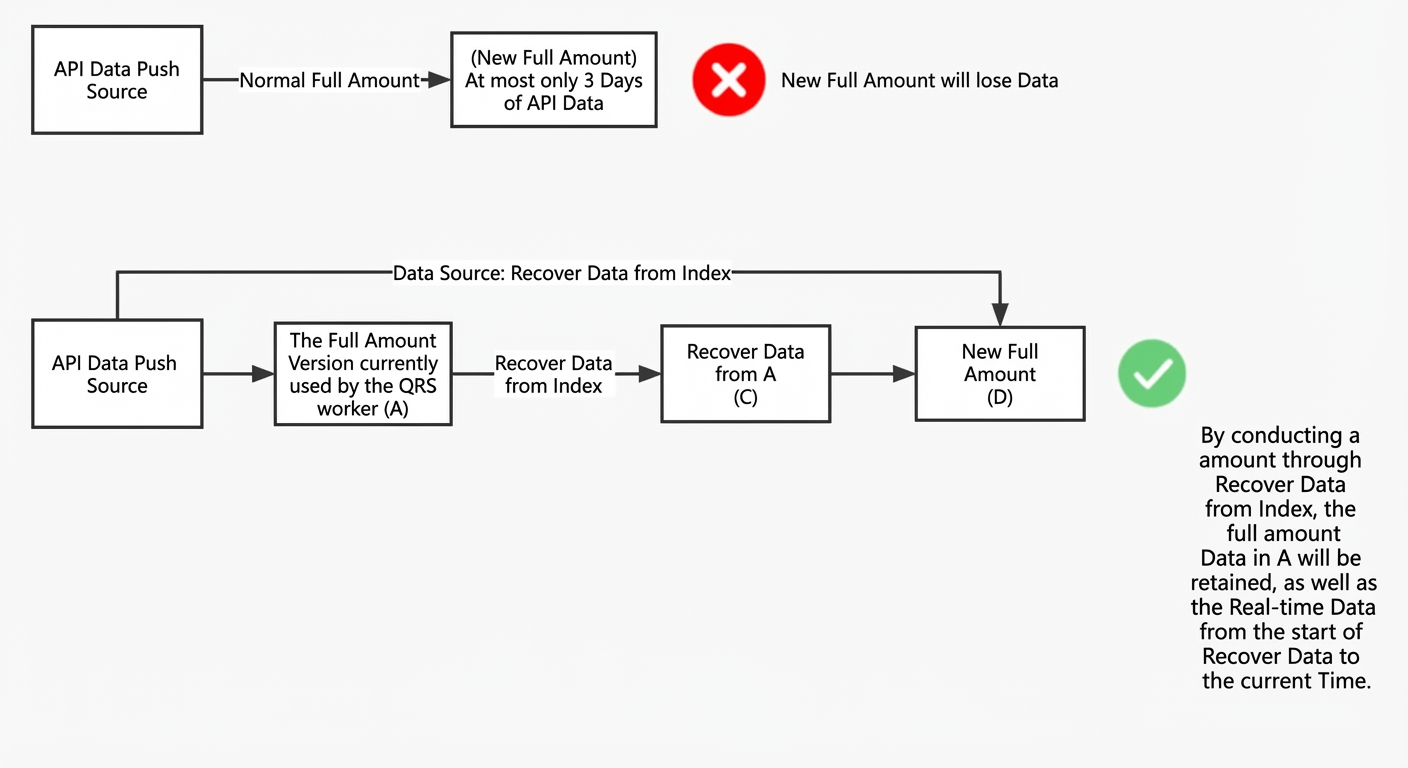
After a full indexing, data pushed from an API data source remains retrievable for only three days. To ensure data integrity, OpenSearch Retrieval Engine Edition lets you restore data from a previous index version. This process preserves all data from your API data source, ensuring it is included in the next full indexing. The following figure illustrates this principle:
Procedure
-
Go to Instance Management > Table Management and click Restore Data from Index.
In the Actions column for the target table, click the ⋮ icon and select Restore Data from Index.
-
Select the table to restore and click OK.
On the Restore Data from Index page, on the Table Information tab, select the index version to restore from, and optionally add a remark (up to 20 characters).
-
Click Confirm.
A confirmation dialog box appears, reminding you that all data fields must be set as search result fields. Otherwise, the content of any field not configured this way will be cleared. After verifying the information is correct, click OK.
-
After the submission is complete, you can track the recovery progress in Change History.
Expand the Restore from Index FSM process to view the execution status and completion time of each node, such as init, create snapshot, and generate data.
-
Once the FSM process for the data source change is complete, you can perform operations that require a full indexing, such as modifying the index table or adding custom intervention entries. During this full indexing, you must select Restore Data from Index as the data source to retain all data from the previous index version.
Usage notes
-
If a task to restore data from an index takes longer than three days, the resulting index version is at risk of data loss. In this case, contact technical support.
-
The Restore Data from Index feature supports only API data sources.
-
The system displays only API data sources that have completed a full indexing at least once.
-
You can restore data from only one data source at a time.
-
To ensure the integrity of the restored data, all data fields must exist in the index. This means they must be configured as search result fields. When you restore data from an index, the system clears the content of any field not configured as a search result field.