Key concepts
Each document consists of multiple fields, and each field contains a series of terms. The purpose of index building is to speed up retrieval. Based on the direction of the mapping, indexes fall into the following types:
-
Field: Defines the field names and field types of an index table.
-
Inverted index: An inverted index stores the mapping from words to document IDs, in the form of word: (Doc1, Doc2, ..., DocN). It is mainly used in retrieval, where it can quickly locate the documents that match the keywords in a user query.
-
Forward index (attribute): A forward index stores the mapping from document IDs to fields, in the form of DocID --> (term1, term2, ..., termn). Forward indexes come in single-value and multi-value types. A single-value attribute has a fixed length (except for the STRING type), so it offers high lookup efficiency and supports updates. A multi-value attribute means that a field contains multiple values (with a variable count). Because its length is uncertain, its lookup efficiency is lower than that of a single-value attribute, and it does not support updates.
A forward index is mainly used to quickly retrieve the attributes of a document by its DocID after the document is found, for use in statistics, sorting, and filtering. The engine currently supports the following primitive data types for forward index fields:
INT8 (8-bit signed integer type), UINT8 (8-bit unsigned integer type),
INT16 (16-bit signed integer type),
UINT16 (16-bit unsigned integer type),
INTEGER (32-bit signed integer type),
UINT32 (32-bit unsigned integer type), INT64 (64-bit signed integer type),
UINT64 (64-bit unsigned integer type),
FLOAT (32-bit floating-point number),
DOUBLE (64-bit floating-point number),
STRING (string type)
-
Summary: A summary is stored in a manner similar to an attribute, but a summary stores multiple fields of a document together and builds a mapping, so the corresponding summary content can be quickly located by DocID. A summary is mainly used to display results. Generally, the summary content is relatively large, so it is not suitable to fetch too many summaries for each query. Only the documents whose results need to be displayed will fetch the corresponding summary. Because summaries can be large, the engine provides a compression mechanism for storing them. If you configure summary compression in the schema, the engine compresses the summary with zlib before storing it, and decompresses it before returning it to you when reading.
For a detailed description of index table configuration, see Index table configuration.
Index schema example:
{
  "file_compress": [
    {
      "name": "file_compressor",
      "type": "zstd"
    },
    {
      "name": "no_compressor",
      "type": ""
    }
  ],
  "table_name": "test",
  "summarys": {
    "summary_fields": [
      "id",
      "fb_boolean",
      "fb_datetime",
      "fb_string",
      "fb_decimal",
      "fb_bigint",
      "fb_text"
    ],
    "parameter": {
      "file_compressor": "zstd"
    }
  },
  "indexs": [
    {
      "index_name": "id",
      "index_type": "PRIMARYKEY64",
      "index_fields": "id",
      "has_primary_key_attribute": true,
      "is_primary_key_sorted": false
    },
    {
      "index_name": "fb_boolean",
      "index_type": "STRING",
      "index_fields": "fb_boolean",
      "file_compress": "file_compressor",
      "format_version_id": 1
    },
    {
      "index_name": "fb_datetime",
      "index_type": "STRING",
      "index_fields": "fb_datetime",
      "file_compress": "file_compressor",
      "format_version_id": 1
    },
    {
      "index_name": "fb_string",
      "index_type": "STRING",
      "index_fields": "fb_string"
    },
    {
      "index_name": "fb_text",
      "index_type": "TEXT",
      "index_fields": "fb_text"
    }
  ],
  "attributes": [
    {
      "field_name": "id",
      "file_compress": "no_compressor"
    },
    {
      "field_name": "fb_boolean",
      "file_compress": "file_compressor"
    },
    {
      "field_name": "fb_datetime",
      "file_compress": "no_compressor"
    },
    {
      "field_name": "fb_string",
      "file_compress": "file_compressor"
    },
    {
      "field_name": "fb_decimal",
      "file_compress": "no_compressor"
    },
    {
      "field_name": "fb_bigint",
      "file_compress": "no_compressor"
    }
  ],
  "fields": [
    {
      "user_defined_param": {},
      "field_name": "id",
      "field_type": "INT64",
      "compress_type": "equal"
    },
    {
      "field_name": "fb_boolean",
      "field_type": "STRING",
      "compress_type": "uniq"
    },
    {
      "field_name": "fb_datetime",
      "field_type": "STRING",
      "compress_type": "uniq"
    },
    {
      "user_defined_param": {
        "multi_value_sep": ","
      },
      "field_name": "fb_string",
      "field_type": "STRING",
      "compress_type": "equal",
      "multi_value": true
    },
    {
      "field_name": "fb_decimal",
      "field_type": "DOUBLE"
    },
    {
      "field_name": "fb_bigint",
      "field_type": "INT64",
      "compress_type": "equal"
    },
    {
      "field_name": "fb_text",
      "field_type": "TEXT",
      "analyzer": "chn_standard"
    }
  ]
}
Add an index table
-
On the instance management page, go to Configuration Center > index schema, and click Add Index Table:
-
Set the Index Table, select a Data Source, and set the Data Sharding:
-
Field settings:
Multi-value field separator settings:
The default is the HA3 separator ^] . You can also customize the separator based on your business requirements.
Attribute and field content compression:
-
For attribute fields, you can choose whether to enable compression. Compression is disabled by default. Selecting file_compressor enables compression.
-
For field content, you can choose whether to enable compression. Compression is disabled by default. For multi-value and STRING types, uniq is used by default, and for single-value numeric types, equal is used.
If attribute compression is enabled, we recommend that you go to Deployment Management - Data Node - Online Table Configuration to edit the index loading method, so as to reduce the impact on performance.
-
Index settings:
Index field compression settings:
-
For index fields, you can choose whether to enable compression. Compression is disabled by default. Selecting file_compressor enables compression.
-
Primary key indexes do not support compression.
-
If index compression is enabled, we recommend that you go to Deployment Management - Data Node - Online Table Configuration to edit the index loading method, so as to reduce the impact on performance.
-
After the configuration is complete, click Save Version, enter remarks (optional) in the dialog, and click Deploy:
-
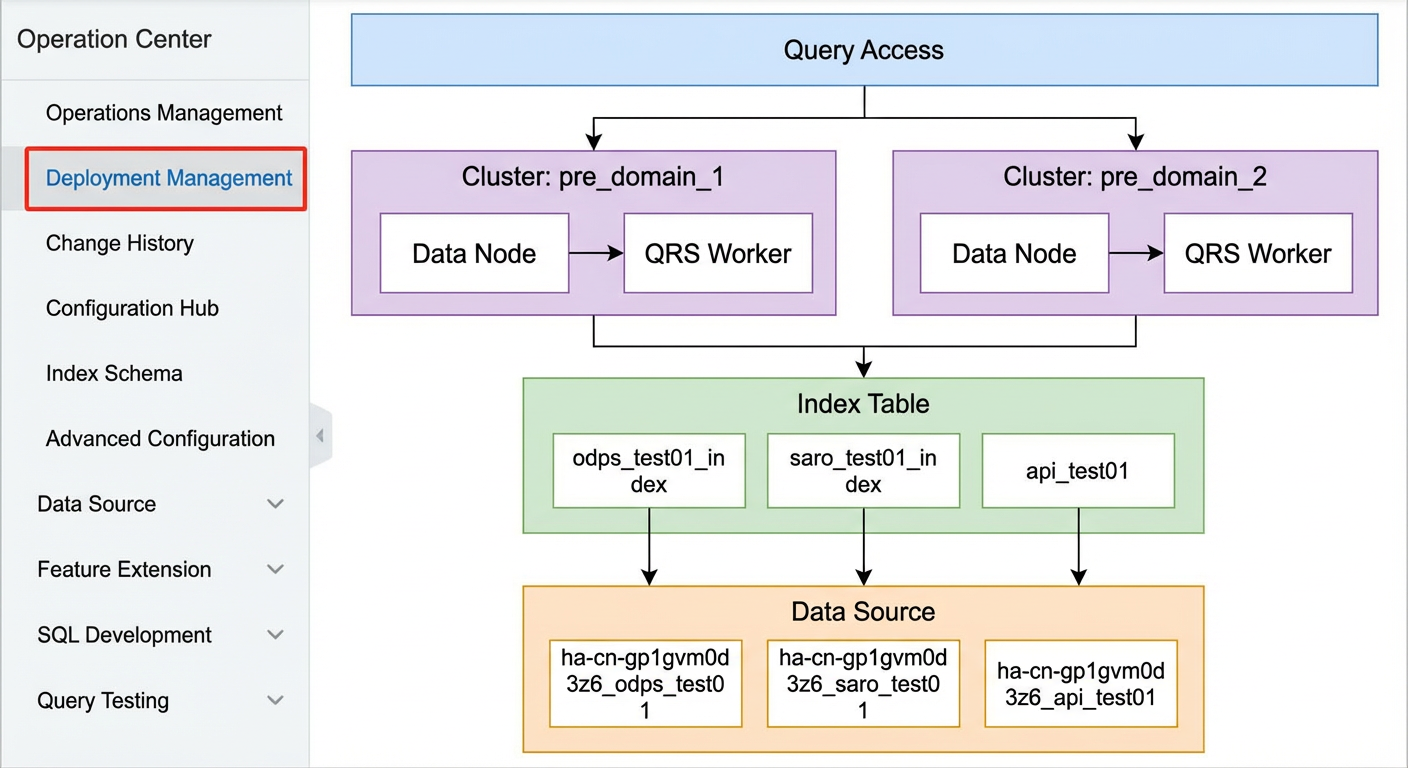
After the index table is added, you can view the topology of the newly added index table in Operation Center > Deployment Management:
-
To make the newly added index table take effect in the cluster, you need to manually trigger a configuration update and full rebuild in Operation Center > Operations Management. In the "Configuration Update" operation, run "Push configuration and trigger index rebuild":
-
During the index rebuild, you can view the full rebuild progress in Data Source Changes under Operation Center > Change History:
After the index rebuild is complete, you can query the new index table.
-
There must be exactly one primary key in the field settings.
-
In the field settings, at least one field must be selected for display in search results.
-
A TEXT field must have an analysis method configured, and multi-value is not supported.
-
There must be exactly one primary key index in the index settings.
-
Except for the default separator, a multi-value separator supports only a single character and does not support full-width characters.
-
Pay attention when setting the data sharding. Suppose the number of replicas in the cluster is 2 and the data sharding is set to 2. In this case, when you purchase the instance, the number of data nodes must be greater than the number of replicas × data sharding for the newly added index table to work properly.
-
Refer to the following rules when setting the number of shards: the data volume of a single shard should not exceed 600 million (2.1 billion at most); the index size of a single shard should not exceed 300 GB; if real-time updates are required, the data update TPS of a single shard should not exceed 4,000 (for documents with add commands; for update only, it can reach 10,000 TPS).
Edit an index table
Index table versions:
A newly created index table has two versions by default:
-
index_config_v1: The initially configured index table version. If the configuration has been pushed and the index rebuilt, its status changes to "In use". If the configuration has not been pushed and the index not rebuilt, its status is "Not in use".
-
index_config_edit: The index table version being edited. Its status is always "Editing".
As index table versions are deployed successively, the version names increase in order. For example, the second version is named "index_config_v2", the third version is named "index_config_v3", and so on. To clearly distinguish between versions, remarks are required for each version.
Edit and deploy a new index table version:
-
Find the version whose status is "Editing" and click Edit:
Additional notes on cluster.json configuration:
The platform supports configuring an index merge policy. You can configure customized_merge_config and segment_customize_metrics_updater (supported only by new instances), as shown in the figure:
For a detailed description of the parameters, see Offline cluster configuration.
-
After making the changes, click Save Version:
You can also switch to developer mode to manually edit the schema:
-
Find the version whose status is "Editing", click Deploy, enter remarks, and click OK:
The system then generates a new index table version for this index table, with the status "Not in use".
-
To make the newly added index table version take effect in the cluster, you need to run Push configuration and trigger index rebuild in Operation Center > Operations Management > Update Configuration:
Delete an index table version:
An index table version whose status is "Not in use" can be deleted directly:
View an index table version:
After you click "View", you are redirected to the read-only configuration page of the index table version:
-
Administrator mode:
-
Developer mode:
Delete an index table
If no index table version in the index table has the status "In use", you can delete the index table directly:
If an index table version in the index table has the status "In use":
You need to follow these steps to delete it:
-
In Operations Management > Deployment Management, click the index table and select 'Unsubscribe', as shown in the figure:
-
Then, in Configuration Center ---> index schema, delete the corresponding index table:
If you unsubscribe from an index table in Deployment Management, you must delete the corresponding index table in index schema; otherwise, the online cluster will be affected.
Notes
-
When you add an index table, a data source is required. If there is no data source, you need to add a data source first before adding the index table.
-
The index table name cannot be modified after it is created.
-
If an index table has an index table version with the status "In use", the index table cannot be deleted directly.
-
Each index table can have only one index table version in the editing state.