Optimizing prompts helps a large language model (LLM) generate output that better meets your expectations. OpenSearch LLM-Based Conversational Search Edition supports custom prompt templates, so you can create dedicated prompt templates for your business scenarios. This topic describes how to create and manage custom prompt templates.
Create a prompt template
The system provides a default prompt template. When no search results are returned, this template does not use public content from the LLM to answer. To create a custom template, choose Prompt Management -> Create Template to open the page for creating a prompt template. On the Create Prompt Template page, specify the Prompt Template Name, Template Description, and message parameters as required, and then click OK to create the template.
Parameters
Prompt Template Name: Required. The name must be 1 to 30 characters in length and start with a letter. It can contain uppercase letters, lowercase letters, digits, and underscores. It must be different from the names of other prompt templates.
Prompt Template Description: Optional. The description must be 1 to 30 characters in length and start with an uppercase or lowercase letter, a digit, or a Chinese character. It can contain underscores (_) and hyphens (-).
message: A message consists of role and content pairs. Click "+" to add a new role and content pair. Valid values of role: system, user, and assistant. The content cannot be empty, cannot contain the <# or [# characters, and cannot exceed 1,024 characters.
system: a system message, which has the highest priority. You can use it to instruct the LLM to generate output based on preset functions, specifications, or roles. System messages are optional. However, if you use a system message, it must be the first item in the message list.
user and assistant: messages from the user and the model, respectively. They must alternate in the conversation to simulate the actual conversation flow. The message list must end with a user message.
Custom variables: You can use custom variables in a prompt. Syntax:
${parameters.variable_name}. A variable name must be 1 to 64 characters in length and can contain uppercase letters, lowercase letters, digits, and underscores.When you define a custom variable, you must set a default value for the variable. You can set the default value in the following ways:
${(parameters.name)!} : The default value is empty.
${(parameters.name)!"LLM"}: The default value is LLM.
NoteSpecify the final prompt that is input to the LLM. You can pass values by using variables. If you configure variables, you must pass the corresponding variable values by calling the API operation. Configure variables based on the required syntax. Variable names cannot be the same as the names of built-in system variables. Built-in system variables:
{question}: the original query entered by the user
{docs}: the content generated based on the document concatenation method
Examples of message settings
After you click OK to create the template, click Q&A Test to go to the Q&A test page. Knowledge about OpenSearch LLM-Based Conversational Search Edition has been uploaded to the knowledge base in advance:
Default system template
role
content
Q&A test
Prompt template effect
system
You are a helpful assistant.
Q: 1+1=
A: I cannot answer this question based on the known information. The preceding information does not contain any content related to mathematical operations. Therefore, the result of 1+1 cannot be determined based on the provided information.
Q: Describe LLM-Based Conversational Search Edition in one sentence.
A: LLM-Based Conversational Search Edition is an intelligent open search service provided by Alibaba Cloud. Based on a built-in LLM, it provides enterprises with dedicated Q&A search services, allows them to quickly build Q&A search systems, and automatically generates content such as answers, reference images, and reference links, delivering a smarter, high-quality Q&A search experience.
Knowledge outside the knowledge base: When no search results are returned, the model does not use public content from the LLM to answer. It answers only based on the known information, which ensures the reliability and authenticity of the answers.
Knowledge in the knowledge base: The model can provide accurate and reliable answers based on the known information.
user
The known information consists of multiple independent documents. Each document is enclosed between <article> and </article>. The known information is as follows:
'''${docs}'''
Based on the preceding known information, answer the user's question in a detailed and well-organized manner. Make sure that the answer fully addresses the question and correctly uses the known information. If the information is insufficient to answer the question, say "I cannot answer this question based on the known information." Do not use content that is not in the known information to generate the answer. Make sure that each statement in the answer is supported by corresponding content in the preceding known information. Please answer in Chinese.
The question is: '''${question}'''
If you want the model to answer based on public content when no search results are returned, you can customize a template as follows:
role
content
Q&A test
Prompt template effect
system
You are a helpful assistant.
Q: 1+1=
A: 1+1=2.
Q: Describe LLM-Based Conversational Search Edition in one sentence.
A: LLM-Based Conversational Search Edition is an intelligent open search service provided by Alibaba Cloud. Based on a built-in LLM, it allows enterprises to quickly build dedicated Q&A search systems and automatically generates content such as answers, reference images, and reference links, providing enterprises with intelligent, high-quality Q&A search services.
Knowledge outside the knowledge base: When no search results are returned, the model uses public content from the LLM to answer.
Knowledge in the knowledge base: The model can provide accurate and reliable answers based on the known information.
user
The known information consists of multiple independent documents. Each document is enclosed between <article> and </article>. The known information is as follows:
'''${docs}'''
You are knowledgeable and well-versed in many fields, including mathematical calculations. Please answer the following question accurately.
The question is: '''${question}'''
If you need to define custom variables in a prompt, write them in the
${(parameters.variable_name)!"variable_value"}format:role
content
Q&A test
Prompt template effect
system
You are a helpful assistant.
Model: opensearch-qwen
You can view custom variables on the Q&A Test -> Prompt Parameters page.
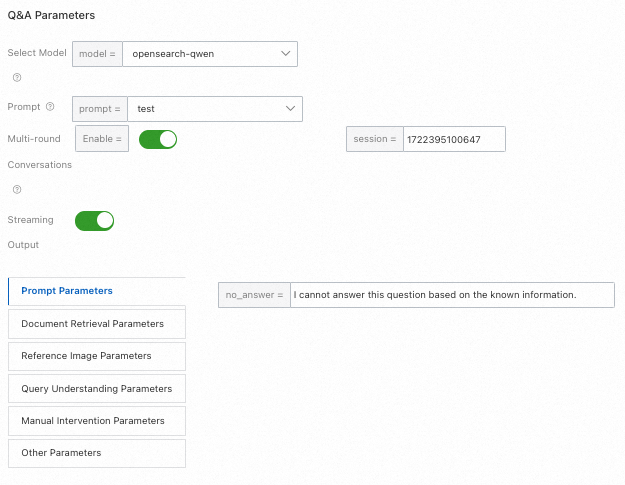
Q: 1+1=
A: I cannot answer this question based on the known information. The preceding information does not contain any content related to mathematical calculations. It only provides an introduction to OpenSearch LLM-Based Conversational Search Edition and Alibaba Cloud services, as well as descriptions of some services and products, and does not involve mathematical operations.
You can directly modify variable values in the console:
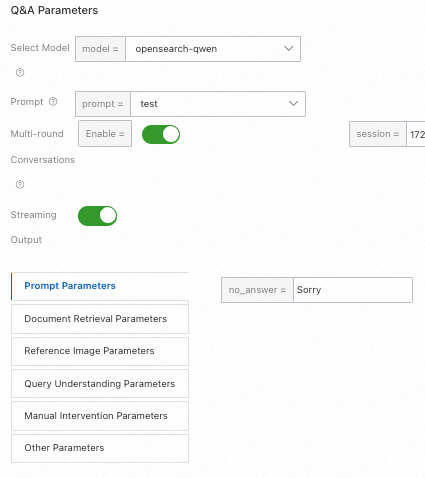
Q: 1+1=
A: I am very sorry, but based on the known information you provided, I cannot answer questions about mathematical calculations, because the provided text does not contain any part related to mathematical operations. If you need to solve a math problem, we recommend that you provide relevant mathematical information or use a dedicated mathematical calculation tool.
A custom variable named no_answer is defined. When the information is insufficient to answer the question, the model outputs the default value of the no_answer variable: "I cannot answer this question based on the known information". You can change the output of the model by modifying the variable value, for example, to "I am very sorry".
user
The known information consists of multiple independent documents. Each document is enclosed between <article> and </article>. The known information is as follows:
'''${docs}'''
Based on the preceding known information, answer the user's question in a detailed and well-organized manner. Make sure that the answer fully addresses the question and correctly uses the known information. If the information is insufficient to answer the question, say ${(parameters.no_answer)!"I cannot answer this question based on the known information"}. Do not use content that is not in the known information to generate the answer. Make sure that each statement in the answer is supported by corresponding content in the preceding known information. Please answer in Chinese.
The question is: '''${question}'''
Manage prompt templates
After a template is created, you can manage all existing prompt templates on the Prompt Management page. You can view Details, Edit, and Delete templates. After you click Q&A Test, you are redirected to the Q&A test page, where the selected prompt template is used for testing.
The default system prompt template cannot be edited.
When you edit a prompt template, you cannot change the prompt template name, but you can modify other content.