OpenSearch LLM-Based Conversational Search Edition supports two methods to authorize and authenticate API calls: API keys and AccessKey pairs. This page covers how to create and manage API keys.
How it works
API key authorization grants access to the OpenSearch LLM-Based Conversational Search Edition API. Each instance supports up to 10 active API keys. Include the key in the Authorization header of every API request:
Authorization: Bearer <your-api-key>AccessKey pair authentication uses a permanent Alibaba Cloud credential — an AccessKey ID and AccessKey secret — to sign API requests. The signature verifies your identity and the validity of each request. AccessKey pairs work with APIs, CLI, SDKs, and Terraform, but cannot be used to log on to the Alibaba Cloud Management Console.
For API development, create a Resource Access Management (RAM) user, generate an AccessKey pair for that user, and grant permissions based on the principle of least privilege. For more information, see Create RAM users and grant permissions.
Prerequisites
Before you begin, ensure that you have:
An OpenSearch LLM-Based Conversational Search Edition instance
Access to the OpenSearch console
Create an API key
Log on to the OpenSearch console.
In the top navigation bar, select the region where your instance resides. In the upper-left corner, select OpenSearch LLM-Based Conversational Search Edition.
On the Instance Management page, find the instance and click Manage in the Actions column. In the left-side pane, click API keys.
Click Create API Key. The system generates an API key.
Click Copy to save the key, or click Download CSV File to save it as a file.
Select I have saved my API KEY and click OK.
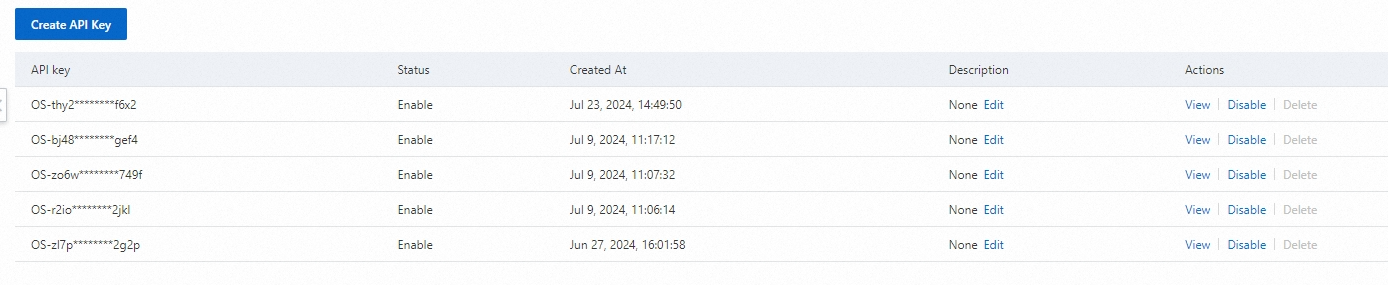
Manage API keys
After creating an API key, use the following actions on the API keys page:
| Action | Description |
|---|---|
| Edit | Add or update a description for the API key |
| View | View the API key value |
| Disable / Enable | Disable or re-enable the API key. A disabled key cannot be used to call the API |
| Delete | Delete a disabled API key |
To delete an API key, you must first disable it.
Keep API keys secure
Never expose API keys in client-side code, browser applications, mobile apps, or mini programs. Initiate all API calls from your server. Unauthorized use of API keys can cause security risks or financial loss.
If you suspect a key has been compromised, log on to the OpenSearch console, disable the key, and then delete it.
Use an API key
Pass the API key in the Authorization header as a Bearer token. The following example queries knowledge entries using curl:
curl --location 'http://***.opensearch-cn-shanghai.aliyuncs.com/v3/openapi/apps/[app_group_identity]/knowledge/entries' \
--header 'Authorization: Bearer <your-api-key>' \
--header 'Content-Type: application/json'
Replace <your-api-key> with the key you copied when creating it.
A successful response looks like:
{
  "request_id": "4F6F9BDC-740F-4FC1-B976-74CAFCBF1333",
  "status": "OK",
  "total_count": 2,
  "latency": 0.0,
  "result": [
    {
      "entry_id": "ca0c8c1cec7c41a280c76c16f0db79f6",
      "create_time": 1718188424000,
      "update_time": 1718188424000,
      "questions": [
        "Where is the office address for withdrawing housing provident funds to purchase owner-occupied housing in Hangzhou?"
      ],
      "answer": "\"The office address is ****. The phone number of the office is 0571-12329-1.\""
    },
    {
      "entry_id": "2f4c7350a7104f029f316706b61b6eb2",
      "create_time": 1718193627000,
      "update_time": 1718193627000,
      "questions": [
        "Can an agent apply for the cancellation of a domestic branch on behalf of others?"
      ],
      "answer": "Yes, an agent can apply for the cancellation of a domestic branch on behalf of others. The agent must submit the authorization materials at the on-site window. ***** The materials must be signed by the authorizer in person."
    }
  ],
  "errors": []
}