This topic introduces what the category prediction feature is, along with its basic principles and usage, to help you quickly understand and use the feature.
Results
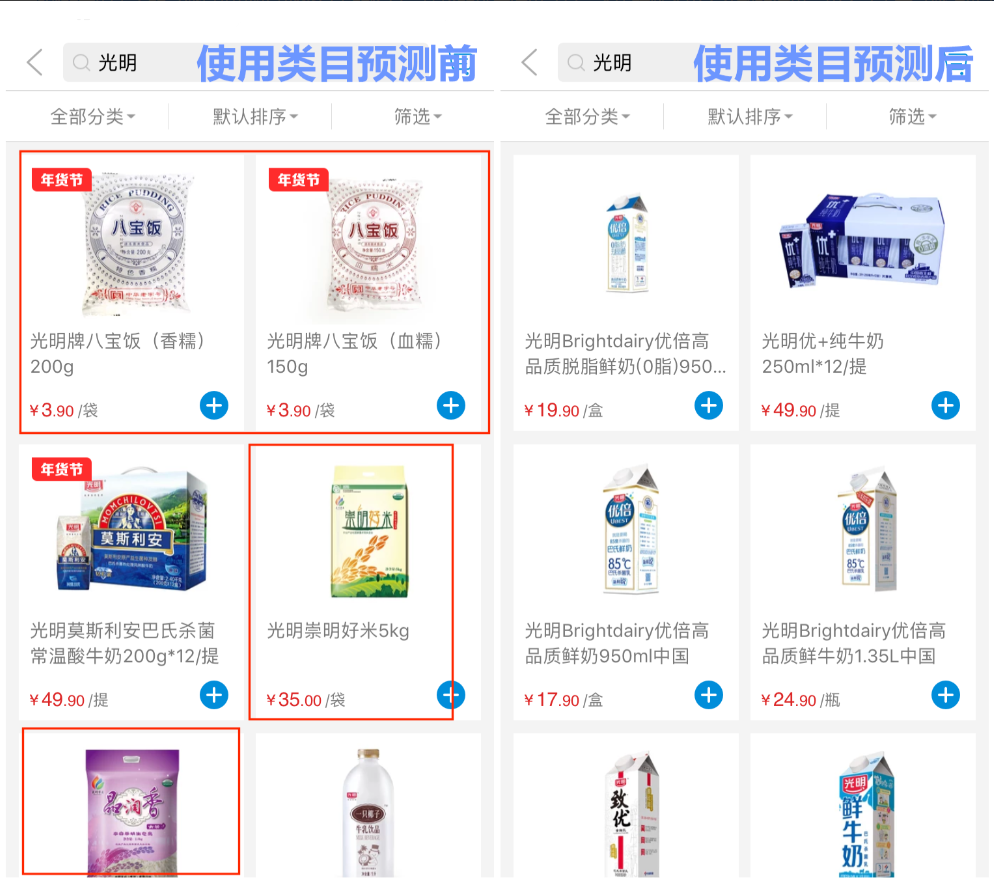
Key concept
Category prediction ranks results by calculating the relevance between a user's search query and commodity categories. Commodities in categories with higher relevance receive higher ranking scores and appear earlier in the search results.
Example:
For example, a user searches for "Bright" and gets a set of commodities. Some belong to the "Milk" category and others to the "Rice" category. Based on historical search behavior data, among users who search for "Bright," significantly more click on commodities in the "Milk" category than on those in the "Rice" category. The category prediction model therefore predicts that the "Milk" category is more relevant to "Bright" than the "Rice" category. As a result, when the ranking score of each commodity is calculated, commodities in the "Milk" category score higher than those in the "Rice" category, so commodities in the "Milk" category rank higher, which increases the business value of the search.
Basic principles of category prediction
The goal of category prediction is to predict the relevance between a search query and a category. This requires historical query data, click behavioral data, and commodity information data under each category. Specifically, it collects previously searched queries, combines them with the click behavioral data after searches, and links them to the commodity information under each category to characterize the data patterns between queries and categories.
Training a model requires a data source. When you create a category prediction model, you must first associate it with an application. After you associate the application, you need to determine the following three types of data required for training the model:
All queries ever searched in the application. You need to add the raw_query parameter to search requests.
Category data and commodity data. You specify these fields from the application when preparing model training. At minimum, you must specify the category ID field and the commodity title field in the application.
Click behavioral data of the application. The more comprehensive and higher-quality the reported behavioral data, the richer the model features and the better the results.
The OpenSearch category prediction feature supports both model training with behavioral data and model training without behavioral data.
Model training with behavioral data applies when behavioral data has been uploaded. Before training starts, an entry check is performed automatically to ensure that the data quantity, data quality, and data integrity meet the requirements. Model training includes the following steps:
Use historical queries and category information to sample and generate sample data, and use behavioral data to label the sample data.
Perform operations such as metric statistics and feature calculations on the behavioral data to generate click behavior features.
Combine queries with commodity titles under each category, tokenize the queries and titles, and calculate the semantic features between the query text and the commodity title text.
If transaction behavioral data is uploaded, perform metric statistics and feature calculations on the transaction behavioral data to generate transaction features, so that commodities with stronger transaction performance rank higher.
Combine the sample data generated above with the behavior features, semantic features, transaction features, and labels of the sample data as training data, and feed it into the algorithm for iterative training.
After training is complete, you obtain a model that describes the relevance between queries and categories in the samples. You can use this model to predict the relevance between a query and a category.
When training a category prediction model with "behavioral data" selected, a query is required to have more than one click on a category under that query within the last 14 days.
Model training without behavioral data applies to scenarios where behavioral data has not been uploaded or the behavioral data is of low quality. You only need to specify the category ID field and the commodity title field in the application to start training the model. Without behavioral data, there is no basis for labeling the samples, so another type of algorithm is used to train the model. It calculates the semantic relevance between the query text and the commodity title text based only on the text data of queries and commodity titles under categories after tokenization, and derives the relevance between queries and categories.
A model that uses behavioral data outperforms one that does not. The richer the training features, the more comprehensively the model characterizes the data patterns between queries and categories, and the more accurate its predictions.
Whether the model uses behavioral data or not, the training process has undergone extensive experimentation with data from different scenarios and careful parameter tuning to ensure that the results meet expectations.
How to use category prediction
Prerequisites
Model training requires a data source, and you must associate an application before training a model. Application data, application query data, and application behavioral data are all data required by the category prediction model.
If you have not uploaded click behavioral data, do not want to use click behavioral data for training, or the click behavioral data does not yet meet the training conditions, you can train the model without click behavioral data first. In this case, the category prediction model needs to select data for three fields from the application: Category ID, Commodity Title, and Category Name. Category ID and commodity title are required, and category name is optional. After model training is complete, prediction results for part of the model are output for result evaluation. The category name is used on the result evaluation page to evaluate whether the relevance between queries and categories meets expectations, so we recommend that you provide the category name field during training.
If click behavioral data has been uploaded, in addition to selecting the fields above, you can also select the option to associate behavioral data during model training. As long as the behavioral data meets the training conditions, it is used to train the model.
Procedure
Create a category prediction model under an application.
Apply the category prediction model: First, apply the model in query analysis, and then enable the model in basic sorting and business sorting.
Create a query analysis, configure category prediction, and select the model created in step 1.
Enable the category prediction model in queries: Call the query API through the SDK and pass in the raw_query parameter.
For the detailed procedure, see Use the category prediction feature.