Users focus on two main aspects of a search engine: retrieval and sorting. Retrieval ensures that all documents that meet the query conditions are returned. Sorting ensures that the most relevant documents are returned first. Sorting often requires adjustments based on specific business requirements. This requires you to understand the sorting capabilities of OpenSearch. This topic describes the sorting features of OpenSearch and provides examples of how to use them in common scenarios.
Relationship between the sort clause and sort policies
The sort clause in OpenSearch performs global sorting. A sort policy acts as a sorting level within the sort clause. Sort policies use built-in functions and expressions to create complex scoring logic for documents. This logic helps meet complex business requirements. The final score calculated by the sort policy expression is used for sorting. For example, a business may want to sort documents by date. For documents with the same date, it may want to perform a secondary sort based on document similarity. To achieve this, you must use the sort clause together with a sort policy. Assume your business table has a field named create_time and the search field is name. You can add the following to the sort clause:
sort=-create_time;-RANKThen, set the `static_bm25()` function for the rough sort and the `text_relevance(name)` function for the fine sort. For more information about how to configure a sort policy, see Configure a sort policy.
Here, RANK represents the score from the sort policy. The minus sign (-) indicates descending order, and the plus sign (+) indicates ascending order.
By default, the system uses -RANK as the sort condition if you do not configure a sort clause. If you configure a sort clause and want to sort by the policy score, you must explicitly include -RANK. Otherwise, the system does not use the sort policy score as a sort condition.
The following example shows the relationship between the sort clause and a sort policy.
Assume you have an OpenSearch application with the following application schema:
Field | Type | Index |
id | int | Keyword |
name | text | General Chinese |
age | int | Keyword |
A rough sort is set for the name field. The expression is as follows:

A fine sort is set for the name field. The expression is as follows:

When you perform a search, the sort clause is configured as follows:
sort=age;-RANKOpen the sort details to view the scoring details:
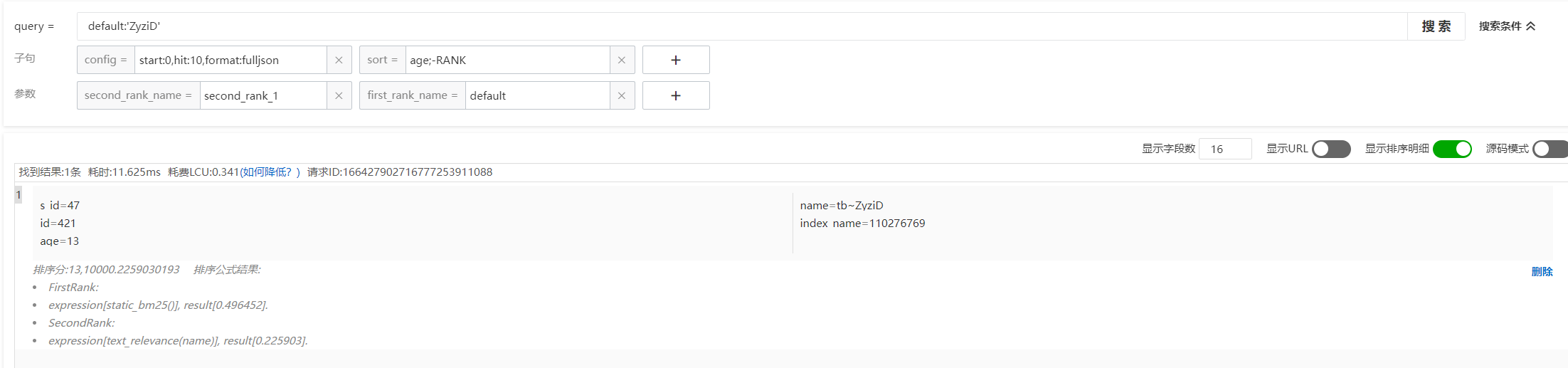
The sort score is 13,10000.2259030193. The sort clause is `age;-RANK`. So, 13 is the value of the age field in the document, and 10000.2259030193 is the final score from the sort policy. OpenSearch first sorts documents in ascending order based on the age value. Documents with the same age value are then sorted in descending order based on the final score from the sort policy.
Look at the sort formula:
FirstRank:
expression[static_bm25()], result[0.496452].
SecondRank:
expression[text_relevance(name)], result[0.225903].
FirstRank is the rough sort score, and SecondRank is the fine sort score. The final sort score is 10000.2259030193. The next section explains why the final sort policy score is 10000.2259030193 instead of [0.496452 + 0.225903].
This example shows that the sort clause in OpenSearch is similar to the `order by` clause in SQL. You can sort directly by the property fields of a document or use complex sort policies for scoring. Sort policies have their own functions and scoring rules. The final document order is controlled by the "+", "-", and sort fields in the sort clause.
Sort policy details
How sort policy scoring works
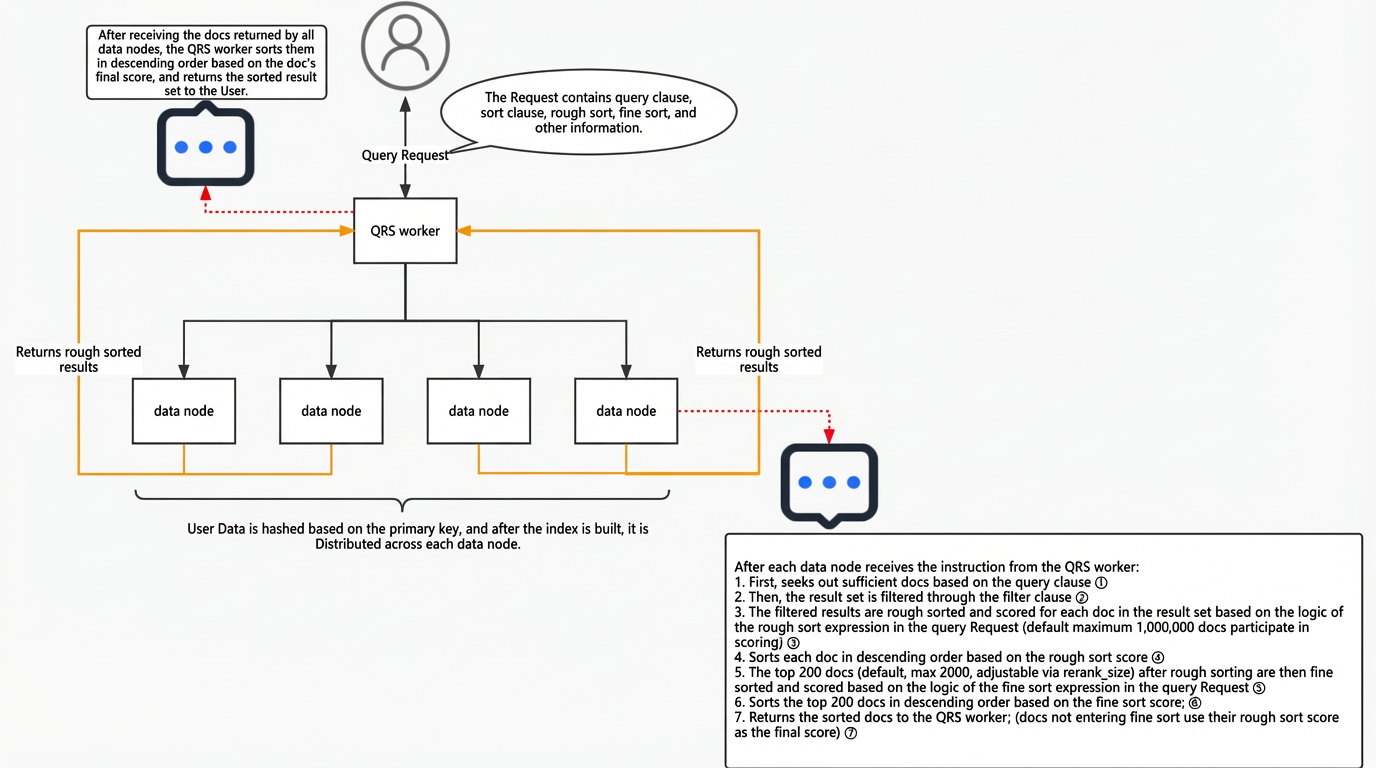
Sort policy scoring has two stages: rough sort and fine sort. Documents that are retrieved by a query and pass through a filter first enter the rough sort stage. The rough sort expression selects documents with higher scores. Then, the top N results are scored again using the fine sort expression. This produces the final score of the sort policy. The scoring rules are as follows:
If you configure only a rough sort, the document score is (10000 + the result of the rough sort expression). The maximum total score is 20000. If the score exceeds 20000, it is capped at 20000.
If you configure only a fine sort, the document score is (10000 + the result of the fine sort expression). There is no upper limit for the total score.
If you configure both a rough sort and a fine sort, the final score for documents that enter the fine sort stage is (10000 + the result of the fine sort expression). The final score for all other documents is (10000 + the result of the rough sort expression). The maximum total score for these other documents is 20000. If the score exceeds 20000, it is capped at 20000.
Let's look again at the sort score from the previous section:
FirstRank:
expression[static_bm25()], result[0.496452].
SecondRank:
expression[text_relevance(name)], result[0.225903].
The final score is 10000.2259030193.
This scoring process means the hit document was one of 1 million documents retrieved. It was scored in the rough sort stage. The `static_bm25` function gave it a score of 0.496452. This score placed the document in the top 200 of all hit documents, so it proceeded to the fine sort stage. When a document moves from the rough sort to the fine sort stage, its score is increased by a default of 10000 points and the rough sort score is discarded. The final sort policy score becomes (10000 + the fine sort score). In the fine sort stage, the `text_relevance` function gave this document a score of 0.225903. Therefore, the final sort policy score for this document is 10000.2259030193.
How to use fine sort functions
Note: The fields from the application schema that are referenced in the following built-in functions must be set as property fields. Otherwise, an "Invalid formula" error occurs.
Function | Description | Example |
i in (value1, value2, ..., valuen) | If the value of i is in the collection [value1, value2, ..., valuen], the expression returns 1. Otherwise, it returns 0. | Field age=5 age in (1,2,3,4,5) # Returns 1 age in (6,7,8,9) # Returns 0 |
if(cond, then_value, else_value) | If the value of cond is not 0, the if expression returns then_value. Otherwise, it returns else_value. For example, if(2, 3, 5) returns 3, and if(0, 3, 5) returns 5. | Field a=1 if(a==1,5,10) #Returns 5 if(1,5,10) #Returns 5 if(a==2,5,10) #Returns 10 if(0,5,10) #Returns 10 |
random() | Returns a random value between 0 and 1. | - |
now() | Returns the current time in seconds since the epoch (00:00:00 UTC, January 1, 1970). | - |
For more information about common functions for text relevance, geolocation, timeliness, algorithm relevance, and other features, see Fine sort functions.
For more information about common mathematical functions and expression operators, see Configure a sort policy.
If the sort policy expression cannot meet your complex scoring logic, you can use a Cava plugin to write a script for complex scoring scenarios. This topic does not describe how to use Cava plugins. For more information, see Develop a sort plugin in Cava.
Sort policy configurations for common scenarios
1. You want to add 10 points if age > 10, add 20 points if age > 40, and add 30 points if weight > 60. Then, you want to sort the documents based on the final score.
Implementation 1:
#Set the fine sort expression. By default, 1 point is added for each match.
(age>10)*10+(age>40)*20+(weight>60)*30
Implementation 2:
#Set the fine sort expression:
if(age>10,10,0) + if(age>40,20,0) +if(weight>60,30,0)
2. You have documents such as "xxx company" and "xxx hangzhou branch". You want "xxx company" to be ranked higher than "xxx hangzhou branch".
Implementation:
#Configure the field_match_ratio function in the fine sort expression.
field_match_ratio(title)
3. You search for `all:'dim_itm_tb'`. You want "dim_itm_tb" to be ranked higher than "dim_itm_tb_dst_itm_relation_dd".
Implementation:
#Configure the field_match_ratio function in the fine sort expression.
field_match_ratio(detail)
4. How do you implement a query such as `item:"iphone 8" OR item: 'iphone 8'`?
Implementation:
#Configure the query_min_slide_window function in the fine sort expression.
query_min_slide_window(title)
5. You set a fine sort expression with `text_relevance`. When you search for the keyword "republic", documents such as "Anecdotes of the Republic - Republic" and "History of Chinese Nationality - Republic" are ranked higher than "Republic". You want "Republic" to be ranked first.
Implementation:
#Configure the query_min_slide_window function in the fine sort expression.
query_min_slide_window(title)
6. If a search keyword appears multiple times in a field, the `static_bm25()` function scores it repeatedly. How can you avoid this?
Implementation:
#Configure query_match_ratio in the fine sort expression.
query_match_ratio(title)
7. How do you lower the rank of documents with stacked keywords?
Implementation:
#Use query_term_match_count to define how many repetitions count as keyword stacking.
if(field_term_match_count(title)>3,1,10)
8. How do you add points if a string is not empty?
Implementation:
First, add a mark field in the source database. Set the mark field to 0 if the target field is empty, and to 1 if it is not empty. Then, use the if function in the fine sort expression to check the value.
Set the fine sort expression to add 500 points to the sort score when mark=1.
if(mark==1,500,0)