CloudOps Orchestration Service (OOS) is an automated O&M service provided by Alibaba Cloud. You can create templates to define execution tasks, execution sequence, input parameters, and output parameters, and then run O&M tasks automatically.
SSH-based password-free logon is commonly used for automated O&M to manage a large number of servers securely and efficiently. If you have multiple Elastic Compute Service (ECS) instances, you can use OOS to configure password-free logon for some or all of them at once.
-
Make sure that ECS instances are available. If no instance is available, purchase ECS instances. For more information, see Getting started.
-
The user used to connect to ECS instances for which you want to configure password-free logon must be the same.
-
Only Linux-based ECS instances are supported.
Procedure
-
Log on to the OOS console.
-
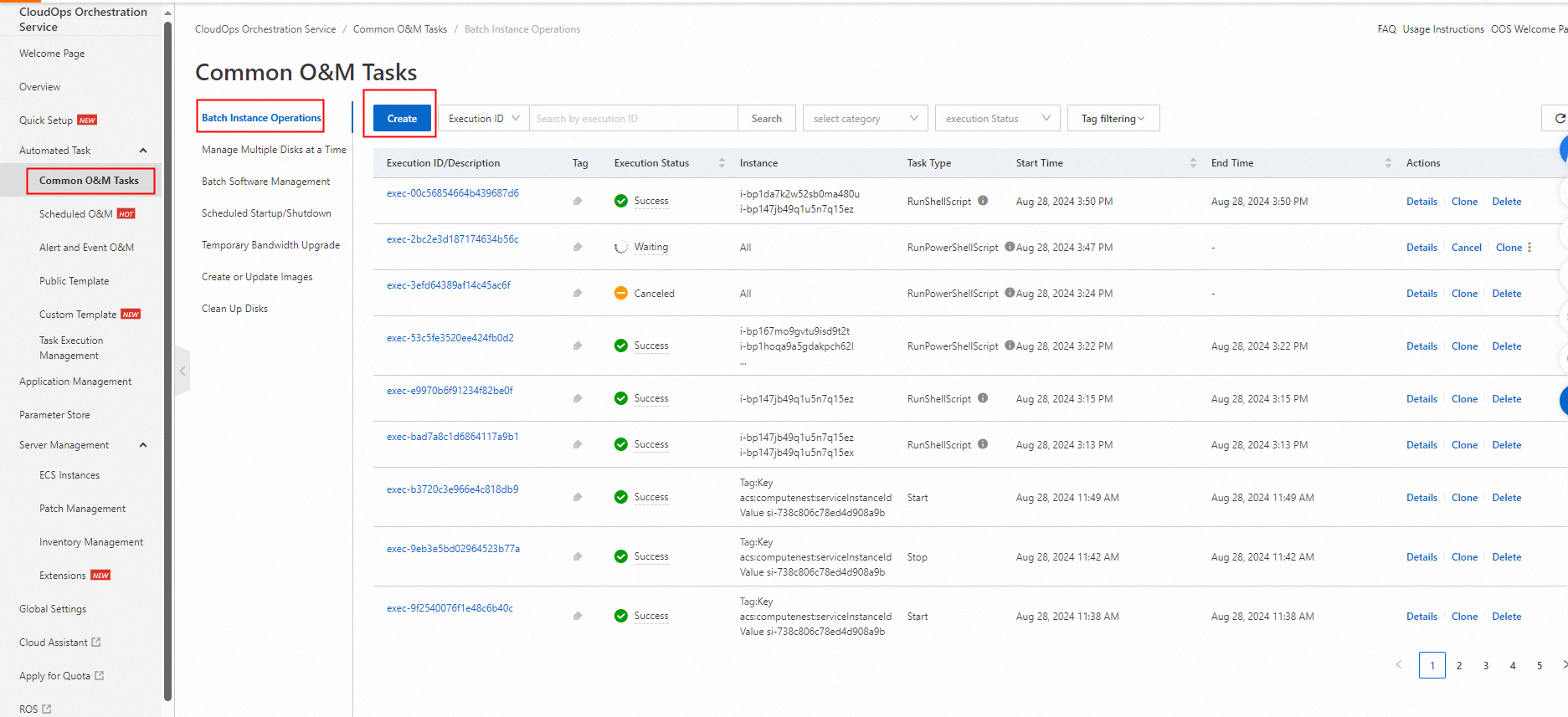
Add a user that is used to connect to ECS instances without a password. If a user is added, skip this step. If no user is available, you can execute a script to add a user to ECS instances on the Batch Instance Operations page of the OSS console. The following figure shows the details.
-
Create a template.
A template is used to configure password-free logon for ECS instances. For the template content, see the Appendix 1: Template for password-free logon section.
Copy the script, paste it into the input box, and click Create Template. The template selects and obtains the public keys of the specified ECS instances and configures password-free logon for the specified user.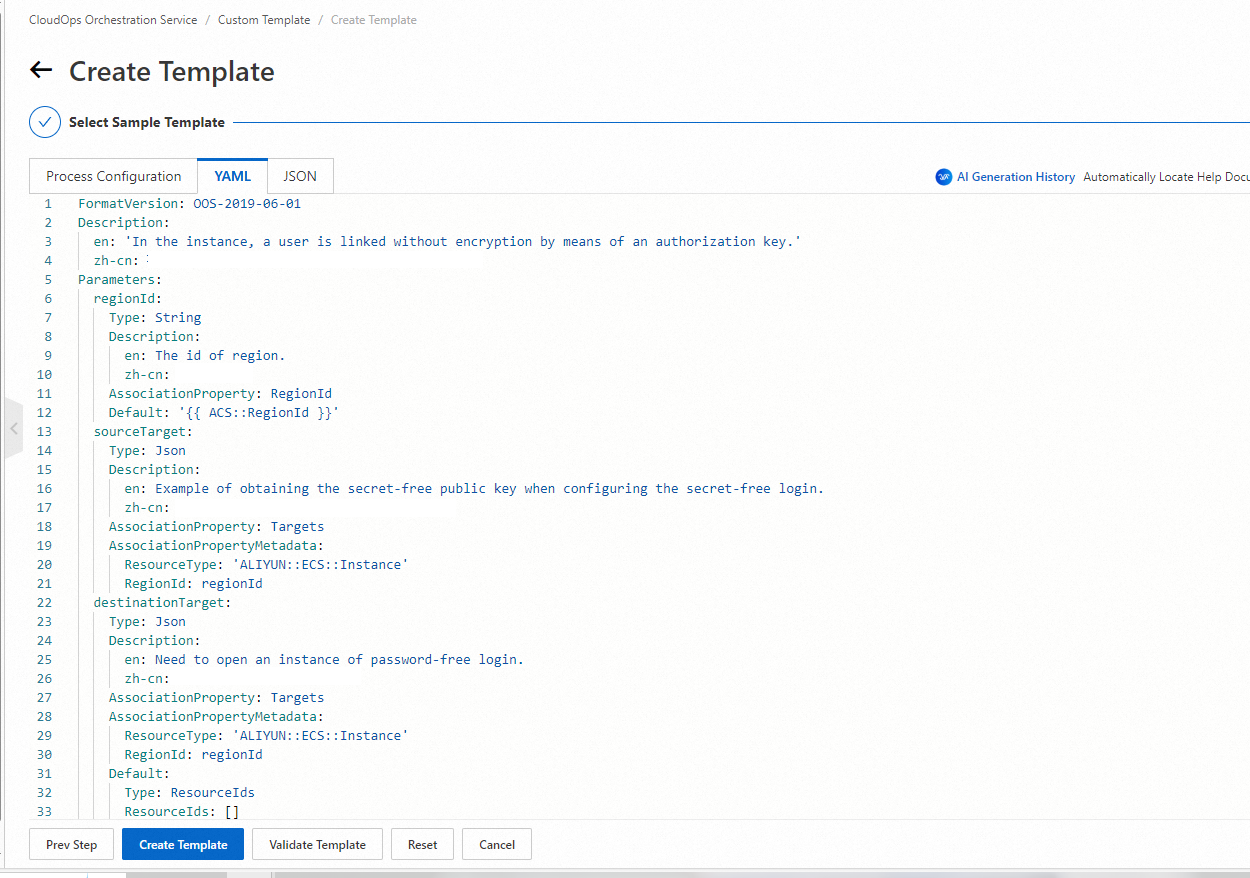
-
Execute the template.
On the Custom Template page, find the template and click Create Execution in the Actions column. Configure the basic information and click Next Step: Parameter Settings.
-
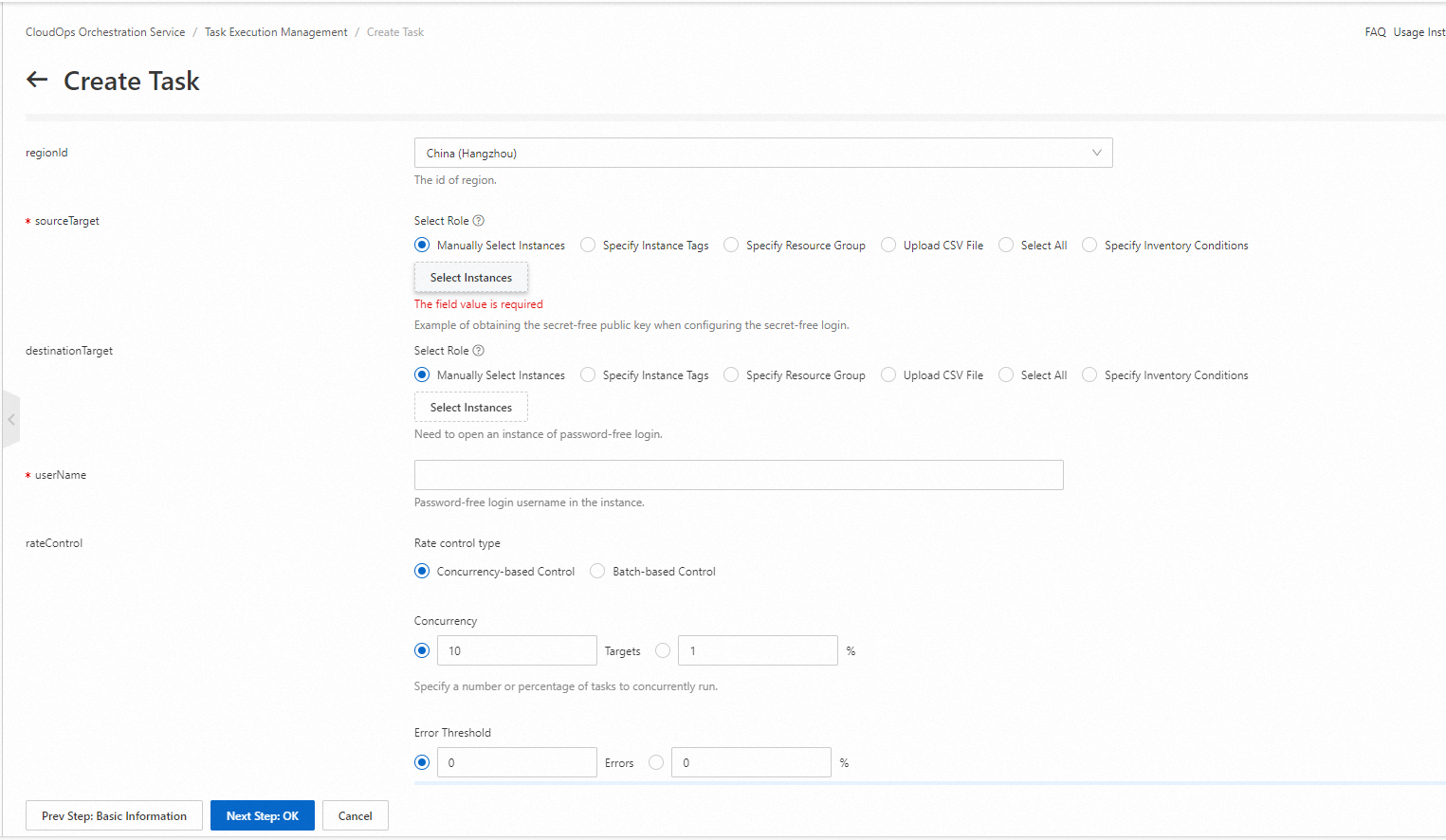
Configure the parameters in the Parameter Settings step. You can manually select ECS instances or specify tags to select ECS instances. The following figure shows the details.
-
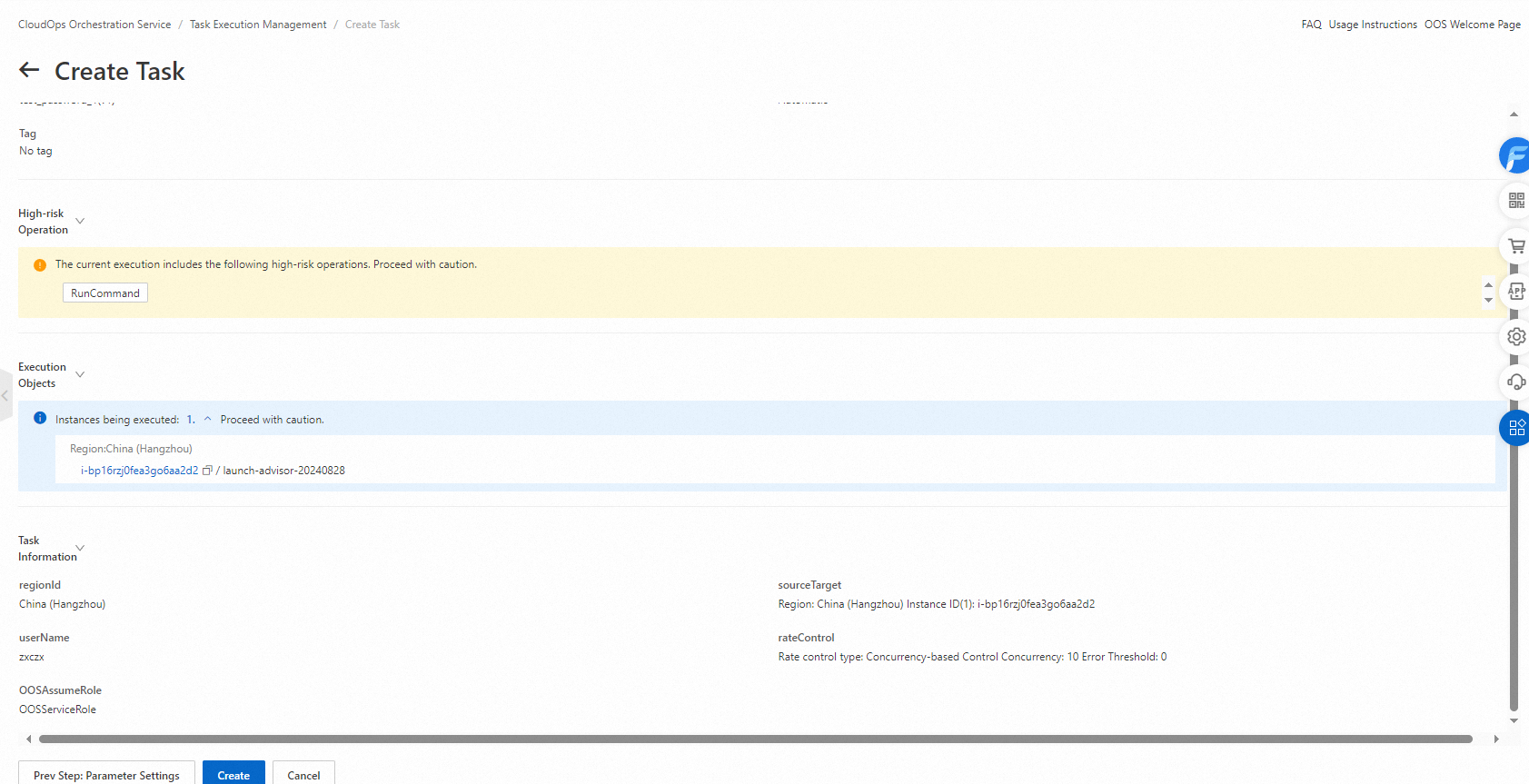
Click Next Step: OK. Confirm the parameters and click Create. Then, you can execute the template.
-
After the template is executed, check whether the password-free configuration takes effect.
To verify that password-free logon takes effect, connect to a configured ECS instance and run the ssh command as the designated user to access another instance. In the following example, the su command switches to the freelogin user, who then connects to another ECS instance without entering a password.
Appendix 1: Template for password-free logon
The following table describes the template parameters.
|
Parameter |
Description |
|
regionId |
The region ID of the cluster. |
|
sourceTarget |
The ECS instance whose public key is required for password-free logon. |
|
destinationTarget |
The ECS instance for which you want to configure password-free logon. |
|
userName |
The name of the user that is used to connect to ECS instances. |
|
rateControl |
The concurrency ratio of task executions. |
|
OOSAssumeRole |
The Resource Access Management (RAM) role that is used by OOS. |
The template script:
FormatVersion: OOS-2019-06-01
Description:
  en: 'In the instance, a user is linked without encryption by means of an authorization key.'

Parameters:
  regionId:
    Type: String
    Description:
      en: The id of region.

    AssociationProperty: RegionId
    Default: '{{ ACS::RegionId }}'
  sourceTarget:
    Type: Json
    Description:
      en: Example of obtaining the secret-free public key when configuring the secret-free login.

    AssociationProperty: Targets
    AssociationPropertyMetadata:
      ResourceType: 'ALIYUN::ECS::Instance'
      RegionId: regionId
  destinationTarget:
    Type: Json
    Description:
      en: Need to open an instance of password-free login.

    AssociationProperty: Targets
    AssociationPropertyMetadata:
      ResourceType: 'ALIYUN::ECS::Instance'
      RegionId: regionId
    Default:
      Type: ResourceIds
      ResourceIds: []
  userName:
    Description:
      en: Password-free login username in the instance.

    Type: String
  rateControl:
    Description:
      en: Concurrency ratio of task execution.

    Type: Json
    AssociationProperty: RateControl
    Default:
      Mode: Concurrency
      MaxErrors: 0
      Concurrency: 10
  OOSAssumeRole:
    Description:
      en: The RAM role to be assumed by OOS.

    Type: String
    Default: OOSServiceRole
RamRole: '{{ OOSAssumeRole }}'
Tasks:
  - Name: getSourceInstance
    Description:
      en: Get an instance that needs to be logged in without password.

    Action: 'ACS::SelectTargets'
    Properties:
      ResourceType: 'ALIYUN::ECS::Instance'
      RegionId: '{{ regionId }}'
      Filters:
        - '{{ sourceTarget }}'
    Outputs:
      instanceIds:
        Type: List
        ValueSelector: 'Instances.Instance[].InstanceId'
  - Name: getDestinationInstance
    Description:
      en: Views the ECS instances than to ssh without password.

    Action: 'ACS::SelectTargets'
    Properties:
      ResourceType: 'ALIYUN::ECS::Instance'
      RegionId: '{{ regionId }}'
      Filters:
        - '{{ destinationTarget }}'
    Outputs:
      instanceIds:
        Type: List
        ValueSelector: 'Instances.Instance[].InstanceId'
  - Name: generateOrGetPublicKey
    Action: 'ACS::ECS::RunCommand'
    Description:
      en: Generate or get a public key.

    Properties:
      regionId: '{{ regionId }}'
      commandContent: |-
        #!/bin/bash
        username="{{ username }}"

        if [ $username == root ]; then
            if [ ! -e "/root/.ssh/id_rsa.pub" ]; then
              ssh-keygen -f "/root/.ssh/id_rsa" -P "" >> /dev/null
            fi
            cat /root/.ssh/id_rsa.pub
        else
            if [ ! -e "/home/$username/.ssh/id_rsa.pub" ]; then
                su $username -l -c "ssh-keygen -f /home/$username/.ssh/id_rsa -P '' >> /dev/null"
            fi
            chmod 700 /home/$username/.ssh
            cat /home/$username/.ssh/id_rsa.pub
        fi
      instanceId: '{{ ACS::TaskLoopItem }}'
      commandType: RunShellScript
    Loop:
      RateControl: '{{ rateControl }}'
      Items: '{{ getSourceInstance.instanceIds }}'
      Outputs:
        publicKeys:
          AggregateType: 'Fn::ListJoin'
          AggregateField: publicKey
    Outputs:
      publicKey:
        Type: String
        ValueSelector: invocationOutput
  - Name: converPublicKeyToStr
    Action: 'ACS::ECS::SMCConversionConstantByJqScript'
    Description:
      en: Convert public key to string.

    Properties:
      parameter:
        'Fn::Jq':
          - First
          - 'join(",")'
          - '{{ generateOrGetPublicKey.publicKeys }}'
      jqScript:
        - '.[0] | .'
        - '.[0] | .'
    Outputs:
      publicKey:
        Type: String
        ValueSelector: 'firstValue | split(",") | join("\n")'
  - Name: authorizedInstances
    Action: 'ACS::ECS::RunCommand'
    Description:
      en: Enable password-free login for users in the instance.

    Properties:
      regionId: '{{ regionId }}'
      commandContent: |-
        #!/bin/bash
        username="{{ username }}"
        publicKey="{{ converPublicKeyToStr.publicKey }}"
        if [ $username == root ]; then
            if [ ! -e "/root/.ssh/id_rsa.pub" ]; then
                ssh-keygen -f "/root/.ssh/id_rsa" -P "" >> /dev/null
            fi
            cat /root/.ssh/id_rsa.pub >> /root/.ssh/authorized_keys
        else
            if [ ! -e "/home/$username/.ssh/id_rsa.pub" ]; then
                su $username -l -c "ssh-keygen -f /home/$username/.ssh/id_rsa -P '' >> /dev/null"
            fi
            chmod 700 /home/$username/.ssh
            cat /home/$username/.ssh/id_rsa.pub >> /home/$username/.ssh/authorized_keys
        fi
        if [ $username == root ]; then
        cat >> /root/.ssh/authorized_keys << eof
        $publicKey
        eof
        else
        cat >> /home/$username/.ssh/authorized_keys << eof
        $publicKey
        eof
        fi
      instanceId: '{{ ACS::TaskLoopItem }}'
      commandType: RunShellScript
    Loop:
      RateControl: '{{ rateControl }}'
      Items: '{{ getDestinationInstance.instanceIds }}'
      Outputs:
        commandOutputs:
          AggregateType: 'Fn::ListJoin'
          AggregateField: commandOutput
    Outputs:
      commandOutput:
        Type: String
        ValueSelector: invocationOutput
Outputs:
  commandOutputs:
    Type: List
    Value: '{{ generateOrGetPublicKey.publicKeys }}'