FormatVersion: OOS-2019-06-01
Description:
  en: Start FC, Deploy static website source files hosted in git repository to OSS
  zh-cn: description in Chinese
  name-en: deploy-static-website-to-oss
  name-zh-cn: description in Chinese
Parameters:
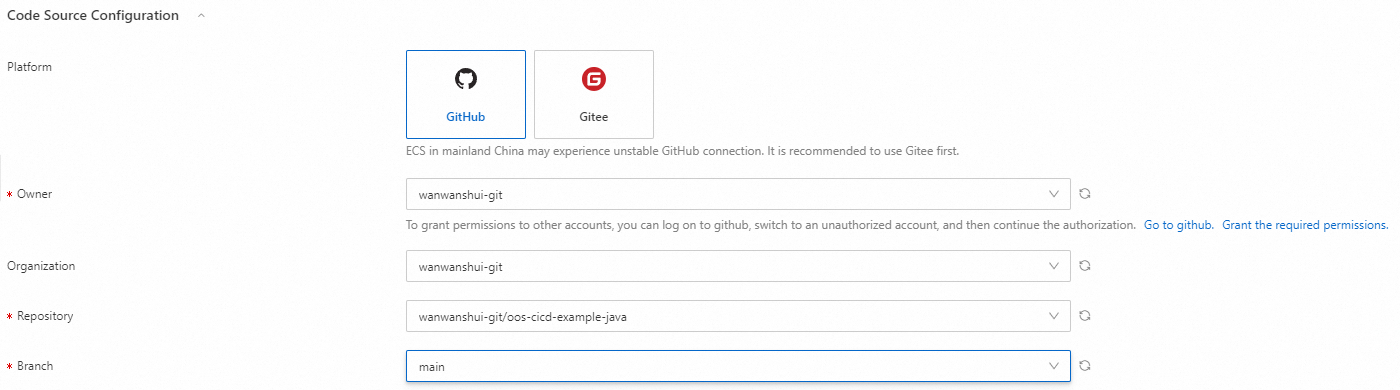
  platform:
    Type: String
    Label:
      en: Platform
      zh-cn: description in Chinese
    AssociationProperty: ALIYUN::OOS::GitPlatform::Name
    Default: gitee
    Description:
      en: ECS in mainland China may experience unstable GitHub connection. It is recommended to use Gitee first.
      zh-cn: description in Chinese
    AllowedValues:
      - github
      - gitee
  owner:
    Type: String
    Label:
      en: Owner
      zh-cn: description in Chinese
    AssociationProperty: ALIYUN::OOS::GitAccount::Name
    AssociationPropertyMetadata:
      Platform: ${platform}
  organization:
    Type: String
    Label:
      en: Organization
      zh-cn: description in Chinese
    Default: ''
    AssociationProperty: ALIYUN::OOS::GitOrganization::Name
    AssociationPropertyMetadata:
      Platform: ${platform}
      Owner: ${owner}
  repository:
    Type: String
    Label:
      en: Repository
      zh-cn: description in Chinese
    AssociationProperty: ALIYUN::OOS::GitRepository::Name
    AssociationPropertyMetadata:
      Platform: ${platform}
      Organization: ${organization}
      Owner: ${owner}
  branch:
    Label:
      en: Branch
      zh-cn: description in Chinese
    AssociationProperty: ALIYUN::OOS::GitBranch::Name
    AssociationPropertyMetadata:
      Platform: ${platform}
      Organization: ${organization}
      Owner: ${owner}
      RepoFullName: ${repository}
    Type: String
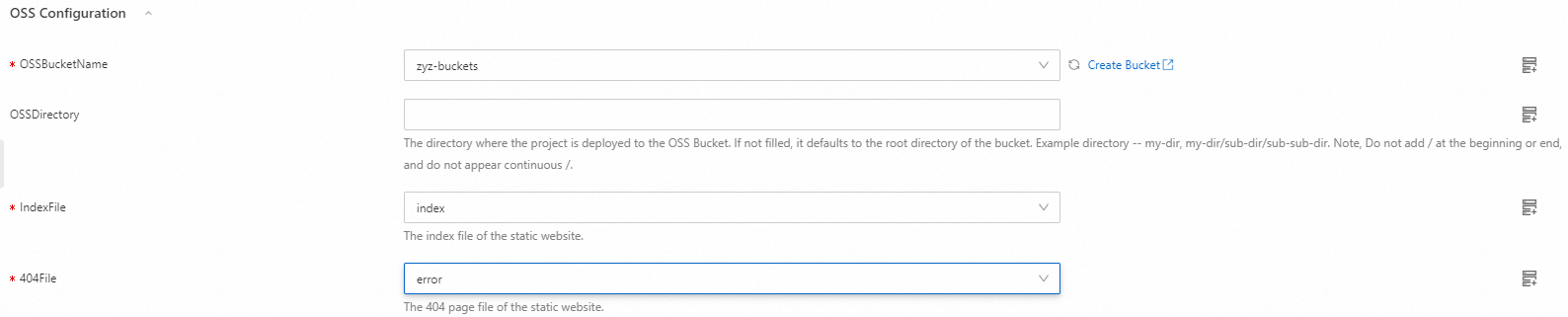
  OSSBucketName:
    Label:
      en: OSSBucketName
      zh-cn: description in Chinese
    Type: String
    AssociationProperty: ALIYUN::OSS::Bucket::BucketName
    AssociationPropertyMetadata:
      RegionId: {{ ACS::RegionId }}
  OSSDirectory:
    Type: String

    Label:
      en: OSSDirectory
      zh-cn: description in Chinese
    Description:
      en: The directory where the project is deployed to the OSS Bucket. If not filled, it defaults to the root directory of the bucket. Example directory -- my-dir, my-dir/sub-dir/sub-sub-dir. Note, Do not add / at the beginning or end, and do not appear continuous /.
      zh-cn: description in Chinese
    Default: ''
  indexFile:
    Type: String
    Label:
      en: IndexFile
      zh-cn: description in Chinese
    Description:
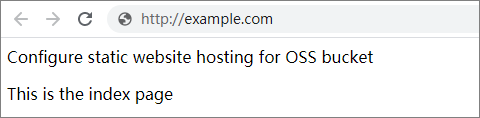
      en: The index file of the static website.
      zh-cn: description in Chinese
    Default: ''
    AssociationProperty: ALIYUN::OOS::GitContent::Content
    AssociationPropertyMetadata:
      Platform: ${platform}
      Owner: ${owner}
      OrgId: ${organization}
      RepoFullName: ${repository}
      Branch: ${branch}
      Required:
        Condition:
          Fn::Equals:
            - ${platform}
            - ${platform}
  errorFile:
    Type: String
    Label:
      en: 404File
      zh-cn: description in Chinese
    Description:
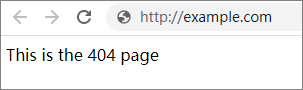
      en: The 404 page file of the static website.
      zh-cn: description in Chinese
    Default: ''
    AssociationProperty: ALIYUN::OOS::GitContent::Content
    AssociationPropertyMetadata:
      Platform: ${platform}
      Owner: ${owner}
      OrgId: ${organization}
      RepoFullName: ${repository}
      Branch: ${branch}
      Required:
        Condition:
          Fn::Equals:
            - ${platform}
            - ${platform}
  WhetherUseTemporaryRam:
    Label:
      en: WhetherUseTemporaryRam
      zh-cn: description in Chinese
    Description:
      en: Function Compute needs the read and write permissions of the target OSS bucket to complete the deployment. Select true to agree that OOS automatically creates a temporary ram role to authorize the necessary permissions. Select false, you can create a ram role or select an existing ram role to authorize.
      zh-cn: description in Chinese
    Type: String
    AllowedValues:
      - true
      - false
  FCAssumeRole:
    Label:
      en: FCAssumeRole
      zh-cn: description in Chinese
    Description:
      en: Please select the ram role that has the necessary permissions to access the target OSS bucket. For details, please see <a href="https://www.alibabacloud.com/help/zh/functioncompute/fc-2-0/security-and-compliance/grant-function-compute-permissions-to-access-other-alibaba-cloud-services?spm=a2c63.p38356.0.i2" target="_blank ">Grant Function Compute permissions to access other cloud services</a>
      zh-cn: description in Chinese
    Type: String
    AssociationProperty: ALIYUN::RAM::Service::Role
    AssociationPropertyMetadata:
      Service: fc.aliyuncs.com
      Visible:
        Condition:
          Fn::Equals:
            - ${WhetherUseTemporaryRam}
            - false
      Required:
        Condition:
          Fn::Equals:
            - ${WhetherUseTemporaryRam}
            - false
    Default: ''
Tasks:
  - Name: createTemporaryRam
    When:
      Fn::Equals:
        - '{{ WhetherUseTemporaryRam }}'
        - true
    OnError: deleteTemporaryRam
    Action: ACS::ROS::CreateStack
    Description:
      en: Create temporary Ram
      zh-cn: description in Chinese
    Properties:
      regionId: '{{ ACS::RegionId }}'
      stackName:
        Fn::Replace:
          - .: _
          - OOS-{{ACS::ExecutionId}}
      disableRollback: true
      templateBody: |-
        {
          "ROSTemplateFormatVersion": "2015-09-01",
          "Resources": {
            "MyRAMRole": {
              "Type": "ALIYUN::RAM::Role",
              "Properties": {
                "RoleName": "TemporaryRAMRole-{{ACS::ExecutionId}}",
                "Description": "Role for OSS PutObject access",
                "AssumeRolePolicyDocument": {
                  "Version": "1",
                  "Statement": [
                    {
                      "Effect": "Allow",
                      "Principal": {
                        "Service": [
                          "fc.aliyuncs.com"
                        ]
                      },
                      "Action": "sts:AssumeRole"
                    }
                  ]
                },
                "Policies": [
                  {
                    "PolicyName": "Policy-{{ACS::ExecutionId}}",
                    "Description": "Allow PutObject to OSS",
                    "PolicyDocument": {
                      "Version": "1",
                      "Statement": [
                        {
                          "Effect": "Allow",
                          "Action": [
                            "oss:PutObject"
                          ],
                          "Resource": [
                            "acs:oss:*:*:{{OSSBucketName}}/*"
                          ]
                        }
                      ]
                    }
                  }
                ]
              }
            }
          },
          "Outputs": {
            "RoleNameOutput": {
              "Value": {
                "Fn::GetAtt": [
                  "MyRAMRole",
                  "RoleName"
                ]
              }
            }
          }
        }
      parameters: []
    Outputs:
      stackId:
        Type: String
        ValueSelector: stackId
  - Name: getRamName
    When:
      Fn::Equals:
        - '{{ WhetherUseTemporaryRam }}'
        - true
    Action: ACS::ExecuteAPI
    OnError: deleteTemporaryRam
    Description:
      en: Get Ram info
      zh-cn: description in Chinese
    Properties:
      Service: ROS
      API: GetStack
      Parameters:
        StackId: '{{createTemporaryRam.stackId}}'
    Outputs:
      ramName:
        Type: String
        ValueSelector: .Outputs[0].OutputValue
  - Name: GitCodeRepo
    Action: ACS::CICD::GitCodeRepo
    Description: Specify the code source and generate a temporary authorization link
    Properties:
      organization: '{{ organization }}'
      platform: '{{ platform }}'
      owner: '{{ owner }}'
      repository: '{{ repository }}'
      branch: '{{ branch }}'
  - Action: ACS::FC::ExecuteScript
    Name: ExecuteScript
    OnError: deleteTemporaryRam
    Description: Pull and deploy the code to OSS
    Properties:
      runtime: python3.10
      handler: index.handler
      script: |-
        import json
        import os
        import subprocess
        import oss2

        def handler(event, context):
            des_dir = 'OOS-{{ACS::ExecutionId}}'
            subprocess.run('apt-get install git -y', shell=True, check=True)
            subprocess.run('git --version', shell=True, check=True)
            subprocess.run('git clone {{GitCodeRepo.authorizedUrl}} OOS-{{ACS::ExecutionId}}', shell=True, check=True)

            auth = oss2.StsAuth(context.credentials.access_key_id, context.credentials.access_key_secret, context.credentials.security_token)
            endpoint = 'https://oss-{{ACS::RegionId}}.aliyuncs.com'
            bucket = oss2.Bucket(auth, endpoint, '{{OSSBucketName}}')

            result = []
            for dirpath, _, filenames in os.walk(des_dir):
                for filename in filenames:
                    # Construct the relative file path from the base_dir
                    file_path = os.path.relpath(os.path.join(dirpath, filename), des_dir)
                    full_file_path = os.path.join(dirpath, filename)
                    if "{{OSSDirectory}}" != "":
                      bucket.put_object_from_file('{{OSSDirectory}}' + '/' + file_path, full_file_path)
                    else:
                      bucket.put_object_from_file(file_path, full_file_path)
            return result
      role:
        Fn::If:
          - Fn::Equals:
              - '{{ WhetherUseTemporaryRam }}'
              - true
          - '{{getRamName.ramName}}'
          - '{{FCAssumeRole}}'
    Outputs: {}
  - Name: configurePage
    Action: 'ACS::ExecuteAPI'
    Description:
      en: Configure default index page and 404 page
      zh-cn: description in Chinese
    Properties:
      Service: OSS
      API: PutBucketWebsite
      Method: PUT
      URI: '?website'
      Headers:
        Content-MD5: ''
        Content-Type: application/json
      Parameters:
        BucketName: '{{ OSSBucketName }}'
        RegionId: '{{ ACS::RegionId }}'
      Body:
        WebsiteConfiguration:
          IndexDocument:
            Suffix: '{{ indexFile }}'
            SupportSubDir: false
            Type: 0
          ErrorDocument:
            Key: '{{ errorFile }}'
            HttpStatus: 404
  - Name: deleteTemporaryRam
    When:
      Fn::Equals:
        - '{{ WhetherUseTemporaryRam }}'
        - true
    Action: ACS::ROS::DeleteStack
    Description:
      en: Delete temporary Ram
      zh-cn: description in Chinese
    Properties:
      regionId: '{{ ACS::RegionId }}'
      stackId: '{{ createTemporaryRam.stackId }}'
      retainAllResources: false
Outputs: {}
Metadata:
  ALIYUN::OOS::Interface:
    ParameterGroups:
      - Parameters:
          - platform
          - owner
          - organization
          - repository
          - branch
        Label:
          default:
      zh-cn: description in Chinese
            en: Code Source Configuration
      - Parameters:
          - OSSBucketName
          - OSSDirectory
          - indexFile
          - errorFile
        Label:
          default:
      zh-cn: description in Chinese
            en: OSS Configuration
      - Parameters:
          - WhetherUseTemporaryRam
          - FCAssumeRole
        Label:
          default:
      zh-cn: description in Chinese
            en: FC Assume Role