You can use Alibaba Cloud Resource Orchestration Service (ROS) together with CloudOps Orchestration Service (OOS) templates to quickly create and execute a patch baseline.
Background information
You can create a patch baseline, immediately fix bugs in a patch baseline, and fix bugs in a patch baseline as scheduled on different pages in the OOS console. Resource Orchestration Service (ROS) can automatically create and configure all the resources defined in templates to implement automated deployment and O&M. You can use Resource Orchestration Service to call the API operations of CloudOps Orchestration Service to quickly create and execute a patch baseline.
ROS resources
ALIYUN::OOS::PatchBaseline: creates a patch baseline.
ALIYUN::OOS::DefaultPatchBaseline: specifies a default patch baseline.
ALIYUN::OOS::Execution: creates an execution for patch-based fixes.
Prerequisites
To ensure the security of your Alibaba Cloud account and cloud resources, we recommend that you do not use your Alibaba Cloud account to access the service unless necessary.
A RAM role is created, and required permissions are granted to the RAM role.
For more information about how to create a RAM role, see Create a RAM role for a trusted Alibaba Cloud service.
For more information about how to grant permissions to a RAM role, see Grant permissions to a RAM role. The following table lists the policies that contain the required permissions of the RAM role you created.
Policy
Description
AliyunOOSFullAccess
Manages OOS.
AliyunROSFullAccess
Manages ROS.
AliyunECSFullAccess
Manages Elastic Compute Service (ECS).
Procedure
Step 1: Check the parameters
Log on to the OOS console and go to the Create Patch Baseline page. On the Create Patch Baseline page, check the parameters that are listed in the following table based on the content displayed on the page and the ALIYUN::OOS::PatchBaseline resource type of ROS.
Parameter
Type
Description
PatchBaseLineName
String
The patch baseline name.
OperationSystem
String
The supported operating system.
Product
CommaDelimitedList
The product name.
Classification
CommaDelimitedList
The product type.
Severity
CommaDelimitedList
The level of the severity.
DefaultPatchBaseline
Boolean
Specifies whether to set the patch baseline as the default patch baseline.
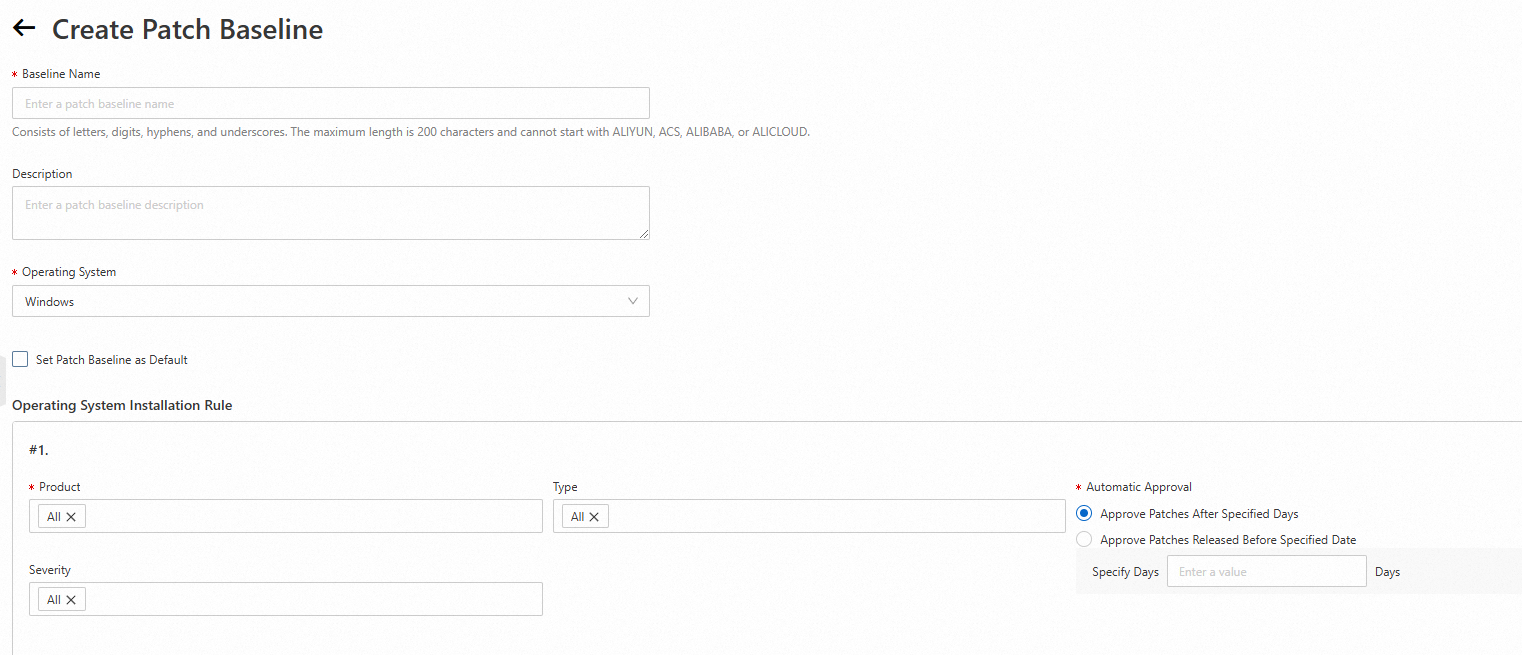
Go to the label-quickSetup-config-name-map page in the OOS console. Check the parameters listed in the following table based on the content displayed on the page and the ALIYUN::OOS::Execution resource type of ROS.
Parameter
Type
Description
OOSTemplateName
String
The OOS template name.
ResourceType
String
The resource type.
Targets
Json
The instances that you want to manage.
Timeout
Number
The timeout period.
CancelOnDelete
Boolean
Specifies whether to cancel the execution that is not completed when the resource is being deleted.
Action
String
The operation to be performed on the patch baseline.
TimerTrigger
Json
The mode in which the patch baseline is executed.
WhetherCreateSnapshot
Boolean
Specifies whether to create snapshots for the system disks.
RetentionDays
Number
The retention period of the snapshots.
RebootIfNeed
Boolean
Specifies whether to restart the instances if needed.

Step 2: Create an ROS template
After you check the parameters, you can create an ROS template by using the parameters in the Parameters, Resources, Metadata, Conditions, and Outputs sections.
For more information about ROS templates, see Get started with template content.
In the
Parameterssection, configure the parameters that you defined in the console.Parameters: RegionId: Required: true Type: String Label: zh-cn: the description in Chinese en: RegionId AssociationProperty: ALIYUN::ECS::RegionId::RegionDeploy PatchBaselineName: Required: true Type: String Label: en: PatchBaselineName zh-cn: the description in Chinese Default: PatchBaseline_test OperationSystem: Required: true Type: String Label: zh-cn: the description in Chinese en: The operating system type. Default: Windows AllowedValues: - Windows - AliyunLinux - CentOS - Ubuntu - RedhatEnterpriseLinux - Debian - Anolis Product: Required: true Label: zh-cn: the description in Chinese en: Product Type: CommaDelimitedList AssociationPropertyMetadata: AllowedValues: - Value: - Windows Server Datacenter - Windows Server 2022 - Windows Server 2019 - Windows Server 2016 - Windows Server 2012 R2 Condition: Fn::Equals: - ${OperationSystem} - Windows - Value: - Aliyun Linux 2.1903 - Aliyun Linux 3.2104 Condition: Fn::Equals: - ${OperationSystem} - AliyunLinux - Value: - CentOS Stream 9 - CentOS 7.9 - CentOS 7.8 - CentOS 7.6 - CentOS 7.5 - CentOS 7.4 - CentOS 7.3 - CentOS 7.2 - CentOS 7.1 - CentOS 7.0 Condition: Fn::Equals: - ${OperationSystem} - CentOS - Value: - Ubuntu 22.04 - Ubuntu 20.04 - Ubuntu 18.04 - Ubuntu 16.04 - Ubuntu 14.04 Condition: Fn::Equals: - ${OperationSystem} - Ubuntu - Value: - Debian 12.5 - Debian 12.4 - Debian 12.2 - Debian 11.8 - Debian 11.7 - Debian 11.6 - Debian 11.5 - Debian 11.4 - Debian 11.3 - Debian 11.2 - Debian 11.1 - Debian 11.0 Condition: Fn::Equals: - ${OperationSystem} - Debian - Value: - Anolis OS 8.8 RHCK - Anolis OS 8.6 RHCK - Anolis OS 8.4 RHCK - Anolis OS 8.2 RHCK Condition: Fn::Equals: - ${OperationSystem} - Anolis - Value: - Red Hat Enterprise Linux 9.3 - Red Hat Enterprise Linux 9.2 - Red Hat Enterprise Linux 9.1 - Red Hat Enterprise Linux 9.0 - Red Hat Enterprise Linux 8.9 - Red Hat Enterprise Linux 8.8 - Red Hat Enterprise Linux 8.7 - Red Hat Enterprise Linux 8.6 - Red Hat Enterprise Linux 8.5 Condition: Fn::Equals: - ${OperationSystem} - RedhatEnterpriseLinux Classification: Label: zh-cn: the description in Chinese en: Classification Type: CommaDelimitedList AssociationPropertyMetadata: AllowedValues: - Value: - Applications - Definition Updates - Drivers - Feature Packs - Security Updates - Service Packs - Tools - Updates - Update Rollups - Critical Updates - Upgrades Condition: Fn::Equals: - ${OperationSystem} - Windows - Value: - Security - Bugfix - Enhancement - Recommended - NewPackage Condition: Fn::Equals: - ${OperationSystem} - AliyunLinux - Value: - Security - Bugfix - Enhancement - Recommended - NewPackage Condition: Fn::Equals: - ${OperationSystem} - CentOS - Value: - libs - libdevel - doc - debug - translations - devel - admin - oldlibs - label - utils - net Condition: Fn::Equals: - ${OperationSystem} - Ubuntu - Value: - admin - cli-mono - libs - libdevel - doc - comm - debug - database - devel - oldlibs - utils - net - misc - gnome - perl - x11 - python - java - kernel - shells Condition: Fn::Equals: - ${OperationSystem} - Debian - Value: - Security - Bugfix - Enhancement - Recommended - NewPackage Condition: Fn::Equals: - ${OperationSystem} - Anolis - Value: - Security - Bugfix - Enhancement - Recommended - NewPackage Condition: Fn::Equals: - ${OperationSystem} - RedhatEnterpriseLinux Severity: Type: CommaDelimitedList Label: zh-cn: the description in Chinese en: Severity AssociationPropertyMetadata: AllowedValues: - Value: - Critical - Important - Moderate - Low - Unspecified Condition: Fn::Not: Fn::Equals: - ${OperationSystem} - Ubuntu - Value: - Required - Important - Standard - Optional - Extra Condition: Fn::Equals: - ${OperationSystem} - Ubuntu DefaultPatchBaseline: Type: Boolean Label: zh-cn: the description in Chinese en: Whether to set the patch baseline as the default. Default: false AllowedValues: - true - false AssociationPropertyMetadata: ValueLabelMapping: true: zh-cn: the description in Chinese en: true false: zh-cn: the description in Chinese en: false OOSTemplateName: Type: String Label: zh-cn: the description in Chinese en: Template name Default: ACS-ECS-BulkyApplyPatchBaseline AssociationProperty: ALIYUN::OOS::Template::TemplateName AssociationPropertyMetadata: RegionId: Ref: RegionId Description: zh-cn: ACS-ECS-BulkyApplyPatchBaseline: the template for performing patch operations. en: ACS-ECS-BulkyApplyPatchBaseline:The template name used to execute patch operations. MinLength: 2 MaxLength: 128 Action: Default: install AssociationPropertyMetadata: LocaleKey: OOSPatchExecuteType ValueLabelMapping: install: zh-cn: the description in Chinese en: Install scan: zh-cn: the description in Chinese en: Scan AllowedValues: - install - scan Type: String Label: zh-cn: the description in Chinese en: Action TimerTrigger: AssociationProperty: ALIYUN::OOS::Component::TimerTrigger AssociationPropertyMetadata: MinuteInterval: 30 Type: Json Label: zh-cn: the description in Chinese en: TimerTrigger WhetherCreateSnapshot: Default: false AssociationPropertyMetadata: Visible: Condition: Fn::Equals: - ${Action} - install Type: Boolean Label: zh-cn: the description in Chinese en: WhetherCreateSnapshot RetentionDays: AssociationPropertyMetadata: Visible: Condition: Fn::Equals: - ${WhetherCreateSnapshot} - true Default: 7 MaxValue: 65536 MinValue: 1 Label: zh-cn: the description in Chinese en: RetentionDays Type: Number RebootIfNeed: Default: false AssociationPropertyMetadata: Visible: Condition: Fn::Equals: - ${Action} - install Type: Boolean Label: zh-cn: the description in Chinese en: RebootIfNeed ResourceType: Type: String Label: en: ResourceType zh-cn: the description in Chinese AssociationPropertyMetadata: ValueLabelMapping: ALIYUN::ECS::Instance: zh-cn: the description in Chinese en: ECS instance ALIYUN::ECD::Desktop: zh-cn: the description in Chinese en: Desktop AllowedValues: - ALIYUN::ECS::Instance - ALIYUN::ECD::Desktop Default: ALIYUN::ECS::Instance Targets: AssociationProperty: Targets AssociationPropertyMetadata: ResourceType: ResourceType DeployedRegionId: RegionId Status: Running Type: Json Label: zh-cn: the description in Chinese en: TargetInstance Timeout: Type: Number Label: zh-cn: the description in Chinese en: Timeout Default: 1800 Description: zh-cn: the description in Chinese en: Timeout in seconds' CancelOnDelete: Type: Boolean Label: zh-cn: the description in Chinese en: CancelOnDelete Default: true AllowedValues: - true - false AssociationPropertyMetadata: ValueLabelMapping: true: zh-cn: the description in Chinese en: true false: zh-cn: the description in Chinese en: falseprovider "alicloud" { region = "cn-hangzhou" } variable "patch_baseline_name" { description = "Patch baseline name" type = string }In the
Metadatasection, divide the parameters into the patch baseline and execution parameter groups.Metadata: ALIYUN::ROS::Interface: ParameterGroups: - Parameters: - PatchBaselineName - OperationSystem - Product - Classification - Severity - DefaultPatchBaseline Label: zh-cn: the description in Chinese en: Patch baseline - Parameters: - OOSTemplateName - ResourceType - Targets - Timeout - CancelOnDelete - Action - TimerTrigger - WhetherCreateSnapshot - RetentionDays - RebootIfNeed Label: zh-cn: the description in Chinese en: Execution parameterslocals { approval_rules_json = <<EOF { "PatchRules": [ { "EnableNonSecurity": true, "PatchFilterGroup": [ { "Values": ["OS"], "Key": "PatchSet" }, { "Values": ["Windows"], "Key": "ProductFamily" }, { "Values": ["Windows 10", "Windows 7", "Windows Server 2022"], "Key": "Product" }, { "Values": ["Security Updates", "Updates", "Update Rollups", "Critical Updates"], "Key": "Classification" }, { "Values": ["Critical", "Important"], "Key": "Severity" } ], "ApproveAfterDays": 7, "ComplianceLevel": "Medium" } ] } EOF oos_parameters_json = <<EOF { "resourceType": "ALIYUN::ECS::Instance", "targets": { "Type": "All", "Parameters": { "regionId": "cn-hangzhou", "Status": "Running" } } } EOF }In the
Resourcessection, configure the parameters based on the dependencies of ROS resources.Resources: OOSPatchBaseline: Type: ALIYUN::OOS::PatchBaseline Condition: IsWindows Properties: PatchBaselineName: Ref: PatchBaselineName OperationSystem: Ref: OperationSystem ApprovalRules: PatchRules: - PatchFilterGroup: - Key: PatchSet Values: - OS - Key: ProductFamily Values: - Ref: OperationSystem - Key: Product Values: - Ref: Product - Key: Classification Values: - Ref: Classification - Key: Severity Values: - Ref: Severity ApproveAfterDays: 7 EnableNonSecurity: true ComplianceLevel: Medium LinuxPatchBaseline: Type: ALIYUN::OOS::PatchBaseline Condition: IsNotWindows Properties: PatchBaselineName: Ref: PatchBaselineName OperationSystem: Ref: OperationSystem ApprovalRules: PatchRules: - PatchFilterGroup: - Key: Product Values: - Ref: Product - Key: Classification Values: - Ref: Classification - Key: Severity Values: - Ref: Severity ApproveAfterDays: 7 EnableNonSecurity: true ComplianceLevel: Medium OOSDefaultPatchBaseline: Type: ALIYUN::OOS::DefaultPatchBaseline Properties: PatchBaselineName: Ref: PatchBaselineName Condition: IsDefault DependsOn: OOSPatchBaseline Execution: Type: ALIYUN::OOS::Execution # Create an execution depending on the patch baseline. DependsOn: OOSPatchBaseline Properties: TemplateName: Ref: OOSTemplateName Parameters: resourceType: Ref: ResourceType targets: Ref: Targets Action: Ref: Action TimerTrigger: Ref: TimerTrigger WhetherCreateSnapshot: Ref: WhetherCreateSnapshot RetentionDays: Ref: RetentionDays ResourceOptions: SuccessStatuses: - Running - Success - Queued - Waiting Timeout: Ref: Timeout CancelOnDelete: Ref: CancelOnDeleteresource "alicloud_oos_patch_baseline" "baseline" { patch_baseline_name = var.patch_baseline_name operation_system = "Windows" approval_rules = local.approval_rules_json } resource "alicloud_oos_default_patch_baseline" "default" { patch_baseline_name = alicloud_oos_patch_baseline.baseline.patch_baseline_name } resource "alicloud_oos_execution" "example" { template_name = "ACS-ECS-BulkyApplyPatchBaseline" parameters = local.oos_parameters_json depends_on = [alicloud_oos_patch_baseline.baseline,alicloud_oos_default_patch_baseline.default] }In the
Outputssection, check the generated information of created resources.Outputs: Execution: Description: zh-cn: the description in Chinese en: Whether the execution is successful. Value: Fn::GetAtt: - Execution - Status PatchBaseline: Description: zh-cn: the description in Chinese en: The name of the patch baseline. Value: Fn::GetAtt: - OOSPatchBaseline - PatchBaselineNameoutput "patch_baseline_id" { value = alicloud_oos_patch_baseline.baseline.id }The following sample code provides a complete sample template:
ROSTemplateFormatVersion: "2015-09-01"
Description:
  en: Create a patch baseline and execute.
  zh-cn: the description in Chinese
Parameters:
  RegionId:
    Required: true
    Type: String
    Label:
      zh-cn: the description in Chinese
      en: RegionId
    AssociationProperty: ALIYUN::ECS::RegionId::RegionDeploy
  PatchBaselineName:
    Required: true
    Type: String
    Label:
      en: PatchBaselineName
      zh-cn: the description in Chinese
    Default: PatchBaseline_test
  OperationSystem:
    Required: true
    Type: String
    Label:
      zh-cn: the description in Chinese
      en: The operating system type.
    Default: Windows
    AllowedValues:
      - Windows
      - AliyunLinux
      - CentOS
      - Ubuntu
      - RedhatEnterpriseLinux
      - Debian
      - Anolis
  Product:

    Required: true
    Label:
      zh-cn: the description in Chinese
      en: Product
    Type: CommaDelimitedList
    AssociationPropertyMetadata:
      AllowedValues:
        - Value:
            - Windows Server Datacenter
            - Windows Server 2022
            - Windows Server 2019
            - Windows Server 2016
            - Windows Server 2012 R2
          Condition:
            Fn::Equals:
              - ${OperationSystem}
              - Windows
        - Value:
            - Aliyun Linux 2.1903
            - Aliyun Linux 3.2104
          Condition:
            Fn::Equals:
              - ${OperationSystem}
              - AliyunLinux
        - Value:
            - CentOS Stream 9
            - CentOS 7.9
            - CentOS 7.8
            - CentOS 7.6
            - CentOS 7.5
            - CentOS 7.4
            - CentOS 7.3
            - CentOS 7.2
            - CentOS 7.1
            - CentOS 7.0
          Condition:
            Fn::Equals:
              - ${OperationSystem}
              - CentOS
        - Value:
            - Ubuntu 22.04
            - Ubuntu 20.04
            - Ubuntu 18.04
            - Ubuntu 16.04
            - Ubuntu 14.04
          Condition:
            Fn::Equals:
              - ${OperationSystem}
              - Ubuntu
        - Value:
            - Debian 12.5
            - Debian 12.4
            - Debian 12,2
            - Debian 11.8
            - Debian 11.7
            - Debian 11.6
            - Debian 11.5
            - Debian 11.4
            - Debian 11.3
            - Debian 11.2
            - Debian 11.1
            - Debian 11.0
          Condition:
            Fn::Equals:
              - ${OperationSystem}
              - Debian
        - Value:
            - Anolis OS 8.8 RHCK
            - Anolis OS 8.6 RHCK
            - Anolis OS 8.4 RHCK
            - Anolis OS 8.2 RHCK
          Condition:
            Fn::Equals:
              - ${OperationSystem}
              - Anolis
        - Value:
            - Red Hat Enterprise Linux 9.3
            - Red Hat Enterprise Linux 9.2
            - Red Hat Enterprise Linux 9.1
            - Red Hat Enterprise Linux 9.0
            - Red Hat Enterprise Linux 8.9
            - Red Hat Enterprise Linux 8.8
            - Red Hat Enterprise Linux 8.7
            - Red Hat Enterprise Linux 8.6
            - Red Hat Enterprise Linux 8.5
          Condition:
            Fn::Equals:
              - ${OperationSystem}
              - RedhatEnterpriseLinux
  Classification:
    Label:
      zh-cn: the description in Chinese
      en: Classification
    Type: CommaDelimitedList
    AssociationPropertyMetadata:
      AllowedValues:
        - Value:
            - Applications
            - Definition Updates
            - Drivers
            - Feature Packs
            - Security Updates
            - Service Packs
            - Tools
            - Updates
            - Update Rollups
            - Critical Updates
            - Upgrades
          Condition:
            Fn::Equals:
              - ${OperationSystem}
              - Windows
        - Value:
            - Security
            - Bugfix
            - Enhancement
            - Recommended
            - NewPackage
          Condition:

            Fn::Equals:
              - ${OperationSystem}
              - AliyunLinux
        - Value:
            - Security
            - Bugfix
            - Enhancement
            - Recommended
            - NewPackage
          Condition:
            Fn::Equals:
              - ${OperationSystem}
              - CentOS
        - Value:
            - libs
            - libdevel
            - doc
            - debug
            - translations
            - devel
            - admin
            - oldlibs
            - label
            - utils
            - net
          Condition:
            Fn::Equals:
              - ${OperationSystem}
              - Ubuntu
        - Value:
            - admin
            - cli-mono
            - libs
            - libdevel
            - doc
            - comm
            - debug
            - database
            - devel
            - oldlibs
            - utils
            - net
            - misc
            - gnome
            - perl
            - x11
            - python
            - java
            - kernel
            - shells
          Condition:
            Fn::Equals:
              - ${OperationSystem}
              - Debian
        - Value:
            - Security
            - Bugfix
            - Enhancement
            - Recommended
            - NewPackage
          Condition:
            Fn::Equals:
              - ${OperationSystem}
              - Anolis
        - Value:
            - Security
            - Bugfix
            - Enhancement
            - Recommended
            - NewPackage
          Condition:
            Fn::Equals:
              - ${OperationSystem}
              - RedhatEnterpriseLinux
  Severity:
    Type: CommaDelimitedList
    Label:
      zh-cn: the description in Chinese
      en: Severity
    AssociationPropertyMetadata:
      AllowedValues:
        - Value:
            - Critical
            - Important
            - Moderate
            - Low
            - Unspecified
          Condition:

            Fn::Not:
              Fn::Equals:
                - ${OperationSystem}
                - Ubuntu
        - Value:
            - Required
            - Important
            - Standard
            - Optional
            - Extra
          Condition:
            Fn::Equals:
              - ${OperationSystem}
              - Ubuntu
  DefaultPatchBaseline:
    Type: Boolean
    Label:
      zh-cn: the description in Chinese
      en: Whether to set the patch baseline as the default.
    Default: false
    AllowedValues:
      - true
      - false
    AssociationPropertyMetadata:
      ValueLabelMapping:
        true:
          zh-cn: the description in Chinese
          en: true
        false:
          zh-cn: the description in Chinese
          en: false
  OOSTemplateName:
    Type: String
    Label:
      zh-cn: the description in Chinese
      en: Template name
    Default: ACS-ECS-BulkyApplyPatchBaseline
    AssociationProperty: ALIYUN::OOS::Template::TemplateName
    AssociationPropertyMetadata:
      RegionId:
        Ref: RegionId
    Description:
      zh-cn: ACS-ECS-BulkyApplyPatchBaseline: the template for performing patch operations.
      en: ACS-ECS-BulkyApplyPatchBaseline:The template name used to execute patch operations.
    MinLength: 2
    MaxLength: 128
  Action:
    Default: install
    AssociationPropertyMetadata:
      LocaleKey: OOSPatchExecuteType
      ValueLabelMapping:
        install:
          zh-cn: the description in Chinese
          en: Install
        scan:
          zh-cn: the description in Chinese
          en: Scan
    AllowedValues:
      - install
      - scan
    Type: String
    Label:
      zh-cn: the description in Chinese
      en: Action
  TimerTrigger:
    AssociationProperty: ALIYUN::OOS::Component::TimerTrigger
    AssociationPropertyMetadata:
      MinuteInterval: 30
    Type: Json
    Label:
      zh-cn: the description in Chinese
      en: TimerTrigger
  WhetherCreateSnapshot:
    Default: false
    AssociationPropertyMetadata:
      Visible:
        Condition:
          Fn::Equals:
            - ${Action}
            - install
    Type: Boolean
    Label:
      zh-cn: the description in Chinese
      en: WhetherCreateSnapshot
  RetentionDays:
    AssociationPropertyMetadata:
      Visible:
        Condition:
          Fn::Equals:
            - ${WhetherCreateSnapshot}
            - true
    Default: 7
    MaxValue: 65536
    MinValue: 1
    Label:
      zh-cn: the description in Chinese
      en: RetentionDays
    Type: Number
  RebootIfNeed:
    Default: false
    AssociationPropertyMetadata:
      Visible:
        Condition:
          Fn::Equals:
            - ${Action}
            - install
    Type: Boolean
    Label:
      zh-cn: the description in Chinese
      en: RebootIfNeed
  ResourceType:
    Type: String
    Label:
      en: ResourceType
      zh-cn: the description in Chinese
    AssociationPropertyMetadata:
      ValueLabelMapping:
        ALIYUN::ECS::Instance:
          zh-cn: the description in Chinese
          en: ECS instance
        ALIYUN::ECD::Desktop:
          zh-cn: the description in Chinese
          en: Desktop
    AllowedValues:
      - ALIYUN::ECS::Instance
      - ALIYUN::ECD::Desktop
    Default: ALIYUN::ECS::Instance
  Targets:
    AssociationProperty: Targets
    AssociationPropertyMetadata:
      ResourceType: ResourceType
      DeployedRegionId: RegionId
      Status: Running
    Type: Json
    Label:
      zh-cn: the description in Chinese
      en: TargetInstance
  Timeout:
    Type: Number
    Label:
      zh-cn: the description in Chinese
      en: Timeout
    Default: 1800
    Description:
      zh-cn: the description in Chinese
      en: Timeout in seconds'
  CancelOnDelete:
    Type: Boolean
    Label:
      zh-cn: the description in Chinese
      en: CancelOnDelete
    Default: true
    AllowedValues:
      - true
      - false
    AssociationPropertyMetadata:
      ValueLabelMapping:
        true:
          zh-cn: the description in Chinese
          en: true
        false:
          zh-cn: the description in Chinese
          en: false
Metadata:
  ALIYUN::ROS::Interface:
    ParameterGroups:
      - Parameters:
          - PatchBaselineName
          - OperationSystem
          - Product
          - Classification
          - Severity
          - DefaultPatchBaseline
        Label:
          zh-cn: the description in Chinese
          en: Patch baseline
      - Parameters:
          - OOSTemplateName
          - ResourceType
          - Targets
          - Timeout
          - CancelOnDelete
          - Action
          - TimerTrigger
          - WhetherCreateSnapshot
          - RetentionDays
          - RebootIfNeed
        Label:
          zh-cn: the description in Chinese
          en: Execution parameters
Resources:
  OOSPatchBaseline:
    Type: ALIYUN::OOS::PatchBaseline
    Condition: IsWindows
    Properties:
      PatchBaselineName:
        Ref: PatchBaselineName
      OperationSystem:
        Ref: OperationSystem
      ApprovalRules:
        PatchRules:
          - PatchFilterGroup:
              - Key: PatchSet
                Values:
                  - OS
              - Key: ProductFamily
                Values:
                  - Ref: OperationSystem
              - Key: Product
                Values:
                  - Ref: Product
              - Key: Classification
                Values:
                  - Ref: Classification
              - Key: Severity
                Values:
                  - Ref: Severity
            ApproveAfterDays: 7
            EnableNonSecurity: true
            ComplianceLevel: Medium
  LinuxPatchBaseline:
    Type: ALIYUN::OOS::PatchBaseline
    Condition: IsNotWindows
    Properties:
      PatchBaselineName:
        Ref: PatchBaselineName
      OperationSystem:
        Ref: OperationSystem
      ApprovalRules:
        PatchRules:
          - PatchFilterGroup:
              - Key: Product
                Values:
                  - Ref: Product
              - Key: Classification
                Values:
                  - Ref: Classification
              - Key: Severity
                Values:
                  - Ref: Severity
            ApproveAfterDays: 7
            EnableNonSecurity: true
            ComplianceLevel: Medium
  OOSDefaultPatchBaseline:
    Type: ALIYUN::OOS::DefaultPatchBaseline
    Properties:
      PatchBaselineName:
        Ref: PatchBaselineName
    Condition: IsDefault
    DependsOn: OOSPatchBaseline
  Execution:
    Type: ALIYUN::OOS::Execution
    # Create an execution depending on the patch baseline.
    DependsOn: OOSPatchBaseline
    Properties:
      TemplateName:
        Ref: OOSTemplateName
      Parameters:
        resourceType:
          Ref: ResourceType
        targets:
          Ref: Targets
        Action:
          Ref: Action
        TimerTrigger:
          Ref: TimerTrigger
        WhetherCreateSnapshot:
          Ref: WhetherCreateSnapshot
        RetentionDays:
          Ref: RetentionDays
      ResourceOptions:
        SuccessStatuses:
          - Running
          - Success
          - Queued
          - Waiting
        Timeout:
          Ref: Timeout
        CancelOnDelete:
          Ref: CancelOnDelete
Conditions:
  IsDefault:
    Fn::Equals:
      - true
      - Ref: DefaultPatchBaseline
  IsNotWindows:
    Fn::Not:
      Fn::Equals:
        - ${OperationSystem}
        - Windows
  IsWindows:
    Fn::Equals:
      - ${OperationSystem}
      - Windows
Outputs:
  Execution:
    Description:
      zh-cn: the description in Chinese
      en: Whether the execution is successful.
    Value:
      Fn::GetAtt:
        - Execution
        - Status
terraform { required_providers { alicloud = { source = "aliyun/alicloud" version = "1.229.1" } } } provider "alicloud" { region = "cn-hangzhou" } variable "patch_baseline_name" { description = "Patch baseline name" type = string } locals { approval_rules_json = <<EOF { "PatchRules": [ { "EnableNonSecurity": true, "PatchFilterGroup": [ { "Values": ["OS"], "Key": "PatchSet" }, { "Values": ["Windows"], "Key": "ProductFamily" }, { "Values": ["Windows 10", "Windows 7", "Windows Server 2022"], "Key": "Product" }, { "Values": ["Security Updates", "Updates", "Update Rollups", "Critical Updates"], "Key": "Classification" }, { "Values": ["Critical", "Important"], "Key": "Severity" } ], "ApproveAfterDays": 7, "ComplianceLevel": "Medium" } ] } EOF oos_parameters_json = <<EOF { "resourceType": "ALIYUN::ECS::Instance", "targets": { "Type": "All", "Parameters": { "regionId": "cn-hangzhou", "Status": "Running" } } } EOF } resource "alicloud_oos_patch_baseline" "baseline" { patch_baseline_name = var.patch_baseline_name operation_system = "Windows" approval_rules = local.approval_rules_json } resource "alicloud_oos_default_patch_baseline" "default" { patch_baseline_name = alicloud_oos_patch_baseline.baseline.patch_baseline_name } resource "alicloud_oos_execution" "example" { template_name = "ACS-ECS-BulkyApplyPatchBaseline" parameters = local.oos_parameters_json depends_on = [alicloud_oos_patch_baseline.baseline,alicloud_oos_default_patch_baseline.default] } output "patch_baseline_id" { value = alicloud_oos_patch_baseline.baseline.id }
Step 3: Use the ROS template to create a stack
This section only describes the main steps for stack creation. For more information about how to create a stack, see Create a stack.
Log on to the ROS> Deployment> Stacks and go to the Stacks page.
Click Create Stack.
On the Create Stack page, copy and paste the complete sample template provided in Step 2 to the Template Content field. Then, click Next.
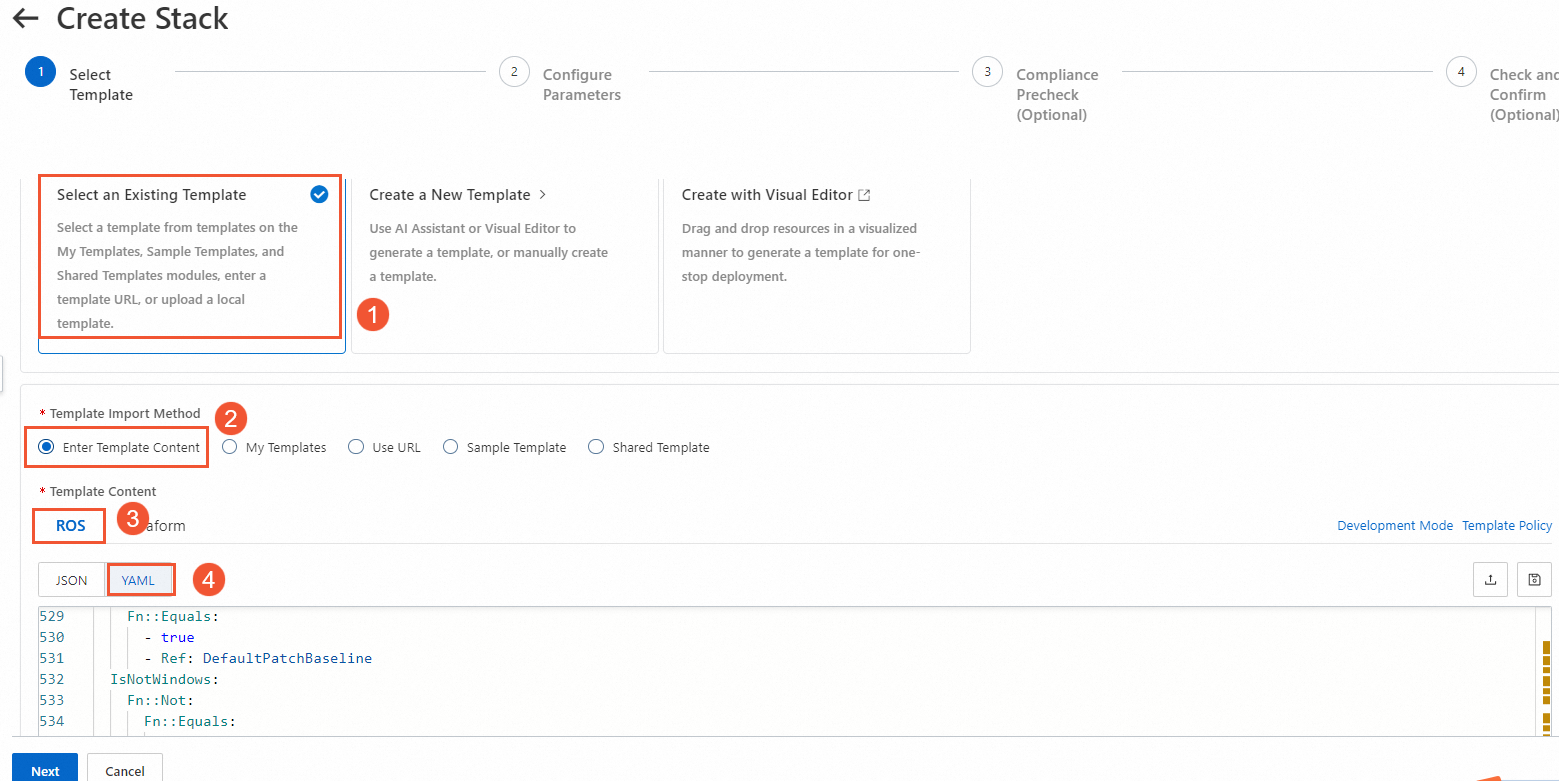
Configure the template and resource stack, and click Next.
After you complete the Compliance Precheck and Check and Confirm steps, click Create.
On the Stacks page, view the created stack.
If the Status of the stack is Created, the stack is created.
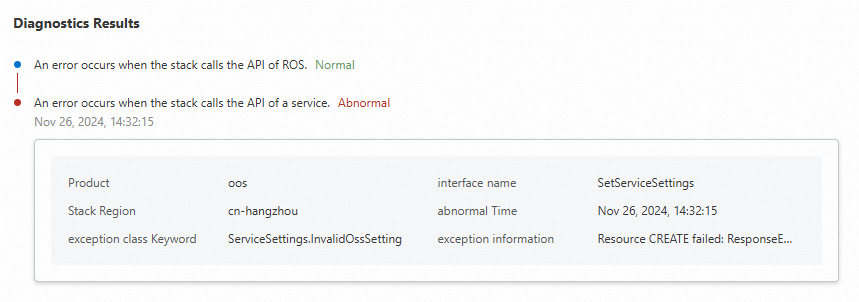
If the Status of the stack is Creation failed, you can click Diagnostics to view the cause of the failure.
Click the Resources tab, and then click the resource ID to go to the console of the resource.
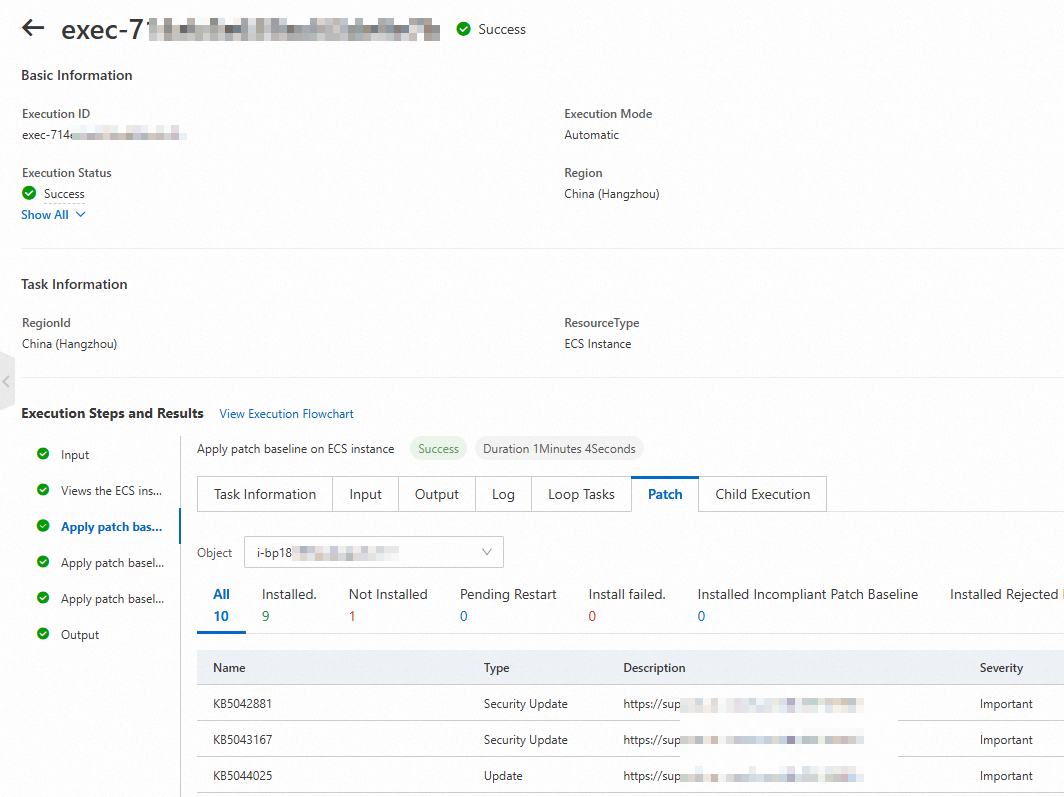
What to do next
A stack fails to be created
If a stack fails to be created, find the stack on the Stacks page and click Diagnostics in the Status column to help you quickly identify and resolve issues.

After the diagnostics are complete, you are redirected to the diagnostics page. You can troubleshoot the failure based on the suggestions.