Background
When usage requirements change, you may need to switch ECS instances between subscription and pay-as-you-go billing. Doing this manually for multiple instances is inefficient and error-prone. You can use CloudOps Orchestration Service to change the billing method of multiple ECS instances at a time. ECS instances support two billing methods: subscription and pay-as-you-go.
Prerequisites
-
To change from subscription to pay-as-you-go, see Change the billing method of an instance from subscription to pay-as-you-go.
-
To change from pay-as-you-go to subscription, see Change the billing method of an instance from pay-as-you-go to subscription.
Procedure
-
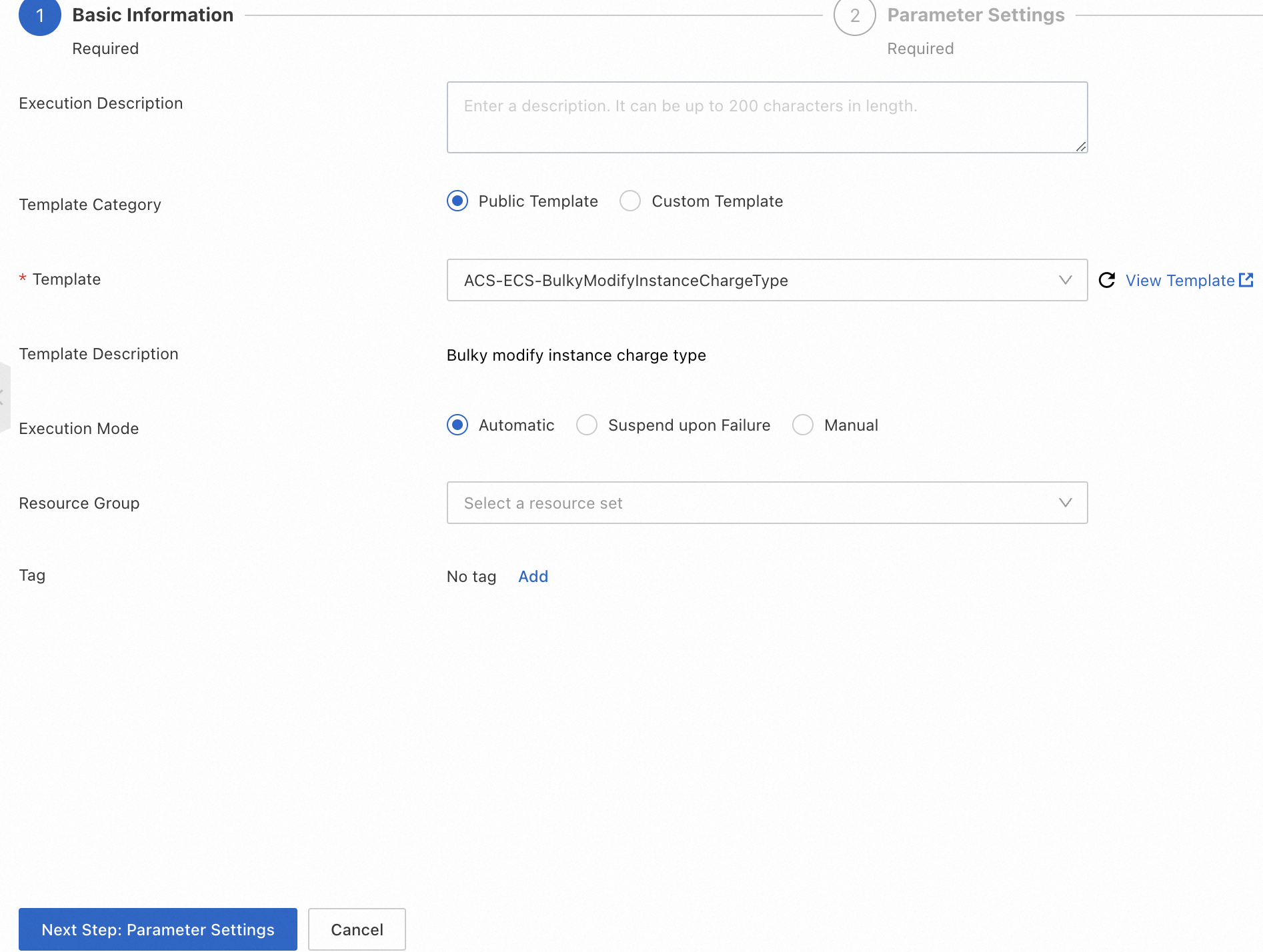
In the OOS console, go to the Automated Task > Public Template page.
-
In the search box, enter Bulk modify instance charge type, click
 , and then click Create Execution in the search results.
-
Click Next Step: Parameter Settings.
-
Set the following parameters:
-
instanceChargeType: The billing method to apply to the instances.-
period: (Required when switching from pay-as-you-go to subscription) The subscription duration. IfPeriodUnitis set toWeek, the valid values are 1 to 4. IfPeriodUnitis set toMonth, the valid values are 1 to 12, 24, 36, 48, and 60. -
periodUnit: (Required when switching from pay-as-you-go to subscription) The time unit for the subscription duration.
-
-
includeDataDisks: (Required when switching from pay-as-you-go to subscription) Whether to convert all attached pay-as-you-go data disks to subscription. -
networkChargeType: The billing method to apply to the network. -
regionId: The region ID. -
targets: The target instances. -
rateControl: (Optional) The concurrency rate for task execution. -
OOSAssumeRole: (Optional) The RAM role that OOS assumes to perform the task.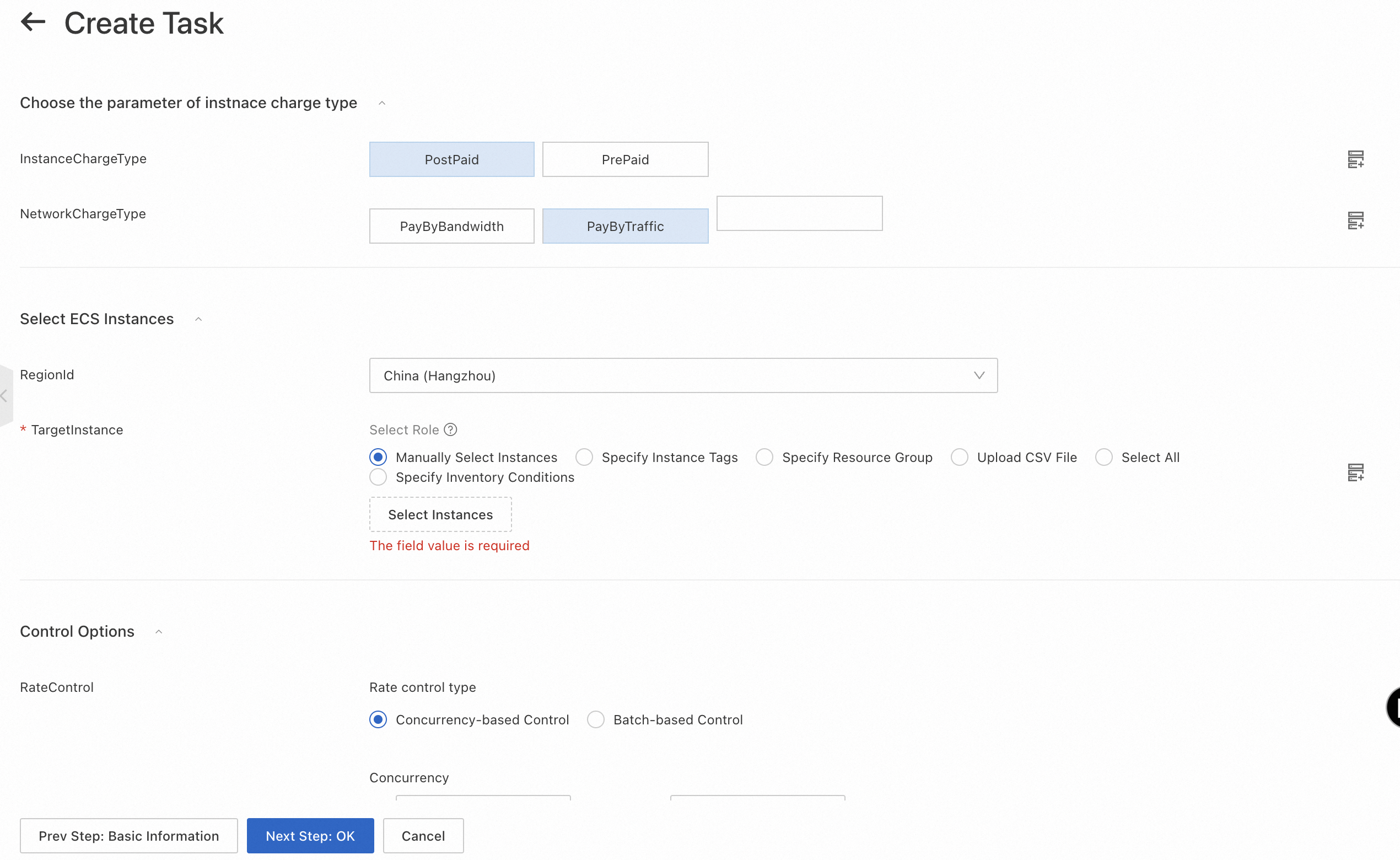
-
-
Click Next Step: OK, and then click Create.
-
On the Task Execution Management page, find the new execution.
-
If the execution status is Running, the billing method change is in progress.
-
When the execution status changes to Success, the operation is complete. You can verify the new billing method on the Instances page in the ECS console.
NoteFor details, click Details for the execution. You can view execution logs to track progress in real time.
-
Appendix
Public template: ACS-ECS-BulkyModifyInstanceChargeType
FormatVersion: OOS-2019-06-01
Description:
  en: Bulk modify instance charge type
  zh-cn: 批量修改实例的计费方式
  name-en: ACS-ECS-BulkyModifyInstanceChargeType
  name-zh-cn: 批量修改实例的计费方式
  categories:
    - instance_manage
Parameters:
  regionId:
    Type: String
    Label:
      en: RegionId
      zh-cn: 地域ID
    AssociationProperty: RegionId
    Default: '{{ ACS::RegionId }}'
  targets:
    Type: Json
    Label:
      en: TargetInstance
      zh-cn: 目标实例
    AssociationProperty: Targets
    AssociationPropertyMetadata:
      ResourceType: ALIYUN::ECS::Instance
      RegionId: regionId
  instanceChargeType:
    Label:
      en: InstanceChargeType
      zh-cn: 实例需要修改的目标计费方式
    Type: String
    AllowedValues:
      - PostPaid
      - PrePaid
    Default: PostPaid
  periodUnit:
    Label:
      en: PeriodUnit
      zh-cn: 续费时长的时间单位
    Type: String
    AllowedValues:
      - Week
      - Month
    Default: Month
    AssociationPropertyMetadata:
      Visible:
        Condition:
          Fn::Not:
            Fn::Equals:
              - ${instanceChargeType}
              - PostPaid
  period:
    Description:
      en: 'If PeriodUnit is set to Week, the valid values for Period are 1 to 4. If PeriodUnit is set to Month, the valid values are 1 to 12, 24, 36, 48, and 60.'
      zh-cn: PeriodUnit=Week时,Period取值:1~4,PeriodUnit=Month时,Period取值:1~12,24, 36, 48, 60
    Label:
      en: Period
      zh-cn: 续费时长
    Type: Number
    Default: 1
    AssociationPropertyMetadata:
      Visible:
        Condition:
          Fn::Not:
            Fn::Equals:
              - ${instanceChargeType}
              - PostPaid
  includeDataDisks:
    Description:
      en: Specifies whether to change the billing method of all data disks attached to the instance from pay-as-you-go to subscription
      zh-cn: 是否将实例挂载的所有按量付费数据盘一起转换为包年包月数据盘
    Label:
      en: IncludeDataDisks
      zh-cn: 是否转换数据盘
    Type: Boolean
    Default: false
    AssociationPropertyMetadata:
      Visible:
        Condition:
          Fn::Not:
            Fn::Equals:
              - ${instanceChargeType}
              - PostPaid
  networkChargeType:
    Label:
      en: NetworkChargeType
      zh-cn: 网络需要修改的目标计费方式
    Type: String
    AllowedValues:
      - PayByBandwidth
      - PayByTraffic
      - ''
    Default: PayByTraffic
  rateControl:
    Label:
      en: RateControl
      zh-cn: 任务执行的并发比率
    Type: Json
    AssociationProperty: RateControl
    Default:
      Mode: Concurrency
      MaxErrors: 0
      Concurrency: 10
  OOSAssumeRole:
    Label:
      en: OOSAssumeRole
      zh-cn: OOS扮演的RAM角色
    Type: String
    Default: OOSServiceRole
RamRole: '{{ OOSAssumeRole }}'
Tasks:
  - Name: getInstance
    Description:
      en: Retrieves the ECS instances
      zh-cn: 获取ECS实例
    Action: ACS::SelectTargets
    Properties:
      ResourceType: ALIYUN::ECS::Instance
      RegionId: '{{ regionId }}'
      Filters:
        - '{{ targets }}'
    Outputs:
      instanceIds:
        Type: List
        ValueSelector: Instances.Instance[].InstanceId
  - Name: modifyInstanceChargeType
    Description:
      en: Modify instance charge type
      zh-cn: 修改实例计费方式
    Action: ACS::ECS::ModifyInstanceChargeType
    Properties:
      regionId: '{{ regionId }}'
      instanceId: '{{ ACS::TaskLoopItem }}'
      instanceChargeType: '{{ instanceChargeType }}'
      networkChargeType: '{{ networkChargeType }}'
      period: '{{ period }}'
      periodUnit: '{{ periodUnit }}'
      includeDataDisks: '{{ includeDataDisks }}'
    Loop:
      RateControl: '{{ rateControl }}'
      Items: '{{ getInstance.instanceIds }}'
Metadata:
  ALIYUN::OOS::Interface:
    ParameterGroups:
      - Parameters:
          - instanceChargeType
          - period
          - periodUnit
          - includeDataDisks
          - networkChargeType
        Label:
          default:
            zh-cn: 计费方式参数选择
            en: Instance Charge Type Settings
      - Parameters:
          - regionId
          - target
        Label:
          default:
            zh-cn: 选择实例
            en: Select ECS Instances
      - Parameters:
          - rateControl
          - OOSAssumeRole
        Label:
          default:
            zh-cn: 高级选项
            en: Control Options