If multiple template executions use the same parameter values, you must search for the parameter values and enter the values when you create these executions. For ease of work, you can use the parameter store feature of CloudOps Orchestration Service (OOS) to assign the values to specific parameters. When you create an execution, you need to only select a parameter from the parameter store without repeated searches.
Use common parameters in OOS templates
OOS provides common parameters. Unlike custom parameters that are created and managed by users, common parameters are managed by Alibaba Cloud. You can use common parameters with ease. The following figure shows the parameters that specify the latest images for different operating systems on Elastic Compute Service (ECS) instances.
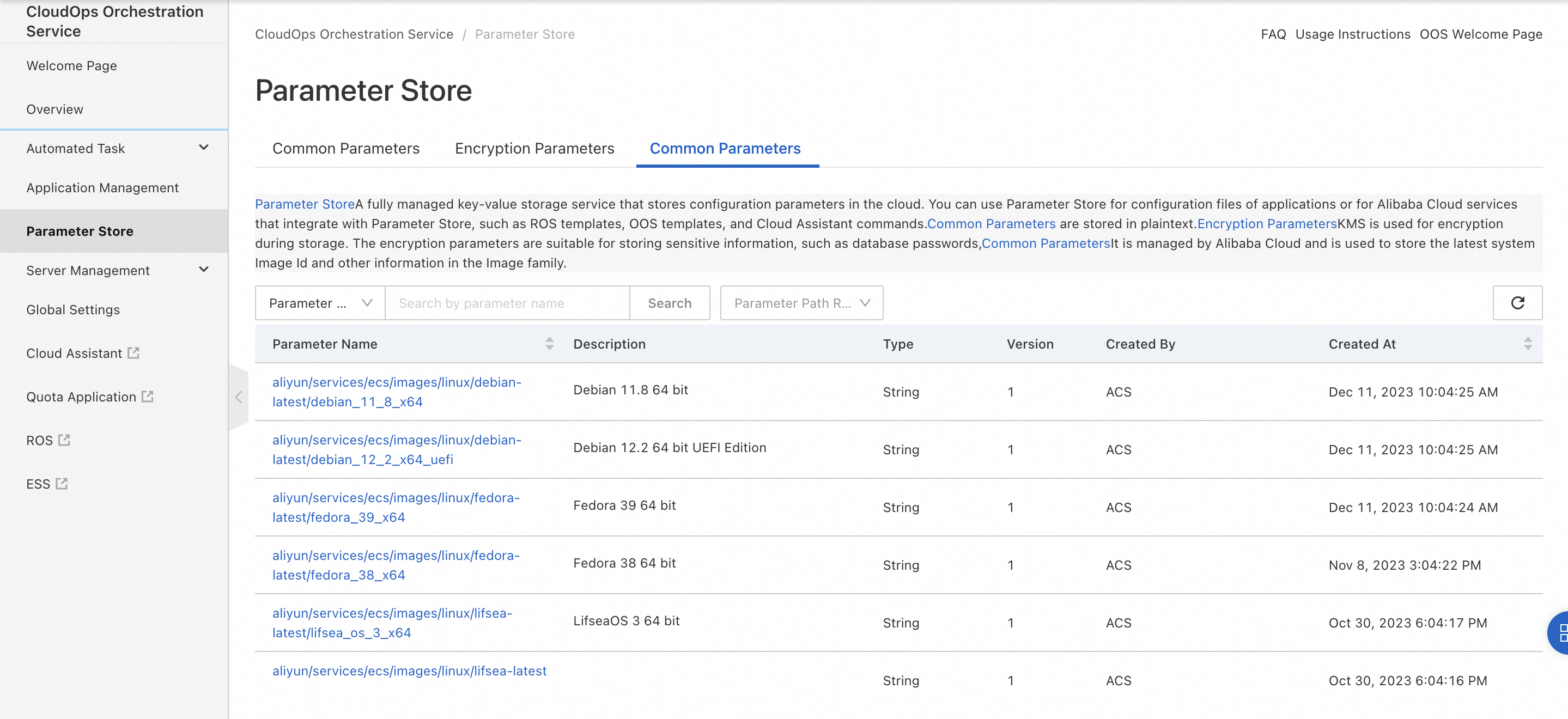
For example, you want to use the latest version of the CentOS 8 image whenever you create ECS instances. If you do not use the relevant common parameter, you must search for the ID of the latest image, such as centos_8_5_x64_20G_alibase_20220428.vhd, and specify the ID when you create an ECS instance.
For ease of work, you can directly use the common parameters that specify ECS images in an OOS template. The following sample code provides an example. In this example, the latestCentos8ImageId parameter is used to specify the ID of the latest version of the CentOS 8 image. You need to only specify the common parameter name for the latestCentos8ImageId parameter without the need to search for the ID of the required image. The common parameter is maintained by Alibaba Cloud. In this example, the latestCentos8ImageId parameter is set to aliyun/services/ecs/images/linux/almalinux-latest/almalinux_9_2_x64. The system automatically identifies the latest CentOS 8 image.
Description: Example template, run instance
FormatVersion: OOS-2019-06-01
Parameters:
  latestCentos8ImageId:
    Type: String
  regionId:
    Type: String
    Label:
      en: RegionId
    AssociationProperty: RegionId
    Default: '{{ ACS::RegionId }}'
  instanceType:
    Label:
      en: InstanceType
    Type: String
    AssociationProperty: ALIYUN::ECS::Instance::InstanceType
    AssociationPropertyMetadata:
      RegionId: regionId
  securityGroupId:
    Label:
      en: SecurityGroupId
    Type: String
    AssociationProperty: ALIYUN::ECS::SecurityGroup::SecurityGroupId
    AssociationPropertyMetadata:
      RegionId: regionId
  vSwitchId:
    Label:
      en: VSwitchId
    Type: String
    AssociationProperty: ALIYUN::VPC::VSwitch::VSwitchId
    AssociationPropertyMetadata:
      RegionId: regionId
      Filters:
        - SecurityGroupId: securityGroupId
Tasks:
  - Name: runInstances
    Action: ACS::ECS::RunInstances
    Description:
      en: Creates one or more ECS instances.
    Properties:
      imageId: '{{ latestCentOS8ImageId }}'
      instanceType: '{{ instanceType }}'
      securityGroupId: '{{ securityGroupId }}'
      vSwitchId: '{{ vSwitchId }}'
      amount: 1
    Outputs:
      instanceId:
        ValueSelector: instanceIds[0]
        Type: String
Parameter configuration
In the OOS console, you can manually specify the common parameter in the format of {{oos:Common parameter name}}. Example: {{oos:aliyun/services/ecs/images/linux/almalinux-latest/almalinux_9_2_x64}}.
You can also click the Select Parameter icon next to the latestCentos8ImageId field and select the common parameter that you require.
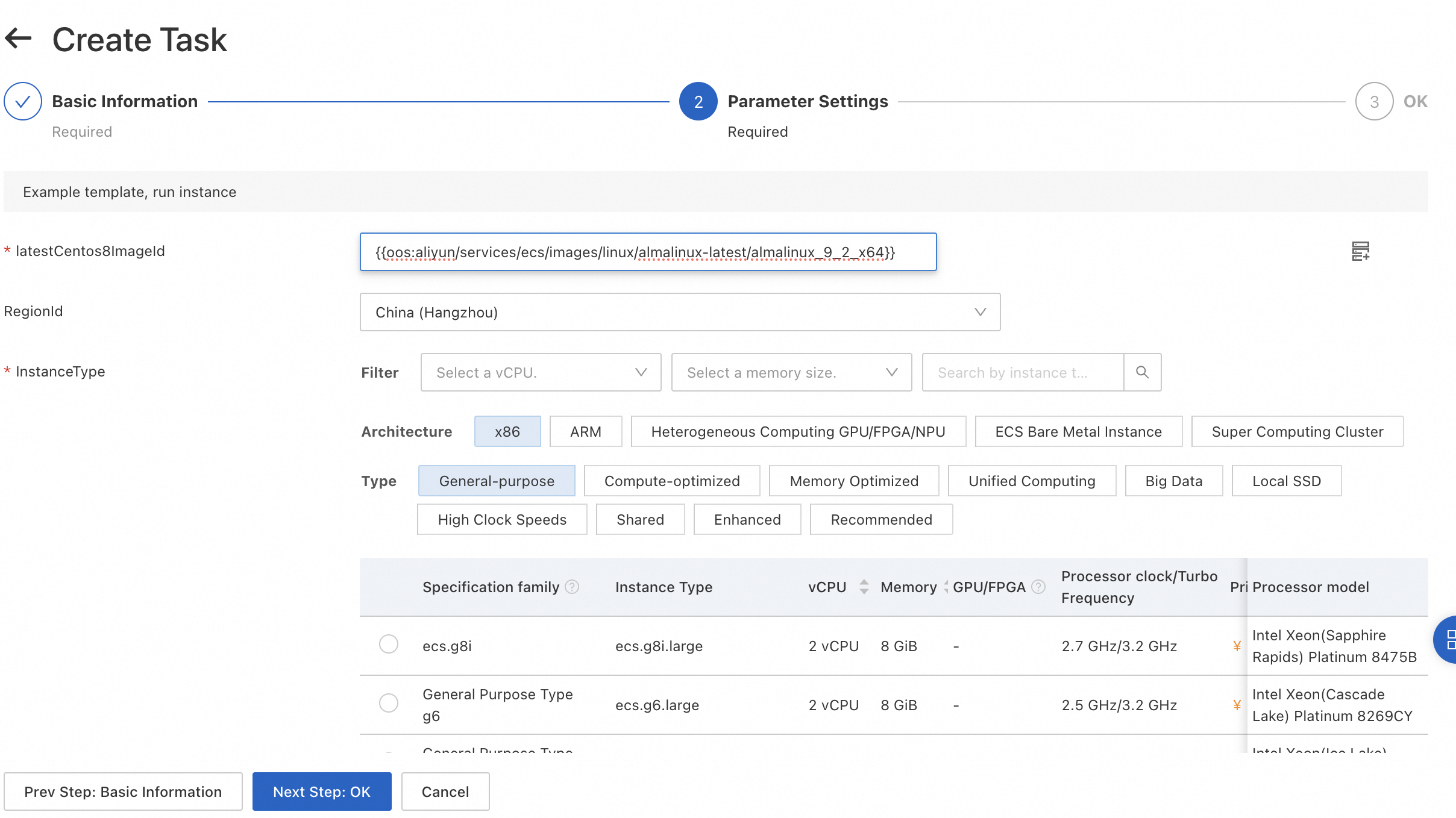
Alternatively, you can directly specify the common parameter in an OOS template in the format of OOS common parameters. The following sample code provides an example:
Description: Example template, run instance
FormatVersion: OOS-2019-06-01
Parameters:
  regionId:
    Type: String
    Label:
      en: RegionId
    AssociationProperty: RegionId
    Default: '{{ ACS::RegionId }}'
  instanceType:
    Label:
      en: InstanceType
    Type: String
    AssociationProperty: ALIYUN::ECS::Instance::InstanceType
    AssociationPropertyMetadata:
      RegionId: regionId
  securityGroupId:
    Label:
      en: SecurityGroupId
    Type: String
    AssociationProperty: ALIYUN::ECS::SecurityGroup::SecurityGroupId
    AssociationPropertyMetadata:
      RegionId: regionId
  vSwitchId:
    Label:
      en: VSwitchId
    Type: String
    AssociationProperty: ALIYUN::VPC::VSwitch::VSwitchId
    AssociationPropertyMetadata:
      RegionId: regionId
      Filters:
        - SecurityGroupId: securityGroupId
Tasks:
  - Name: runInstances
    Action: ACS::ECS::RunInstances
    Description:
      en: Creates one or more ECS instances.
    Properties:
      imageId: '{{oos:aliyun/services/ecs/images/linux/almalinux-latest/almalinux_9_2_x64}}'
      instanceType: '{{ instanceType }}'
      securityGroupId: '{{ securityGroupId }}'
      vSwitchId: '{{ vSwitchId }}'
      amount: 1
    Outputs:
      instanceId:
        ValueSelector: instanceIds[0]
        Type: String
Use common parameters in ROS templates
You can use common parameters in Resource Orchestration Service (ROS) templates based on the syntax of ROS templates. For example, you can set the imageId parameter to aliyun/services/ecs/centos-latest/centos_8_5_64 to use the latest version of the CentOS 8 image.
ROSTemplateFormatVersion: '2015-09-01'
Parameters:
  InstanceType:
    Type: String
    Default: ECS.c6.large
  ImageId:
    Type: 'ALIYUN::OOS::Parameter::Value'
    Default: aliyun/services/ecs/centos-latest/centos_8_5_64
  SecurityGroupId:
    Type: String
    AssociationProperty: 'ALIYUN::ECS::SecurityGroup::SecurityGroupId'
    AssociationPropertyMetadata:
      VpcId: '${VpcId}'
  VpcId:
    Type: String
    AssociationProperty: 'ALIYUN::ECS::VPC::VPCId'
    AssociationPropertyMetadata:
      RegionId: '${RegionId}'
Resources:
  ECS:
    Type: 'ALIYUN::ECS::InstanceGroup'
    Properties:
      ImageId:
        Ref: ImageId
      InstanceType:
        Ref: InstanceType
      MaxAmount: 1
      SecurityGroupId:
        Ref: SecurityGroupId
      VpcId:
        Ref: VpcId
      NetworkType: vpc
Outputs:
  InstanceIds:
    Value:
      'Fn::GetAtt':
        - ECS
        - InstanceIds
In the ROS console, specify the name of the common parameter in the ImageId field.
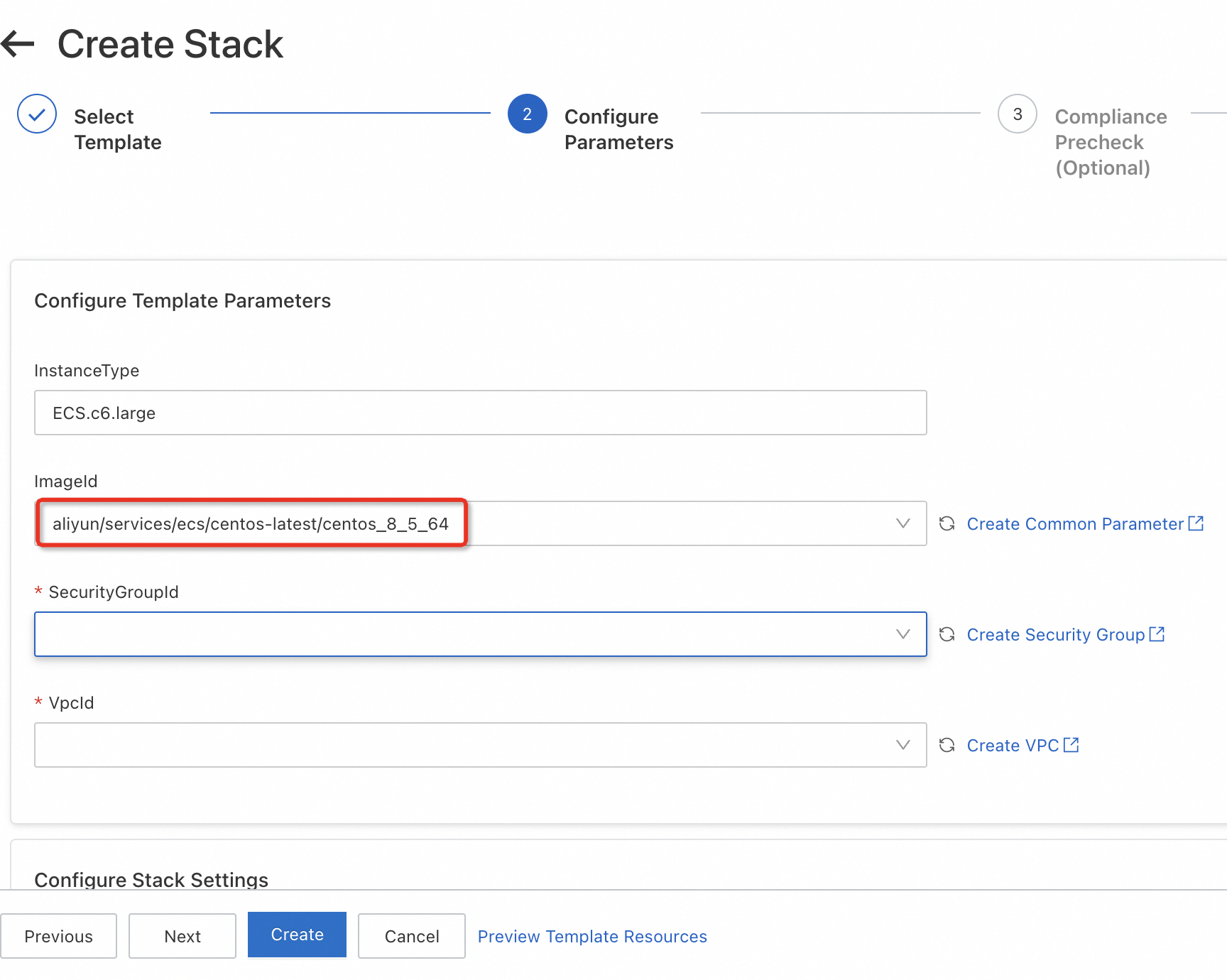
You can also reference a common parameter in the {{resolve:oos:Common parameter name}} format
in the Resources section of an ROS template.
For example, you can specify {{resolve:oos:aliyun/services/ecs/centos-latest/centos_8_5_64}} for the ImageId parameter in the Resources section. The following sample code provides an example:
ROSTemplateFormatVersion: '2015-09-01'
Parameters:
  InstanceType:
    Type: String
    Default: ECS.c6.large
  SecurityGroupId:
    Type: String
    AssociationProperty: 'ALIYUN::ECS::SecurityGroup::SecurityGroupId'
    AssociationPropertyMetadata:
      VpcId: '${VpcId}'
  VpcId:
    Type: String
    AssociationProperty: 'ALIYUN::ECS::VPC::VPCId'
    AssociationPropertyMetadata:
      RegionId: '${RegionId}'
Resources:
  ECS:
    Type: 'ALIYUN::ECS::InstanceGroup'
    Properties:
      ImageId: '{{resolve:oos:aliyun/services/ecs/centos-latest/centos_8_5_64}}'
      InstanceType:
        Ref: InstanceType
      MaxAmount: 1
      SecurityGroupId:
        Ref: SecurityGroupId
      VpcId:
        Ref: VpcId
      NetworkType: vpc
Outputs:
  InstanceIds:
    Value:
      'Fn::GetAtt':
        - ECS
        - InstanceIds