When you upgrade a microservice, how you shift traffic from the old version to the new one determines your risk exposure, resource cost, and rollback speed. Three strategies are widely used in the industry: blue-green deployment, A/B testing, and canary release. Each strategy offers a different tradeoff between blast radius, resource overhead, and release speed.
| Strategy | Traffic shift | Resource overhead | Blast radius | Rollback speed |
|---|---|---|---|---|
| Blue-green deployment | All at once | High (2x environments) | Full | Instant |
| A/B testing | Rule-based (headers, cookies) | Medium-high | Limited to matched requests | Fast |
| Canary release | Weight-based (gradual) | Low | Proportional to weight | Fast |
Blue-green deployment
Blue-green deployment maintains two identical environments: one actively serving traffic (blue) and one on hot standby (green). To release a new version, deploy it to the standby environment and switch all traffic at once.
How it works
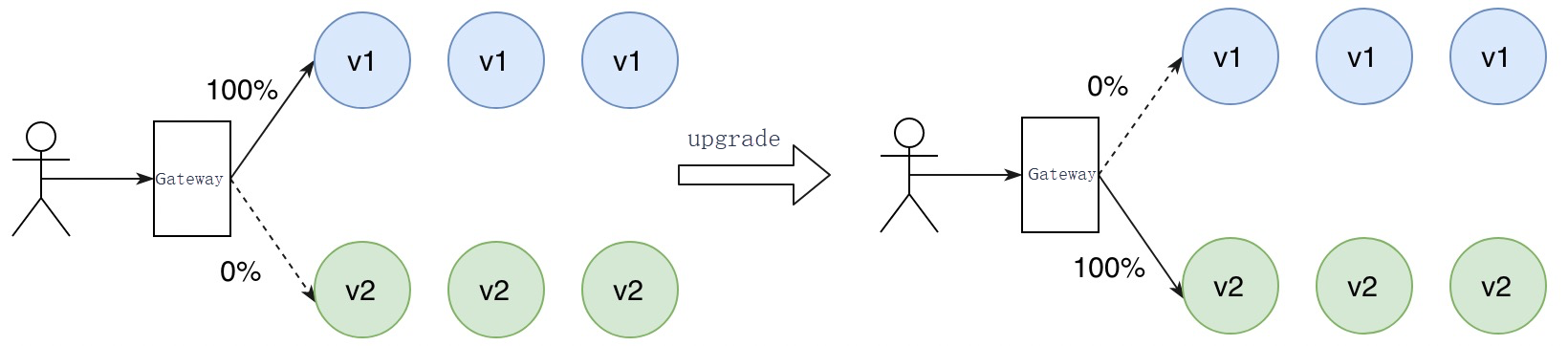
Deploy the current version (v1) and the new version (v2) with the same instance types and instance quantities.
v1 handles all production traffic while v2 waits in hot standby mode.
Switch traffic to v2. v1 becomes the standby.
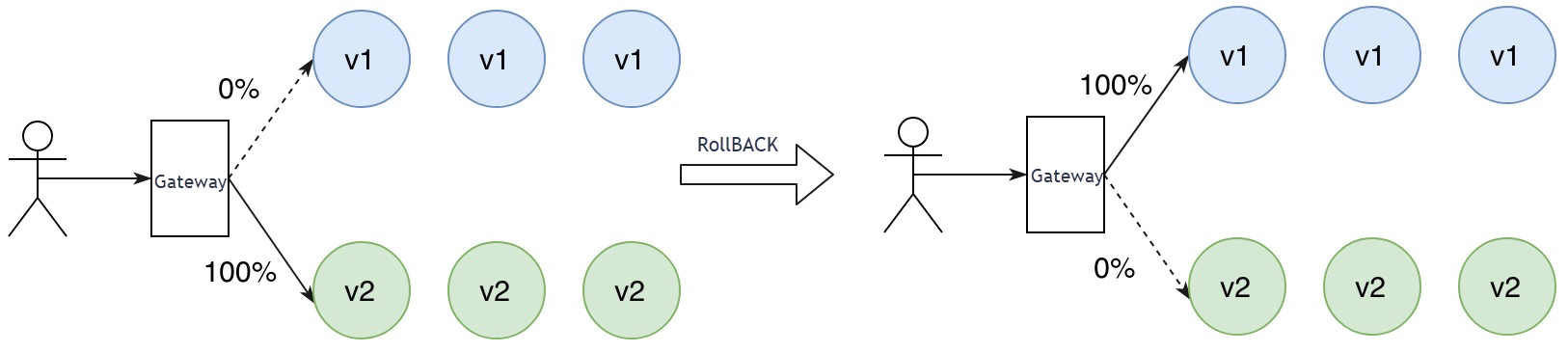
If v2 has issues, switch traffic back to v1 immediately. This reduces fault recovery time.
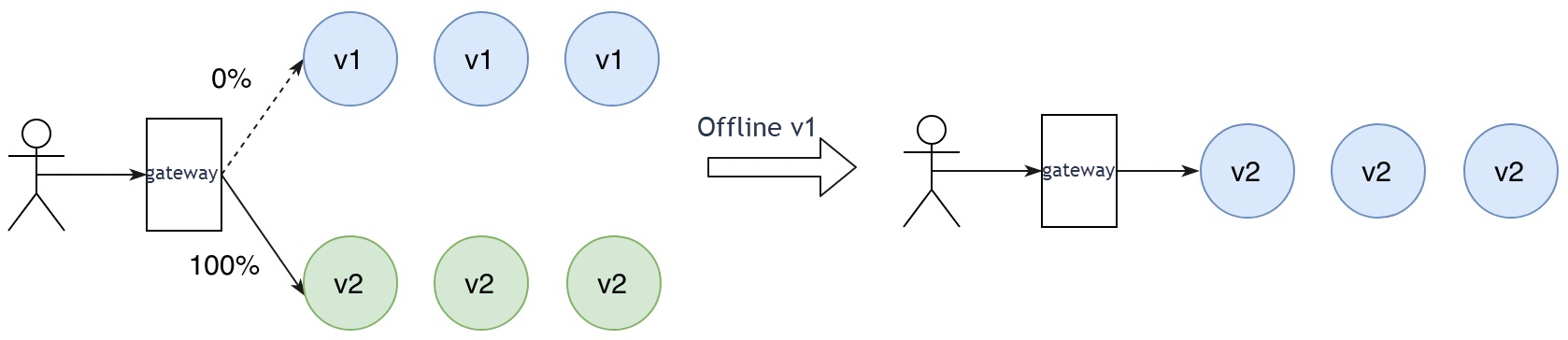
After v2 is verified and stable, decommission v1.
In the following figure, v1 handles traffic while v2 is in hot standby. To upgrade, traffic switches to v2.
If v2 has issues after release, roll back by switching traffic to v1.
When to use blue-green deployment
You need zero-downtime upgrades with instant rollback.
You can afford to run two full production environments simultaneously.
Your service can tolerate an all-or-nothing traffic switch (no gradual migration needed).
Pros and cons
| Details | |
|---|---|
| Pros | Simple to implement and straightforward to maintain. |
| Fast upgrades: the traffic switch is nearly instantaneous. | |
| Instant rollback: switch traffic back to v1 if v2 fails. | |
| Cons | Requires redundant resources. Two identical production environments must run at the same time. |
| High blast radius: if v2 has a defect, all traffic is affected until you roll back. |
A/B testing
A/B testing routes specific requests to the new version based on request metadata, while all other requests continue to reach the current version. This is a canary release strategy that controls routing based on request content such as HTTP headers or cookies.
How it works
Deploy the current version (v1) and the new version (v2) side by side.
Define routing rules based on HTTP headers, cookies, or other request metadata.
Only requests that match the rules reach v2. All other requests continue to reach v1.
Monitor the access success rate and response time (RT) of both versions.
If v2 performs as expected, switch all traffic to v2 and phase out v1.
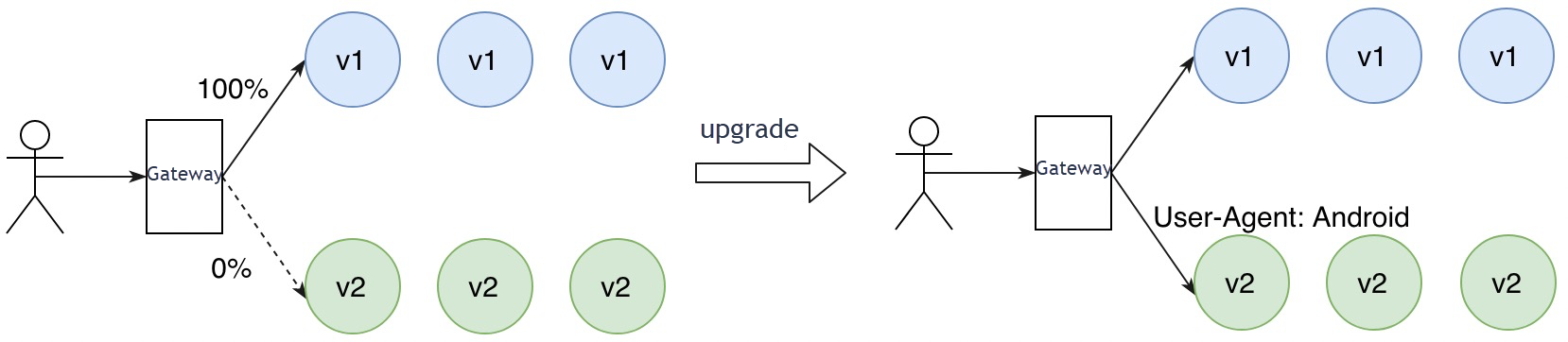
Example -- header-based routing: Route requests whose User-Agent header is Android to v2. Non-Android users continue accessing v1.
Example -- cookie-based routing: Use cookies that carry business-level data to target user segments. For example, route regular users to v2 while VIP users stay on v1.
In the following figure, Android users access v2 while non-Android users continue accessing v1.
After monitoring confirms v2 is stable, switch all traffic to v2 and phase out v1.
When to use A/B testing
You want to validate the new version with a specific user segment before a full rollout.
You need fine-grained control over which users or request types reach the new version.
You have a monitoring platform that can compare metrics across versions.
Pros and cons
| Details | |
|---|---|
| Pros | Low blast radius: only targeted requests reach v2, so fewer users are affected if something goes wrong. |
| Enables controlled validation with real production traffic from targeted user segments. | |
| Requires a monitoring platform to compare success rates and response times across versions. | |
| Cons | Hard to estimate request capacity for v2, so resource planning relies on redundancy. |
| Long release cycle: validating across user segments takes time. |
Canary release
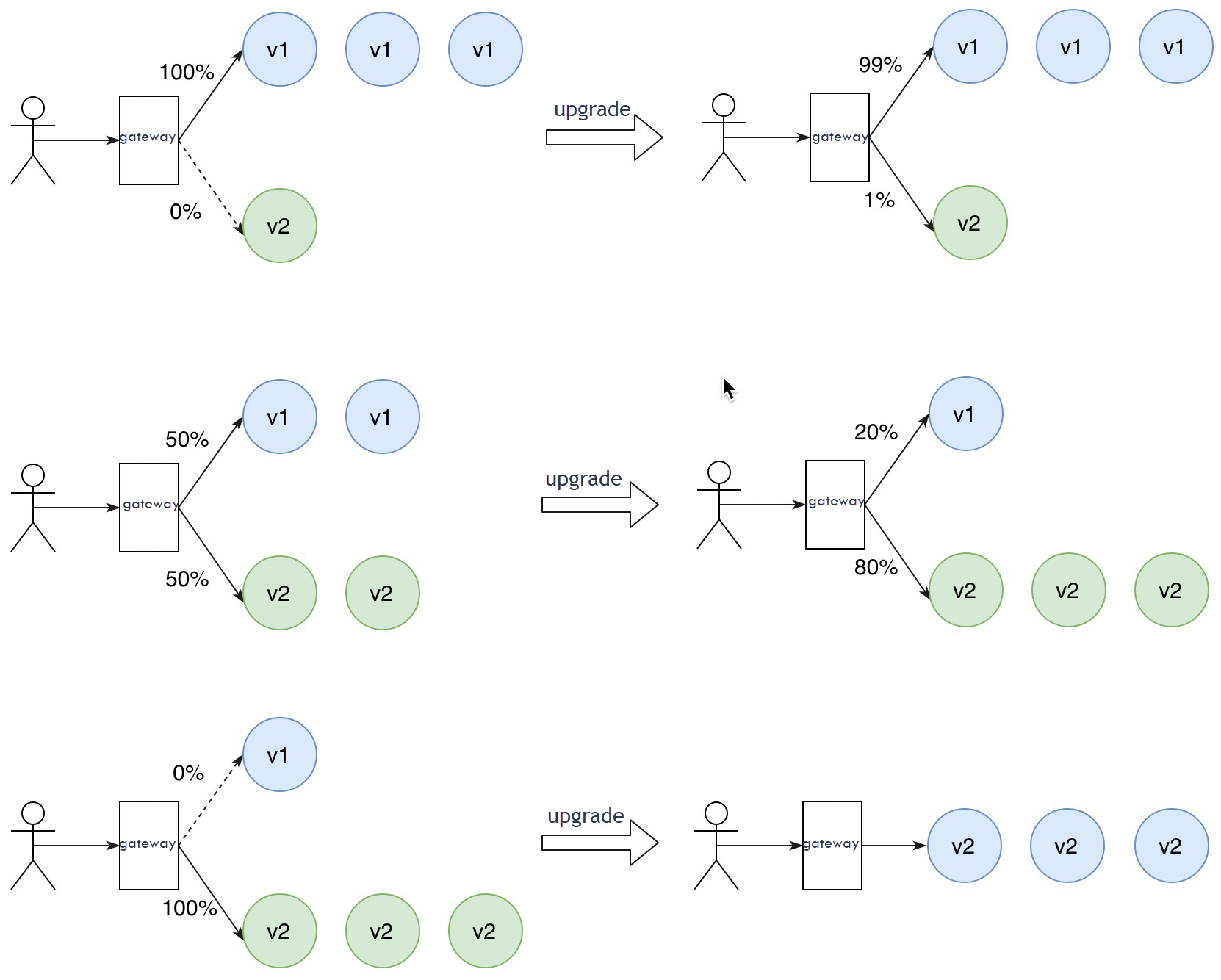
Canary release shifts a small percentage of traffic to the new version first. After the new version proves stable, you gradually increase the traffic weight until the new version handles all traffic.
How it works
Deploy the new version (v2) alongside the current version (v1). Only a few instances are needed for v2 initially.
Route a small percentage of traffic to v2 by adjusting traffic weights.
Monitor v2 performance. If stable, gradually increase the v2 traffic weight.
As v2 scales out, scale in v1 to maximize resource utilization.
When v2 handles 100% of traffic, decommission v1.
The following figure shows gradual traffic migration from v1 to v2 for a smooth, lossless upgrade.
When to use canary release
You want to minimize risk by testing with real traffic at a small scale first.
You need to optimize resource costs by scaling the new version up incrementally rather than maintaining two full environments.
Your traffic is not segmented by user type, so weight-based routing is more practical than rule-based routing.
Pros and cons
| Details | |
|---|---|
| Pros | Low blast radius: only a small, weight-based portion of traffic reaches v2 initially. |
| Higher resource utilization: scale out v2 and scale in v1 gradually, rather than running two full environments. | |
| Fast rollback: shift all traffic back to v1 by resetting the weight. | |
| Cons | Traffic is routed indiscriminately by weight, so VIP users may be exposed to v2 during the rollout. |
| Long release cycle: gradual traffic migration takes more time than an instant switch. |
Strategy comparison
Choose a strategy based on your risk tolerance, resource budget, and rollout requirements.
| Criteria | Blue-green deployment | A/B testing | Canary release |
|---|---|---|---|
| Traffic control | All-or-nothing switch | Rule-based (headers, cookies) | Weight-based (percentage) |
| Resource cost | High (2x environments) | Medium-high (hard to predict capacity) | Low (incremental scale-out) |
| Blast radius | All users | Only matched requests | Proportional to traffic weight |
| Rollback | Instant (switch back) | Fast (remove routing rules) | Fast (reset weight to 0%) |
| User targeting | No | Yes (by request metadata) | No (random sampling) |
| Release speed | Fast | Slow | Slow |
| Best for | Services that need instant switchover and can afford 2x resources | Validating changes with specific user segments | Minimizing risk with gradual rollout and efficient resource use |