IOPS utilization is a critical metric for MongoDB instances. When it reaches or approaches 100%, application responses slow down and services may become unavailable. This guide covers how to check IOPS utilization, common causes of high utilization, and optimization strategies.
Background information
Cloud database providers typically use technologies such as cgroups (Control Groups) to enforce I/O isolation and IOPS (Input/Output Operations Per Second) limits per instance, preventing I/O contention on shared hosts. Each instance type therefore has a specific maximum IOPS capacity.
Important notes
The IOPS Usage and IOPS utilization metrics are unavailable for standalone instances and for replica set or sharded cluster instances that run MongoDB 4.2 with cloud disks.
For these instances, the Monitoring Information page in the ApsaraDB for MongoDB console always displays 0 for the IOPS Usage and IOPS Usage metrics. This value does not reflect the actual IOPS data.
Check IOPS utilization
You can check IOPS utilization by using monitoring charts or running commands.
-
Log on to the ApsaraDB for MongoDB console. In the Basic Information page, in the Specification Information section, view the maximum IOPS for the instance. For the IOPS limits of different instance types, see Instance types.
-
Log on to the ApsaraDB for MongoDB console. On the Monitoring Information page, check the IOPS Usage and IOPS Usage metrics to determine if the instance is nearing its IOPS limit. For more information about IOPS-related metrics, see Metrics.
Common causes of I/O issues
High disk I/O on a MongoDB instance typically stems from the following factors:
-
Insufficient memory: I/O performance depends heavily on the WiredTiger cache size. A larger cache holds more hot data, reducing disk I/O and lowering the risk of bottlenecks. A smaller cache forces the system to flush dirty pages to disk more frequently, increasing I/O pressure.
-
Improper configuration: Configuration issues that can cause high I/O include frequent flushing of the journal or run-time logs, an inefficient Write Concern level, or moveChunk errors in a sharded cluster.
Optimization strategies for I/O issues
To address I/O issues on an ApsaraDB for MongoDB instance, select an appropriate instance type, optimize indexes, and refine application write patterns.
-
Select an appropriate instance type
Predicting the ideal ratio of hot data to cache size before deployment is often difficult. As a general rule, choose an instance type that meets your business requirements while keeping daily peak CPU utilization and IOPS utilization below 50%.
-
Optimize indexes
Full table scans and queries with inefficient indexes consume significant I/O. For example, exporting an entire collection can cause an I/O spike. Excessive indexing also increases data size on disk, reducing the hot data that the WiredTiger cache can hold. Each write operation requires additional I/O to update indexes, further degrading performance. Create appropriate indexes for your query patterns to mitigate these issues.
-
Optimize your application architecture and operations
To prevent disk I/O from becoming an application-level bottleneck, consider the following optimizations:
-
Control concurrent write and read threads
MongoDB is a multithreaded application. A high number of concurrent writes or complex queries can cause I/O bottlenecks and persistent replication lag on secondary nodes. If high write volume causes I/O bottlenecks, consider upgrading to a sharded cluster to scale write performance linearly by distributing data horizontally.
-
Avoid write spikes whenever possible
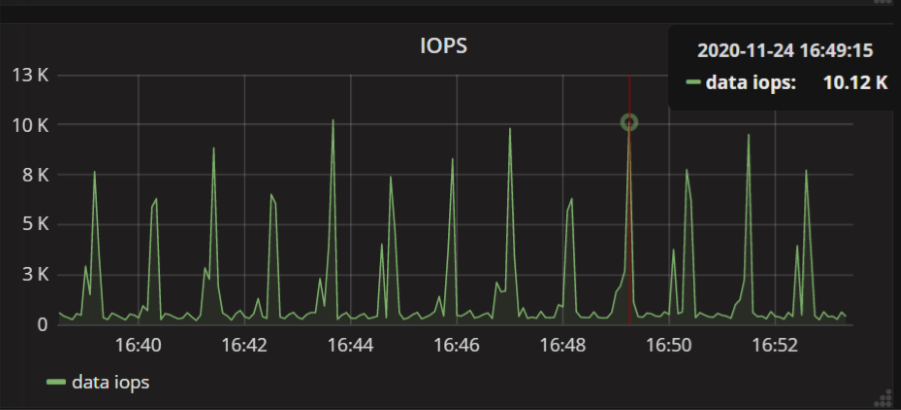
Some applications perform periodic writes or bulk data persistence, causing IOPS spikes. If the current instance cannot handle these peak loads, distribute write operations more evenly. For example, add a small, random delay to each batch write operation.
-
Avoid performing maintenance operations during peak hours
Certain maintenance operations can significantly impact performance and spike IOPS. Schedule such operations during off-peak hours whenever possible. High-I/O operations include batch data modifications (writes, updates, and deletions), index creation, collection compactions, and bulk data exports.
-