NimoShake (also known as DynamoShake) is a data synchronization tool developed by Alibaba Cloud that migrates Amazon DynamoDB databases to ApsaraDB for MongoDB. It supports full migration, incremental migration, or both in a single run.
Feature support
| Feature | Supported |
|---|---|
| Full migration | Yes |
| Incremental migration | Yes |
| Resumable transmission (incremental) | Yes |
| Resumable transmission (full) | No |
| Index migration (full phase only) | Yes |
| Schema-only migration | Yes |
| Collection filtering | Yes |
| Index migration (incremental phase) | No |
Prerequisites
Before you begin, make sure you have:
-
An ApsaraDB for MongoDB replica set instance or sharded cluster instance. See Create a replica set instance or Create a sharded cluster instance.
-
The AccessKey ID and AccessKey secret for Amazon DynamoDB.
-
Enough storage space in ApsaraDB for MongoDB to hold all data from the source DynamoDB database. The destination storage capacity must exceed the source.
How it works
NimoShake runs full migration and incremental migration as separate phases.
Full migration
Full migration consists of two parts: data migration followed by index migration.
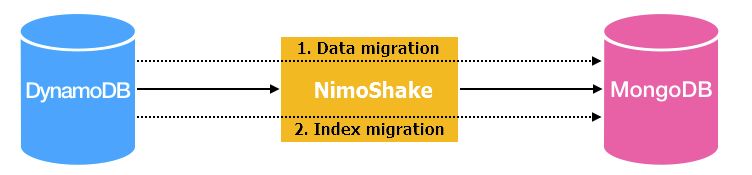
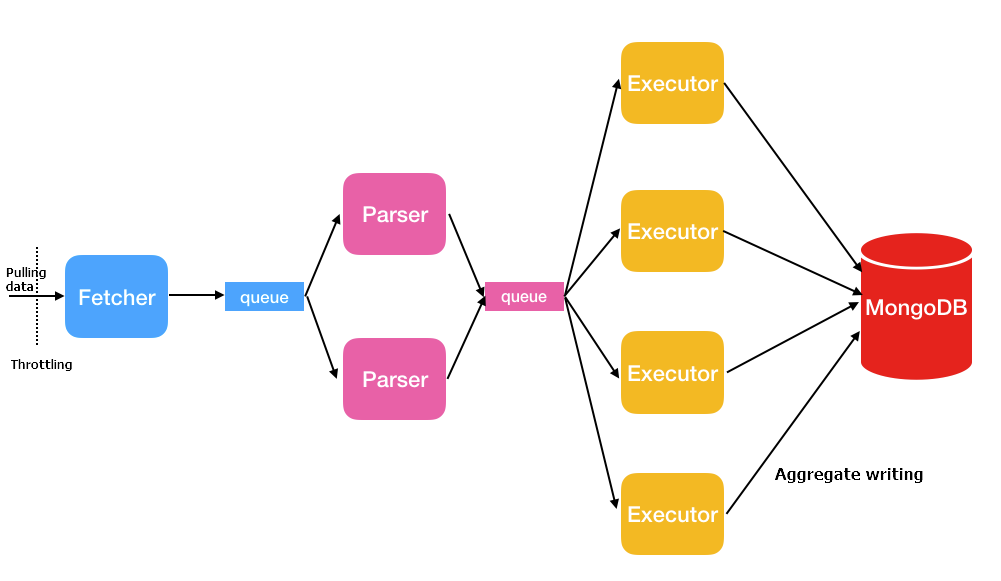
Data migration uses three thread types in a pipeline:
| Thread | Description |
|---|---|
| Fetcher | Calls Amazon's protocol conversion driver to batch-retrieve data from the source table and place it in queues. Only one fetcher thread runs at a time. |
| Parser | Reads data from queues and converts it to BSON format, then passes it to executors. Default: 2 threads. Controlled by full.document.parser. |
| Executor | Pulls data from queues, aggregates up to 16 MB or 1,024 entries, and writes to the destination. Default: 4 threads. Controlled by full.document.concurrency. |
Index migration runs after data migration completes and creates the following indexes:
-
Auto-generated indexes:
-
If the source table has a partition key and a sort key: a unique compound index on both keys, plus a hashed index on the partition key.
-
If the source table has only a partition key: a hashed index and a unique index on the partition key.
-
-
User-created indexes: A hashed index based on the primary key is created for each user-defined index.
Incremental migration
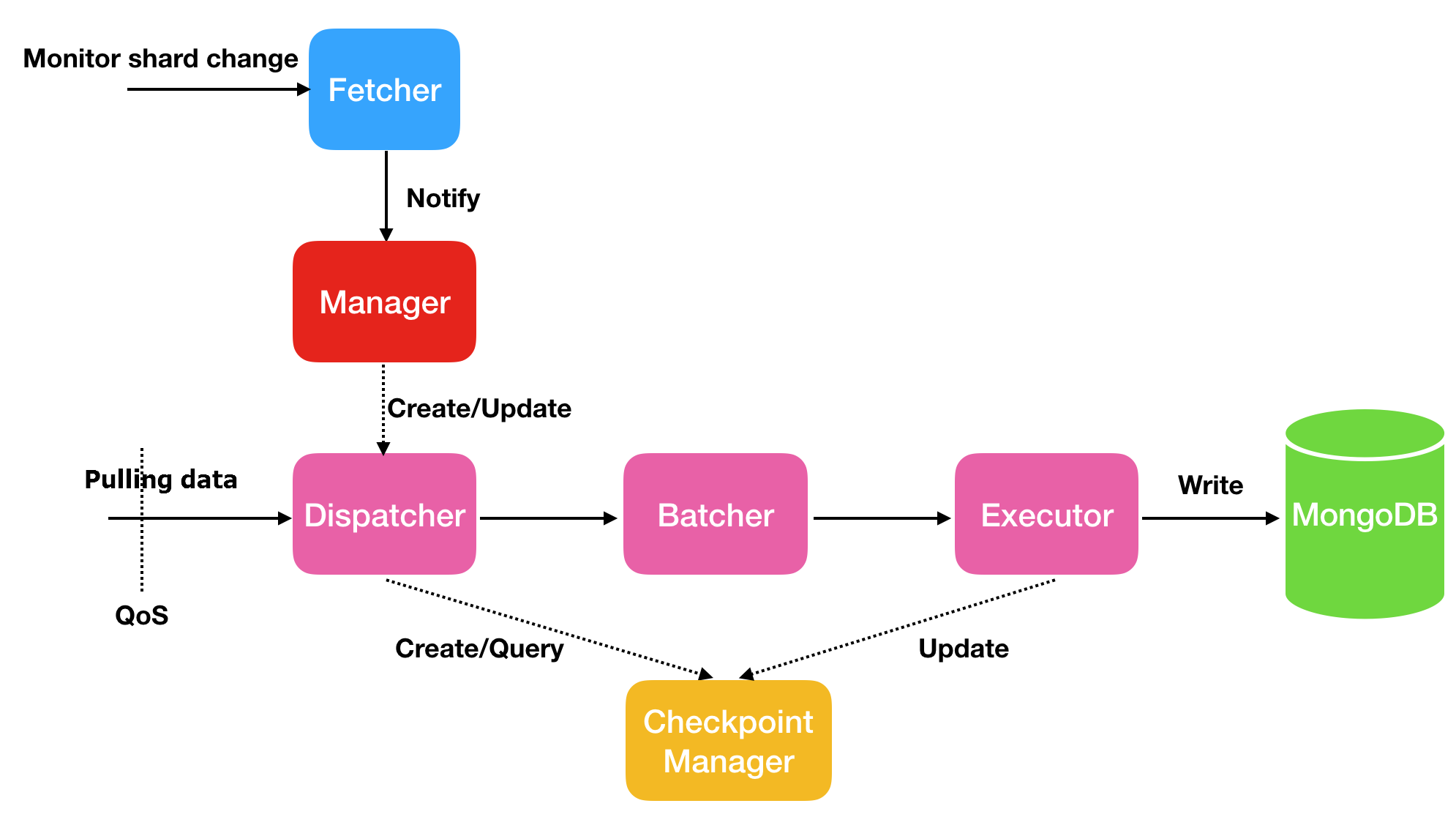
Incremental migration captures ongoing changes from the source and writes them to ApsaraDB for MongoDB. It does not migrate indexes created during the incremental phase.
| Thread | Description |
|---|---|
| Fetcher | Monitors shard changes in the stream. |
| Manager | Manages message notification and creates a Dispatcher for each shard. |
| Dispatcher | Retrieves incremental data from the source, resuming from the last checkpoint when resumable transmission is active. |
| Batcher | Parses, packages, and aggregates incremental data from Dispatcher threads. |
| Executor | Writes aggregated data to the destination ApsaraDB for MongoDB instance and updates the checkpoint. |
Resumable transmission and checkpoints
Incremental migration supports resumable transmission through checkpoints. If a connection is lost and recovered quickly, migration resumes from the last checkpoint. A prolonged disconnection or loss of the checkpoint may trigger a full migration again.
By default, checkpoints are stored in the destination ApsaraDB for MongoDB database in a database named nimo-shake-checkpoint. Each collection has its own checkpoint table, and a status_table records whether the current sync is a full or incremental task.
Full migration does not support resumable transmission. If a full migration is interrupted, it restarts from the beginning.
Migrate DynamoDB to ApsaraDB for MongoDB
The following steps use Ubuntu as an example.
Step 1: Download NimoShake
wget https://github.com/alibaba/NimoShake/releases/download/release-v1.0.14-20250704/nimo-shake-v1.0.14.tar.gzDownload the latest version from the NimoShake releases page.
Step 2: Extract the package
tar zxvf nimo-shake-v1.0.14.tar.gzStep 3: Enter the directory
cd nimo-shake-v1.0.14Step 4: Configure NimoShake
Open the configuration file:
vi nimo-shake.confThe tables below describe all configuration parameters, grouped by category. Start with the required parameters, then adjust optional parameters as needed.
Required parameters
| Parameter | Description | Example |
|---|---|---|
source.access_key_id |
The AccessKey ID for the Amazon DynamoDB database. | source.access_key_id = AKIAIOSFODNN7EXAMPLE |
source.secret_access_key |
The AccessKey secret for the Amazon DynamoDB database. | source.secret_access_key = wJalrXUtnFEMI/K7MDENG |
source.region |
The AWS region of the DynamoDB database. Optional if the region is auto-detected or not applicable. | source.region = us-east-2 |
target.type |
The type of the destination database. Set to mongodb for ApsaraDB for MongoDB. Set to aliyun_dynamo_proxy for a DynamoDB-compatible ApsaraDB for MongoDB instance.For more MongoDB addresses, see Replica set instance connection or Connect to a sharded cluster instance. |
target.type = mongodb |
target.address |
The connection string of the destination database. See Connect to a replica set instance or Connect to a sharded cluster instance. | target.address = mongodb://username:password@s-*****-pub.mongodb.rds.aliyuncs.com:3717 |
target.mongodb.type |
The type of the destination ApsaraDB for MongoDB instance. replica for a replica set instance. sharding for a sharded cluster instance. |
target.mongodb.type = sharding |
sync_mode |
The migration mode. all: runs full migration followed by incremental migration. full: runs full migration only. Default: all. Note
Only |
sync_mode = all |
General settings
| Parameter | Default | Required | Description | Example |
|---|---|---|---|---|
id |
— | Optional | The ID of the migration task. Used for PID files, log names, the checkpoint database name, and the destination database name. | id = nimo-shake |
log.file |
stdout | Optional | The path of the log file. If not set, logs are printed to stdout. | log.file = nimo-shake.log |
log.level |
info |
Optional | The log level. Valid values: none, error, warn, info, debug. |
log.level = info |
log.buffer |
true |
Optional | Whether to enable log buffering. true: high performance, but may lose the last few log entries on exit. false: all log entries are flushed, but performance may decrease. |
log.buffer = true |
system_profile |
— | Optional | The PPROF port for debugging and viewing stackful coroutine information. | system_profile = 9330 |
full_sync.http_port |
— | Optional | The RESTful port for the full migration phase. Use curl to view monitoring statistics. See the wiki. |
full_sync.http_port = 9341 |
incr_sync.http_port |
— | Optional | The RESTful port for the incremental migration phase. Use curl to view monitoring statistics. See the wiki. |
incr_sync.http_port = 9340 |
Source connection settings
| Parameter | Default | Required | Description | Example |
|---|---|---|---|---|
source.session_token |
— | Optional | The temporary session token for accessing DynamoDB. Required only when using temporary credentials. | source.session_token = AQoXnyc4lcK4w4... |
source.endpoint_url |
— | Optional | The endpoint URL, if the source is an endpoint type. Setting this parameter overrides all other source.* parameters. |
source.endpoint_url = "http://192.168.0.1:1010" |
source.session.max_retries |
— | Optional | The maximum number of retries after a session failure. | source.session.max_retries = 3 |
source.session.timeout |
— | Optional | The session timeout in milliseconds. Set to 0 to disable the timeout. |
source.session.timeout = 3000 |
Collection filtering
| Parameter | Default | Required | Description | Example |
|---|---|---|---|---|
filter.collection.white |
— | Optional | Whitelist of collections to migrate. Only the listed collections are migrated. | filter.collection.white = c1;c2 |
filter.collection.black |
— | Optional | Blacklist of collections to exclude. All other collections are migrated. Cannot be used together with filter.collection.white. If both are set, all collections are migrated. |
filter.collection.black = c1;c2 |
Destination settings
| Parameter | Default | Required | Description | Example |
|---|---|---|---|---|
target.db.exist |
Error | Optional | How to handle existing collections with the same name at the destination. rename: renames the existing collection by appending a timestamp suffix (for example, c1 becomes c1.2019-07-01Z12:10:11). drop: deletes the existing collection. If not set, the migration stops with an error if a same-name collection exists. |
target.db.exist = drop |
sync_schema_only |
false |
Optional | Whether to migrate only the table schema without data. | sync_schema_only = false |
Full migration performance
| Parameter | Default | Required | Description | Example |
|---|---|---|---|---|
full.concurrency |
4 |
Optional | The maximum number of collections migrated concurrently. | full.concurrency = 4 |
full.read.concurrency |
1 |
Optional | The number of concurrent threads reading from a single source table. Corresponds to the TotalSegments parameter of the DynamoDB Scan API. |
full.read.concurrency = 1 |
full.document.concurrency |
4 |
Optional | The number of concurrent writer threads per table. | full.document.concurrency = 4 |
full.document.write.batch |
— | Optional | The number of entries aggregated per write. When the destination is a DynamoDB-compatible database, the maximum value is 25. | full.document.write.batch = 25 |
full.document.parser |
2 |
Optional | The number of concurrent parser threads for converting DynamoDB data to the destination protocol. | full.document.parser = 2 |
full.enable_index.user |
true |
Optional | Whether to migrate user-defined indexes. | full.enable_index.user = true |
full.executor.insert_on_dup_update |
true |
Optional | Whether to convert an INSERT to UPDATE when a duplicate key exists at the destination. |
full.executor.insert_on_dup_update = true |
qps.full |
1000 |
Optional | The maximum number of Scan command calls per second during full migration. |
qps.full = 1000 |
qps.full.batch_num |
128 |
Optional | The number of data entries pulled per second during full migration. | qps.full.batch_num = 128 |
full.read.filter_expression |
— | Optional | A DynamoDB filter expression for full migration. Variables start with a colon, for example :begin and :end. Specify the variable values in full.read.filter_attributevalues. |
full.read.filter_expression = create_time > :begin AND create_time < :end |
full.read.filter_attributevalues |
— | Optional | The values for variables in full.read.filter_expression. N represents Number, S represents String. |
full.read.filter_attributevalues = begin`N`1646724207280~~~end`N`1646724207283 |
Incremental migration performance
Skip this section if you are running full migration only (sync_mode = full).
| Parameter | Default | Required | Description | Example |
|---|---|---|---|---|
incr_sync_parallel |
false |
Optional | Whether to enable parallel incremental migration. true: uses more memory. false: standard mode. |
incr_sync_parallel = false |
increase.concurrency |
16 |
Optional | The maximum number of shards captured concurrently. | increase.concurrency = 16 |
increase.executor.insert_on_dup_update |
true |
Optional | Whether to convert an INSERT to UPDATE when the same keys exist at the destination. |
increase.executor.insert_on_dup_update = true |
increase.executor.upsert |
true |
Optional | Whether to convert an UPDATE to UPSERT when no matching keys exist at the destination. An UPSERT updates the record if the key exists, or inserts it if it does not. |
increase.executor.upsert = true |
qps.incr |
1000 |
Optional | The maximum number of GetRecords command calls per second during incremental migration. |
qps.incr = 1000 |
qps.incr.batch_num |
128 |
Optional | The number of data entries pulled per second during incremental migration. | qps.incr.batch_num = 128 |
Checkpoint settings
Skip this section if you are running full migration only (sync_mode = full).
| Parameter | Default | Required | Description | Example |
|---|---|---|---|---|
checkpoint.type |
— | Optional | The storage type for checkpoint data. mongodb: stores checkpoints in an ApsaraDB for MongoDB database (available only when target.type is mongodb). file: stores checkpoints on the local machine. |
checkpoint.type = mongodb |
checkpoint.address |
Destination DB | Optional | The address for storing checkpoint data. If checkpoint.type is mongodb, enter the connection string. If not set, checkpoints are stored in the destination database. If checkpoint.type is file, enter a relative path. If not set, defaults to the checkpoint folder relative to the NimoShake executable. |
checkpoint.address = mongodb://username:password@s-*****-pub.mongodb.rds.aliyuncs.com:3717 |
checkpoint.db |
<id>-checkpoint |
Optional | The database name for checkpoint storage. Defaults to <id>-checkpoint, for example nimo-shake-checkpoint. |
checkpoint.db = nimo-shake-checkpoint |
Advanced settings
| Parameter | Default | Required | Description | Example |
|---|---|---|---|---|
convert._id |
— | Optional | A prefix added to the _id field from DynamoDB to avoid conflicts with MongoDB's _id field. |
convert._id = pre |
Step 5: Start the migration
./nimo-shake.linux -conf=nimo-shake.confWhen full migration completes, the output displays:
full sync done!If the migration stops due to an error, NimoShake prints the error message and exits. Review the log file or stdout output to diagnose the issue.
Usage notes
-
Run during off-peak hours. Full migration consumes resources on both the source DynamoDB database and the destination ApsaraDB for MongoDB instance. High traffic or underpowered server specs can increase database load. Schedule migrations during off-peak hours to minimize impact.
-
Monitor incremental migration continuously. If incremental migration is interrupted for a prolonged period or the checkpoint is lost, a full migration may be required to resync all data.
-
Incremental migration does not sync indexes. Indexes created or modified during the incremental phase are not migrated. Manage index changes on the destination manually if needed.
-
Collection name conflicts. If a collection with the same name already exists at the destination, configure
target.db.existto eitherrenameordrop. Without this setting, the migration stops with an error.