ApsaraDB for MongoDB Global Active Database (GAD) provides a multi-region architecture that ensures business continuity and high availability. It integrates with the ApsaraDB for MongoDB high availability architecture and Data Transmission Service (DTS) for unified data replication and disaster recovery.
Architecture
-
Primary instance: Processes core read and write requests. Data is replicated in real time to the disaster recovery instance.
-
Secondary instance (disaster recovery instance): Receives replicated data from DTS and serves read-only queries. It can be promoted to the primary instance in a disaster recovery scenario.
-
DTS synchronization link: Provides low-latency, one-way data replication. In Serverless mode, the bandwidth adjusts automatically.

Use cases
GAD suits the following scenarios involving multiple ApsaraDB for MongoDB instances:
-
Geo-disaster recovery
Protects mission-critical applications that require extremely high availability and a low Recovery Time Objective (RTO). GAD delivers cross-region redundancy to guard against region-level failures.
-
Cross-region read-only instances
Supports applications that serve read requests from multiple geographic locations. GAD reduces latency by routing reads to the nearest replica.
Benefits
-
Secure and reliable
-
Replication is efficient, stable, and free of compatibility issues.
-
Both ApsaraDB for MongoDB and DTS are backed by robust Service-Level Agreements (SLAs) that guarantee the availability and security of your database and replication links.
-
-
Easy to use
-
Configure a disaster recovery topology quickly through the ApsaraDB for MongoDB console.
-
Built-in features cover the entire disaster recovery lifecycle, including disaster recovery assessment, one-click failover, and replication latency monitoring.
-
-
Cost-effective
-
The billing method for a secondary instance does not need to match that of the primary instance. You can choose pay-as-you-go or subscription for secondary instances based on your needs.
-
GAD uses DTS for its network backbone. The replication link is powered by Serverless technology that automatically scales bandwidth, and you are billed based on actual usage.
-
Billing
When you create a Global Active Database instance group or add a secondary instance, you are not charged extra for using existing MongoDB instances. You are billed only for the data synchronization links.
Data synchronization fee = Unit price per link × Number of links × Usage duration.
The unit price of a one-way synchronization link is: USD 0.1880/hour per link
Limitations
|
Restriction type |
Description |
|
Instance limitations |
|
|
Region limitations |
Supported regions: China (Qingdao), China (Beijing), China (Shanghai), China (Hangzhou), China (Hohhot), China (Zhangjiakou), China (Shenzhen), China (Guangzhou), China (Ulanqab), China (Heyuan), and China (Chengdu). |
Procedures
If you are using Global Active Database for the first time, you must authorize DTS to access your cloud resources before you create an instance group. For more information, see Grant DTS access to cloud resources.
Create an instance group
-
Navigate to the Global Active Database page and click Create Instance Group or Create Global Active Instance Group.
-
On the Create Global Active Database Instance Group page, configure the following parameters:
Parameter
Description
Instance Group Name
Use a name that reflects your business or purpose to make the instance group easy to find.
The name must be 2 to 126 characters long, start with a letter or a Chinese character, and contain digits, underscores (_), and hyphens (-).
Database Instance Type
Select MongoDB.
Instance Group Type
Select an instance group type. Currently, only Disaster Recovery is supported.
This type uses one-way data synchronization between the primary and secondary instances.
Instance Type
Select an instance type: Replica Set or Sharded cluster.
Region of Primary Instance
By default, this is the same as the region selected in the ApsaraDB for MongoDB console. To select a different region, change the region at the top of the console.
Primary Instance
From the drop-down list, select the target MongoDB instance in the region of the primary instance.
If no primary instances are available in the current region, click Create Primary Instance to go to the instance purchase page, create an ApsaraDB for MongoDB instance, and then create the Global Active Database instance group.
-
Click OK.
You can view the new instance group in the instance group list. You can then add a secondary instance.
Add a secondary instance
-
The primary and secondary instances in an instance group must be in different regions. However, multiple secondary instances can be in the same region.
-
An instance group can contain only one primary instance and a maximum of four secondary instances, supporting a topology that spans up to five regions.
-
An ApsaraDB for MongoDB instance can be added to only one Global Active Database instance group, either as a primary or a secondary instance.
-
You cannot release a pay-as-you-go instance or cancel the subscription for a subscription instance while it is part of an instance group. To do so, you must first remove the instance from the group and then release the instance.
-
After a secondary instance is added to an instance group, do not perform write operations on it. Writing data to a secondary instance can cause data inconsistencies and compromise deployment reliability.
-
Go to the ApsaraDB for MongoDB Instances list, select a region, and then click the ID of the instance that you want to use as the secondary instance.
-
In the upper-right corner of the page, click Add to Global Active Database Cluster.

-
In the dialog box that appears, configure the settings for the target Global Active Database instance group.
-
Click OK. You are redirected to the Global Active Database page. After the secondary instance is successfully added and the synchronization link is created, you can click the target instance group ID to view the secondary instance and the DTS synchronization instance. For more information, see View instance group information.
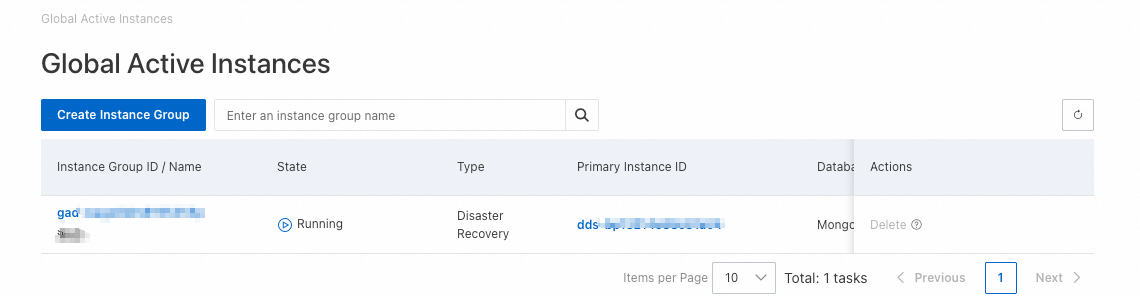
Instance group details
Go to the Global Active Database page. In the instance group list, click the ID of the instance group that you want to view. On the instance group details page, you can view its basic information, topology, and configuration list.
-
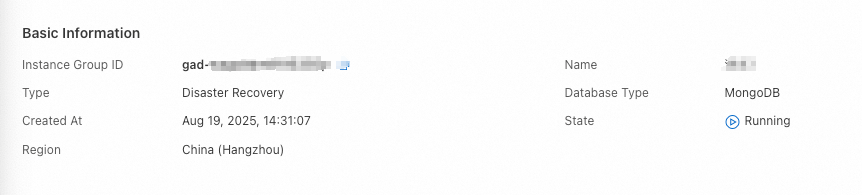
View basic information
Basic information includes the instance group ID, name, type, database type, creation time, status, and region.
-
View the topology
The topology visually maps the replication links between the primary and secondary instances, showing their status and key details.
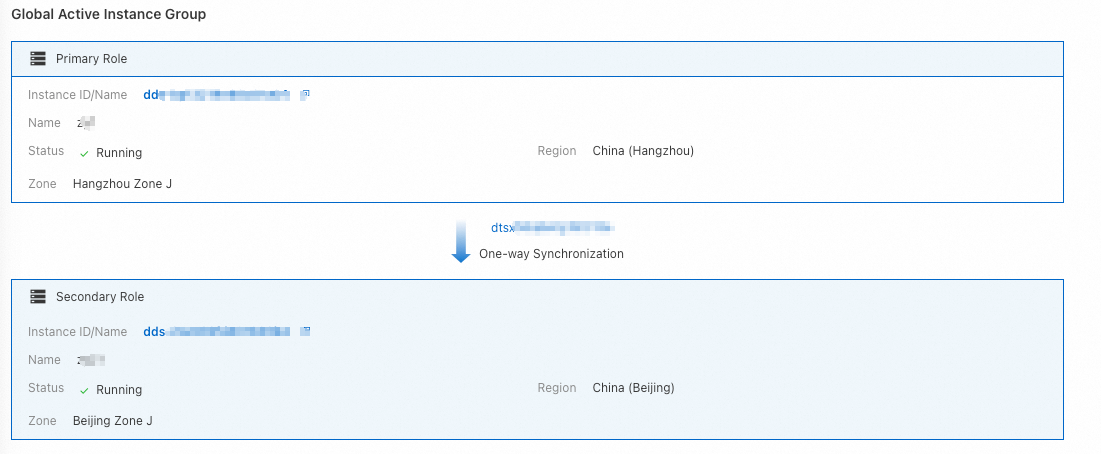 To view the details of an instance, click its ID to go to the ApsaraDB for MongoDB console.
 -
View the configuration list
The configuration list is divided into a MongoDB Instances list and a DTS Instances list.
-
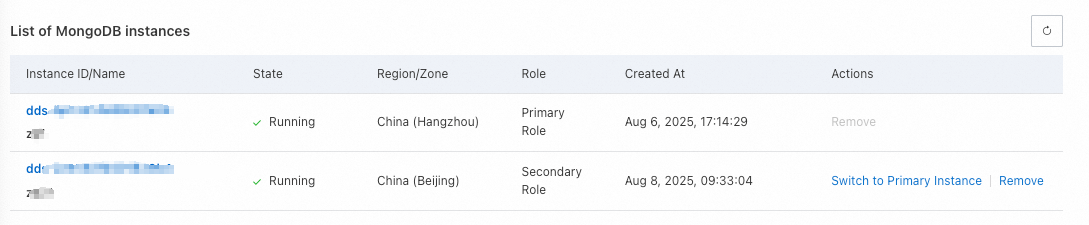
MongoDB Instances
-
This list displays all instances in the group, along with their status, region/zone, role, and creation time. Click an instance ID to view its details.
-
-
DTS Instances
This list displays all DTS synchronization links in the group, along with their synchronization direction and region, status, synchronization latency, and creation time.

-
Click Details for a synchronization link to view more information.
-
When you remove a secondary instance from the group, the associated DTS synchronization link is automatically released.
-
-
Promote a secondary instance
If all nodes of the primary instance become unavailable, you can promote a secondary instance to the new primary with a single click. The promoted instance becomes read/write, restoring service quickly. Use this feature for disaster recovery drills and geo-disaster recovery events.
-
Promoting a secondary instance carries a risk of data loss. Proceed with caution. This process may cause a transient connection interruption. Ensure that your application has an automatic reconnection mechanism.
-
The DTS synchronization link is one-way. After you promote a secondary instance, the system removes the original primary instance from the instance group and disconnects the DTS synchronization link. Proceed with caution.
-
Its data and DTS account credentials remain unchanged. You can still manage the instance on the ApsaraDB for MongoDB Instances page.
-
After the promotion, you can add the removed instance back to the group as a new secondary instance. For instructions, see Add a secondary instance.
-
Go to the Global Active Database page.
-
In the instance group list, click the ID of the target instance group.
-
In the MongoDB Instances list at the bottom of the page, find the secondary instance that you want to promote and click Switch to Primary Instance in the Actions column.

-
In the dialog box, review the impacts of this operation, and then click OK.
After you promote a secondary instance to a primary instance, decide if you need to change the application endpoint to that of the new primary instance.