Best practices for using transactions and configuring Read/Write Concern in ApsaraDB for MongoDB.
Background
MongoDB 4.0 introduced standalone transactions (replica set transactions) for operations on one or more collections within a single replica set. MongoDB 4.2 added distributed transactions (sharded transactions) for operations across multiple collections and shards.
In MongoDB, single-document operations are always atomic. Applications can use embedded documents and arrays to model relationships within one document, unlike relational databases that require normalized collections and joins. With proper data modeling, single-document atomicity eliminates the need for distributed transactions in most cases.
However, applications in finance or accounting may still require distributed transactions. MongoDB 4.2 and later fully support this capability.
Transactions
Basic information
MongoDB transaction APIs are similar to those in relational databases, so the learning curve is minimal.
The following example demonstrates a complete transaction with the startTransaction/abortTransaction/commitTransaction APIs, along with session and readConcern/writeConcern settings.
// Create collections.
db.getSiblingDB("mydb1").foo.insertOne(
    {abc: 0},
    { writeConcern: { w: "majority", wtimeout: 2000 } }
)
db.getSiblingDB("mydb2").bar.insertOne(
   {xyz: 0},
   { writeConcern: { w: "majority", wtimeout: 2000 } }
)
// Start a session.
session = db.getMongo().startSession( { readPreference: { mode: "primary" } } );
coll1 = session.getDatabase("mydb1").foo;
coll2 = session.getDatabase("mydb2").bar;
// Start a transaction.
session.startTransaction( { readConcern: { level: "local" }, writeConcern: { w: "majority" } } );
// Perform operations in the transaction.
try {
   coll1.insertOne( { abc: 1 } );
   coll2.insertOne( { xyz: 999 } );
} catch (error) {
   // Abort the transaction if an error occurs.
   session.abortTransaction();
   throw error;
}
// Commit the transaction.
session.commitTransaction();
session.endSession();
Key behaviors of transactions:
-
Each transaction must be associated with a session. A session supports only one active transaction at a time. Ending a session rolls back any active transaction.
-
A distributed transaction can span multiple documents, collections, and databases.
-
A transaction can read its own uncommitted writes, but these writes are not visible to operations outside the transaction.
-
Writes are not replicated to secondary nodes until the transaction commits. After commit, writes are automatically applied to all secondary nodes.
-
Transactions lock documents they modify, blocking other operations until completion. If a lock cannot be acquired within 5 milliseconds (default), the transaction aborts with a write conflict. This timeout is controlled by the maxTransactionLockRequestTimeoutMillis parameter.
-
Transactions automatically retry on transient errors such as temporary network interruptions. This retry is transparent to the client.
-
A transaction running longer than 60 seconds is forcibly aborted. This timeout is controlled by the transactionLifetimeLimitSeconds parameter.
Limits
-
You cannot create new collections or indexes in a distributed transaction.
-
Transactions cannot write to capped collections.
-
Transactions cannot use the `snapshot` read concern to read from capped collections. This limit applies to MongoDB 5.0 and later.
-
In a transaction, you cannot read from or write to collections in the
config/admin/localdatabases. -
Transactions cannot write to system collections, such as collections in the
system.*format. -
Transactions do not support
explain. -
You cannot use
getMoreinside a transaction to read cursors created outside the transaction. Similarly, you cannot usegetMoreoutside a transaction to read cursors created inside it. -
The first operation in a transaction cannot be a command such as killCursors or
hello. -
You cannot run non-CRUD commands inside a transaction. Examples include listCollections, listIndexes, createUser, getParameter, and
count. -
For distributed transactions, you cannot set the writeConcernMajorityJournalDefault parameter on shards to false.
-
Distributed transactions do not support shards with arbiters.
Best practices
Prefer standalone transactions over distributed transactions
Distributed transactions have lower performance than standalone transactions due to their more complex logic. In MongoDB, denormalized data models (embedded documents and arrays) remain the best choice. With proper data modeling, standalone transactions meet most transactional requirements.
Avoid long-running transactions
MongoDB automatically aborts distributed transactions running longer than 60 seconds. Break large transactions into smaller parts and ensure queries use proper indexes for fast execution.
Avoid modifying too many documents in a single transaction
While there is no hard limit on documents that can be read in a transaction, modifying many documents increases primary-secondary synchronization load, potentially causing replication lag. Limit modifications to 1,000 documents per transaction. For larger batches, split into multiple transactions.
Avoid large transactions that exceed 16 MB
In MongoDB 4.0, a transaction uses a single oplog entry limited to 16 MB. Update operations store incremental changes; inserts store full documents. If the combined oplog exceeds 16 MB, the transaction aborts and rolls back.
MongoDB 4.2 and later can split transaction writes across multiple oplog entries, removing the 16 MB single-entry limit. However, keep transaction sizes within 16 MB to avoid other issues.
Handle transaction rollbacks on the client
When a transaction aborts, it returns an exception and rolls back. Your application should catch these exceptions and retry on transient errors (primary/secondary switchover, node failure). Although MongoDB drivers automatically retry commits via Retryable Writes, the application must still handle non-retryable errors such as TransactionTooLarge, TransactionTooOld, and TransactionExceededLifetimeLimitSeconds.
Avoid performing DDL operations in transactions
DDL operations such as createIndex or dropDatabase are blocked by active transactions on the same database or collection. Blocked DDL operations prevent new transactions from acquiring locks, causing them to abort.
MongoDB 4.4 relaxed these restrictions via the shouldMultiDocTxnCreateCollectionAndIndexes parameter. You can run createCollection or createIndex in a distributed transaction, with these limits:
-
Collections can only be created implicitly.
-
The target collection must not already exist.
-
The target collection must be empty.
Therefore, avoid performing DDL operations in transactions.
Roll back uncommitted or errored transactions promptly
Uncommitted transaction modifications reside in the WiredTiger cache. Multiple concurrent uncommitted or errored transactions can pressure the cache and cause further problems. Roll back unneeded transactions as soon as possible to release resources.
Increase the lock timeout if transactions frequently roll back
By default, a transaction operation rolls back if it cannot acquire a lock within 5 milliseconds. Locks are released on commit or rollback. If lock timeouts cause frequent rollbacks, increase the maxTransactionLockRequestTimeoutMillis parameter.
If increasing the timeout does not help, check for operations that hold locks for extended periods, such as DDL operations or unoptimized queries, and optimize them.
Avoid concurrent modifications to the same document inside and outside a transaction
If an external write modifies a document that an in-progress transaction also modifies, the transaction rolls back due to a write conflict. Conversely, if a transaction already holds a lock on a document, external writes to that document wait until the transaction completes.
On a write conflict, the external write does not fail. MongoDB retries it internally, incrementing the writeConflicts counter until it succeeds. The client perceives a successful but slower operation.
A small number of write conflicts has minimal impact. Frequent write conflicts degrade performance. Use audit logs or slow query logs to detect excessive write conflicts.
Kernel bug risks
Long-running or oversized transactions place significant load on the WiredTiger cache. From the start of the oldest uncommitted transaction, WiredTiger must maintain data and state for all subsequent writes. Active transactions share the same snapshot, so new writes accumulate in the cache throughout the transaction's lifetime and cannot be evicted until the transaction commits or aborts. An overloaded cache (usage and dirty usage exceeding thresholds) causes database stuttering, increased latency, full CPU utilization, and potential deadlocks. Related issues: SERVER-50365 and SERVER-51281.
ApsaraDB for MongoDB recommends upgrading to MongoDB 5.0 or later for applications that heavily use transactions.
Read Concern
Basic information
Read Concern controls consistency and isolation with the following levels:
-
"local": Default for reads against primary or secondary nodes. Reads from the local node and may return data that is later rolled back. -
"available": Default for reads against secondaries in a sharded cluster. May return data that is later rolled back. Does not check shard version and may return orphaned documents. Provides the lowest access latency. -
"majority": Reads data acknowledged by a majority of replica set members. This data will not be rolled back. -
"linearizable": The strictest level. Waits for all preceding writes to be acknowledged by a majority of nodes. Lowest performance; only available on the primary. -
"snapshot": Reads from a data snapshot acknowledged by a majority of nodes. Can be associated with a specific point in time using atClusterTime.
Usage notes:
-
The latest data on a single mongod node does not necessarily represent the most recent data in the replica set, regardless of Read Concern level.
-
Different Read Concern levels can be specified per operation. MongoDB 4.4+ also supports a server-side default, which operation-level settings override.
-
Read Concern is ignored when reading from the
localdatabase. All data in thelocaldatabase is readable regardless of the level. -
Distributed transactions support only three Read Concern levels:
"local","majority", and"snapshot". -
Causally consistent sessions must use the
"majority"Read Concern level.
Best practices
For distributed transactions, set the Read Concern for the transaction, not for individual operations
Specify Read Concern at the transaction level. The transaction-level setting overrides any other Read Concern settings or defaults.
Read Concern applies to any database query, whether a single-document read, a multi-document read, or part of a transaction.
Use the "majority" Read Concern level for general use cases
Set Read Concern to "majority" for isolation and consistency. This ensures the application reads only data replicated to a majority of nodes, preventing rollback on primary election.
For 'Read Your Own Writes' scenarios, read from the primary and use the "local" or "linearizable" Read Concern level
Read from the primary node with "local" or "linearizable" Read Concern. If the Write Concern is "majority", you can also use "majority" Read Concern.
MongoDB 3.6+ also supports causally consistent sessions for this scenario.
For scenarios requiring the strongest consistency, use the "linearizable" Read Concern with a maxTimeMS timeout
The "linearizable" level confirms the node is still the primary and that returned data will not be rolled back. However, it significantly impacts latency. Use it with a maxTimeMS timeout to prevent indefinite blocking if a majority of nodes become unavailable.
Write Concern
Basic information
Write Concern uses the following format. Full reference: Write Concern.
{ w: <value>, j: <boolean>, wtimeout: <number> }-
Write Concern controls data persistence guarantees at these levels:
-
{w: 0}: No acknowledgment. Does not confirm completion; data loss may occur.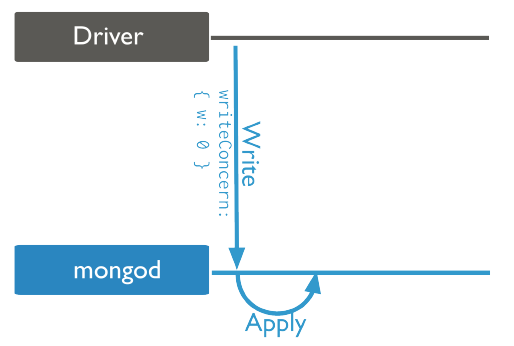
-
{w: 1}: Acknowledges the write in memory. Default before MongoDB 5.0. Data loss can still occur because data is not yet persisted to disk.
-
{j: true}: Journal acknowledgment. Confirms the write is flushed to the write-ahead log (WAL) on persistent storage. The write will not be lost.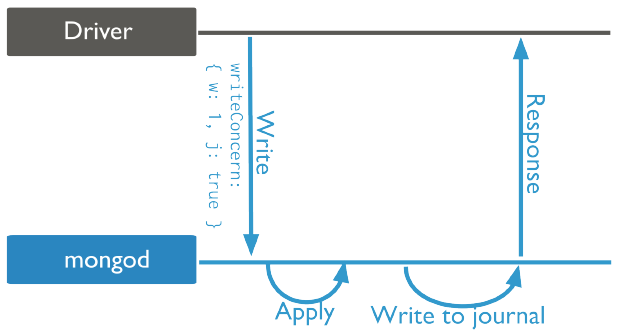
-
{ w: "majority" }: Majority acknowledgment. Default for MongoDB 5.0+. Waits for the write to replicate to a majority of nodes. The data will not be rolled back.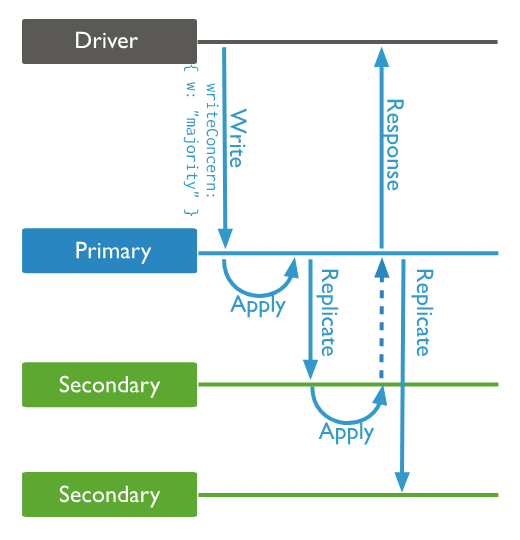
-
Replica acknowledgment: Waits for replication to a specified number of nodes before acknowledging.
-
Custom acknowledgment: You can use the settings.getLastErrorModes parameter to specify other custom acknowledgment methods using tags.
-
Usage notes:
-
Write Concern can be specified for any write operation or transaction. If omitted, the default is used.
NoteIn MongoDB 5.0+, the default global Write Concern for a standard three-member replica set changed from
{w:1}to{w:"majority"}. This may cause performance degradation after upgrading. -
Hidden nodes, delayed nodes, and other voting nodes with a priority of 0 in a replica set can all count towards a
"majority"acknowledgment. -
Different Write Concern levels can be specified per operation. MongoDB 4.4+ also supports a server-side default, which operation-level settings override.
-
When you write to the
localdatabase, any specified Write Concern is ignored. -
Causally consistent sessions must use the
"majority"Write Concern.
Best practices
For distributed transactions, set the Write Concern for the transaction, not for individual operations
Setting a Write Concern for individual write operations within a transaction returns an error.
Use the "majority" Write Concern for general use cases
The "majority" Write Concern ensures a majority of replica set nodes acknowledge the write, preventing data loss or rollback even during node failures or unexpected switchovers.
For write-intensive scenarios, consider using {w:1} and monitor secondary node replication lag
{w:1} provides better write performance for write-heavy scenarios. However, monitor secondary node replication lag. Excessive lag can cause the primary to ROLLBACK. If lag exceeds the oplog retention period, secondaries enter a RECOVERING state that requires manual intervention.
When batch-loading data or performing DTS migration on a ApsaraDB for MongoDB instance running a version earlier than 5.0, use the "majority" Write Concern if excessive lag occurs.
Set the most appropriate Write Concern for different operations
Write Concern can be set per operation. For example, use transactions with a specific Write Concern for financial data to ensure atomicity, "majority" for core player data to prevent rollback, and the default or {w:1} for log data.
MongoDB provides this flexibility so applications can choose appropriate settings based on their requirements.