This topic describes how to troubleshoot failed connections to an ApsaraDB for MongoDB instance.
For more information about how to troubleshoot errors returned by clients, see Errors concerning failed connections.
Overview
You can troubleshoot failed connections to an ApsaraDB for MongoDB instance from the following perspectives:
Check whitelist settings
You must add the client IP address to the whitelist of the instance before you connect to the instance.
Troubleshooting method: If you can connect to the instance after 0.0.0.0/0 is added to the IP whitelist of the instance, the IP address of the client is not authorized to access to the instance.
Solution: Delete the 0.0.0.0/0 whitelist and add the client IP address to the whitelist of the instance. For more information about how to configure a whitelist, see Modify an IP address whitelist of an ApsaraDB for MongoDB instance.
Check network environment
ApsaraDB for MongoDB supports both internal and public endpoints. The following requirements must be met before you connect to the instance:
Internal endpoints: Make sure that the instances are deployed in the same region and use the same network type and that the internal endpoint of the ApsaraDB for MongoDB instance is correct.
If the instances both use the VPC network type, you must make sure that the instances are on the same VPC.
Public endpoints: Make sure that the public endpoint of the ApsaraDB for MongoDB instance is correct.
For more information about failed instance connections caused by network environment, see Failed instance connections caused by network environment
Check instance endpoints
You must use correct endpoints to connect to the ApsaraDB for MongoDB instance.
You can log on to the ApsaraDB for MongoDB console and view the endpoints of the ApsaraDB for MongoDB instance on the Database Connections page. 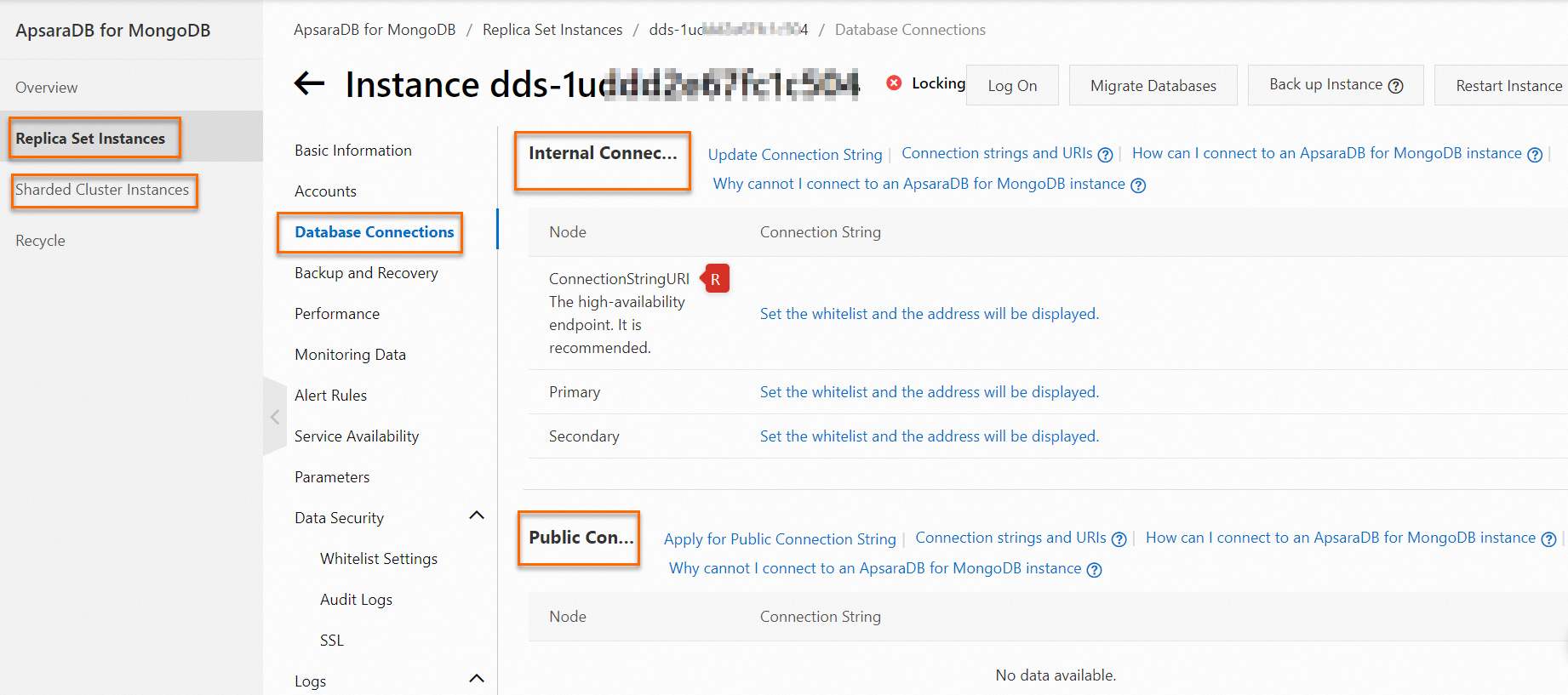
The following sections describe the common causes and solutions for incorrect instance endpoints:
Common cause 1: Use incorrect endpoint types.
For example, the instance is not connected because you use the VPC endpoint to connect to an ApsaraDB for MongoDB instance over the Internet.
Solution: Use the correct endpoint type based on your network environment.
Common cause 2: The authentication database in the connection string URI is incorrect.
Solution: Enter the correct authentication database in the connection string URI.
If you use a connection string URI to connect to an ApsaraDB for MongoDB instance, the connection string URI contains a database and an authentication database. The two databases can be the same or different. The following example shows the format of the connection string URI for a replica set instance:
mongodb://<username>:<password>@<host1>:<port1>,<host2>:<port2>,...,<hostN>:<portN>/<database>?replicaSet=<replicaSet_value>[&authSource=<authenticationDatabase>]The parameters for the database and authentication database in the connection string URI:
<database>: the database to be accessed by default after the instance is connected, which is equivalent to theuse <database>parameter in an endpoint.authSource=<authenticationDatabase>: Optional.<authenticationDatabase>is the name of the authentication database. If you do not specify the authentication database, the database specified by<database>is used as the authentication database.The authentication database stores database accounts and passwords. For the authentication to succeed, the specified database account must belong to the specified authentication database.
Examples:
The root account is stored in the admin database. After the authentication on the admin database is successful, you access the admin database.
mongodb://root:****@dds-bp19f409d7512****.mongodb.rds.aliyuncs.com:3717,dds-bp19f409d7512****.mongodb.rds.aliyuncs.com:3717/admin?replicaSet=mgset-6108****The test account is stored in the newDB database. After the authentication on the newDB database is successful, you access the admin database.
mongodb://test:****@dds-bp19f409d7512****.mongodb.rds.aliyuncs.com:3717,dds-bp19f409d7512****.mongodb.rds.aliyuncs.com:3717/admin?replicaSet=mgset-6108****&authSource=newDBThe test account is stored in the newDB database. After the authentication on the newDB database is successful, you access the newDB database.
mongodb://test:****@dds-bp19f409d7512****.mongodb.rds.aliyuncs.com:3717,dds-bp19f409d7512****.mongodb.rds.aliyuncs.com:3717/newDB?replicaSet=mgset-6108****&authSource=newDB
Common cause 3: The primary node is not connected.
This occurs only on replica set instances. If you use the endpoint of the primary node to connect to the instance but the connected node becomes a secondary node after the primary/secondary switchover, the write operation fails.
NoteThe primary/secondary switchover is triggered due to many reasons. For more information, see What causes the primary/secondary switchover for an instance?
Solution:
Manually switch the node roles of the instance. The node whose endpoint is actually connected after the primary/secondary switchover serves as the primary node. For more information about how to switch node roles, see Switch node roles.
If your application runs in a production environment, we recommend that you use a connection string URI to connect your application to the instance. This way, a primary/secondary switchover can be performed to ensure that the read and write operations of your application remain available even if a node fails. For more information, see Connect to a replica set instance.
We recommend that you ensure your application can be reconnected to an ApsaraDB for MongoDB instance after it is disconnected and handle exceptions to protect business continuity.
Common cause 4: The password in the endpoint contains special characters
!@#$%^&*()_+=.If the password in the endpoint contains special characters
!@#$%^&*()_+=when you connect to an ApsaraDB for MongoDB instance by using the mongo shell or program code. These special characters cannot be recognized.Solution: Escape special characters in the password. For more information, see Why is the instance not connected if the password in the connection string contains special characters?
Check endpoint resolution
You can connect to an ApsaraDB for MongoDB instance only if the endpoint is correctly resolved.
Troubleshooting method: Run the ping <Endpoint> or telnet <Endpoint> <Port> command to test network connectivity.
Solution: For more information, see What do I do if domain names cannot be resolved normally within a Linux instance?
Check instance status
You can connect to an ApsaraDB for MongoDB instance only when the instance is in the Running state.
Log on to the ApsaraDB for MongoDB console. On the Basic Information page of the instance, check the status of the instance. Make sure that the instance is in the Running state.
The common cause and solution for a locked instance:
Common cause: The disk space is exhausted.
Solution: For more information, see What do I do if the instance is locked or data cannot be written to the instance due to exhausted disk space?.
Check third-party tools
If you cannot connect to an ApsaraDB for MongoDB instance by using third-party tools such as Navicat and Compass, the settings of the instance or the third-party tools may be incorrect. Make sure that the settings of the instance and the third-party tool are correct before you use a third-party tool to connect to an ApsaraDB for MongoDB instance.
We recommend that you use the mongo shell tool and connection string URI to connect to the instance to test connectivity. The test results and corresponding solutions:
If the instance is connected: The settings of the third-party tool are incorrect. Check the settings of the third-party tool.
If the instance is not connected: The settings of the instance are incorrect. Check the whitelist settings, network environment, instance endpoints, endpoint resolution, and instance status as set out in this topic.
For more information about how to install and use the mongo shell to connect to an instance, see the following topics:
How do I install and use the mongo shell in a Windows operating system?
Connect to an ApsaraDB for MongoDB standalone instance by using the mongo shell
Connect to an ApsaraDB for MongoDB replica set instance by using the mongo shell
Connect to an ApsaraDB for MongoDB sharded cluster instance by using the mongo shell