The Retrieve API returns text segments from a knowledge base based on semantic similarity. When semantic search returns too many irrelevant results, use SearchFilters to apply metadata-based filtering on top of semantic results. This is effective for structured data such as data tables with well-defined fields.
How SearchFilters works
Without SearchFilters, the Retrieve API returns all semantically similar text segments, which may include irrelevant matches. SearchFilters first performs semantic search and then filters results by field conditions.
{
  "indexId": "o73yjlxxxx",
  "query": "Employees in the company named San Zhang"
}
Semantic retrieval returns text segments that are not highly relevant to "San Zhang".
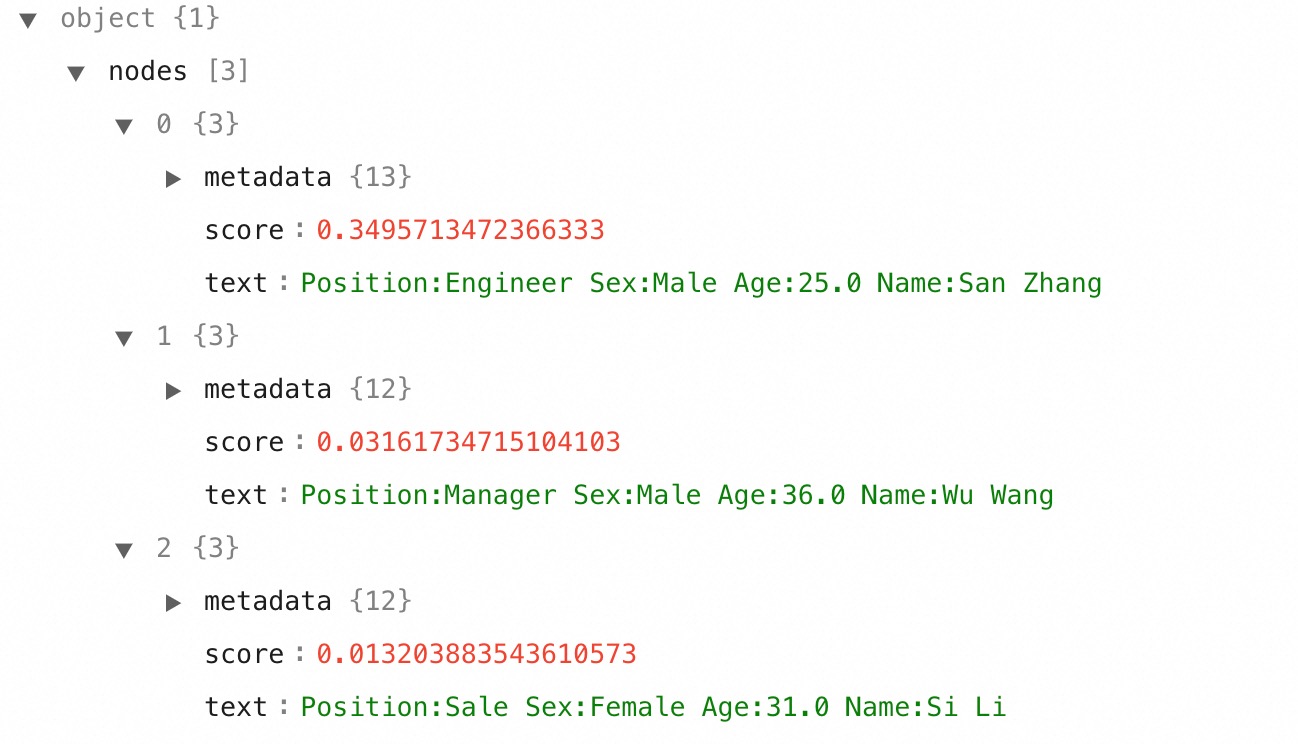 With SearchFilters:
{
  "indexId": "o73yjlxxxx",
  "query": "Employees in the company named San Zhang",
  "searchFilters": [
    {
      "Name": "San Zhang"
    }
  ]
}
SearchFilters removes text segments that do not match Name: "San Zhang" from the semantic results.
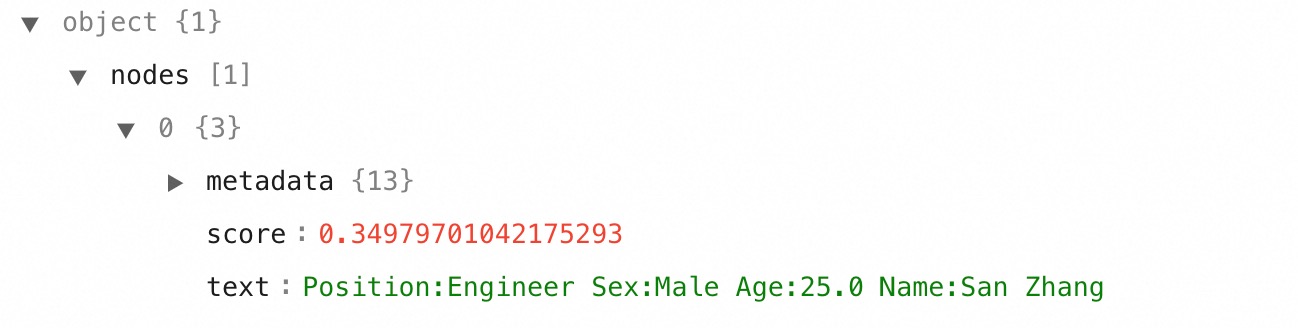
Syntax
SearchFilters is an array of subgroups. Each subgroup is a JSON object with one or more field: value pairs. Subgroups are always combined with AND logic.
{
  "searchFilters": [
    {
      "Name": "San Zhang",
      "Sex": "Male"
    },
    {
      "Position": "Engineer"
    }
  ]
}
In this example, results must match Name = "San Zhang" AND Sex = "Male" (within subgroup 1) AND Position = "Engineer" (subgroup 2).
Supported query types
Operator reference
| Query type | Operator | Supported field types | Description |
|---|---|---|---|
| Single-value | *(direct value)* | string, numeric (long, double) | Match a single exact value. Example: {"Name": "San Zhang"} |
| Multi-value | *(JSON array)* | string array, numeric array | Match any value in the array (similar to SQL IN). Example: {"Name": "[\"San Zhang\",\"Si Li\"]"} |
| Equality | eq | string, numeric | Equal to. Example: {"Name": {"eq": "San Zhang"}} |
| Equality | neq | string, numeric | Not equal to. Example: {"Name": {"neq": "San Zhang"}} |
| Interval | gt | numeric | Greater than. Example: {"Age": {"gt": 20}} |
| Interval | gte | numeric | Greater than or equal to. Example: {"Age": {"gte": 20}} |
| Interval | lt | numeric | Less than. Example: {"Age": {"lt": 30}} |
| Interval | lte | numeric | Less than or equal to. Example: {"Age": {"lte": 30}} |
| Fuzzy | like | string | Wildcard pattern match. Example: {"Position": {"like": "E%r"}} |
| Tag | tags | string array | Filter by document tags (document search knowledge bases only). Example: {"tags": "[\"tag1\",\"tag2\"]"} |
Equality and interval queries are range query subtypes. Equality queries are case-insensitive and accept only single values per field.
Wildcard characters for fuzzy queries
| Character | Description | Example |
|---|---|---|
% | Matches zero or more characters | E%r matches Engineer |
_ | Matches exactly one character | E_gineer matches Engineer |
Tag query logic
- Multiple tags in one subgroup use OR logic: files matching any tag are returned.
- For AND logic between tags, place each tag in a separate subgroup.
Prerequisites
You need:
- (RAM users only) The AliyunBailianDataFullAccess policy and workspace membership. Not required for an Alibaba Cloud account.
- A workspace ID
- The Model Studio SDK installed and configured
- AccessKey and AccessKey secret configured as environment variables
RAM users can manage knowledge bases only in workspaces they've joined. Alibaba Cloud accounts can manage all workspaces.
Sample data setup
Examples use EmployeeInformation.xlsx (3 records). Create a knowledge base with:
| Setting | Value |
|---|---|
| Knowledge base type | Data Query |
| Data source | Upload Data Table |
| Fields | Name (string), Sex (string), Position (string), Age (double) |
| Index settings | All fields used for retrieval and model responses |

Complete code examples
The following Python and Java examples cover all query types.
Before running the sample code, configure your AccessKey and AccessKey secret as environment variables.
Python
SearchFiltersFullExample.py
# The sample code is for reference only. Do not use it in a production environment.
import json
import os
import sys
from typing import List

from alibabacloud_bailian20231229 import models as bailian_20231229_models
from alibabacloud_bailian20231229.client import Client as bailian20231229Client
from alibabacloud_tea_openapi import models as open_api_models
from alibabacloud_tea_util.client import Client as UtilClient

class SearchFiltersFullExample:
    class QueryObject:
        def __init__(self, prefix):
            self.like = prefix

        def to_dict(self):
            return {
                "like": self.like
            }

    class Range:
        def __init__(self, gte, lte):
            self.gte = gte
            self.lte = lte

        def to_dict(self):
            return {
                "gte": self.gte,
                "lte": self.lte
            }

    def __init__(self):
        pass

    @staticmethod
    def create_client() -> bailian20231229Client:
        """
        Initializes a client using an AccessKey pair.
        @return: Client
        @throws Exception
        """
        # For production, use STS or other secure credential management. See https://www.alibabacloud.com/help/sdk/developer-reference/v2-manage-access-credentials
        config = open_api_models.Config(
            # Required. Make sure that the ALIBABA_CLOUD_ACCESS_KEY_ID environment variable is set.
            access_key_id=os.environ['ALIBABA_CLOUD_ACCESS_KEY_ID'],
            # Required. Make sure that the ALIBABA_CLOUD_ACCESS_KEY_SECRET environment variable is set.
            access_key_secret=os.environ['ALIBABA_CLOUD_ACCESS_KEY_SECRET']
        )
        # For more information about endpoints, see https://www.alibabacloud.com/help/model-studio/api-bailian-2023-12-29-endpoint
        config.endpoint = f'bailian.ap-southeast-1.aliyuncs.com'
        return bailian20231229Client(config)

    @staticmethod
    def sub_group_query() -> None:
        try:
            client = SearchFiltersFullExample.create_client()
            # Create a retrieve_request object.
            retrieve_request = bailian_20231229_models.RetrieveRequest()
            # Required. You can enter the actual prompt.
            retrieve_request.query = 'Employees in the company named San Zhang'
            # Required. Enter the actual knowledge base ID.
            retrieve_request.index_id = 'Enter the actual knowledge base ID'
            # Group 1: Name = "San Zhang", Group 2: Sex = "Female"
            retrieve_request.search_filters = [
                {"Name": "San Zhang"},
                {"Sex": "Female"}
            ]
            # Perform a retrieval. Enter the workspace ID and the retrieve_request object.
            resp = client.retrieve('Enter the actual workspace ID', retrieve_request)
            print(UtilClient.to_jsonstring(resp))
        except Exception as error:
            # Handle exceptions appropriately in production
            print(error.message)

    @staticmethod
    def single_query() -> None:
        try:
            client = SearchFiltersFullExample.create_client()
            # Create a retrieve_request object.
            retrieve_request = bailian_20231229_models.RetrieveRequest()
            # Required. You can enter the actual prompt.
            retrieve_request.query = 'Employees in the company named San Zhang'
            # Required. Enter the actual knowledge base ID.
            retrieve_request.index_id = 'Enter the actual knowledge base ID'
            # Single-value filter: Name = "San Zhang"
            retrieve_request.search_filters = [
                {"Name": "San Zhang"}
            ]
            # Perform a retrieval. Enter the workspace ID and the retrieve_request object.
            resp = client.retrieve('Enter the actual workspace ID', retrieve_request)
            print(UtilClient.to_jsonstring(resp.body))
        except Exception as error:
            # Handle exceptions appropriately in production
            print(error.message)

    @staticmethod
    def multi_query() -> None:
        try:
            client = SearchFiltersFullExample.create_client()
            # Create a retrieve_request object.
            retrieve_request = bailian_20231229_models.RetrieveRequest()
            # Required. You can enter the actual prompt.
            retrieve_request.query = 'All employees in the company'
            # Required. Enter the actual knowledge base ID.
            retrieve_request.index_id = 'Enter the actual knowledge base ID'
            # Create a list to store multiple values.
            names = ["San Zhang", "Si Li"]
            # Multi-value filter: Name IN ["San Zhang", "Si Li"]
            retrieve_request.search_filters = [{"Name": json.dumps(names)}]
            # Perform a retrieval. Enter the workspace ID and the retrieve_request object.
            resp = client.retrieve('Enter the actual workspace ID', retrieve_request)
            print(UtilClient.to_jsonstring(resp.body))
        except Exception as error:
            # Handle exceptions appropriately in production
            print(error.message)

    @staticmethod
    def range_query() -> None:
        try:
            client = SearchFiltersFullExample.create_client()
            # Create a retrieve_request object.
            retrieve_request = bailian_20231229_models.RetrieveRequest()
            # Required. You can enter the actual prompt.
            retrieve_request.query = 'All employees in the company'
            # Required. Enter the actual knowledge base ID.
            retrieve_request.index_id = 'Enter the actual knowledge base ID'
            # Range filter: Age
            age_range = SearchFiltersFullExample.Range(20, 27)
            retrieve_request.search_filters = [
                {"Position": "Engineer"},  # Group 1: Position filter condition
                {"Age": json.dumps(age_range.to_dict())}  # Group 2: Age range filter condition
            ]
            # Perform a retrieval. Enter the workspace ID and the retrieve_request object.
            resp = client.retrieve('Enter the actual workspace ID', retrieve_request)
            print(UtilClient.to_jsonstring(resp.body))
        except Exception as error:
            # Handle exceptions appropriately in production
            print(error.message)

    @staticmethod
    def wildcard_query() -> None:
        try:
            client = SearchFiltersFullExample.create_client()
            # Create a retrieve_request object.
            retrieve_request = bailian_20231229_models.RetrieveRequest()
            # Required. You can enter the actual prompt.
            retrieve_request.query = 'Male employees in the company'
            # Required. Enter the actual knowledge base ID.
            retrieve_request.index_id = 'Enter the actual knowledge base ID'
            # Fuzzy filter: Position LIKE "E%r" (% = zero or more chars)
            position = SearchFiltersFullExample.QueryObject('E%r')
            retrieve_request.search_filters = [
                {"Name": "San Zhang"},  # Name filter condition. You can replace it with the actual property and value.
                {"Position": json.dumps(position.to_dict())}  # Position (fuzzy query) filter condition. You can replace it with the actual property and value.
            ]
            # Perform a retrieval. Enter the workspace ID and the retrieve_request object.
            resp = client.retrieve('Enter the actual workspace ID', retrieve_request)
            print(UtilClient.to_jsonstring(resp.body))
        except Exception as error:
            # Handle exceptions appropriately in production
            print(error.message)

    @staticmethod
    def tag_query() -> None:
        try:
            client = SearchFiltersFullExample.create_client()
            # Create a retrieve_request object.
            retrieve_request = bailian_20231229_models.RetrieveRequest()
            # Required. You can enter the actual prompt.
            retrieve_request.query = 'Provide some candidates'
            # Required. Enter the actual knowledge base ID.
            retrieve_request.index_id = 'Enter the actual knowledge base ID'
            # Tag filter (OR logic within array)
            tags = ["University A", "Student Union President"]
            retrieve_request.search_filters = [
                {"tags": json.dumps(tags)}
            ]
            # Perform a retrieval. Enter the workspace ID and the retrieve_request object.
            resp = client.retrieve('Enter the actual workspace ID', retrieve_request)
            print(UtilClient.to_jsonstring(resp.body))
        except Exception as error:
            # Handle exceptions appropriately in production
            print(error.message)

    @staticmethod
    def tag_query2() -> None:
        try:
            client = SearchFiltersFullExample.create_client()
            # Create a retrieve_request object.
            retrieve_request = bailian_20231229_models.RetrieveRequest()
            # Required. You can enter the actual prompt.
            retrieve_request.query = 'Provide some candidates'
            # Required. Enter the actual knowledge base ID.
            retrieve_request.index_id = 'Enter the actual knowledge base ID'
            # Tag filters (AND logic between groups)
            tag1 = ["University A"]
            tag2 = ["Sports Specialist Student"]
            retrieve_request.search_filters = [
                {"tags": json.dumps(tag1)},
                {"tags": json.dumps(tag2)}
            ]
            # Perform a retrieval. Enter the workspace ID and the retrieve_request object.
            resp = client.retrieve('Enter the actual workspace ID', retrieve_request)
            print(UtilClient.to_jsonstring(resp.body))
        except Exception as error:
            # Handle exceptions appropriately in production
            print(error.message)

    @staticmethod
    def main(args: List[str]) -> None:
        SearchFiltersFullExample.sub_group_query()
        SearchFiltersFullExample.single_query()
        SearchFiltersFullExample.multi_query()
        SearchFiltersFullExample.range_query()
        SearchFiltersFullExample.wildcard_query()
        SearchFiltersFullExample.tag_query()
        SearchFiltersFullExample.tag_query2()

if __name__ == '__main__':
    SearchFiltersFullExample.main(sys.argv[1:])
Java
SearchFiltersFullExample.java
// The sample code is for reference only. Do not use it in a production environment.
import com.aliyun.bailian20231229.models.RetrieveRequest;
import com.aliyun.bailian20231229.models.RetrieveResponse;
import com.google.gson.Gson;
import com.google.gson.JsonArray;

import java.util.ArrayList;
import java.util.HashMap;
import java.util.List;
import java.util.Map;

public class SearchFiltersFullExample {
    /**
     * description
Query type examples
Each query type includes JSON syntax and sample request/response.
Replace these placeholders with your actual values:
| Placeholder | Description | Example |
|---|---|---|
<knowledge-base-id> | Knowledge base index ID | 27ubwxxxxx |
<workspace-id> | Workspace ID | llm-4u5xpd1xdjxxxxxx |
Subgroup query
Each element in the searchFilters array is a subgroup combining filter conditions. All subgroups must match (AND logic).
Name is "San Zhang" AND Sex is "Female":
{
  "searchFilters": [
    {
      "Name": "San Zhang"
    },
    {
      "Sex": "Female"
    }
  ]
}
No records match both conditions, so nodes is empty.
Python
SubGroupQueryExample.py
# The sample code is for reference only. Do not use it in a production environment.
import os
import sys
from typing import List

from alibabacloud_bailian20231229 import models as bailian_20231229_models
from alibabacloud_bailian20231229.client import Client as bailian20231229Client
from alibabacloud_tea_openapi import models as open_api_models
from alibabacloud_tea_util.client import Client as UtilClient

class SubGroupQueryExample:
    def __init__(self):
        pass

    @staticmethod
    def create_client() -> bailian20231229Client:
        """
        Initializes a client using an AccessKey pair.
        @return: Client
        @throws Exception
        """
        # For production, use STS or other secure credential management. See https://www.alibabacloud.com/help/sdk/developer-reference/v2-manage-access-credentials
        config = open_api_models.Config(
            # Required. Make sure that the ALIBABA_CLOUD_ACCESS_KEY_ID environment variable is set.
            access_key_id=os.environ['ALIBABA_CLOUD_ACCESS_KEY_ID'],
            # Required. Make sure that the ALIBABA_CLOUD_ACCESS_KEY_SECRET environment variable is set.
            access_key_secret=os.environ['ALIBABA_CLOUD_ACCESS_KEY_SECRET']
        )
        # For more information about endpoints, see https://www.alibabacloud.com/help/model-studio/api-bailian-2023-12-29-endpoint
        config.endpoint = f'bailian.ap-southeast-1.aliyuncs.com'
        return bailian20231229Client(config)

    @staticmethod
    def main(
            args: List[str],
    ) -> None:
        try:
            client = SubGroupQueryExample.create_client()
            # Create a retrieve_request object.
            retrieve_request = bailian_20231229_models.RetrieveRequest()
            # Required. You can enter the actual prompt.
            retrieve_request.query = 'Employees in the company named San Zhang'
            # Required. Enter the actual knowledge base ID.
            retrieve_request.index_id = 'Enter the actual knowledge base ID'
            # Group 1: Name = "San Zhang", Group 2: Sex = "Female"
            retrieve_request.search_filters = [
                {"Name": "San Zhang"},
                {"Sex": "Female"}
            ]
            # Perform a retrieval. Enter the workspace ID and the retrieve_request object.
            resp = client.retrieve('Enter the actual workspace ID', retrieve_request)
            print(UtilClient.to_jsonstring(resp))
        except Exception as error:
            # Handle exceptions appropriately in production
            print(error.message)

if __name__ == '__main__':
    SubGroupQueryExample.main(sys.argv[1:])
Java
SubGroupQueryExample.java
// The sample code is for reference only. Do not use it in a production environment.
import com.aliyun.bailian20231229.models.RetrieveRequest;
import com.aliyun.bailian20231229.models.RetrieveResponse;
import com.google.gson.Gson;

import java.util.ArrayList;
import java.util.HashMap;
import java.util.List;
import java.util.Map;

public class SubGroupQueryExample {
    /**
     * description
Sample request
{
  "indexId": "27ubwxxxxx",
  "WorkspaceId":"llm-4u5xpd1xdjxxxxxx",
  "query": "Employees in the company named San Zhang",
  "searchFilters": [
    {
      "Name": "San Zhang"
    },
    {
      "Sex": "Female"
    }
  ]
}
Sample response
{
  "code": "Success",
  "data": {
    "nodes": []
  },
  "message": "success",
  "requestId": "5BA30772-xxxx-560C-B1F7-C1DA737A9D80",
  "status": "200",
  "success": true
}
Single-value query
Pass a single value for a field to match records with that exact value.
Filter for records whereName is "San Zhang":
{
  "searchFilters": [
    {
      "Name": "San Zhang"
    }
  ]
}
Python
SingleQueryExample.py
# The sample code is for reference only. Do not use it in a production environment.
import os
import sys
from typing import List

from alibabacloud_bailian20231229 import models as bailian_20231229_models
from alibabacloud_bailian20231229.client import Client as bailian20231229Client
from alibabacloud_tea_openapi import models as open_api_models
from alibabacloud_tea_util.client import Client as UtilClient

class SingleQueryExample:
    def __init__(self):
        pass

    @staticmethod
    def create_client() -> bailian20231229Client:
        """
        Initializes a client using an AccessKey pair.
        @return: Client
        @throws Exception
        """
        # For production, use STS or other secure credential management. See https://www.alibabacloud.com/help/sdk/developer-reference/v2-manage-access-credentials
        config = open_api_models.Config(
            # Required. Make sure that the ALIBABA_CLOUD_ACCESS_KEY_ID environment variable is set.
            access_key_id=os.environ['ALIBABA_CLOUD_ACCESS_KEY_ID'],
            # Required. Make sure that the ALIBABA_CLOUD_ACCESS_KEY_SECRET environment variable is set.
            access_key_secret=os.environ['ALIBABA_CLOUD_ACCESS_KEY_SECRET']
        )
        # For more information about endpoints, see https://www.alibabacloud.com/help/model-studio/api-bailian-2023-12-29-endpoint
        config.endpoint = f'bailian.ap-southeast-1.aliyuncs.com'
        return bailian20231229Client(config)

    @staticmethod
    def main(
            args: List[str],
    ) -> None:
        client = SingleQueryExample.create_client()
        # Create a retrieve_request object.
        retrieve_request = bailian_20231229_models.RetrieveRequest()
        # Required. You can enter the actual prompt.
        retrieve_request.query = 'Employees in the company named San Zhang'
        # Required. Enter the actual knowledge base ID.
        retrieve_request.index_id = 'Enter the actual knowledge base ID'
        # The property for the single-value query is Name and the value is San Zhang. You can replace them with the actual property and value.
        retrieve_request.search_filters = [
            {"Name": "San Zhang"}
        ]
        try:
            # Perform a retrieval. Enter the workspace ID and the retrieve_request object.
            resp = client.retrieve('Enter the actual workspace ID', retrieve_request)
            print(UtilClient.to_jsonstring(resp.body))
        except Exception as error:
            # Handle exceptions appropriately in production
            print(error.message)

if __name__ == '__main__':
    SingleQueryExample.main(sys.argv[1:])
Java
SingleQueryExample.java
// The sample code is for reference only. Do not use it in a production environment.
import com.aliyun.bailian20231229.models.RetrieveRequest;
import com.aliyun.bailian20231229.models.RetrieveResponse;
import com.google.gson.Gson;

import java.util.ArrayList;
import java.util.HashMap;
import java.util.List;
import java.util.Map;

public class SingleQueryExample {
    /**
     * description
Sample request
{
  "indexId": "27ubwxxxxx",
  "WorkspaceId":"llm-4u5xpd1xdjxxxxxx",
  "query": "Employees in the company named San Zhang",
  "searchFilters": [
    {
      "Name": "San Zhang"
    }
  ]
}
Sample response
{
  "code": "Success",
  "data": {
    "nodes": [
      {
        "metadata": {
          "_rc_v_score": 0.32581159472465515,
          "_q_score": 1,
          "source": "0",
          "_score": 0.4556944966316223,
          "doc_id": "table_xxxx75507aab4bd9a24c18d098b2e8ac_10285263_1",
          "Sex": "Male",
          "_rc_score": 0,
          "Name": "San Zhang",
          "doc_name": "Employee Sheet",
          "_id": "llm-xxxxpd1xdjqp8itj_27ubwxxxxx_table_200275507aab4bd9a24c18d098b2e8ac_10285263_1",
          "Age": "25",
          "Position": "Engineer"
        },
        "score": 0.4556944966316223,
        "text": "Name:San Zhang Age:25 Position:Engineer Sex:Male"
      }
    ]
  },
  "message": "success",
  "requestId": "2FA4113E-xxxx-59C1-BDB2-5B930D8C9B1C",
  "status": "200",
  "success": true
}
Multi-value query
Pass multiple values for a field to match records containing any of the specified values, similar to the SQL IN operator. Serialize the value array as a JSON string.
Name is "San Zhang" or "Si Li":
{
  "searchFilters": [
    {
      "Name": "[\"San Zhang\",\"Si Li\"]"
    }
  ]
}
Python
MultiQueryExample.py
# The sample code is for reference only. Do not use it in a production environment.
import json
import os
import sys
from typing import List

from alibabacloud_bailian20231229 import models as bailian_20231229_models
from alibabacloud_bailian20231229.client import Client as bailian20231229Client
from alibabacloud_tea_openapi import models as open_api_models
from alibabacloud_tea_util.client import Client as UtilClient

class MultiQueryExample:
    def __init__(self):
        pass

    @staticmethod
    def create_client() -> bailian20231229Client:
        """
        Initializes a client using an AccessKey pair.
        @return: Client
        @throws Exception
        """
        # For production, use STS or other secure credential management. See https://www.alibabacloud.com/help/sdk/developer-reference/v2-manage-access-credentials
        config = open_api_models.Config(
            # Required. Make sure that the ALIBABA_CLOUD_ACCESS_KEY_ID environment variable is set.
            access_key_id=os.environ['ALIBABA_CLOUD_ACCESS_KEY_ID'],
            # Required. Make sure that the ALIBABA_CLOUD_ACCESS_KEY_SECRET environment variable is set.
            access_key_secret=os.environ['ALIBABA_CLOUD_ACCESS_KEY_SECRET']
        )
        # For more information about endpoints, see https://www.alibabacloud.com/help/model-studio/api-bailian-2023-12-29-endpoint
        config.endpoint = f'bailian.ap-southeast-1.aliyuncs.com'
        return bailian20231229Client(config)

    @staticmethod
    def main(
            args: List[str],
    ) -> None:
        try:
            client = MultiQueryExample.create_client()
            # Create a retrieve_request object.
            retrieve_request = bailian_20231229_models.RetrieveRequest()
            # Required. You can enter the actual prompt.
            retrieve_request.query = 'All employees in the company'
            # Required. Enter the actual knowledge base ID.
            retrieve_request.index_id = 'Enter the actual knowledge base ID'
            # Create a list to store multiple values.
            names = ["San Zhang", "Si Li"]
            # Multi-value filter: Name IN ["San Zhang", "Si Li"]
            retrieve_request.search_filters = [{"Name": json.dumps(names)}]
            # Perform a retrieval. Enter the workspace ID and the retrieve_request object.
            resp = client.retrieve('Enter the actual workspace ID', retrieve_request)
            print(UtilClient.to_jsonstring(resp.body))
        except Exception as error:
            # Handle exceptions appropriately in production
            print(error.message)

if __name__ == '__main__':
    MultiQueryExample.main(sys.argv[1:])
Java
MultiQueryExample.java
// The sample code is for reference only. Do not use it in a production environment.
import com.aliyun.bailian20231229.models.RetrieveRequest;
import com.aliyun.bailian20231229.models.RetrieveResponse;
import com.google.gson.Gson;
import com.google.gson.JsonArray;

import java.util.ArrayList;
import java.util.HashMap;
import java.util.List;
import java.util.Map;

public class MultiQueryExample {
    /**
     * description
Sample request
{
  "indexId": "27ubwxxxxx",
  "WorkspaceId":"llm-4u5xpd1xdjxxxxxx",
  "query": "All employees in the company",
  "searchFilters": [
    {
      "Name": "[\"San Zhang\",\"Si Li\"]"
    }
  ]
}
Sample response
{
  "code": "Success",
  "data": {
    "nodes": [
      {
        "metadata": {
          "_rc_v_score": 0.3016361088048254,
          "_q_score": 1,
          "source": "0",
          "_score": 0.3322954773902893,
          "doc_id": "table_xxxxad1c331c424780a8023376a73fac_10285263_1",
          "Sex": "Male",
          "_rc_score": 0,
          "Name": "San Zhang",
          "doc_name": "Employee Sheet",
          "_id": "llm-xxxxpd1xdjqp8itj_27ubwxxxxx_table_xxxxad1c331c424780a8023376a73fac_10285263_1",
          "Age": "25.0",
          "Position": "Engineer"
        },
        "score": 0.3322954773902893,
        "text": "Name:San Zhang Age:25.0 Position:Engineer Sex:Male"
      },
      {
        "metadata": {
          "_rc_v_score": 0.2531493306159973,
          "_q_score": 0.8392540654998252,
          "source": "0",
          "_score": 0.25632044672966003,
          "doc_id": "table_xxxxad1c331c424780a8023376a73fac_10285263_2",
          "Sex": "Female",
          "_rc_score": 0,
          "Name": "Si Li",
          "doc_name": "Employee Sheet",
          "_id": "llm-xxxxpd1xdjqp8itj_27ubwxxxxx_table_xxxxad1c331c424780a8023376a73fac_10285263_2",
          "Age": "31.0",
          "Position": "Sales"
        },
        "score": 0.25632044672966003,
        "text": "Name:Si Li Age:31.0 Position:Sales Sex:Female"
      }
    ]
  },
  "message": "success",
  "requestId": "1DFE5E9E-xxxx-5C37-8011-8FA2E2875309",
  "status": "200",
  "success": true
}
Range query
Use range queries to find records where a numeric field falls within a specified interval. Combine range queries with other query types by placing them in separate subgroups.
Filter for records wherePosition is "Engineer" (single-value) AND Age is between 20 and 25 (range):
{
  "searchFilters": [
    {
      "Position": "Engineer"
    },
    {
      "Age": {
        "gte": 20,
        "lte": 25
      }
    }
  ]
}
Python
RangeQueryExample.py
# The sample code is for reference only. Do not use it in a production environment.
import json
import os
import sys
from typing import List

from alibabacloud_bailian20231229 import models as bailian_20231229_models
from alibabacloud_bailian20231229.client import Client as bailian20231229Client
from alibabacloud_tea_openapi import models as open_api_models
from alibabacloud_tea_util.client import Client as UtilClient

class RangeQueryExample:
    class Range:
        def __init__(self, gte, lte):
            self.gte = gte
            self.lte = lte

        def to_dict(self):
            return {
                "gte": self.gte,
                "lte": self.lte
            }

    def __init__(self):
        pass

    @staticmethod
    def create_client() -> bailian20231229Client:
        """
        Initializes a client using an AccessKey pair.
        @return: Client
        @throws Exception
        """
        # For production, use STS or other secure credential management. See https://www.alibabacloud.com/help/sdk/developer-reference/v2-manage-access-credentials
        config = open_api_models.Config(
            # Required. Make sure that the ALIBABA_CLOUD_ACCESS_KEY_ID environment variable is set.
            access_key_id=os.environ['ALIBABA_CLOUD_ACCESS_KEY_ID'],
            # Required. Make sure that the ALIBABA_CLOUD_ACCESS_KEY_SECRET environment variable is set.
            access_key_secret=os.environ['ALIBABA_CLOUD_ACCESS_KEY_SECRET']
        )
        # For more information about endpoints, see https://www.alibabacloud.com/help/model-studio/api-bailian-2023-12-29-endpoint
        config.endpoint = f'bailian.ap-southeast-1.aliyuncs.com'
        return bailian20231229Client(config)

    @staticmethod
    def main(
            args: List[str],
    ) -> None:
        try:
            client = RangeQueryExample.create_client()
            # Create a retrieve_request object.
            retrieve_request = bailian_20231229_models.RetrieveRequest()
            # Required. You can enter the actual prompt.
            retrieve_request.query = 'All employees in the company'
            # Required. Enter the actual knowledge base ID.
            retrieve_request.index_id = 'Enter the actual knowledge base ID'
            # Range filter: Age
            age_range = RangeQueryExample.Range(20, 27)
            retrieve_request.search_filters = [
                {"Position": "Engineer"},  # Group 1: Position filter condition
                {"Age": json.dumps(age_range.to_dict())}  # Group 2: Age range filter condition
            ]
            # Perform a retrieval. Enter the workspace ID and the retrieve_request object.
            resp = client.retrieve('Enter the actual workspace ID', retrieve_request)
            print(UtilClient.to_jsonstring(resp.body))
        except Exception as error:
            # Handle exceptions appropriately in production
            print(error.message)

if __name__ == '__main__':
    RangeQueryExample.main(sys.argv[1:])
Java
RangeQueryExample.java
// The sample code is for reference only. Do not use it in a production environment.
import com.aliyun.bailian20231229.models.RetrieveRequest;
import com.aliyun.bailian20231229.models.RetrieveResponse;
import com.google.gson.Gson;

import java.util.ArrayList;
import java.util.HashMap;
import java.util.List;
import java.util.Map;

public class RangeQueryExample {
    /**
     * description
Sample request
{
  "indexId": "27ubwxxxxx",
  "WorkspaceId":"llm-4u5xpd1xdjxxxxxx",
  "query": "All employees in the company",
  "searchFilters": [
    {
      "Sex": "Male"
    },
    {
      "Age": "{\"gte\":20.0,\"lte\":27.0}"
    }
  ]
}
Sample response
{
  "code": "Success",
  "data": {
    "nodes": [
      {
        "metadata": {
          "_rc_v_score": 0.3016361088048254,
          "_q_score": 1,
          "source": "0",
          "_score": 0.3322954773902893,
          "doc_id": "table_xxxxad1c331c424780a8023376a73fac_10285263_1",
          "Sex": "Male",
          "_rc_score": 0,
          "Name": "San Zhang",
          "doc_name": "Employee Sheet",
          "_id": "llm-xxxxpd1xdjqp8itj_27ubwxxxxx_table_xxxxad1c331c424780a8023376a73fac_10285263_1",
          "Age": "25.0",
          "Position": "Engineer"
        },
        "score": 0.3322954773902893,
        "text": "Name:San Zhang Age:25.0 Position:Engineer Sex:Male"
      }
    ]
  },
  "message": "success",
  "requestId": "AE0B5ABC-xxxx-54A1-9ED4-91865B859DF6",
  "status": "200",
  "success": true
}
Fuzzy query
Use wildcard patterns to match string fields partially, similar to the SQL LIKE operator. Wrap the pattern in a {"like": "<pattern>"} object and serialize it as a JSON string.
Name is "San Zhang" AND Position starts with "E" and ends with "r":
{
  "searchFilters": [
    {
      "Name": "San Zhang"
    },
    {
      "Position": {
        "like": "E%r"
      }
    }
  ]
}
Python
WildcardQueryExample.py
# The sample code is for reference only. Do not use it in a production environment.
import json
import os
import sys
from typing import List

from alibabacloud_bailian20231229 import models as bailian_20231229_models
from alibabacloud_bailian20231229.client import Client as bailian20231229Client
from alibabacloud_tea_openapi import models as open_api_models
from alibabacloud_tea_util.client import Client as UtilClient

class WildcardQueryExample:
    class QueryObject:
        def __init__(self, prefix):
            self.like = prefix

        def to_dict(self):
            return {
                "like": self.like
            }

    def __init__(self):
        pass

    @staticmethod
    def create_client() -> bailian20231229Client:
        """
        Initializes a client using an AccessKey pair.
        @return: Client
        @throws Exception
        """
        # For production, use STS or other secure credential management. See https://www.alibabacloud.com/help/sdk/developer-reference/v2-manage-access-credentials
        config = open_api_models.Config(
            # Required. Make sure that the ALIBABA_CLOUD_ACCESS_KEY_ID environment variable is set.
            access_key_id=os.environ['ALIBABA_CLOUD_ACCESS_KEY_ID'],
            # Required. Make sure that the ALIBABA_CLOUD_ACCESS_KEY_SECRET environment variable is set.
            access_key_secret=os.environ['ALIBABA_CLOUD_ACCESS_KEY_SECRET']
        )
        # For more information about endpoints, see https://www.alibabacloud.com/help/model-studio/api-bailian-2023-12-29-endpoint
        config.endpoint = f'bailian.ap-southeast-1.aliyuncs.com'
        return bailian20231229Client(config)

    @staticmethod
    def main(
            args: List[str],
    ) -> None:
        try:
            client = WildcardQueryExample.create_client()
            # Create a retrieve_request object.
            retrieve_request = bailian_20231229_models.RetrieveRequest()
            # Required. You can enter the actual prompt.
            retrieve_request.query = 'Male employees in the company'
            # Required. Enter the actual knowledge base ID.
            retrieve_request.index_id = 'Enter the actual knowledge base ID'
            # Fuzzy filter: Position LIKE "E%r" (% = zero or more chars)
            position = WildcardQueryExample.QueryObject('E%r')
            retrieve_request.search_filters = [
                {"Name": "San Zhang"},  # Name filter condition. You can replace it with the actual property and value.
                {"Position": json.dumps(position.to_dict())}  # Position (fuzzy query) filter condition. You can replace it with the actual property and value.
            ]
            # Perform a retrieval. Enter the workspace ID and the retrieve_request object.
            resp = client.retrieve('Enter the actual workspace ID', retrieve_request)
            print(UtilClient.to_jsonstring(resp.body))
        except Exception as error:
            # Handle exceptions appropriately in production
            print(error.message)

if __name__ == '__main__':
    WildcardQueryExample.main(sys.argv[1:])
Java
WildcardQueryExample.java
// The sample code is for reference only. Do not use it in a production environment.
import com.aliyun.bailian20231229.models.RetrieveRequest;
import com.aliyun.bailian20231229.models.RetrieveResponse;
import com.google.gson.Gson;

import java.util.ArrayList;
import java.util.HashMap;
import java.util.List;
import java.util.Map;

public class WildcardQueryExample {
    /**
     * description
Sample request
{
  "indexId": "27ubwxxxxx",
  "WorkspaceId":"llm-4u5xpd1xdjxxxxxx",
  "query": "Male employees in the company",
  "searchFilters": [
    {
      "Name": "San Zhang"
    },
    {
      "Position": "{\"like\":\"E%r\"}"
    }
  ]
}
Sample response
{
  "code": "Success",
  "data": {
    "nodes": [
      {
        "metadata": {
          "_rc_v_score": 0.41137335930387275,
          "_q_score": 1,
          "source": "0",
          "_score": 0.46098726987838745,
          "doc_id": "table_xxxxad1c331c424780a8023376a73fac_10285263_1",
          "Sex": "Male",
          "_rc_score": 0,
          "Name": "San Zhang",
          "doc_name": "Employee Sheet",
          "_id": "llm-xxxxpd1xdjqp8itj_27ubwxxxxx_table_xxxxad1c331c424780a8023376a73fac_10285263_1",
          "Age": "25.0",
          "Position": "Engineer"
        },
        "score": 0.46098726987838745,
        "text": "Name:San Zhang Age:25.0 Position:Engineer Sex:Male"
      }
    ]
  },
  "message": "success",
  "requestId": "FA759FEC-xxxx-50B7-A64D-BE49A7DF56B8",
  "status": "200",
  "success": true
}
Tag query
Filter by document tags in a document search knowledge base. Tags narrow retrieval to text segments from files that match specific tag values.
Sample setup: A document search knowledge base contains three resume files with the following tags:
| File | Tags |
|---|---|
| San Zhang's Resume | University A, Sports Specialist Student |
| Si Li's Resume | University B |
| Wu Wang's Resume | University B, Student Union President |
Example 1: OR logic (multiple tags in one subgroup)
Return text segments from files tagged with University A OR Student Union President:
Multiple tags within a single subgroup use OR logic. To apply AND logic, place each tag in a separate subgroup (see Example 2).
{
  "searchFilters": [
    {
      "tags": "[\"University A\",\"Student Union President\"]"
    }
  ]
}
Python -- TagQueryExample.py
# The sample code is for reference only. Do not use it in a production environment.
import json
import os
import sys
from typing import List

from alibabacloud_bailian20231229 import models as bailian_20231229_models
from alibabacloud_bailian20231229.client import Client as bailian20231229Client
from alibabacloud_tea_openapi import models as open_api_models
from alibabacloud_tea_util.client import Client as UtilClient

class TagQueryExample:
    def __init__(self):
        pass

    @staticmethod
    def create_client() -> bailian20231229Client:
        """
        Initializes a client using an AccessKey pair.
        @return: Client
        @throws Exception
        """
        # Leaking code that contains an AccessKey pair threatens the security of all resources in your account. The following sample code is for reference only.
        # We recommend that you use a more secure method, such as Security Token Service (STS), to manage access credentials. For more information, see https://www.alibabacloud.com/help/en/sdk/developer-reference/v2-manage-python-access-credentials.
        config = open_api_models.Config(
            # Required. Make sure that the ALIBABA_CLOUD_ACCESS_KEY_ID environment variable is set.
            access_key_id=os.environ['ALIBABA_CLOUD_ACCESS_KEY_ID'],
            # Required. Make sure that the ALIBABA_CLOUD_ACCESS_KEY_SECRET environment variable is set.
            access_key_secret=os.environ['ALIBABA_CLOUD_ACCESS_KEY_SECRET']
        )
        # For more information about endpoints, see https://www.alibabacloud.com/help/model-studio/api-bailian-2023-12-29-endpoint
        config.endpoint = f'bailian.ap-southeast-1.aliyuncs.com'
        return bailian20231229Client(config)

    @staticmethod
    def main(
            args: List[str],
    ) -> None:
        client = TagQueryExample.create_client()
        # Create a retrieve_request object.
        retrieve_request = bailian_20231229_models.RetrieveRequest()
        # Required. You can enter the actual prompt.
        retrieve_request.query = 'Provide some candidates'
        # Required. Enter the actual knowledge base ID.
        retrieve_request.index_id = 'Enter the actual knowledge base ID'
        # Create a list to store tags. The logical relationship between multiple tags is OR, not AND.
        tags = ["University A", "Student Union President"]
        retrieve_request.search_filters = [
            {"tags": json.dumps(tags)}
        ]
        try:
            # Perform a retrieval. Enter the workspace ID and the retrieve_request object.
            resp = client.retrieve('Enter the actual workspace ID', retrieve_request)
            print(UtilClient.to_jsonstring(resp.body))
        except Exception as error:
            # Handle exceptions appropriately in production
            print(error.message)

if __name__ == '__main__':
    TagQueryExample.main(sys.argv[1:])
Java -- TagQueryExample.java
// The sample code is for reference only. Do not use it in a production environment.
import com.aliyun.bailian20231229.models.RetrieveRequest;
import com.aliyun.bailian20231229.models.RetrieveResponse;
import com.google.gson.Gson;
import com.google.gson.JsonArray;

import java.util.ArrayList;
import java.util.HashMap;
import java.util.List;
import java.util.Map;

public class TagQueryExample {
    /**
     * description
Sample request
{
  "IndexId": "8mbtdxxxxx",
  "WorkspaceId": "llm-4u5xpd1xdjxxxxxx",
  "Query": "Provide some candidates",
  "SearchFilters": "[{\"tags\":\"[\\\"University A\\\", \\\"Student Union President\\\"]\"}]"
}
Sample response
{
  "Code": "Success",
  "Data": {
    "Nodes": [
      {
        "Metadata": {
          "file_path": "https://bailian-datahub-data-prod.oss-cn-beijing.aliyuncs.com/10285263/multimodal/docJson/Zhang_San_Resume_1746760910599.json?Expires=1747020348&OSSAccessKeyId=YOUR_ACCESS_KEY_ID&Signature=YOUR_SIGNATURE",
          "is_displayed_chunk_content": "true",
          "_rc_v_score": 0.1422617520249937,
          "image_url": [],
          "nid": "ba8a14099f43308734538c29271cc7cd|b99e98835c3c6d8f6496df5a43de0ba5|aa3ed8fc4aae8bbb78872994b01e0fda",
          "_q_score": 0.8935035934804278,
          "source": "0",
          "_score": 0.1736905574798584,
          "title": "",
          "doc_id": "file_e787926158704f95aad6bc967619f176_10285263",
          "content": "Name: San Zhang Sex: Male Age: 23",
          "_rc_score": 0,
          "workspace_id": "llm-4u5xpd1xdjxxxxxx",
          "hier_title": "",
          "page_number": [
            0
          ],
          "doc_name": "San Zhang's Resume",
          "pipeline_id": "8mbtdxxxxx",
          "_id": "llm-4u5xpd1xdjxxxxxx_8mbtdxxxxx_file_e787926158704f95aad6bc967619f176_10285263_0_0"
        },
        "Score": 0.1736905574798584,
        "Text": "Name: San Zhang Sex: Male Age: 23"
      },
      {
        "Metadata": {
          "file_path": "https://bailian-datahub-data-prod.oss-cn-beijing.aliyuncs.com/10285263/multimodal/docJson/Wang_Wu_Resume_1746760946844.json?Expires=1747020348&OSSAccessKeyId=YOUR_ACCESS_KEY_ID&Signature=YOUR_SIGNATURE",
          "is_displayed_chunk_content": "true",
          "_rc_v_score": 0.1592178845871759,
          "image_url": [],
          "nid": "ba8a14099f43308734538c29271cc7cd|d4a048b6799ce07e08430f018af091a0|fe90f8248ea64f70ea37c0df7afcfc12",
          "_q_score": 1,
          "source": "0",
          "_score": 0.15737050771713257,
          "title": "",
          "doc_id": "file_63563df5df66488cb8e28bfff11e40eb_10285263",
          "content": "Name: Wu Wang Sex: Male Age: 23",
          "_rc_score": 0,
          "workspace_id": "llm-4u5xpd1xdjxxxxxx",
          "hier_title": "",
          "page_number": [
            0
          ],
          "doc_name": "Wu Wang's Resume",
          "pipeline_id": "8mbtdxxxxx",
          "_id": "llm-4u5xpd1xdjxxxxxx_8mbtdxxxxx_file_63563df5df66488cb8e28bfff11e40eb_10285263_0_0"
        },
        "Score": 0.15737050771713257,
        "Text": "Name: Wu Wang Sex: Male Age: 23"
      }
    ]
  },
  "Message": "success",
  "RequestId": "12A5F9C6-xxxx-5593-8955-86D52585EE27",
  "Status": 200,
  "Success": true
}
This returns results from both San Zhang's Resume (tagged University A) and Wu Wang's Resume (tagged Student Union President).
Example 2: AND logic (tags in separate subgroups)
Return text segments from files tagged with both University A AND Sports Specialist Student:
{
  "searchFilters": [
    {
      "tags": "[\"University A\"]"
    },
    {
      "tags": "[\"Sports Specialist Student\"]"
    }
  ]
}
Python -- TagQueryExample2.py
import json
import os
import sys
from typing import List

from alibabacloud_bailian20231229 import models as bailian_20231229_models
from alibabacloud_bailian20231229.client import Client as bailian20231229Client
from alibabacloud_tea_openapi import models as open_api_models
from alibabacloud_tea_util.client import Client as UtilClient

class TagQueryExample2:
    def __init__(self):
        pass

    @staticmethod
    def create_client() -> bailian20231229Client:
        """
        Initializes a client using an AccessKey pair.
        @return: Client
        @throws Exception
        """
        # Leaking code that contains an AccessKey pair threatens the security of all resources in your account. The following sample code is for reference only.
        # We recommend that you use a more secure method, such as Security Token Service (STS), to manage access credentials. For more information, see https://www.alibabacloud.com/help/en/sdk/developer-reference/v2-manage-python-access-credentials.
        config = open_api_models.Config(
            # Required. Make sure that the ALIBABA_CLOUD_ACCESS_KEY_ID environment variable is set.
            access_key_id=os.environ['ALIBABA_CLOUD_ACCESS_KEY_ID'],
            # Required. Make sure that the ALIBABA_CLOUD_ACCESS_KEY_SECRET environment variable is set.
            access_key_secret=os.environ['ALIBABA_CLOUD_ACCESS_KEY_SECRET']
        )
        # For more information about endpoints, see https://www.alibabacloud.com/help/model-studio/api-bailian-2023-12-29-endpoint
        config.endpoint = f'bailian.ap-southeast-1.aliyuncs.com'
        return bailian20231229Client(config)

    @staticmethod
    def main(
            args: List[str],
    ) -> None:
        client = TagQueryExample.create_client()
        # Create a retrieve_request object.
        retrieve_request = bailian_20231229_models.RetrieveRequest()
        # Required. You can enter the actual prompt.
        retrieve_request.query = 'Provide some candidates'
        # Required. Enter the actual knowledge base ID.
        retrieve_request.index_id = 'Enter the actual knowledge base ID'
        # Create two lists to store tags.
        tag1 = ["University A"]
        tag2 = ["Sports Specialist Student"]
        retrieve_request.search_filters = [
            {"tags": json.dumps(tag1)},
            {"tags": json.dumps(tag2)}
        ]
        try:
            # Perform a retrieval. Enter the workspace ID and the retrieve_request object.
            resp = client.retrieve('Enter the actual workspace ID', retrieve_request)
            print(UtilClient.to_jsonstring(resp.body))
        except Exception as error:
            # Handle exceptions appropriately in production
            print(error.message)

if __name__ == '__main__':
    TagQueryExample2.main(sys.argv[1:])
Java -- TagQueryExample2.java
import com.aliyun.bailian20231229.models.RetrieveRequest;
import com.aliyun.bailian20231229.models.RetrieveResponse;
import com.google.gson.Gson;
import com.google.gson.JsonArray;

import java.util.ArrayList;
import java.util.HashMap;
import java.util.List;
import java.util.Map;

public class TagQueryExample2 {
    /**
     * description
Sample request
{
  "IndexId": "8mbtdxxxxx",
  "WorkspaceId": "llm-4u5xpd1xdjxxxxxx",
  "Query": "Provide some candidates",
  "SearchFilters": "[{\"tags\":\"[\\\"University A\\\"]\"},{\"tags\":\"[\\\"Sports Specialist Student\\\"]\"}]"
}
Sample response
{
  "Code": "Success",
  "Data": {
    "Nodes": [
      {
        "Metadata": {
          "file_path": "https://bailian-datahub-data-prod.oss-cn-beijing.aliyuncs.com/10285263/multimodal/docJson/Zhang_San_Resume_1746760910599.json?Expires=1747020348&OSSAccessKeyId=YOUR_ACCESS_KEY_ID&Signature=YOUR_SIGNATURE",
          "is_displayed_chunk_content": "true",
          "_rc_v_score": 0.1422617520249937,
          "image_url": [],
          "nid": "ba8a14099f43308734538c29271cc7cd|b99e98835c3c6d8f6496df5a43de0ba5|aa3ed8fc4aae8bbb78872994b01e0fda",
          "_q_score": 1,
          "source": "0",
          "_score": 0.1736905574798584,
          "title": "",
          "doc_id": "file_e787926158704f95aad6bc967619f176_10285263",
          "content": "Name: San Zhang Sex: Male Age: 23",
          "_rc_score": 0,
          "workspace_id": "llm-4u5xpd1xdjxxxxxx",
          "hier_title": "",
          "page_number": [
            0
          ],
          "doc_name": "San Zhang's Resume",
          "pipeline_id": "8mbtdxxxxx",
          "_id": "llm-4u5xpd1xdjxxxxxx_8mbtdxxxxx_file_e787926158704f95aad6bc967619f176_10285263_0_0"
        },
        "Score": 0.1736905574798584,
        "Text": "Name: San Zhang Sex: Male Age: 23"
      }
    ]
  },
  "Message": "success",
  "RequestId": "1ED6CECE-xxxx-5B21-91DB-410E0219412A",
  "Status": 200,
  "Success": true
}
Only San Zhang's Resume is returned because it is the only file with both tags.
References
| Resource | Description |
|---|---|
| Create and use a knowledge base | Knowledge base user guide |
| Retrieve API | Retrieve text segments from a knowledge base |
| Grant API permissions to a RAM user | Set up RAM user access for the Retrieve API |
| Error codes | Troubleshoot API call failures |