my.getLocation supports Baidu SDK
Set the switch in the initialize method.
- (void)application:(UIApplication *)application beforeDidFinishLaunchingWithOptions:(NSDictionary *)launchOptions {
	[LBSmPaaSAdaptorsharedInstance].shouldSkipLBSLocation = YES;
}
Implement the
AriverMapEngineDelegateandBMKGeoCodeSearchDelegateprotocols on the page. Import the header file#import <APMobileLBS/LBSmPaaSAdaptor.h>.@interfaceViewController : UIViewController<AriverMapEngineDelegate,BMKGeoCodeSearchDelegate> @property (nonatomic, copy) mapReGeocodeCompletedBlockreGeoBlock; @end - (void)viewDidLoad { [superviewDidLoad]; [LBSmPaaSAdaptorsharedInstance].ariverMapEngineDelegate = self; }Implement the methods in the protocol.
#pragma mark - AriverMapEngineDelegate
-(void)mPaaSReverseWithLocation:(APMapReGeoRequest*)reGeoRequest completion:(mapReGeocodeCompletedBlock)completion {
	BMKGeoCodeSearch *search = [[BMKGeoCodeSearchalloc] init];
  search.delegate = self;
  BMKReverseGeoCodeSearchOption *reGeoCodeSearchOption = [[BMKReverseGeoCodeSearchOptionalloc]init];
  reGeoCodeSearchOption.location = reGeoRequest.coordinate;
  self.reGeoBlock = completion;
  BOOL flag = [search reverseGeoCode:(BMKReverseGeoCodeSearchOption *)reGeoCodeSearchOption];
}
#pragma mark - BMKGeoCodeSearchDelegate /** *Return reverse geocoding search results *@param searcher Search object *@param result Search result *@param error Error code, @see BMKSearchErrorCode */ - (void)onGetReverseGeoCodeResult:(BMKGeoCodeSearch *)searcher result:(BMKReverseGeoCodeSearchResult *)result errorCode:(BMKSearchErrorCode)error { if (result) { NSDictionary* resultDic = [selfparseLBSAddressInfo:result searcher:searcher]; self.reGeoBlock(resultDic, nil); }else{ NSMutableDictionary *infoDic = [[NSMutableDictionaryalloc] initWithCapacity:1]; infoDic[NSLocalizedDescriptionKey] = __TEXT(@"APMobileLBS",@"APMobileLBS:APMapService.requestFail", @"Request result is empty"); NSError *resultError = [[NSErroralloc] initWithDomain:@"APMapService"code:error userInfo:infoDic]; self.reGeoBlock(nil, resultError); } }(NSDictionary )parseLBSAddressInfo:(BMKReverseGeoCodeSearchResult )result searcher:(BMKGeoCodeSearch *)searcher { if (!result) { return @{}; } NSMutableDictionary* resultDic = [NSMutableDictionary dictionary]; resultDic[@"longitude"] = [NSNumber numberWithDouble:result.location.longitude]; resultDic[@"latitude"] = [NSNumber numberWithDouble:result.location.latitude]; resultDic[@"accuracy"] = [NSNumber numberWithInteger:result.confidence]; if (result.addressDetail) { resultDic[@"country"] = result.addressDetail.country; resultDic[@"countryCode"] = result.addressDetail.countryCode; resultDic[@"city"] = result.addressDetail.city; resultDic[@"cityAdcode"] = result.addressDetail.adCode; resultDic[@"province"] = result.addressDetail.province; resultDic[@"district"] = result.addressDetail.district; resultDic[@"street"] = result.addressDetail.streetName; resultDic[@"number"] = result.addressDetail.streetNumber; } resultDic[@"timestamp"] = [NSDate date]; resultDic[@"pois"] = result.poiList; resultDic[@"roads"] = result.roads; return resultDic; }
Map component /my.openLocation supports Baidu Map
Important
It is recommended to use the baseline version 10.2.3.
If using the cp_change_15200851 baseline version, it must be >= cp_change_15200851.40.
After extracting MPBaiduMap.framework.zip, add it to the project.
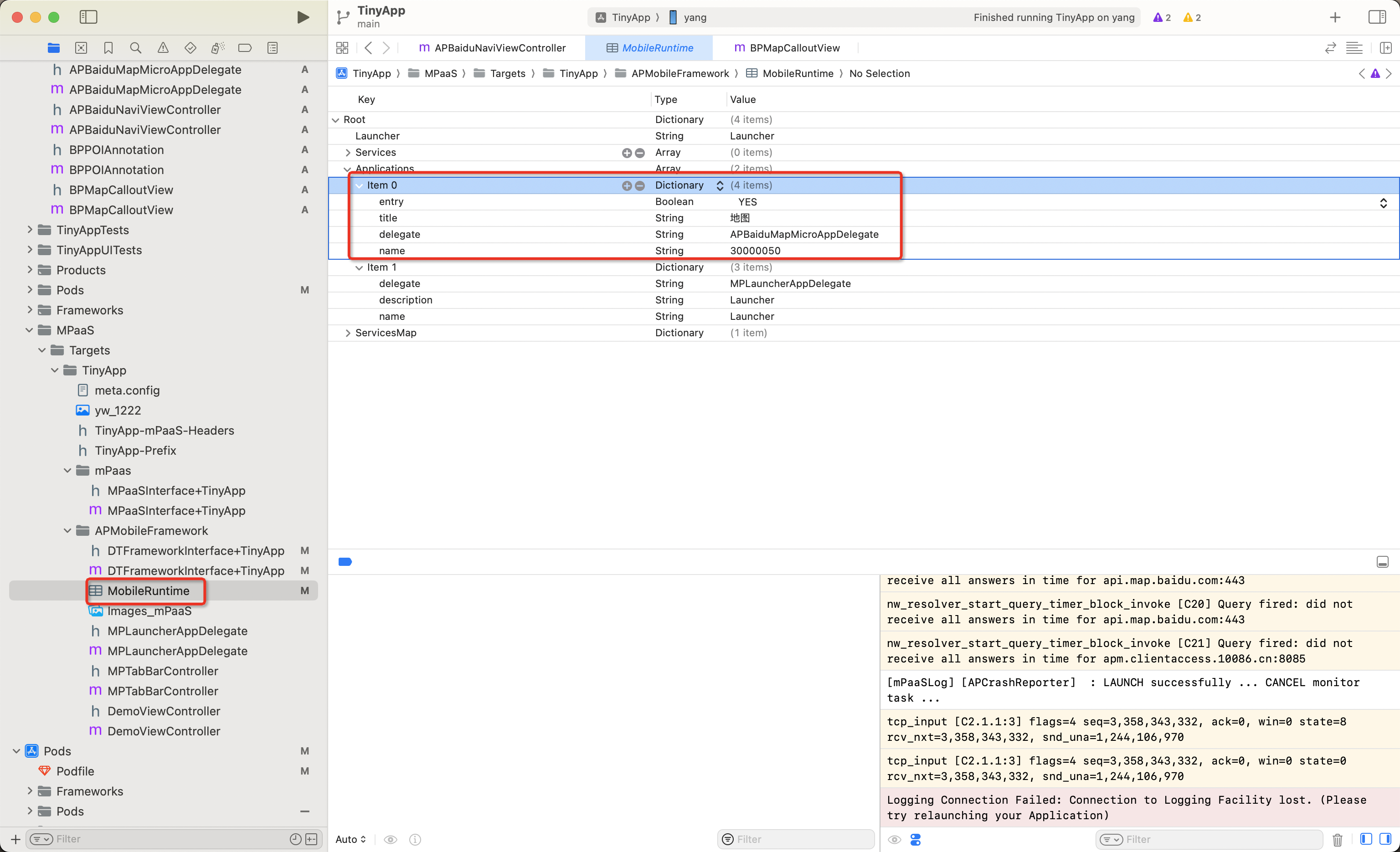
Create the
APMobileFramework/MobileRuntime.plistfile in the project folder if it does not exist.Add a new item under the Applications node in MobileRuntime.plist:
delegate: APBaiduMapMicroAppDelegate
name: 30000050
title: Map
entry: YES (BOOL)