This document is intended for systems that have integrated the gateway Service Provider Interface (SPI), such as business systems that expose mpaaschannel or Dubbo API services. This document does not apply to business systems that use HTTP APIs.
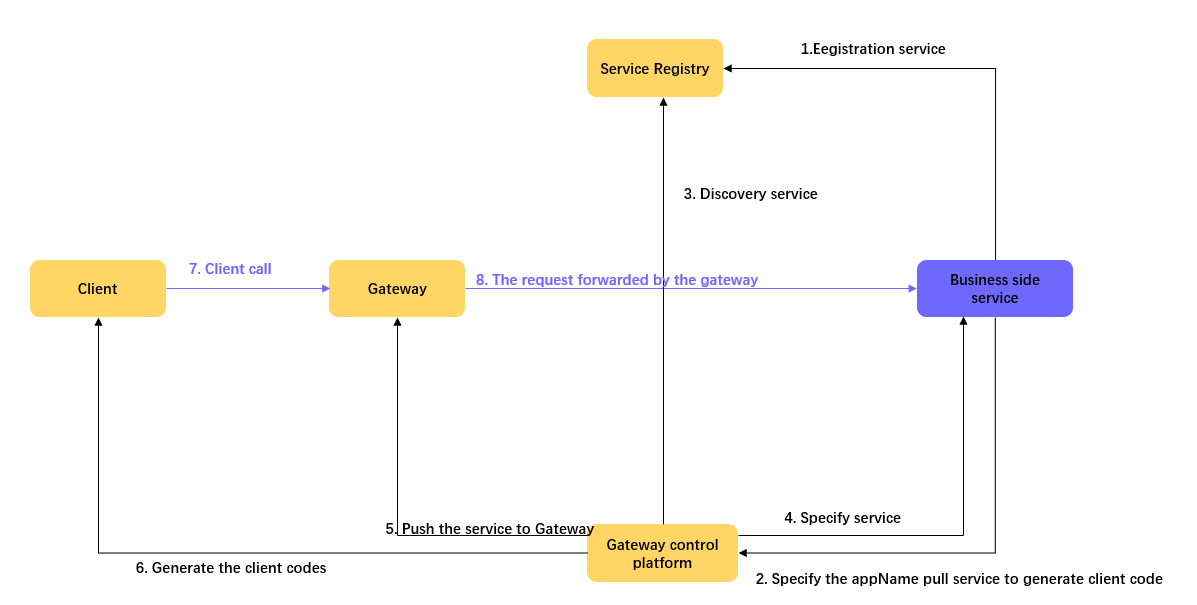
Import gateway packages
In your project's main pom.xml file, import the following packages. If your project already has these dependencies, you can skip this step.
You must import all basic dependencies.
Basic dependencies
<dependency>
    <groupId>com.alipay.gateway</groupId>
    <artifactId>mobilegw-unify-spi-adapter</artifactId>
    <version>1.0.5.20201010</version>
</dependency>
<dependency>
    <groupId>com.alipay.gateway</groupId>
    <artifactId>mobilegw-unify-log</artifactId>
    <version>1.0.5.20201010</version>
</dependency>
<dependency>
    <groupId>com.alipay.hybirdpb</groupId>
    <artifactId>classparser</artifactId>
    <version>1.2.2</version>
</dependency>
<dependency>
    <groupId>org.apache.commons</groupId>
    <artifactId>commons-lang3</artifactId>
    <version>3.5</version>
</dependency>
<dependency>
    <groupId>com.alibaba</groupId>
    <artifactId>fastjson</artifactId>
    <version>1.2.72_noneautotype</version>
</dependency>
<dependency>
    <groupId>com.alipay.gateway</groupId>
    <artifactId>mobilegw-unify-common</artifactId>
    <version>1.0.5.20201010</version>
</dependency>
MPC dependencies
<dependency>
    <groupId>com.alipay.gateway</groupId>
    <artifactId>mobilegw-unify-spi-mpc</artifactId>
    <version>1.0.5.20201010</version>
</dependency>
<dependency>
    <groupId>com.alipay.mpaaschannel</groupId>
    <artifactId>common</artifactId>
    <version>2.4.2019040801</version>
</dependency>
<dependency>
    <groupId>com.alipay.mpaaschannel</groupId>
    <artifactId>tenant-client</artifactId>
    <version>2.4.2019040801</version>
</dependency>
Define and implement the service interface
Define the service interface, such as com.alipay.xxxx.MockRpc, based on your requirements. Then, provide an implementation for the interface, such as com.alipay.xxxx.MockRpcImpl.
In method definitions, define input parameters as Value Objects (VOs). This practice lets you add parameters to the VO later without changing the method's signature.
For more information about the specifications for defining service interfaces, see Business interface definition specifications.
Define the operationType
Add the @OperationType annotation to the method in the service interface to define the name of the published service. The @OperationType annotation has three members:
value: The unique identifier for the RPC service. The format isorganization.product_domain.product.sub_product.operation.name: The name of the interface.desc: A description of the interface.
The
valuemust be globally unique within the gateway. To avoid conflicts with other services, define this value with a high level of detail. A naming conflict can prevent your service from registering.For easier maintenance, ensure that you fill in all three fields of the
@OperationTypeannotation.
Example:
public interface MockRpc {

    @OperationType("com.alipay.mock")
    Resp mock(Req s);

    @OperationType("com.alipay.mock2")
    String mock2(String s);
}

public static class Resp {
    private String msg;
    private int    code;

    // ignore getter & setter
}

public static class Req {
    private String name;
    private int age;

    // ignore getter & setter
}
Then, use the SPI package provided by the gateway to register the defined API service with the specified registry.
Register an MPC API service
Registering an MPC API service requires the following parameters:
registryUrl: The address of the registry. The address for the shared financial technology registry ismpcpub.mpaas.cn-hangzhou.aliyuncs.com.appName: The name of your application. This must be the same as the API group name.workspaceId: The workspace ID of the environment where the application is located.projectName: The project name of the tenant that the application belongs to. This must be the same as the Project Name in the API group.privateKeyPath: The classpath for the RSA private key. This key is used to verify the connection to mpaaschannel. We recommend that you place it in/META-INF/config/rsa-mpc-pri-key-{env}.der, where{env}represents different environments, such as dev, sit, or prod.
Configure the public key
In the console for the corresponding environment, choose Code Management > Interface Keys > Configure in the navigation pane on the left. Configure the RSA public key that corresponds to your private key.
The following commands show how to generate an RSA key pair. Configure the public key in the console. Configure the private key file in the ${privateKeyPath} of your backend application:
* the way to generate key pair:
* ### Generate a 2048-bit RSA private key
*
* $ openssl genrsa -out private_key.pem 2048
*
* ### Convert private Key to PKCS#8 format (so Java can read it)
*
* $ openssl pkcs8 -topk8 -inform PEM -outform DER -in private_key.pem -out private_key.der -nocrypt
*
* ### Output public key portion in DER format (so Java can read it)
*
* $ openssl rsa -in private_key.pem -pubout -outform DER -out public_key.der
*
* ### change to base64:
*
* ## The generated private key, to be configured in the backend application
* $ openssl base64 -in private_key.der -out private_key_base64.der
*
* ## The generated public key, to be configured in Interface Keys in the console
* $ openssl base64 -in public_key.der -out public_key_base64.der
*
* ### remember to clear the whitespace chars and line breaks before submit!!!
Spring method
In the spring configuration file of the corresponding bundle, declare the Spring bean for the defined service.
<bean id="mockRpc" class="com.alipay.gateway.spi.mpc.test.MockRpcImpl"/>In the spring configuration file of the corresponding bundle, declare the starter bean that exposes the service.
The
MpcServiceStarterinterface registers all beans that have theOperationTypeannotation with the specified registry using the mpaaschannel protocol.<bean id="mpcServiceStarter" class="com.alipay.gateway.spi.mpc.MpcServiceStarter"> <property name="registryUrl" value="${registy_url}"/> <property name="appName" value="${app_name}"/> <property name="workspaceId" value="${workspace_id}"/> <property name="projectName" value="${project_name}"/> <property name="privateKeyPath" value="${privatekey_path}"/> </bean>
Spring Boot method
The Spring Boot method is essentially the same as the Spring method. The only difference is that you use annotations for registration instead of an XML configuration file.
Use an annotation to register the defined service as a bean:
@Service
public class MockRpcImpl implements MockRpc{
}
Use an annotation to define the starter that exposes the service:
@Configuration
public class MpaaschannelDemo {
 @Bean(name="mpcServiceStarter")
 public MpcServiceStarter mpcServiceStarter(){
     MpcServiceStarter mpcServiceStarter = new MpcServiceStarter();
     mpcServiceStarter.setWorkspaceId("${workspace_id}");
     mpcServiceStarter.setAppName("${app_name}");
     mpcServiceStarter.setRegistryUrl("${registy_url}");
     mpcServiceStarter.setProjectName("${project_name}");
     mpcServiceStarter.setPrivateKeyPath("${privatekey_path}");
     return mpcServiceStarter;
 }
}
Configure MPC logs
To facilitate troubleshooting, you can configure MPC-related logs. The following example shows a log4j configuration:
<!-- [MPC Logger] tenant link, records connection establishment and settings information -->
    <appender name="MPC-TENANT-LINK-APPENDER" class="org.apache.log4j.DailyRollingFileAppender">
        <param name="file" value="${log_root}/mpaaschannel/tenant-link.log"/>
        <param name="append" value="true"/>
        <param name="encoding" value="${file.encoding}"/>
        <layout class="org.apache.log4j.PatternLayout">
            <param name="ConversionPattern" value="%d [%X{remoteAddr}][%X{uniqueId}] %-5p %c{2} - %m%n"/>
        </layout>
    </appender>

    <!-- [MPC Logger] records data related to a stream (including a pair of tenant stream <-> component stream) -->
    <appender name="MPC-STREAM-DATA-APPENDER" class="org.apache.log4j.DailyRollingFileAppender">
        <param name="file" value="${log_root}/mpaaschannel/stream-data.log"/>
        <param name="append" value="true"/>
        <param name="encoding" value="${file.encoding}"/>
        <layout class="org.apache.log4j.PatternLayout">
            <param name="ConversionPattern" value="%d [%X{remoteAddr}][%X{uniqueId}] %-5p %c{2} - %m%n"/>
        </layout>
    </appender>


<!-- [MPC Logger] tenant log -->
    <logger name="TENANT-LINK-DIGEST" additivity="false">
        <level value="INFO" />
        <appender-ref ref="MPC-TENANT-LINK-APPENDER" />
        <appender-ref ref="ERROR-APPENDER" />
    </logger>

    <!-- [MPC Logger] component log -->
    <logger name="STREAM-DATA-DIGEST" additivity="false">
        <level value="INFO" />
        <appender-ref ref="MPC-STREAM-DATA-APPENDER" />
        <appender-ref ref="ERROR-APPENDER" />
    </logger>
Results
After you complete these steps, you can perform several operations in the gateway to expose the API service to clients. For more information, see Register API.