The Code Scanner SDK is used by Alipay to detect QR codes, barcodes, and more. This topic describes how to integrate the Code Scanner component into an iOS client based on an existing project and using CocoaPods.
Prerequisites
You have successfully connected your project to mPaaS. For more information, see Connecting to mPaaS with an Existing Project and CocoaPods.
Add the SDK
To add the Code ner SDK using the cocoapods-mPaaS plugin, follow these steps:
In the Podfile, add the dependency for the Code Scanner component using
mPaaS_pod "mPaaS_ScanCode".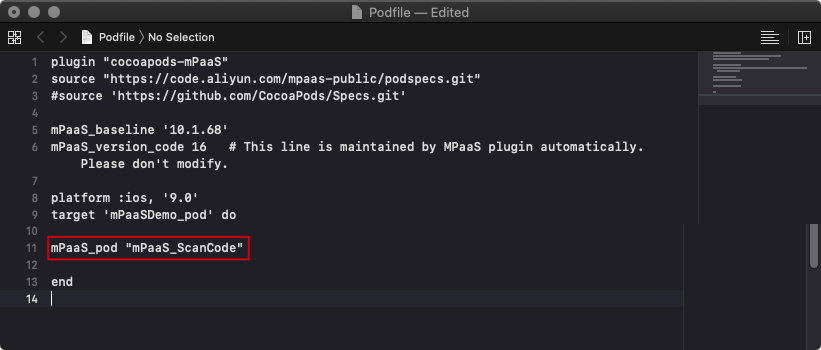
Run
pod installon the command line to complete the integration.
Use the SDK (10.1.68.17 or later)
This section describes how to use the Code Scanner SDK in baselines 10.1.68.17 and later. The examples are from the official Code Scanner demo.
Multi-code detection is supported only in the standard interface.
The procedure is as follows:
Call the standard scan page and process the scan result.
  @interface MPScanDemoVC()<TBScanViewControllerDelegate>
  @property(nonatomic, strong) TBScanViewController *scanVC;
  @end
 - (void)defaultScan {
    TBScanViewController *vc = [[MPScanCodeAdapterInterface sharedInstance] createDefaultScanPageWithallback:^(id  _Nonnull result, BOOL keepAlive) {
0000000000000000        // Process the scan result
        UIAlertView *alert = [[UIAlertView alloc] initWithTitle:@"" message:result[@"resp_result"] delegate:self cancelButtonTitle:@"OK" otherButtonTitles:nil, nil];
         alert.tag = 1999;
         [alert show];
     }];
     [self.navigationController pushViewController:vc animated:YES];
     self.scanVC =  vc;
 }
Scan continuously.
 - (void)alertView:(UIAlertView *)alertView clickedButtonAtIndex:(NSInteger)buttonIndex {
     // Scan continuously
     [self.scanVC resumeScan];
 }
Use the SDK (earlier than 10.1.68.17)
This section describes how to use the Code Scanner SDK in baselines earlier than 10.1.68.17. The examples are from the official Code Scanner demo.
The procedure is as follows:
Call the scan interface.
 @interface MPScanDemoVC()<TBScanViewControllerDelegate>
 @property(nonatomic, strong) TBScanViewController *scanVC;
 @end
 - (void)startDefauleScanViewController
 {
     TBScanViewController *vc = [[TBScanViewController alloc] init];
     vc.scanType = ScanType_All_Code;
     vc.delegate = self;
     [self.navigationController pushViewController:vc animated:YES];
     self.scanVC = vc;
 }
Process the scan result.
 #pragma mark Process the scan result
 -(void)didFind:(NSArray<TBScanResult*>*)resultArray
 {
     if([resultArray count] > 0) {
         TBScanResult *result = resultArray.firstObject;
         NSString* content = result.data;

         dispatch_async(dispatch_get_main_queue(), ^{
             // Note: The scan result is returned in a subthread. Switch to the main thread for UI-related operations.
             UIAlertView *alert = [[UIAlertView alloc] initWithTitle:@"" message:content delegate:self cancelButtonTitle:@"OK" otherButtonTitles:nil, nil];
             [alert show];
         });
     }
 }
Scan continuously.
 #pragma mark alert
 - (void)alertView:(UIAlertView *)alertView clickedButtonAtIndex:(NSInteger)buttonIndex {
     [self.scanVC resumeScan];
 }