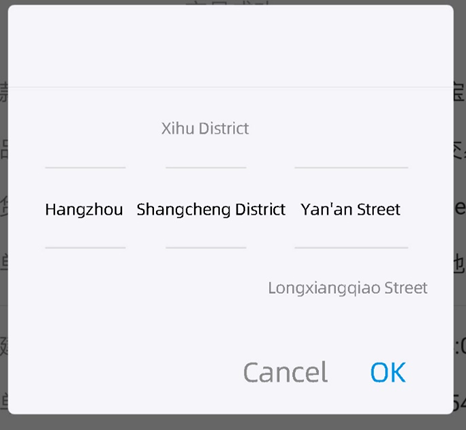
AUCascadePicker is a multi-level cascade picker control that supports up to three levels.
Preview
API reference
// Sets the selected item for the picker.
@interface AUCascadePickerSelectedRowItem : NSObject

@property (nonatomic, strong) NSString *selectedLeftTitle;    // The title of the selected item in the first sublist.
@property (nonatomic, strong) NSString *selectedMiddleTitle;  // The title of the selected item in the second sublist.
@property (nonatomic, strong) NSString *selectedRightTitle;   // The title of the selected item in the third sublist.

@end

@interface  AUCascadePickerRowItemModel : NSObject

@property (nonatomic, strong) NSString *rowTitle;
@property (nonatomic, strong) NSArray<AUCascadePickerRowItemModel *> *rowSubList;

@end

// The data model required for the filter interaction.
@interface AUCascadePickerModel : NSObject

@property (nonatomic,strong) AUCascadePickerSelectedRowItem            *preSelected;   // The pre-selected item.
@property (nonatomic, strong) AUCascadePickerSelectedRowItem           *selectedItem;  // The list of selected data recorded within the current component.
@property (nonatomic, strong) NSArray<AUCascadePickerRowItemModel *>   *dataList ;     // The data list.
@property (nonatomic, strong) NSString *title;                                         // The picker title.

@end


@interface AUCascadePicker : AUPickerBaseView <UIPickerViewDataSource, UIPickerViewDelegate>

@property (nonatomic, strong) AUCascadePickerModel *dataModel;
@property (nonatomic, assign) NSInteger numberOfComponents;
@property (nonatomic, weak) id <AUCascadePickerDelegate> linkageDelegate;

- (instancetype)initWithPickerModel:(AUCascadePickerModel *)model;

@end

// Callback for the "Cancel" & "Done" buttons at the top.
@protocol AUCascadePickerDelegate <AUPickerBaseViewDelegate>
/*
 * Callback for when Cancel is tapped.
 */
- (void)cancelPickerView:(AUCustomDatePicker *)pickerView;

/*
 * Callback for when Done is tapped. The selected item can be returned through selectedRowInComponent.
 */
- (void)selectedPickerView:(AUCustomDatePicker *)pickerView

@end
JSAPI reference
API: antUIGetCascadePicker
Example
AlipayJSBridge.call('antUIGetCascadePicker',
{
    title: 'nihao',// The title of the cascade picker.
    selectedList:[{"name":"Hangzhou",subList:[{"name":"Shangcheng District"}]}],
    list: [
        {
            name: "Hangzhou",// The item name.
            subList: [
                {
                    name: "Xihu District",
                    subList: [
                        {
                            name: "Gucui Street"
                        },
                        {
                            name: "Wenxin Street"
                        }
                    ]
                },
                {
                    name: "Shangcheng District",
                    subList: [
                        {
                            name: "Yanan Street"
                        },
                        {
                            name: "Longxiangqiao Street"
                        }
                    ]
                }
            ]// The cascaded sublist of data.
        }
    ]// The cascaded data list.
},
function(result){
    console.log(result);
});
Input parameters
Property | Type | Description | Required | Version |
title | String | The title of the cascade control. | No | 10.1.2 |
selectedList | Json | The selected state. Specifies the selected sub-item. The format is the same as the request parameter format. Example: | No | 10.1.2 |
list | Json | The data list for the picker. | Yes | 10.1.2 |
name | String | The name of an item in the list. | Yes | 10.1.2 |
subList | Json | The sub-item list. This is a sublist within the list. | No | 10.1.2 |
fn | Function | The callback function that is executed after a selection is made. | No | 10.1.2 |
Output parameters
Property | Type | Description | Version |
success | bool | Indicates whether the selection was completed. Returns false if the operation was canceled. | 10.1.2 |
result | Json | The selection result. Example: | 10.1.2 |
Code example
    model = [[AULinkagePickerModel alloc] init];

    NSMutableArray *modelList = [[NSMutableArray alloc] init];
    for (int i=0; i<6; i++)
    {
        AULinkagePickerRowItemModel *item = [[AULinkagePickerRowItemModel alloc] init];
        item.rowTitle = [NSString stringWithFormat:@"Layer 1: %d", i];
        NSMutableArray *array = [[NSMutableArray alloc] init];
        for (int j=0; j<7; j++)
        {
            if (i == 0)
            {
                break;
            }
            AULinkagePickerRowItemModel *item1 = [[AULinkagePickerRowItemModel alloc] init];
            item1.rowTitle = [NSString stringWithFormat:@"Layer 2: %d", j];
            NSMutableArray *array1 = [[NSMutableArray alloc] init];
            for (int k=0; k<5; k++) {
                AULinkagePickerRowItemModel *item2 = [[AULinkagePickerRowItemModel alloc] init];
                item2.rowTitle = [NSString stringWithFormat:@"Layer 3: %d", k];
                [array1 addObject:item2];
                if (j == 1 || j== 2) {
                    break;
                }
            }
            item1.rowSubList = array1;
            [array addObject:item1];
            if (i == 3 || i== 5) {
                break;
            }
        }
        item.rowSubList = array;
        [modelList addObject:item];
    }

    model.dataList = modelList;


    AULinkagePickerSelectedRowItem *item = [[AULinkagePickerSelectedRowItem alloc] init];
    item.selectedLeftTitle = @"Layer 1: 0";
    item.selectedMiddleTitle = @"Layer 2: 0";
    item.selectedRightTitle = @"Layer 3: 0";

    model.selectedItem = item;

self.linkagePickerView = [[AULinkagePickerView alloc] initWithPickerModel:model];
self.linkagePickerView.linkageDelegate = self;
[self.linkagePickerView show];