Background
Starting April 28, 2026, Apple requires all App Store submissions to be built with Xcode 26 or later. See the official Apple announcement for details. Xcode 26 also drops support for building apps targeting iOS versions earlier than 15.6. See the Xcode 26 release notes for a full list of changes.
Current status
mPaaS baseline 10.2.3.70 and later are adapted and tested for Xcode 26. If you are on baseline 10.1.68 (deprecated) or earlier, upgrade to the latest 10.2.3 version. Note that mPaaS no longer supports iOS versions earlier than 14.
Upgrade baseline
Choose an upgrade path based on your current baseline version.
10.2.3 main baseline
See mPaaS 10.2.3 compatibility with Xcode 26 to upgrade to the latest 10.2.3 baseline and apply the required adjustments.
Customized baseline
If you are on a customized baseline, search for and join the DingTalk group with ID 145930007362, or submit a ticket to ask technical support whether you can switch to the 10.2.3 baseline.
Upgrade methods
Upgrade with CocoaPods
To install the latest 10.2.3 SDK:
Set the mPaaS component version in your Podfile to 10.2.3.
Run
pod mpaas update 10.2.3. If this command returns an error, runpod mpaas update --allto update the plugin first, then rerun the original command.Run
pod install.
Upgrade notes
When compiling with Xcode 26, add the following parameters to Other Linker Flags: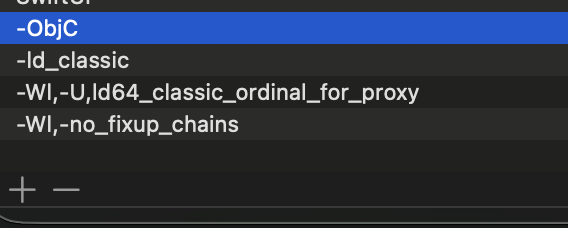
-ObjC
-ld_classic
-Wl,-U,ld64_classic_ordinal_for_proxy
-Wl,-no_fixup_chains
API changes
This Xcode 26 compatibility update introduces no API changes.
Updated libraries
Mobile Gateway
Mobile Scheduling
Data Synchronization
Message Push
SM algorithm
multimedia
mini program
Security Keyboard
Some internal dependency components
Testing and validation scope
Apple toolchain upgrades can introduce stability issues. After adapting your app for Xcode 26, run a comprehensive regression test.