Whitelist management is a core feature of Mobile Delivery Service. It provides a platform to manage whitelists, allowing you to easily create whitelists with hundreds of thousands of entries.
On the whitelist management page, you can create whitelists, add users to whitelists, and delete whitelists.
Create a whitelist
Log on to the mPaaS console. In the left navigation pane, click Mobile Delivery Service > Whitelist Management to open the whitelist list page.
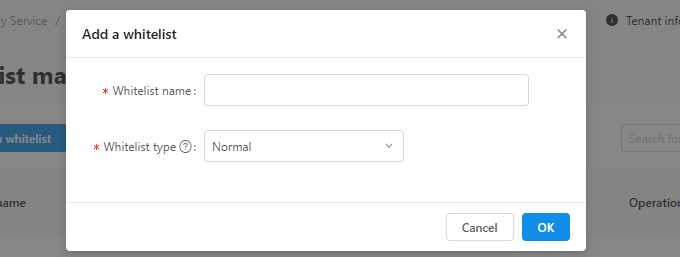
On the whitelist list page, click Add a Whitelist. In the dialog box that appears, enter a name, select a type for the whitelist, and then click OK.
Normal: The whitelist contains specific user IDs. A user is included in the whitelist only if their ID is an exact match.
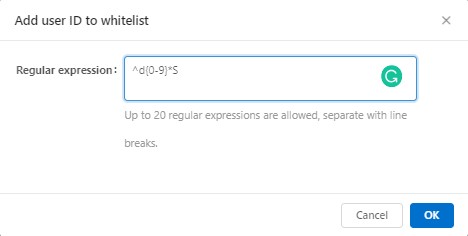
Regular expression mode: The whitelist contains multiple regular expressions. A user is included in the whitelist if their ID matches any of the regular expressions.
Add user information to a whitelist
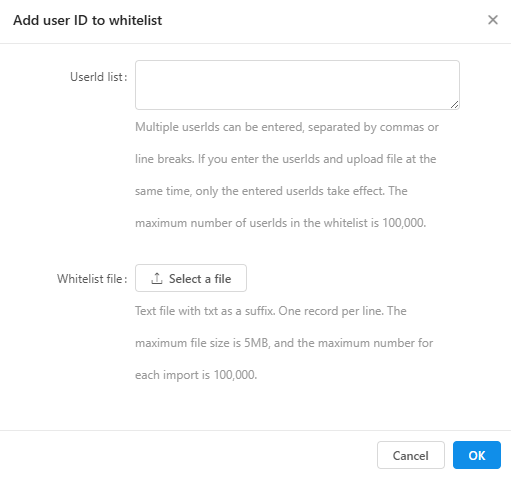
Click Add next to the target whitelist in the list. In the dialog box that appears, enter the user IDs or regular expressions that you want to add.
For normal-type whitelists, you must configure the user IDs on the client.
NoteFor instructions on adding user IDs on Android, see User activation instrumentation.
For instructions on adding user IDs on iOS, see Configure user ID.
You can separate multiple user IDs with commas or line breaks. You can also upload a file that contains the user IDs.
You can add a user to the whitelist using a regular expression pattern.
When you are finished, click OK.
Delete a whitelist
To delete a whitelist, click Delete next to the target whitelist in the list.