Search, edit, or delete campaign units, and view campaign performance metrics.
Search for a campaign unit
Search for a campaign unit by name or ID.
-
Enter the campaign unit name or ID in the search box in the upper-right corner of the list.
-
Click Search to find the matching campaign units.
Edit a campaign unit
If a campaign unit contains an online campaign, you cannot edit the unit. The Edit option is not available in the Operation column.
To edit campaign unit information such as the name and conversion rate metrics:
-
In the list, click Edit in the Operation column for the target campaign unit.
-
In the Modify Campaign Unit dialog box, modify the campaign unit information. Parameters are the same as in Create a campaign unit.
-
Click OK to save your changes.
Delete a campaign unit
If a campaign unit contains an online campaign, you cannot delete the unit. The Delete option is not available in the Operation column.
To delete a campaign unit:
-
In the list, click Delete in the Operation column for the target campaign unit.
-
In the dialog box, click OK to confirm the deletion.
View campaign performance
In the campaign unit list, click Performance in the Operation column for a campaign unit to view its performance across multiple dimensions. You can view performance for a specific campaign or all campaigns within the unit.
When you view a specific campaign, you can also see the performance of all marketing channels or a specific marketing channel for that campaign.
The campaign performance dashboard has two sections: Campaign Overview and Campaign Retention.
Campaign overview
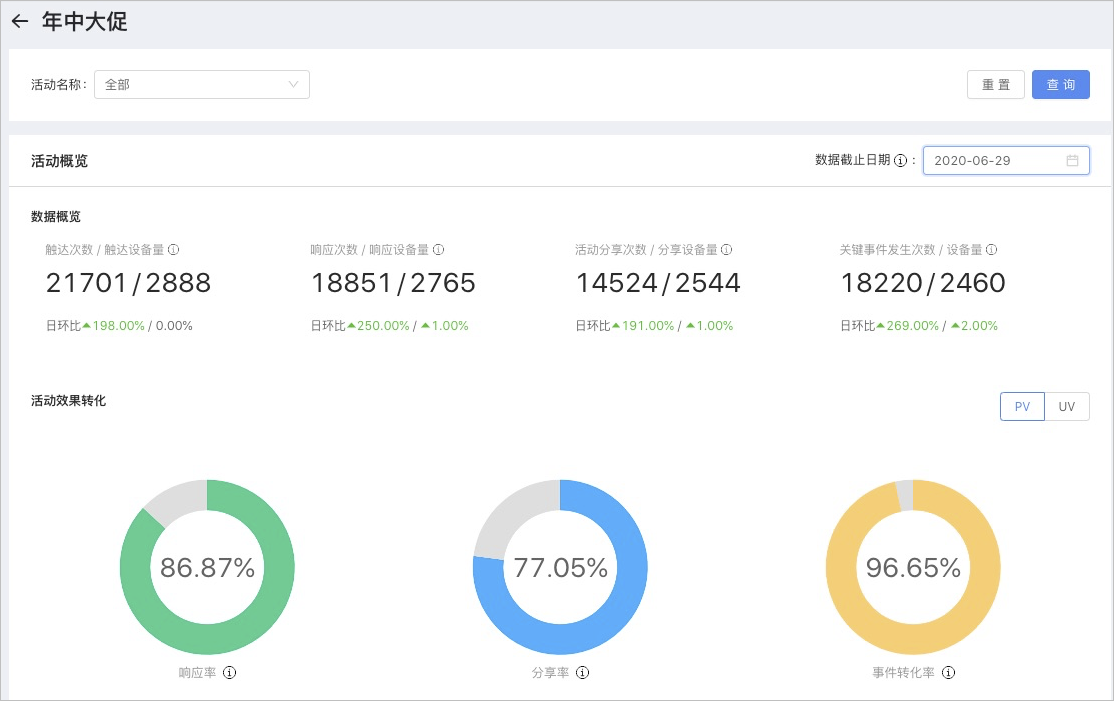
The Campaign Overview section covers data overview, campaign conversion, and campaign performance metrics.
-
Data Overview: All metrics include day-over-day comparison showing percentage change from the previous day.
Metric
Description
Reach count
The total number of ad impressions for ad slots and successful push notifications for a campaign within a specified period.
Reached devices
The sum of the total number of unique devices that displayed any ad material and the number of devices that successfully received a push notification within a specified period.
Response count
Total ad clicks and push notification clicks within a specified period.
Responding devices
The sum of the number of users who clicked an ad and the total number of unique devices that clicked a push notification within a specified period.
Campaign share count
Times the campaign was shared via the share button on the landing page within a specified period. Requires accurate client-side instrumentation and sharing support on the campaign page.
Sharing devices
Unique devices that clicked the share button on the landing page within a specified period. Requires accurate client-side instrumentation and sharing support on the campaign page.
Key event occurrences
Times the associated Mobile Analysis event occurred after a user clicked the campaign ad within a specified period.
Devices with key events
Unique devices on which the associated Mobile Analysis event occurred after an ad click within a specified period.
-
Campaign Conversion: Metrics viewable by page views (PV) and unique visitors (UV).
Metric
Description
Response rate
Responding devices as a percentage of all reached devices.
Share rate
Sharing devices as a percentage of all responding devices.
Event conversion rate
Devices where the associated Mobile Analysis event occurred as a percentage of all responding devices.
-
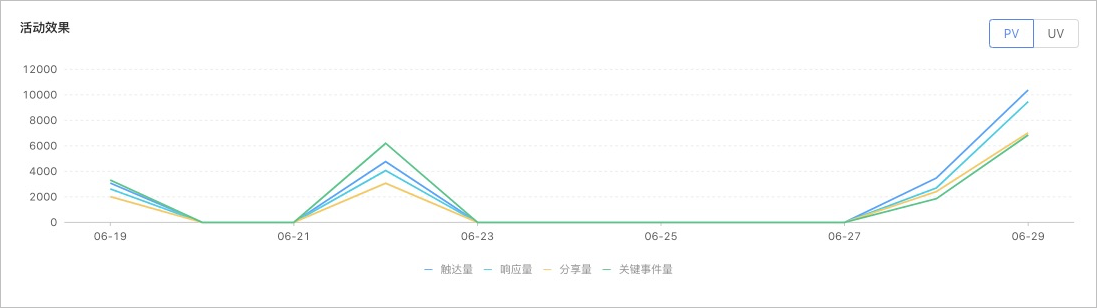
Campaign Performance: Shows change trends for reach count, response count, share count, and key event occurrences since the campaign went online. View by PV and UV.
Campaign retention
The Campaign Retention section shows user retention from the start of campaign delivery. Smart delivery displays retention for each day of the first week, plus Day 15 and Day 30. By default, the retention window spans from campaign start to the current date, up to 30 days.