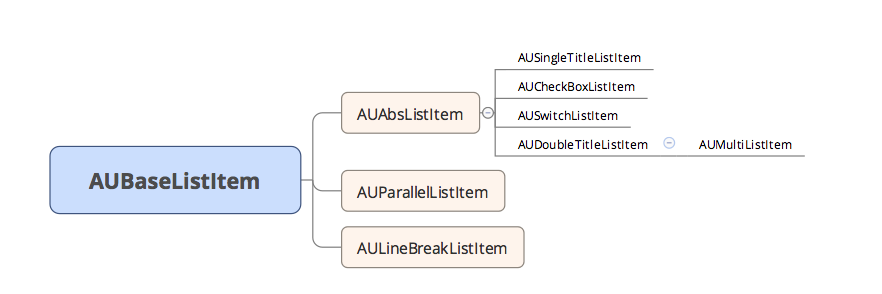
AUListItem is a list item component, including the following controls:
AUSingleTitleListItem
AUDoubleTitleListItem
AUCheckBoxListItem
AUSwitchListItem
AUMultiListItem
AUParallelTitleListItem
AULineBreakListItem
Sample images
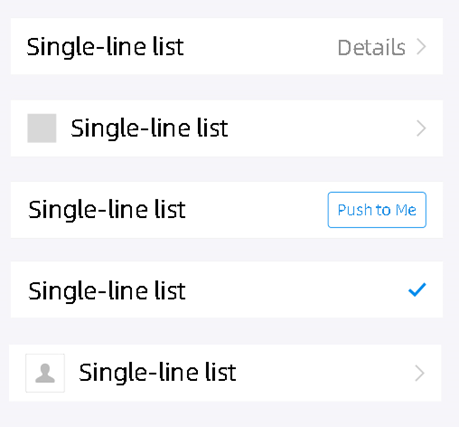
AUSingleTitleListItem
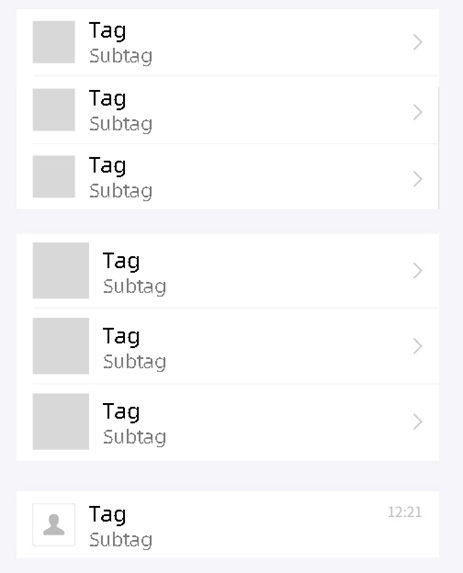
AUDoubleTitleListItem
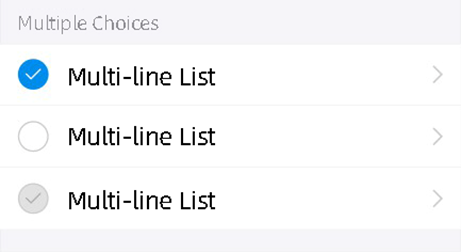
AUCheckBoxListItem
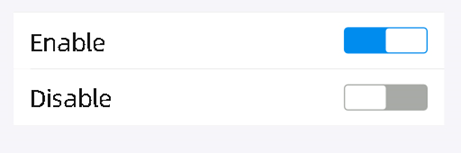
AUSwitchListItem
Dependency
See Getting Started.
API description
Basic APIs
/**
* Set the item type, including upper, medium, and lower.
*
* @param positionStyle AULineGroupItemInterface.NORMAL TOP BOTTOM CENTER LINE NONE
*/
public void setItemPositionStyle(int positionStyle)

/**
* Specify whether the arrow on the right is visible.
* @param isVisible
*/
public void setArrowVisibility(boolean isVisible)
AUParallelListItem
/**
 * Set the text in four positions simultaneously.
 * @param leftText
 * @param leftSubText
 * @param rightText
 * @param rightSubText
 */
public void setParallelText(String leftText, String leftSubText, String rightText, String rightSubText)

/**
 * Set the main text on the left.
 * @param leftText
 */
public void setLeftText(String leftText)

/**
 * Set the main text on the right.
 * @param rightText
 */
public void setRightText(String rightText)

/**
 * Set the auxiliary text on the left.
 * @param leftSubText
 */
public void setLeftSubText(String leftSubText)

/**
 * Set the auxiliary text on the right.
 * @param rightSubText
 */
public void setRightSubText(String rightSubText)
AULineBreakListItem
/**
 * Set the text on the left and right.
 * @param left
 * @param right
 */
public void setText(String left, String right)

/**
 * Get the left TextView.
 * @return
 */
public AUTextView getLeftText()

/**
 * Get the right TextView.
 * @return
 */
public AUTextView getRightText()
Public APIs
/**
 * Set the size of the icon image.
 */
public void setIconSize(float width, float height)

/**
 * Get the main text on the left.
 * @return
 */
public CharSequence getLeftText()

/**
 * Set the main text on the left.
 * @param text
 */
public void setLeftText(CharSequence text)

/**
 * Set the color of the main text on the left.
 * @param color
 */
public void setLeftTextColor(int color)

/**
 * Get the view of the left-side image.
 * @return
 */
public AURoundImageView getLeftRoundImageView()
public AUImageView getLeftImageView()

/**
 * Set the left-side image.
 * @param resId
 */
public void setLeftImage(int resId)

/**
 * Set the left-side image.
 * @param drawable
 */
public void setLeftImage(Drawable drawable)

/**
 * Set visibility when setLeftImage is set in the API.
 * If setLeftImage is called after this API is called, the system will reset the visibility.
 *
 * @param vis View.GONE
 */
public void setLeftImageVisibility(int vis)

/**
 * Get text information on the left.
 * @return
 */
public AUTextView getLeftTextView()
}
AUSingleTitleListItem
/**
 * Set the Select button on the right.
 * @param checked
 */
public void setItemChecked (boolean checked)


/**
 * Set text information on the right.
 * @param text
 */
public void setRightText(CharSequence text)

/**
 * Set the color of the text on the right.
 * @param color
 */
public void setRightTextColor(int color)

/**
 * Set the right-side image.
 */
public void setRightImage(int resId)
public void setRightImage(Bitmap bitmap)
public void setRightImage(Drawable drawable)

/**
 * Get the view of the text on the right.
 * @return
 */
public AUTextView getRightTextView()

/**
 * Get the view of the right-side image.
 * @return
 */
public AUImageView getRightImageView()

/**
 * Set text information on the right.
 * @param text
 */
public void setRightButtonText(CharSequence text)

/**
 * Get the button.
 * @return
 */
public AUProcessButton getProcessButton()

/**
 * Set the button clicking listener.
 * @param listener
 */
public void setButtonClickListener(OnClickListener listener)

/**
 * Set the style on the right.
 * @param type AUAbsListItem.TEXT_IMAGE AUAbsListItem.BUTTON
 */
public void setRightType(int type)
AUCheckBoxListItem
/**
 * Get the check icon on the left.
 * @return
 */
public AUCheckIcon getLeftCheckIcon()

/**
 * Set the icon state.
 * @param status AUCheckIcon.STATE_CHECKED|STATE_UNCHECKED|STATE_DISABLED
 */
public void setCheckstatus(int status)

/**
 * Get the check state.
 * @return
 */
public int getIconState()
AUSwitchListItem
/**
 * Set switch status listening.
 * @param onCheckedChangeListener
 */
public void setOnSwitchListener (CompoundButton.OnCheckedChangeListener onCheckedChangeListener)

/**
 * Get the switch.
 * @return
 */
public AUSwitch getSwitch()

/**
 * Return the switch status.
 * @return Indicates whether the switch is enabled.
 */
public boolean isSwitchOn()

/**
 * Set the switch status.
 * @param status
 */
public void setSwitchStatus(boolean status)

/**
 * Set the state to enable or disable.
 * @param enabled
 */
public void setSwitchEnabled(boolean enabled)
AUDoubleTitleListItem
/**
 * Set the auxiliary text on the left.
 * @param text
 */
public void setLeftSubText(CharSequence text)

/**
 * Set the text on the right.
 * @param text
 */
public void setRightText(CharSequence text)

/**
 * Set the font and color of the text on the right.
 * @param color
 */
public void setRightTextColor(int color)

/**
 * Get the view of the text on the right.
 * @return
 */
public AUTextView getRightTextView()

/**
 * Get the view of the auxiliary text on the left.
 * @return
 */
public AUTextView getLeftSubTextView()

/**
 * Set text information on the right.
 * @param text
 */
public void setRightButtonText(CharSequence text)

/**
 * Get the button.
 * @return
 */
public AUProcessButton getProcessButton()

/**
 * Set the button clicking listener.
 * @param listener
 */
public void setButtonClickListener(OnClickListener listener)

/**
 * Set the style on the right.
 * @param type AUAbsListItem.TEXT_IMAGE AUAbsListItem.BUTTON
 */
public void setRightType(int type)
AUMultiListItem
/**
 * Add an extended view to the left.
 * @param view
 */
public void addLeftAssistantView(View view)

/**
 * Set the auxiliary text on the left.
 * @param text
 */
public void setLeftSubText(CharSequence text)

/**
 * Get the subtitle text.
 * @return
 */
public AUEmptyGoneTextView getLeftSubTextView()
Custom attributes
Property | Description | Type |
listItemType | Sets the position style. | normal/top/bottom/center/line/none |
listLeftText | The text on the left. | string, reference |
listLeftSubText | The auxiliary text on the left. | string, reference |
listLeftTextSize | The font size of the text on the left. | dimension |
listLeftSubTextSize | The font size of the auxiliary text on the left. | dimension |
listLeftTextColor | The color of the text on the left. | color, reference |
listLeftSubTextColor | The color of the auxiliary text on the left. | color, reference |
listLeftImage | The left-side icon. | reference |
listLeftImageWidth | The width of the left-side image. | dimension, reference |
listLeftImageHeight | The height of the left-side image. | dimension, reference |
listShowArrow | Whether to show the arrow on the right. | boolean |
listArrowType | Direction of arrow. | arrow_right/arrow_down/arrow_up |
listRightText | The text on the right. | string, reference |
listRightSubText | The auxiliary text on the right. | string, reference |
listRightType | The style on the right. | text_image/button |
listRightImage | The right-side image. | string, reference |
listShowCheck | The checking image on the right. | boolean |
The following code sample (XML) shows the attributes supported in each control.
If you want to change the color of the background by clicking it, please add the attribute:
android:clickable="true".The height of the control, the width and height of the left image are custom based on business requirements.
Sample code
Introduce XML namespace. When the SDK is accessed in Native AAR mode, define xmlns:app="http://schemas.android.com/apk/res-auto" to make all the elements with the same app prefix are associated with the same namespace. The following takes app as an example.
Introduce XML namespace. When the SDK is accessed in component mode, define xmlns:aui="http://schemas.android.com/apk/res/com.alipay.mobile.antui" to make all the elements with the same aui prefix are associated with the same namespace.
AUParallelListItem
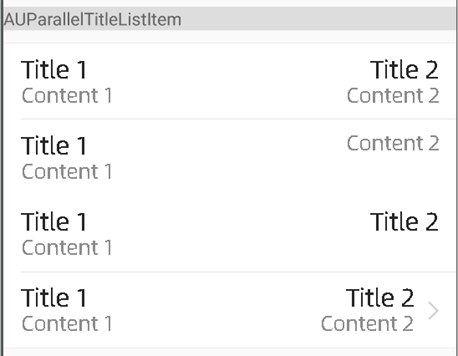
<com.alipay.mobile.antui.tablelist.AUParallelTitleListItem
    android:layout_width="match_parent"
    android:layout_height="wrap_content"
    android:clickable="true"
    app:listItemType="top"
    app:listLeftText="Title 1"
    app:listLeftSubText="Content 1"
    app:listRightText="Title 2"
    app:listRightSubText="Content 2"
    app:listShowArrow="false" />

<com.alipay.mobile.antui.tablelist.AUParallelTitleListItem
    android:layout_width="match_parent"
    android:layout_height="wrap_content"
    android:clickable="true"
    app:listItemType="center"
    app:listLeftText="Title 1"
    app:listLeftSubText="Content 1"
    app:listRightSubText="Content 2"
    app:listShowArrow="false" />

<com.alipay.mobile.antui.tablelist.AUParallelTitleListItem
    android:layout_width="match_parent"
    android:layout_height="wrap_content"
    android:clickable="true"
    app:listItemType="center"
    app:listLeftText="Title 1"
    app:listLeftSubText="Content 1"
    app:listRightText="Title 2"
    app:listShowArrow="false" />
AULineBreakListItem
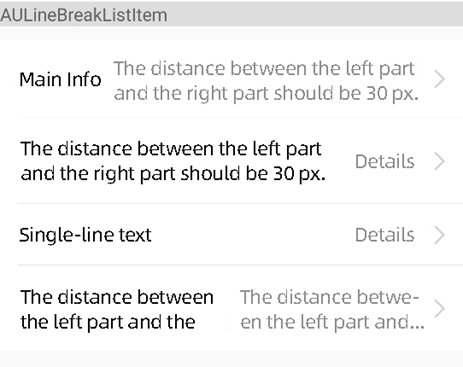
<com.alipay.mobile.antui.tablelist.AULineBreakListItem
    android:layout_width="match_parent"
    android:layout_height="wrap_content"
    app:listItemType="top"
    app:listLeftText="Main info"
    app:listRightText="The distance between the left part and the right part should be 30 px."/>

<com.alipay.mobile.antui.tablelist.AULineBreakListItem
    android:layout_width="match_parent"
    android:layout_height="wrap_content"
    app:listItemType="center"
    app:listLeftText="The distance between the left part and the right part should be 30 px."
    app:listRightText="Details"/>

<com.alipay.mobile.antui.tablelist.AULineBreakListItem
    android:layout_width="match_parent"
    android:layout_height="wrap_content"
    app:listItemType="center"
    app:listLeftText="Single-line text"
    app:listRightText="Details"/>

<com.alipay.mobile.antui.tablelist.AULineBreakListItem
    android:layout_width="match_parent"
    android:layout_height="wrap_content"
    app:listItemType="bottom"
    app:listLeftText="The distance between the left part and the right part should be 30 px."
    app:listRightText="The distance between the left part and the right part should be 30 px."/>
AUSingleTitleListItem
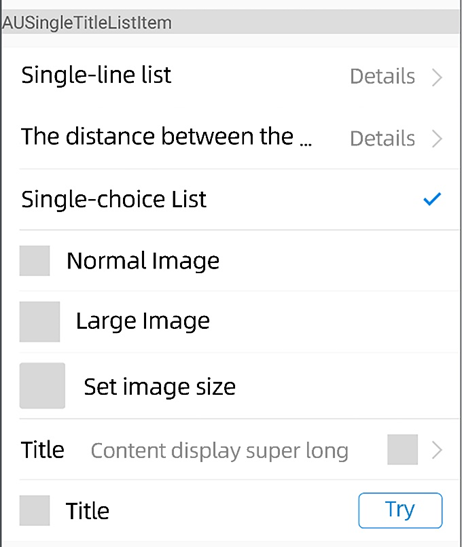
<com.alipay.mobile.antui.tablelist.AUSingleTitleListItem
    android:layout_width="match_parent"
    android:layout_height="wrap_content"
    android:clickable="true"
    app:listItemType="top"
    app:listLeftText="Single-line list"
    app:listRightText="Details" />

<com.alipay.mobile.antui.tablelist.AUSingleTitleListItem
    android:layout_width="match_parent"
    android:layout_height="wrap_content"
    android:clickable="true"
    app:listItemType="center"
    app:listLeftText="The distance between the left part and the right part should be 30 px."
    app:listRightText="Details" />

<com.alipay.mobile.antui.tablelist.AUSingleTitleListItem
    android:layout_width="match_parent"
    android:layout_height="wrap_content"
    app:listItemType="center"
    app:listLeftText="Single-choice list"
    app:listShowCheck="true" />

<com.alipay.mobile.antui.tablelist.AUSingleTitleListItem
    android:layout_width="match_parent"
    android:layout_height="wrap_content"
    app:listItemType="center"
    app:listLeftImage="@drawable/image"
    app:listLeftText="Normal Image"
    app:listShowArrow="false" />

<com.alipay.mobile.antui.tablelist.AUSingleTitleListItem
    android:layout_width="match_parent"
    android:layout_height="wrap_content"
    app:listItemType="center"
    app:listLeftImage="@drawable/image"
    app:listLeftImageSizeType="size_large"
    app:listLeftText="Large Image"
    app:listShowArrow="false" />

<com.alipay.mobile.antui.tablelist.AUSingleTitleListItem
    android:layout_width="match_parent"
    android:layout_height="wrap_content"
    android:clickable="true"
    app:hasRound="true"
    app:listItemType="center"
    app:listLeftImage="@drawable/image"
    app:listLeftImageHeight="36dp"
    app:listLeftImageWidth="36dp"
    app:listLeftText="Set image size"
    app:listShowArrow="false" />

<com.alipay.mobile.antui.tablelist.AUSingleTitleListItem
    android:layout_width="match_parent"
    android:layout_height="wrap_content"
    android:clickable="true"
    app:listItemType="center"
    app:listLeftText="Title"
    app:listRightImage="@drawable/image"
    app:listRightText="Content display extra long" />


<com.alipay.mobile.antui.tablelist.AUSingleTitleListItem
    android:id="@+id/button_item"
    android:layout_width="match_parent"
    android:layout_height="wrap_content"
    app:listItemType="bottom"
    app:listLeftImage="@drawable/image"
    app:listLeftText="Title"
    app:listRightText="Try"
    app:listRightType="button"/>
AUDoubleTitleListItem
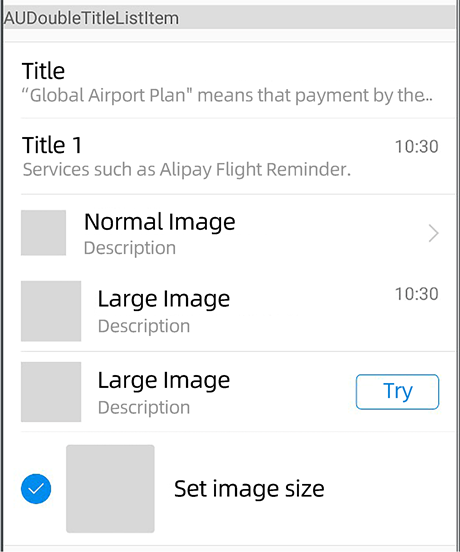
<com.alipay.mobile.antui.tablelist.AUDoubleTitleListItem
    android:layout_width="match_parent"
    android:layout_height="wrap_content"
    android:clickable="true"
    app:listItemType="center"
    app:listLeftSubText="Services such as Alipay Flight Reminder."
    app:listLeftText="Title"
    app:listRightText="10:30"
    app:listShowArrow="false" />

<com.alipay.mobile.antui.tablelist.AUDoubleTitleListItem
    android:layout_width="match_parent"
    android:layout_height="wrap_content"
    android:clickable="true"
    app:listItemType="center"
    app:listLeftImage="@drawable/testapp_icon"
    app:listLeftSubText="Description text"
    app:listLeftText="Normal Image" />

<com.alipay.mobile.antui.tablelist.AUDoubleTitleListItem
    android:layout_width="match_parent"
    android:layout_height="wrap_content"
    android:clickable="true"
    app:listItemType="center"
    app:listLeftImage="@drawable/testapp_icon"
    app:listLeftImageSizeType="size_large"
    app:listLeftSubText="Description text"
    app:listLeftText="Large Image"
    app:listRightText="10:30"
    app:listShowArrow="false" />

<com.alipay.mobile.antui.tablelist.AUDoubleTitleListItem
    android:layout_width="match_parent"
    android:layout_height="wrap_content"
    android:clickable="true"
    app:listItemType="bottom"
    app:listLeftImage="@drawable/testapp_icon"
    app:listLeftImageSizeType="size_multi"
    app:listLeftSubText="Global Airport Plan" means Alipay will give tourists in overseas airports access to services such as Flight Reminder.
    app:listLeftText="Pics & Text list"
    app:listShowArrow="false" />

<com.alipay.mobile.antui.tablelist.AUDoubleTitleListItem
    android:layout_width="match_parent"
    android:layout_height="wrap_content"
    android:clickable="true"
    app:listItemType="center"
    app:listLeftImage="@drawable/image"
    app:listLeftImageSizeType="size_large"
    app:listLeftSubText="Description"
    app:listLeftText="Large Image"
    app:listRightText="Try"
    app:listRightType="button" />


<com.alipay.mobile.antui.tablelist.AUDoubleTitleListItem
    android:id="@+id/testLitItem"
    android:layout_width="match_parent"
    android:layout_height="wrap_content"
    android:layout_marginBottom="20dp"
    android:layout_marginTop="10dp"
    android:clickable="true"
    app:listItemType="normal"
    app:listLeftImage="@drawable/testapp_icon"
    app:listLeftImageHeight="70dp"
    app:listLeftImageWidth="70dp"
    app:listLeftSubText="Click the button to set the type"
    app:listLeftText="Set image size" />
AUCheckBoxListItem
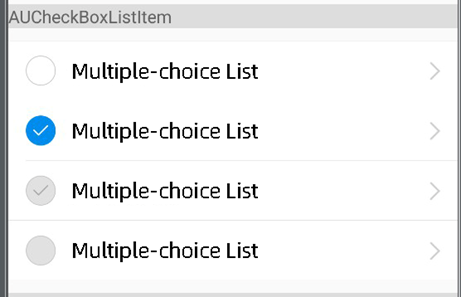
<com.alipay.mobile.antui.tablelist.AUCheckBoxListItem
    android:layout_width="match_parent"
    android:layout_height="wrap_content"
    android:clickable="true"
    app:listItemType="top"
    app:listLeftText="Multiple-choice List" />

<com.alipay.mobile.antui.tablelist.AUCheckBoxListItem
    android:layout_width="match_parent"
    android:layout_height="wrap_content"
    android:clickable="true"
    app:checkIconState="checked"
    app:listItemType="center"
    app:listLeftText="Multiple-choice List" />

<com.alipay.mobile.antui.tablelist.AUCheckBoxListItem
    android:layout_width="match_parent"
    android:layout_height="wrap_content"
    android:clickable="true"
    app:checkIconState="cannot_uncheck"
    app:listItemType="bottom"
    app:listLeftText="Multiple-choice List" />

<com.alipay.mobile.antui.tablelist.AUCheckBoxListItem
    android:layout_width="match_parent"
    android:layout_height="wrap_content"
    android:clickable="true"
    app:checkIconState="cannot_check"
    app:listItemType="bottom"
    app:listLeftText="Multiple-choice List" />
AUSwitchListItem
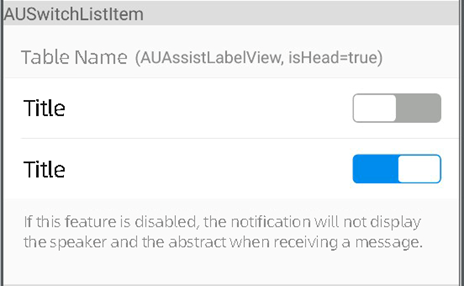
<com.alipay.mobile.antui.tablelist.AUSwitchListItem
    android:layout_width="match_parent"
    android:layout_height="48dp"
    app:listItemType="top"
    app:listLeftText="Title" />

<com.alipay.mobile.antui.tablelist.AUSwitchListItem
    android:id="@+id/disable_switch_list_item"
    android:layout_width="match_parent"
    android:layout_height="48dp"
    app:listItemType="bottom"
    app:listLeftText="Title" />