Resolve the "System busy, please try again later" error when loading HTML5 apps or mini programs in mPaaS by checking RPC requests and offline package configuration.
Problem description
After you complete basic access and attempt to open an HTML5 app, the container page displays “The system is busy, please try it again later”.
Common causes
Before opening an HTML5 app, the mPaaS client pulls the offline package information through the alipay.client.getUnionResource RPC API. If the client fails to retrieve the offline package information or cannot match the target app, the container displays “The system is busy, please try it again later”.
To resolve this error, verify the RPC request and check the offline package release status and environment configuration.
Troubleshooting procedure
Verify the RPC request
The client relies on RPC requests to pull offline package information (Common causes). If the RPC link fails, the offline package cannot be retrieved and loading fails. Search for alipay.client.getUnionResource in the Xcode console to check whether the RPC request returns correctly. Common error codes belong to the 7XXX or 3XXX series:
-
Normal return (
result-statusis1000):
Demo[83767:2555863] [mPaaSLog] APMobileNetwork alipay.client.getUnionResource resp:{
    "Content-Encoding" = gzip;
    "Content-Type" = "text/plain;charset=UTF-8";
    Date = "Tue, 11 Aug 2020 05:01:37 GMT";
    Vary = "Accept-Encoding";
    "mgw-traceid" = 0a1cfd401597122097726853822435;
    "result-status" = 1000;
    "server-time" = 1597122097739;
}-
Error return (
result-statusis not1000):
Demo[83383:2546279] [mPaaSLog] APMobileNetwork alipay.client.getUnionResource resp:{
    "Content-Length" = 0;
    "Content-Type" = "text/plain;charset=UTF-8";
    Date = "Tue, 11 Aug 2020 04:50:08 GMT";
    memo = "%E9%AA%8C%E7%AD%BERPC%E6%8E%A5%E5%8F%A3%20%E5%8A%A0%E7%AD%BE%E6%95%B0%E6%8D%AE%E4%B8%BA%E7%A9%BA";
    "mgw-traceid" = 0a1d7667159712140890222728553;
    "result-status" = 7014;
    "server-time" = 1597121408902;
    tips = "%E9%AA%8C%E7%AD%BERPC%E6%8E%A5%E5%8F%A3%20%E5%8A%A0%E7%AD%BE%E6%95%B0%E6%8D%AE%E4%B8%BA%E7%A9%BA";
}
RPC 7XXX errors
7XXX errors relate to the RPC signature verification process (Description of Gateway Result Code). Common error codes:
|
Error code |
Description |
Examples |
|
7000 |
Public key has not been set up |
The mobile app has no key for the appId in Security Guard, or the gateway cannot retrieve the signature key for the appId. |
|
7001 |
Parameters for signature verification are not sufficient |
Signature verification on the gateway server side has failed. |
|
7002 |
Unable to verify the signature. |
Signature verification on the gateway server side has failed. |
|
7003 |
Signature verification - time-sensitive failure |
The API request timestamp (ts) exceeds the system time limit. Verify that the client clock is accurate. |
|
7007 |
Signature verification - missing of ts parameters |
The API request is missing the ts parameters of signature verification. |
|
7014 |
Signature verification - missing of sign parameters |
The API request is missing the sign parameter. This usually means the client failed to sign the data. Verify that the Security Guard image on the client is correct. |
-
Troubleshooting steps:
-
Verify that the
Bundle IDon the mPaaS console matches the iOS project exactly:-
Bundle IDon the mPaaS console (Console > Code Configuration > iOS). -
Bundle Indentifierof the project: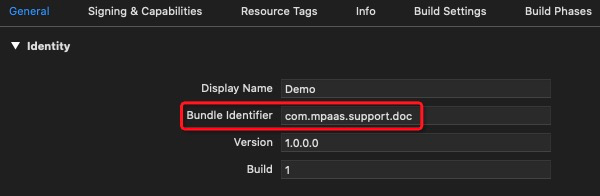
-
Bundle Indentifierof theInfo.plistin the project: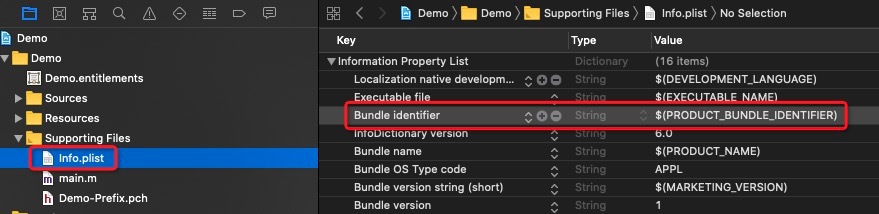
-
-
Verify that the
.configfile downloaded from the console matchesmeta.configin the project:-
.configfile downloaded by the mPaaS console: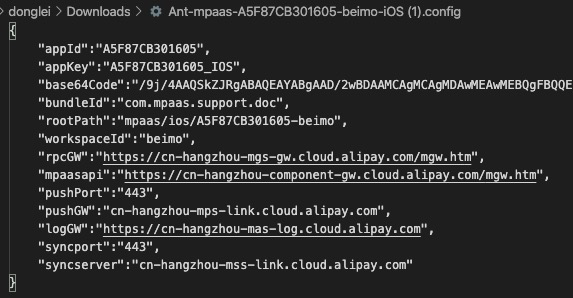
-
meta.configin the project: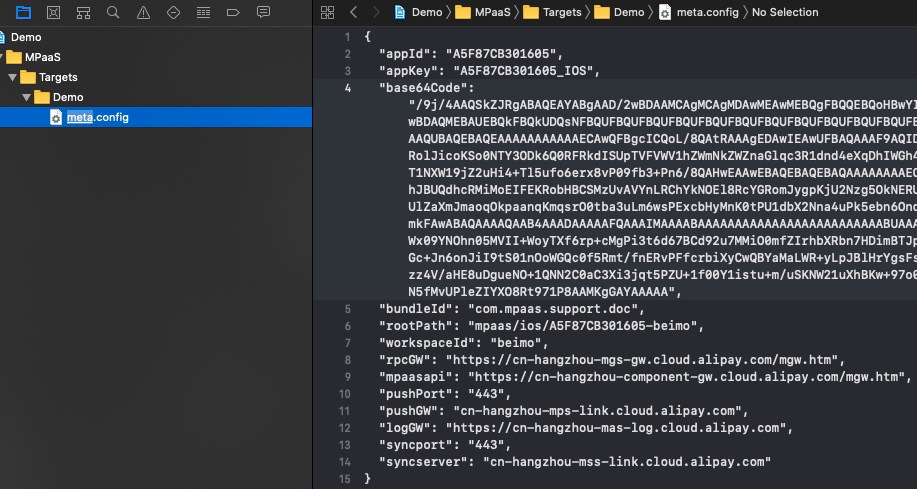
-
-
Verify that the client device clock is accurate. The time difference must be less than 8 hours.
-
Apsara Stack developers must generate Security Guard images manually and add them to the project. Public cloud (aliyun.com) developers can skip this step.
-
If any inconsistency is found, take the following actions:
-
Update the project configuration to match the mPaaS console.
-
Correct the device time if inaccurate.
-
Download the latest
.configfile from the console and re-import it through the mPaaS Extension plug-in: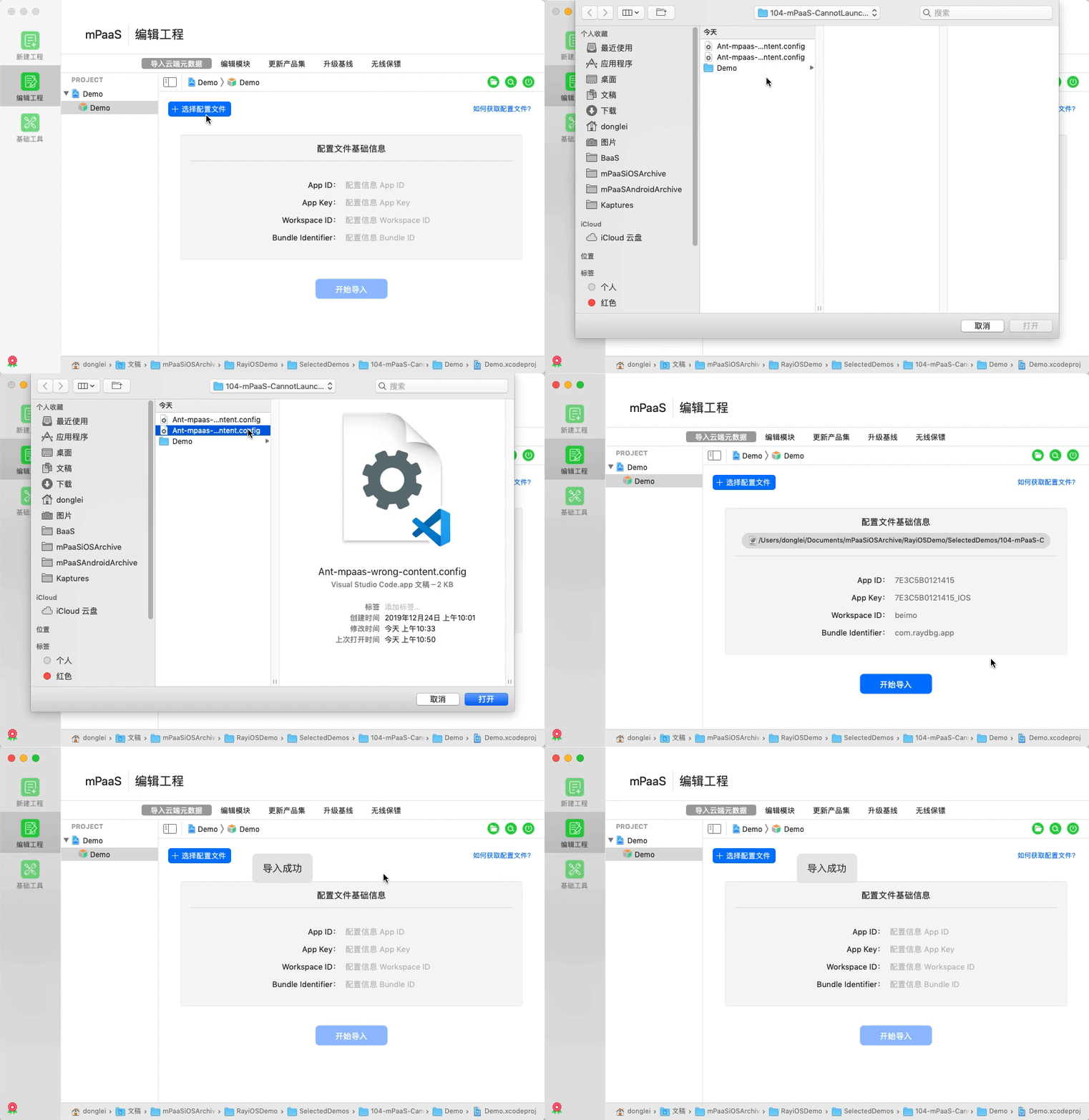
-
After correcting all issues, uninstall the app, repackage and compile it, and verify that the RPC 7XXX error is resolved.
-
RPC 3XXX errors
RPC 3XXX errors apply only to Apsara Stack environments. Public cloud (aliyun.com) developers can skip this section.
If gateway data encryption is enabled (Console > Backend Service Management > Mobile Gateway > Gateway Management Tab Page > Data Encryption) but the client encryption is not configured correctly, the alipay.client.getUnionResource RPC request may return a 3XXX error:
|
Error code |
Description |
Examples |
|
3001 |
The requested data is null |
The |
|
3002 |
Wrong data format |
The RPC request format is invalid. Apsara Stack users can check the |
|
3003 |
Failed to decrypt data |
Failed to decrypt data. |
Troubleshooting steps:
-
Verify that mobile gateway data encryption is enabled in the console.
-
Verify the client encryption configuration (key match, format) against the Data Encryption Configuration Document.
-
After correcting the configuration, uninstall the app, repackage and compile it, and verify that the RPC 3XXX error is resolved.
Verify HTML5 app information and release status
Even if the RPC request succeeds (Common causes), loading can still fail if the server does not return the target offline package. This results in an AppNotExist error.
Troubleshooting steps:
-
Verify that the
alipay.client.getUnionResourceRPC request returns correctly by following the Verify the RPC request section above. -
Search for
AppNotExistin the Xcode console to confirm whether the target HTML5 app was not found:
-
Cross-check the following between the mPaaS console and the iOS project:
-
for such metadata as worksapceId,appId, andmpaasapi: these must match exactly between the console andmeta.config. If they differ, re-download the.configfile and re-import it. -
The offline package ID on the management page must match the ID specified in the project code.
-
Confirm that the offline package has a released version.
-
Confirm the resource type is “normal resource package”. A “global resource package” cannot be opened directly.
-
Confirm the released offline package version is later than the version installed on the client.
-
Confirm the release covers the current client version of the test app. Note: For iOS, the client version is the
Produc Versionfield ininfo.plist, not the Xcode projectversion. Synchronize these manually.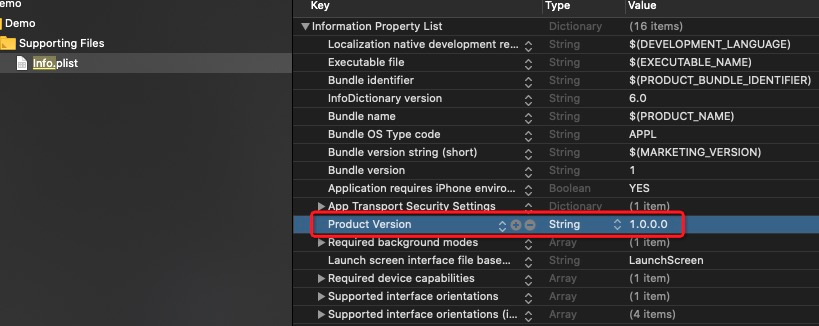
-
After correcting all issues, uninstall the app, repackage and compile it, and verify that the
AppNotExisterror is resolved.
-
Contact support
If the issue persists, prepare a demo project that reproduces the problem and submit a ticket through the Alibaba Cloud Ticket System for mPaaS support.