This topic describes how to fix the 'APOpenSSL does not contain bitcode' error for projects integrated using pods.
Fault description
When you compile an mPaaS iOS project integrated using pods, the following error occurs:
ld: '/Users/xxx/Documents/xxx_project/Pods/APOpenSSL/APOpenSSL.framework/APOpenSSL' does not contain bitcode. You must rebuild it with bitcode enabled (Xcode setting ENABLE_BITCODE), obtain an updated library from the vendor, or disable bitcode for this target. file '/Users/donglei/Documents/mPaaSiOSArchive/RayiOSDemo/SelectedDemos/101-mPaaS-CannotSetStatusBarIssue_pod/Demo/Pods/APOpenSSL/APOpenSSL.framework/APOpenSSL' for architecture arm64
clang: error: linker command failed with exit code 1 (use -v to see invocation)
Solution
The APOpenSSL.framework library does not support bitcode. In Target > Build Settings > Build Options, set Enable Bitcode to NO.
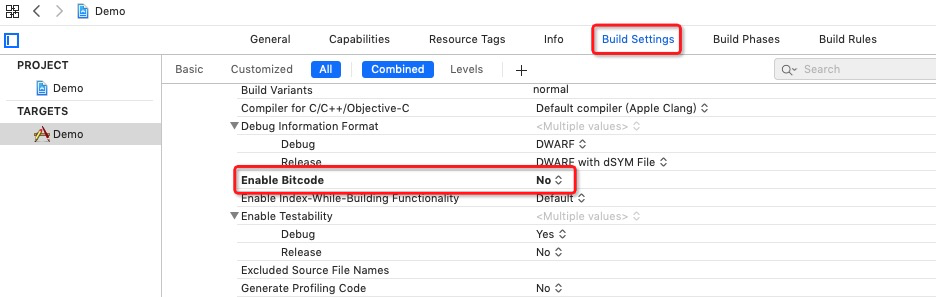
The project will then compile successfully.