Standard key-value (KV) storage supports only simple data types or encapsulated Objective-C objects and does not support searches. If your service needs to access SQLite, you can use the Data Access Object (DAO) feature of the unified storage service. This feature simplifies and encapsulates database operations as follows:
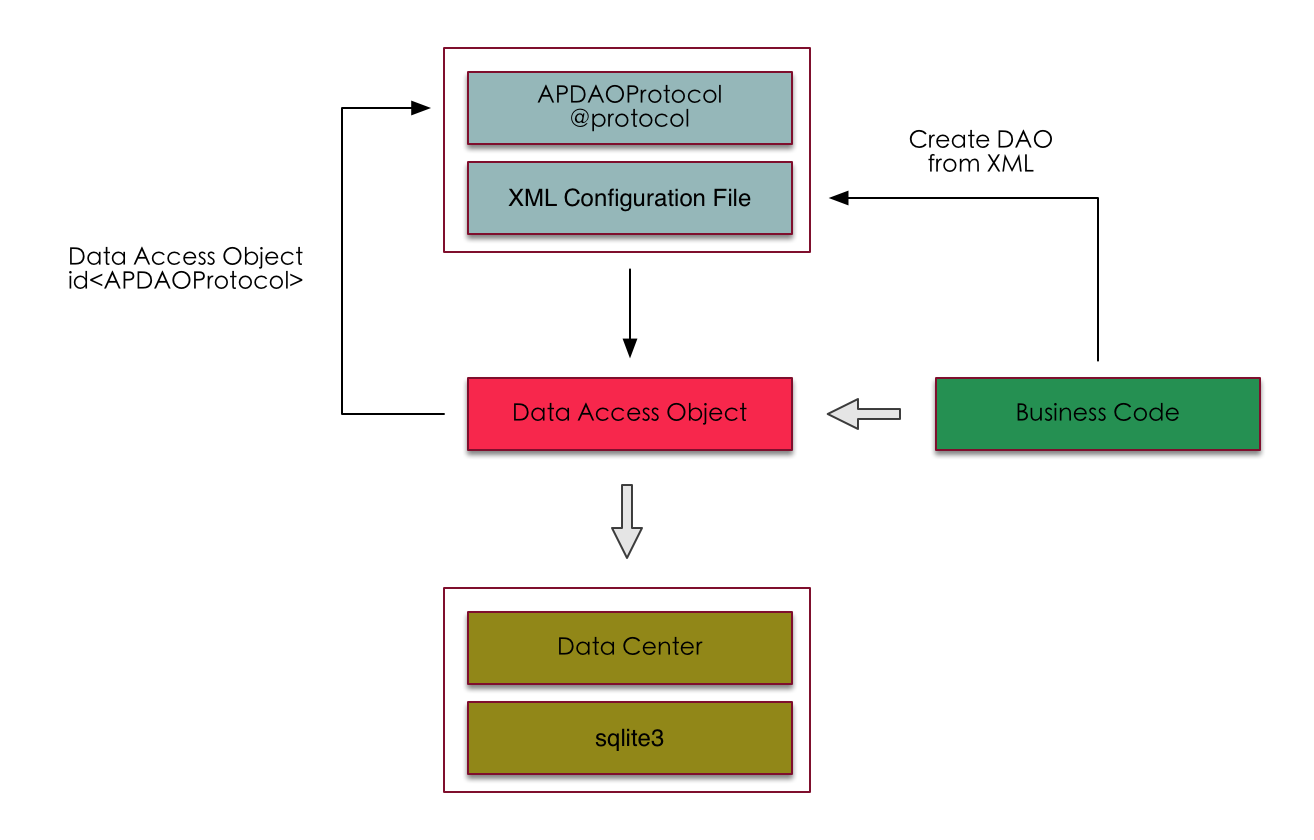
Define a configuration file in XML format. This file describes the function, return value type, and fields to encrypt for each SQLite operation.
Define an interface for the DAO object, such as
DAOInterface (@protocol). The interface methods and parameters must match the descriptions in the configuration file.Pass the XML configuration file to the
daoWithPathmethod ofAPDataCenterto generate a DAO access object. You can then cast this object toid<DAOInterface>.You can then call the methods of the DAO object. The unified storage service converts the method call into the database operation described in the configuration file.
Example
The first line of the configuration file defines the default table name, database version, and initialization method.
insertItemandgetItemare two methods for inserting and reading data. They accept parameters and format them into an SQL statement.The
createTablemethod is called once by default in the underlying layer.<module name="Demo" initializer="createTable" tableName="demoTable" version="1.0"> <update id="createTable"> create table if not exists ${T} (index integer primary key, content text) </update> <insert id="insertItem" arguments="content"> insert into ${T} (content) values(#{content}) </insert> <select id="getItem" arguments="index" result="string"> select * from ${T} where index = #{index} </select> </module>DAO interface definition:
@protocol DemoProtocol <APDAOProtocol>
- (APDAOResult*)insertItem:(NSString*)content;
- (NSString*)getItem:(NSNumber*)index;
@end
Create a DAO proxy object. Assume the configuration file is named
demo_config.xmland is in the Main Bundle.Use the
insertItemmethod to write data. Then, retrieve its index and use the index to read the data that you wrote.NSString* filePath = [[NSBundle mainBundle] pathForResource:@"demo_config" ofType:@"xml"]; id<DemoProtocol> proxy = [[APDataCenter defaultDataCenter] daoWithPath:filePath userDependent:YES]; [proxy insertItem:@"something"]; long long lastIndex = [proxy lastInsertRowId]; NSString* content = [proxy getItem:[NSNumber numberWithInteger:lastIndex]]; NSLog(@"content %@", content);The
lastInsertRowIdmethod is part ofAPDAOProtocol. It retrieves therowIdof the last inserted row. To enable your DAO object to support this method, you can inherit fromAPDAOProtocolwhen you declare yourDemoProtocol.
Keywords
module
<module name="demo" initializer="createTable" tableName="tableDemo" version="1.5" resetOnUpgrade="true" upgradeMinVersion="1.2">initializer: This parameter is optional. DAO considers theupdatemethod specified byinitializerto be a database table creation method. This method is executed once by default during the first DAO request.tableName: Specifies the default table for the methods below. You can use${T} or ${t}in SQL statements instead of writing the full table name each time. We recommend that each configuration file operates on a single table.tableNamecan be empty to handle cases where a single configuration file operates on multiple tables that have the same format. For example, in table sharding for chat messages, you can call thesetTableNamemethod of the DAO object to set the target table name.version: The version number of the configuration file, in anx.xformat. After a table is created, its version is stored in theTableVersionstable of the database file, withtableNameas the key. This parameter works with theupgradeblock to update the table.resetOnUpgrade: If set to TRUE or YES, the original table is deleted when theversionis updated, instead of calling theupgradeblock. The default value is false.upgradeMinVersion: If not empty, database files with a version lower than this value are reset directly. Otherwise, the upgrade operation is performed.
const
<const table_columns="(id, time, content, uin, read)"/>Defines a string constant.
table_columnsis the name of the constant, and the value is what follows the equals sign (=). You can reference it in the configuration file using${constant_name}.
select
<select id="find" arguments="id, time" result=":messageModelMap">
  select * from ${T} where id = #{id} and time > @{time}
</select>@arguments:
A comma-separated list of parameter names. The parameters passed by the caller are named sequentially based on the description in
arguments. Because the selector call of the DAO object does not include parameter names, you must name them in order here.A dollar sign ($) prefix on a parameter name indicates that the parameter does not accept a nil value. When calling a DAO interface, you can pass nil parameters. If a parameter is prefixed with
$, the DAO call automatically fails if the caller passes a nil value. This prevents unpredictable issues.For more information about how to reference parameters, see Reference methods.
For example, in the code above, the corresponding selector is:
- (MessageModel*)find:(NSNumber*)id time:(NSNumber*)time;If the DAO object calls [daoProxy find:@1234 time:@2014], the resulting SQL statement is:
select * from tableDemo where id = ? and time > 2014The NSNumber @1234 is then bound to SQLite.
@result:
In result, you can specify the return value of the DAO method. Brackets [] indicate an array return type. The select execution iterates until SQLite returns no more results. Without brackets, it returns a single result. The select execution iterates only once. This is similar to calling the next method once on an FMResultSet object in the FMDB library.
Return types:
int: A single result. Returns an[NSNumber numberWithInt]object. Note that overflow is possible.long long: A single result. Returns an[NSNumber numberWithLongLong]object.bool: A single result. Returns an[NSNumber numberWithBool]object.double: A single result. Returns an[NSNumber numberWithDouble]object.string: A single result. Returns anNSString*object.binary: A single result. Returns anNSData*object.[int]: Returns an array of[NSNumber numberWithInt]objects.[long long]: Returns an array of[NSNumber numberWithLongLong]objects.[bool]: Returns an array of[NSNumber numberWithBool]objects.[double]: Returns an array of[NSNumber numberWithDouble]objects.[string]: Returns an array ofNSString*objects.[binary]: Returns an array ofNSData*objects.[{}]: Returns an array of maps. The keys are column names and the values are column values.[AType]: Returns an array of populated custom class objects.{}: A single result. Returns a map where keys are column names and values are column values.AType: A single result. Returns a populated custom class object.[:AMap]: Returns an array of objects mapped using an
AMapdefined in thexmlfile.:AMap: A single result. Uses an
AMapdefined in the configuration file to describe the object.
For example, in the code above, the return type is :messageModelMap. The specific Objective-C type to be returned and any columns that require special mapping are defined in messageModelMap. For more information, see the map keyword.
@foreach: The select tag also supports the foreach attribute. The usage is similar to that in insert, update, and delete, which are described later. The difference is that if a select method specifies the foreach parameter, it executes the SQL select operation N times and returns the results in an array. Therefore, if a DAO select method uses foreach, its return value in the protocol must be defined as NSArray*.
insert/update/delete
<insert id="addMessages" arguments="messages" foreach="messages.model">
    insert or replace into ${T} (id, content, uin, read) values(#{model.msgId}, #{model.content}, #{model.uin}, #{model.read})
</insert>

<update id="createTable">
  <step>
    create table if not exists ${T} (id integer primary key, content text, uin integer, read boolean)
  </step>
  <step>
    create index if not exists uin_idx on ${T} (uin)
  </step>
</update>

<delete id="remove" arguments="msgId">
  delete from ${T} where msgId = #{msgId}
</delete>
The insert, update, and delete methods have the same format. Parameter concatenation and referencing are the same as in the select method.
The insert and delete keywords are used to better distinguish the purpose of the methods. You can write a delete from table operation within an update function.
In the DAO interface, methods that perform insert, update, or delete operations must have a return value of APDAOResult* to indicate whether the execution was successful.
@foreach:
When an insert, update, or delete method has a
foreachattribute, the method executes an SQL statement for each element in the parameter array when called.The foreach attribute must follow the format: collectionName.item. Here, collectionName must correspond to a parameter in arguments, specifying the container object for the loop. It must be an NSArray or NSSet type when called. item represents the object retrieved from the container and is used as the loop variable. It cannot have the same name as any parameter in arguments. This item can be used as a regular parameter in the SQL statement.
For example, the agent method is as follows:
- (void)addMessages:(NSArray*)messages;and messages is an array of MessageModel objects, an SQL call is executed for each model in messages. This lets you insert all elements of the array into the database at once, without requiring the upper layer to handle the loop. The underlying layer merges this operation into a single transaction to improve efficiency.
step
<upgrade toVersion='3.2'>
    <step resumable="true">alter table ${T} add column1 text</step>
    <step resumable="true">alter table ${T} add column2 text</step>
</upgrade>
In insert, update, delete, or upgrade methods, a single DAO method may need to execute multiple SQL update statements. For example, after you create a table, you might also need to create indexes. In the function
Each <step> is executed as a separate SQL update, but the underlying layer merges all operations into a single transaction. The createTable method is an example.
If a function contains a step, no text is allowed outside the step. A step cannot contain another step.
@resumable:
Specifies whether to continue executing subsequent statements if the SQL generated by this step fails. The default value is false. This means steps are executed sequentially, and if any step fails, the entire DAO method is considered to have failed.
map
<map id="messageModelMap" result="MessageModel">
  <result property="msgId" column="id"/>
</map>
Defines a mapping named messageModelMap. The actual generated Objective-C object is of the
MessageModelclass.The msgId property of the Objective-C object corresponds to the value of the id column in the table. Properties that are not listed are assumed to have the same name as the table columns and can be omitted.
upgrade
<upgrade toVersion="1.1">
  <step>
    alter table...
  </step>
  <step>
    alter table...
  </step>
</upgrade>
When a version is upgraded, the database may also need to be upgraded. The SQL statements for handling the upgrade are written here. For example, if the module version in the configuration file was initially 1.0 and is later upgraded to 1.1, the system checks the current table version against the configuration file version when a DAO method is executed for the first time with the new version. If they do not match, the upgrade methods are executed sequentially. This process is called automatically by the underlying layer. The DAO method is executed only after the upgrade is complete.
The upgrade tag is executed as an SQL update. If there is more than one SQL statement, you can wrap them in <step>, similar to the implementation of <update id="createTable">.
To use the operations defined in the upgrade block to upgrade the table, resetOnUpgrade in the module must be set to false.
crypt
<crypt class="MessageModel" property="content"/>This keyword specifies that a class property is encrypted. When writing to the database, the value retrieved from this property is encrypted. When reading from the database, the value is decrypted before being assigned to this property of the generated object.
For example, when executing a DAO method, model is of the MessageModel class. When the content property of the model object is accessed, it is encrypted before being written to the database.
<insert id="insertMessage" arguments="model">
     insert into ${T} (content) values(#{model.content})
</insert>
When this select method is executed, the returned object is of the MessageModel class. When the underlying layer retrieves data from the database to write to the content property of the MessageModel instance, the data is first decrypted. The processed MessageModel object is then returned.
<select id="getMessage" arguments="msgId" result="MessageModel">
     select * from ${T} where msgId = #{msgId}
</select>
The methods for setting the encryption method are defined in APDAOProtocol as follows:
/**
 *  Sets the encryptor to encrypt data in columns marked for encryption. When writing data to the table, this method is called for these columns.
 *
 *  @param crypt The encryption struct. A copy is made. If the passed crypt is created externally, it must be freed externally. If it is APDefaultEncrypt(), no release is needed.
 */
- (void)setEncryptMethod:(APDataCrypt*)crypt;

/**
 *  Sets the decryptor to decrypt data in columns marked for encryption. When reading data from the table, this method is called for these columns.
 *
 *  @param crypt The decryption struct. A copy is made. If the passed crypt is created externally, it must be freed externally. If it is APDefaultDecrypt(), no release is needed.
 */
- (void)setDecryptMethod:(APDataCrypt*)crypt;
If these methods are not set, the default encryption of APDataCenter is used. For more information, see KV storage. If a DAO proxy object is of type id<DAOProtocol> and DAOProtocol is @protocol<APDAOProtocol>, you can call setEncryptMethod and setDecryptMethod on the DAO proxy object to set the encryption and decryption methods.
if
<insert id="addMessages" arguments="messages, onlyRead" foreach="messages.model">
    <if true="model.read or (not onlyRead)">
    insert or replace into ${T} (msgId, content, read) values(#{model.msgId}, #{model.content}, #{model.read})
    </if>
</insert>
You can nest if conditional statements within insert, update, delete, and select methods. When the if condition is met, the text inside the if block is appended to the final SQL statement.
The if tag can be followed by true="expr" or false="expr". expr is an expression that can use method parameters. You can also use the dot (.) operator for chained access to the properties of parameter objects.
The expression supports the following operators:
(): Parentheses
+: Positive sign
-: Negative sign
+ (Plus sign)
Minus sign (-)
*: Multiplication
/: Division
\: Integer division
%: Modulo operation
>: Greater than
<: Less than
>=: Greater than or equal to
<=: Less than or equal to
==: Equal to
!=: Not equal to
and: Logical AND, case-insensitive
or: Logical OR, case-insensitive
not: Logical NOT, case-insensitive
xor: Exclusive OR, case-insensitive
The greater-than (>) and less-than (<) signs must be escaped.
The parameters inside are the names of the parameters passed in from the external call. Do not wrap them in #{} or @{}, unlike in an SQL block.
nil has the same meaning as nil in Objective-C.
Strings in expressions start and end with a single quotation mark. Escape characters are not supported, but \’ can be used to represent a single quotation mark.
When a parameter is an Objective-C object, you can use the dot (.) operator to access its properties. For example, in
model.read, if the parameter is an array or a dictionary, you can useparameter_name.countto retrieve the number of elements.
A more complex expression is as follows:
<if true="(title != nil and year > 2010) or authors.count >= 2">title, year, and authors are parameters passed by the caller. title can be nil. The expression above means "when the book title is not empty and the publication year is after 2010, or the number of authors is greater than or equal to 2."
choose
<choose>
  <when true="title != nil">
    AND title like #{title}
  </when>
  <when true="author != nil and author.name != nil">
    AND author_name like #{author.name}
  </when>
  <otherwise>
    AND featured = 1
  </otherwise>
</choose>
Implements a switch-like syntax. The expression requirements are similar to the if statement. when can be followed by true="expr" or false="expr".
Only the first matching when block or the otherwise block is executed. The otherwise block is optional.
foreach
<foreach item="iterator" collection="list" open="(" separator="," close=")" reverse="yes">
  @{iterator}
</foreach>
open, separator, close, and reverse are optional.
item represents the loop variable, and collection represents the name of the loop array parameter.
For example, a method receives a string array parameter. The content of list is @[@"1", @"2", @"3"]. Another parameter is prefix=@"abc". The items are wrapped in () and separated by ,. The execution result is: (abc1,abc2,abc3).
<update id="proc" arguments="list, prefix">
   <foreach item="iterator" collection="list" open="(" separator="," close=")">
       {prefix}{iterator}
   </foreach>
</update>
The foreach statement is typically used to build the in clause of a select statement. For example:
select * from ${T} where id in
<foreach item="id" collection="idList" open="(" separator="," close=")">
#{id}
</foreach>
where/set/trim
<where onVoid="quit">
  <if true="state != nil">
    state = #{state}
  </if>
  <if true="title != nil">
    AND title like #{title}
  </if>
  <if true="author != nil and author.name != nil">
    AND author_name like #{author.name}
  </if>
</where>
The where tag handles extra AND or OR keywords (case-insensitive). It omits the where keyword if no conditions are met. Use it to build where clauses with many conditional judgments in an SQL statement. For example, in the code above, if only the last condition is true, the statement correctly returns where author_name like XXX instead of where AND author_name like XXX.
<set>
  <if false="username != nil">username=#{username},</if>
  <if false="password != nil">password=#{password},</if>
  <if true="email != nil">email=#{email},</if>
  <if true="bio != nil">bio=#{bio},</if>
</set>
The set tag handles extra trailing commas (,). It returns nothing if no conditions are met. It is similar to the where statement, but it handles trailing commas.
<trim prefix="WHERE" prefixOverrides="AND | OR | and | or " onVoid="ignoreAfter">
</trim>
<!--
  Equivalent to <where>
-->

<trim prefix="SET" suffixOverrides=",">
</trim>
<!--
  Equivalent to <set>
-->
The where and set statements can be replaced with trim. The trim statement defines an overall prefix for the statement and a list of extra prefixes and suffixes (separated by |) to handle for each clause.
The onVoid parameter can appear in where, set, and trim. It has two possible values: ignoreAfter and quit. These values determine the logic when the trim statement generates an empty string because none of its subclauses are met. ignoreAfter ignores the following formatting statements and directly executes the currently generated SQL statement. quit stops the execution of this SQL statement but returns a success status.
sql
<sql id="userColumns"> id,username,password </sql>
<select id="selectUsers" result="{}">
  select ${userColumns}
  from some_table
  where id = #{id}
</select>
Defines a reusable SQL code segment. Use ${name} in other statements to include it from the original source. name cannot be T or t, because ${T} and ${t} represent the default table name. An sql block can reference other sql blocks.
try except
<insert id="insertTemplates" arguments="templates" foreach="templates.model">
    <try>
        insert into ${T} (tplId, tplVersion, time, data, tag) values(%{'#{model.*}', tplId, tplVersion, time, data, tag})
        <except>
            update ${T} set %{'* = #{model.*}', data, tag} where tplId = #{model.tplId} and tplVersion = #{model.tplVersion}
        </except>
    </try>
</insert>
Sometimes, the same model may be inserted into the database multiple times. Using insert or replace causes the original data to be deleted and re-inserted when a primary key conflict occurs (a model with the same primary key already exists). This changes the rowid of the same data. The try except block can solve this problem, among others. try except can only appear in a DAO method definition, and no other statements can precede or follow it. The try and except blocks can contain other statement blocks.
When this DAO method is executed, if the statement in the try block fails, the system automatically tries to execute the statement in the except block. The DAO call returns a failure only if both fail.
Reference methods
@ Reference
@{something} is used for a method parameter named something. When formatting the SQL statement, the content of the object is concatenated into the SQL statement. Because all parameters are of type id, [NSString stringWithFormat:@"%@", id] is used for formatting by default. The format @{something or ""} means that if the passed parameter is nil, it is converted to an empty string instead of NULL.
Do not use the @{} syntax to reference parameters. This method is inefficient and poses a risk of SQL injection. If the parameter object is an NSString, it is automatically enclosed in quotation marks when concatenated to ensure the correctness of the SQL statement. If you write the quotation marks yourself in the configuration file, the underlying layer does not add them automatically.
Use the format @{something no ""} to force no quotation marks to be added.
<select id="getMessage" arguments="id" result="[MessageModel]">
    select * from ${T} where id = @{id}
</select>
In the example above, the id parameter is an NSString. The syntax is correct. The generated SQL automatically formats the id and encloses it in quotation marks.
# reference
#{something} is used for a method parameter named something. When formatting the SQL statement, it is converted to a question mark (?), and the object is then bound to SQLite. We recommend that you use this method when writing SQL for better efficiency. The format #{something or ""} means that if the passed parameter is nil, it is converted to an empty string instead of NULL.
$ reference
${something} is used to reference content within the configuration file, such as the default table name ${T} or ${t}, or constants and SQL code blocks defined in the file.
Chained access
For @ and # references, you can use the dot (.) operator to access the properties of a parameter object. For example, if the passed parameter is named model and is of type MessageModel, which has an NSString* content property, then @{model.content} retrieves the value of its content property. This is implemented internally as [NSObject valueForKey:]. Therefore, if the parameter is a dictionary (where valueForKey is equivalent to dict[@""]), you can also use #{adict.aaa} to reference the value of adict[@"aaa"].
Proxy methods
Each generated DAO proxy object supports APDAOProtocol.
@protocol MyDAOOperations <APDAOProtocol>
- (APDAOResult*)insertMessage:(MyMessageModel*)model;
@end
For more information about the methods, see the function comments in the code.
#import <Foundation/Foundation.h>
#import <sqlite3.h>
#import "APDataCrypt.h"
#import "APDAOResult.h"
#import "APDAOTransaction.h"

@protocol APDAOProtocol;

typedef NS_ENUM (NSUInteger, APDAOProxyEventType)
{
    APDAOProxyEventShouldUpgrade = 0,   // The upgrade is about to start.
    APDAOProxyEventUpgradeFailed,       // The table upgrade failed.
    APDAOProxyEventTableCreated,        // The table was created.
    APDAOProxyEventTableDeleted,        // The table was deleted.
};

typedef void(^ APDAOProxyEventHandler)(id<APDAOProtocol> proxy, APDAOProxyEventType eventType, NSDictionary* arguments);

/**
 *  The methods defined in this protocol are supported by every DAO proxy object. Use id<APDAOProtocol> to cast the DAO object.
 */
@protocol APDAOProtocol <NSObject>

/**
 *  You can set a table name in the module of the configuration file. To use a configuration file as a template for different tables, manually set the table name for the DAO object after it is generated.
 *  This is useful in scenarios such as sharding chat messages by ID.
 */
@property (atomic, strong) NSString* tableName;

/**
 *  Returns the path of the database file where the table operated on by this proxy is located.
 */
@property (atomic, strong, readonly) NSString* databasePath;

/**
 *  Gets the handle of the database file operated on by this proxy.
 */
@property (atomic, assign, readonly) sqlite3* sqliteHandle;

/**
 *  Registers global variable parameters. All methods in the configuration file can use these parameters. Access them in the configuration file using #{name} and @{name}.
 */
@property (atomic, strong) NSDictionary* globalArguments;

/**
 *  The event callback for this proxy, which is set by the service. The callback thread is not guaranteed.
    To avoid circular references, do not access the service object or the proxy in this handler. The proxy is available as the first parameter of the callback.
 */
@property (atomic, copy) APDAOProxyEventHandler proxyEventHandler;

/**
 *  Sets the encryptor to encrypt data in columns marked for encryption. When writing data to the table, this method is called for these columns.
 *
 *  @param crypt The encryption struct. A copy is made. If the passed crypt is created externally, it must be freed externally. If it is APDefaultEncrypt(), no release is needed.
 */
@property (atomic, assign) APDataCrypt* encryptMethod;

/**
 *  Sets the decryptor to decrypt data in columns marked for encryption. When reading data from the table, this method is called for these columns.
 *
 *  @param crypt The decryption struct. A copy is made. If the passed crypt is created externally, it must be freed externally. If it is APDefaultDecrypt(), no release is needed.
 */
@property (atomic, assign) APDataCrypt* decryptMethod;

/**
 *  Returns the last rowId from SQLite.
 *
 *  @return sqlite3_last_insert_rowid()
 */
- (long long)lastInsertRowId;

/**
 *  Gets a list of all methods defined in the configuration file.
 */
- (NSArray*)allMethodsList;

/**
 *  Deletes the table defined in the configuration file. This can be used for data reversion in special cases. After the table is deleted, the DAO object can still be used. Calling another method will recreate the table.
 */
- (APDAOResult*)deleteTable;

/**
 *  Deletes all tables that match a regular expression. Ensure that you only delete tables operated on by this proxy to avoid exceptions.
 *
 *  @param pattern    The regular expression.
 *  @param autovacuum Specifies whether to automatically call vacuum to clean up database space after deletion.
 *  @param progress   A progress callback. Can be nil. The callback is not guaranteed to be on the main thread. The result is a percentage.
 *
 *  @return Indicates whether the operation was successful.
 */
- (APDAOResult*)deleteTablesWithRegex:(NSString*)pattern autovacuum:(BOOL)autovacuum progress:(void(^)(float progress))progress;

/**
 *  Calls its own database connection to perform a vacuum operation.
 */
- (void)vacuumDatabase;

/**
 *  A DAO object can place its operations in a transaction to improve speed. This actually calls the daoTransaction method of the APSharedPreferences for the database file that the DAO object operates on.
 */
- (APDAOResult*)daoTransaction:(APDAOTransaction)transaction;

/**
 *  Creates a secondary database connection to speed up potential concurrent select operations. You can call this method multiple times to create multiple connections for use.
 *  These connections are closed automatically. The service layer does not need to handle them.

 *  @param autoclose The number of seconds of inactivity after which the connection automatically closes. A value of 0 indicates that the system default is used.
 */
- (void)prepareParallelConnection:(NSTimeInterval)autoclose;

@end