Develop a custom plugin to handle specific events, such as recording instrumentation when a user enters a page. After a plugin subscribes to an event, it processes the event data in its handler.
About this task
Creating a custom plugin involves these steps:
The following example uses the H5 container and offline package demo to create a plugin that modifies the navigation bar when an H5 page loads.
Procedure
Create a plugin
General format for a plugin class:
#import <NebulaSDK/NBPluginBase.h>

@interface MPPlugin4TitleView : NBPluginBase

@end

@implementation MPPlugin4TitleView

- (void)pluginDidLoad
{
}

- (void)handleEvent:(PSDEvent *)event
{
   [super handleEvent:event];
}

- (int)priority
{
    return PSDPluginPriority_High +1;
}
Key points:
-
Naming: Start the name with
XXPlugin4, whereXXis a custom prefix, to match the container's default plugin naming convention. -
Base class: All plugins must inherit from
NBPluginBase. -
Implement basic methods: In the
.mfile, you must override the following methods:-
- (void)pluginDidLoad: Required. Subscribes to H5 events. Events are listed in theNBDefines.hheader file. -
- (void)handleEvent: Required. Handles logic when a subscribed event triggers. -
- (**int**) priority: Required. Sets the event priority toPSDPluginPriority_High + 1. -
- (void)addJSApis: Optional. Registers a JSAPI for communication with the H5 page.
-
Listen for events
Register event listeners in the - (void)pluginDidLoad method.
- (void)pluginDidLoad {
    self.scope = kPSDScope_Scene; // 1

    [self.target addEventListener:kNBEvent_Scene_NavigationItem_Left_Back_Create_After withListener:self useCapture:NO];
    // -- Modify the navigation bar style.
    [self.target addEventListener:kH5Event_Scene_NavigationBar_ChangeColor withListener:self useCapture:NO];

    [super pluginDidLoad];
}
The addEventListener parameters:
|
Name |
Description |
|
scope |
Event scope. From smallest to largest: Scene, Session, and Service. |
|
event |
Event name. Constants are defined in |
|
listener |
Event handler object that provides |
|
capture |
Whether to use event capture. Typically set to |
Set the plugin priority
Set a high priority to prevent the plugin from being overwritten.
- (int)priority
{
    return PSDPluginPriority_High +1;
}
Handle the listener
Implement event-handling logic in the -handleEvent: method.
- (void)handleEvent:(NBNavigationTitleViewEvent *)event
{
    [super handleEvent:event];

    if ([kNBEvent_Scene_NavigationItem_Left_Back_Create_After isEqualToString:event.eventType]){
        // Modify the style based on the default back button.
        NSArray *leftBarButtonItems = event.context.currentViewController.navigationItem.leftBarButtonItems;
        if ([leftBarButtonItems count] == 1) {
            if (leftBarButtonItems[0] && [leftBarButtonItems[0] isKindOfClass:[AUBarButtonItem class]]) {
                // Modify the color of the back arrow and text based on the default back button.
                AUBarButtonItem *backItem = leftBarButtonItems[0];
                backItem.backButtonColor = [UIColor greenColor];
                backItem.titleColor = [UIColor colorFromHexString:@"#00ff00"];

                // Hide the back arrow.
                //                backItem.hideBackButtonImage = YES;

                // Hide the back text: Set the text to transparent but keep the clickable area of the back button.
                //                backItem.titleColor = [UIColor clearColor];
            }
        }
        [event preventDefault];
        [event stopPropagation];
    }else if([kH5Event_Scene_NavigationBar_ChangeColor isEqualToString:event.eventType]) {

        // Disable the default navigation bar style of the container.
        [event preventDefault];
        [event stopPropagation];
    }
}
Add a JSAPI
Register a custom JSAPI in the optional - (void)addJSApis method. Custom JSAPIs > Register using code.
- (void)addJSApis
{
    [super addJSApis];
    // You can add custom JSAPIs related to TitleView here.
}
Register the plugin
Register the plugin class in your custom Plist file. Custom JSAPIs > Register a JSAPI.
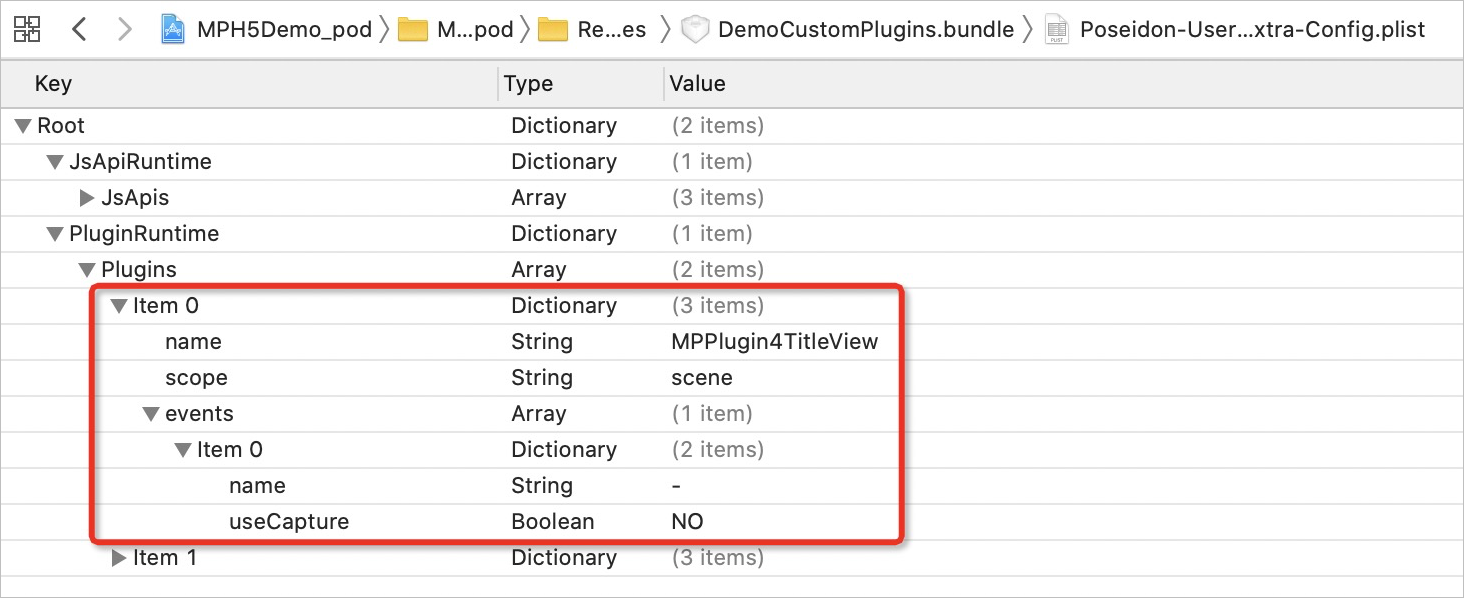
The registered plugin dictionary contains these items:
|
Name |
Description |
|
name |
Plugin class name. |
|
scope |
Plugin scope. |
|
events |
Events to listen for. |
Use the plugin
-
Add a breakpoint in the
pluginDidLoadmethod to verify the call stack when the event triggers.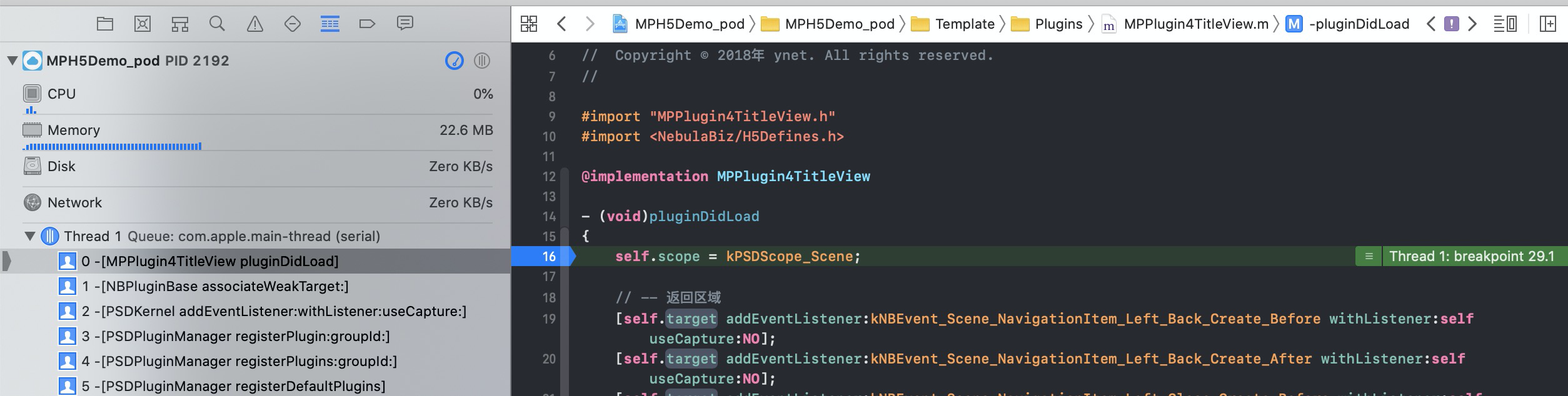
-
Add a breakpoint in the
handleEventmethod to verify that subscribed events trigger correctly.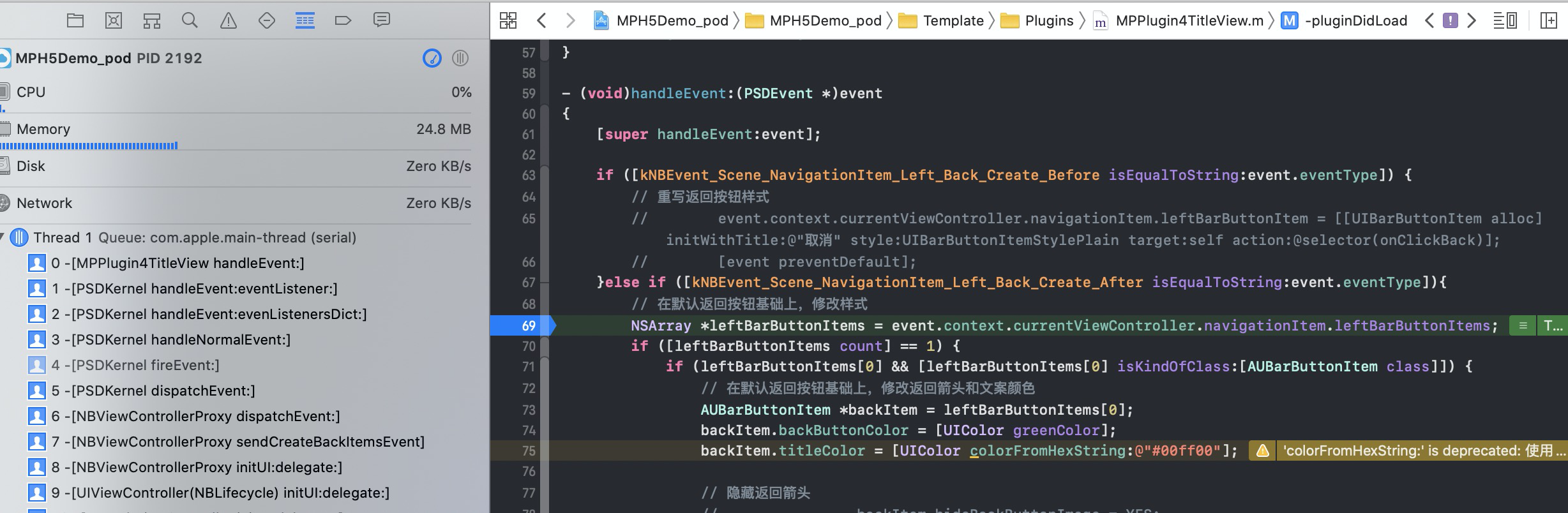
-
Verify that the custom navigation bar style takes effect on the H5 page.