Ant Cube Card provides properties for customizing element backgrounds, including colors, images, shadows, and transparency.
Background styles
The following properties control the background style of an element:
-
background-color defines the background color of an element.
Property
Value type
Default value
Syntax
background-color
Color unit
transparent
background-color: red;
-
background-image defines the background image of an element.
Property
Value type
Default value
Accepted values
Syntax
Notes
background-image
string
none
url("https:/xxx")is used for a CDN address,url("./xxx")is used for a relative address of an offline package, andurl("data:")is used for Base64 encoding.url("data:")linear-gradient(s1, s2, ..., slast)The format is linear-gradient(s1, s2, ..., slast). The first parameter sets the gradient angle as a value ending in deg or a direction keyword such as top, to top, right, to right, bottom, to bottom, left, or to left. The second parameter sets the starting color. If a percentage is specified, it must be 0%. Intermediate parameters set intermediate colors with optional percentage values in ascending order. Without percentages, colors are evenly spaced. The last parameter sets the ending color. If a percentage is specified, it must be 100%.
none: Clears the background.
background-image: linear-gradient(45deg, red 0%, #333 50%, rgb(255,0, 255) 80%, green 100%);
None
background-image: linear-gradient(to top, red, #333, rgb(255, 0, 255), green);
background-image: url("https://gw-office.alipayobjects.com/basement_prod/e047f6c8-dc14-481f-a22c-8dd9012b01a3.png");
background-size
string or length unit
auto
A single keyword: `cover`, `contain`, or `auto`.
Two values, such as `${x}px ${y}px`. You can use length units or percentages.
${x}px A single length or percentage value.
background-size: contain;
If you specify only one value, the other value defaults to `auto`.
background-size: 100px 200px;
background-position
string
0
A single keyword: `top`, `right`, `bottom`, `left`, or `center`.
Two keywords, such as `bottom right`.
${x}px length value / ${y}px length value plus a descriptive value.
${x}px: a length value or a percentage. ${y}px: a length value or a percentage.
background-position: top;
If you specify only one value, the other value defaults to `center`.
background-position: bottom right;
background-position: 30px left;
background-position: 100px;
background-position: 50px 50px;
background-repeat
string
repeat
repeat-x, repeat-y, no-repeat, repeat
One value: `background-repeat: repeat-x;`
None
Two values, such as `background-repeat: repeat no-repeat;`. The first value applies to the x-axis (`repeat` or `no-repeat`) and the second value applies to the y-axis (`repeat` or `no-repeat`).
None
-
background shorthand:
-
You can combine `background-color` and `background-image` related properties. The order does not matter.
-
You can combine `background-image` related properties, such as `background-image` and `background-repeat`.
-
Use
noneto clear the background.
-
Examples
background: url('https://img.alicdn.com/tfs/TB1uCUdfND1gK0jSZFyXXciOVXa-151-164.png') repeat-x;
background: url('https://img.alicdn.com/tfs/TB1uCUdfND1gK0jSZFyXXciOVXa-151-164.png') #f0f no-repeat;
background: url('https://img.alicdn.com/tfs/TB1uCUdfND1gK0jSZFyXXciOVXa-151-164.png') #00f repeat-x bottom;
background: #ff0 url('https://img.alicdn.com/tfs/TB1uCUdfND1gK0jSZFyXXciOVXa-151-164.png') repeat-y right;
Basic background usage example
div
{
	background-image: url('img_tree.png');
	background-repeat: repeat;
}-
When you set both a background image and a gradient, the gradient takes precedence over the image.
-
[v-alipay-10.2.0] Gradient backgrounds support multiple syntaxes, such as:
background: linear-gradient(#FF6010, 50%, #FFD2B3, #FFF2E9, #FFFFFF);.
Shadows
Use the following property to add shadows to elements.
|
Property |
Value type |
Default value |
Valid Values |
Syntax |
Notes |
|
box-shadow |
Length units & color units |
none |
The format is |
box-shadow: 10px 20px 10px red; |
All four values are required. |
-
The built-in components of Ant Cube Card support this style on both iOS and Android platforms.
-
Each element supports only one shadow effect.
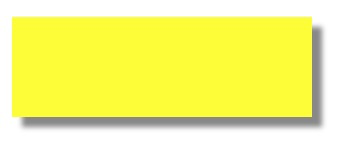
Basic shadow usage example
div
{
	width: 300px;
	height: 100px;
	background-color: yellow;
	box-shadow: 10px 10px 5px #888888;
}
Transparency
|
Property |
Value type |
Default value |
Accepted values |
Syntax |
|
opacity |
float |
1 |
A floating-point number from 0 to 1. |
opacity: 0.5; |