The AUAmountInputBox component provides an input box for amounts and uses a special numeric font. This component includes an edit box (AUAmountEditText) and a note section (AUAmountFootView). The AUAmountFootView is available in two styles: an editable input box and a text display. You can combine these parts as needed.
The component also provides AUAmountLabelText to display text with the special numeric font.
API reference
AUAmountInputBox
    /**
     * Gets the edit box.
     * @return
     */
    public AUEditText getEditText()

    /**
     * Gets the edit layout.
     * @return
     */
    public AUAmountEditText getEditLayout()

    /**
     * Gets the footView of the amount input box.
     * @return
     */
    public AUAmountFootView getFootView()

    /**
     * Gets the title bar of the input box.
     * @return
     */
    public AUTextView getTitleView()

    /**
     * Sets the style of the FootView.
     * @param style The style. Valid values: EDIT_STYLE and TEXT_STYLE.
     */
    public void setFootStyle(int style)

    /**
     * Sets the hint for the FootView edit box.
     * @param hint
     */
    public void setFootHint(String hint)


    /**
     * Sets the text of the FootView.
     * @param text
     */
    public void setFootText(String text)
AUAmountEditText
    /**
     * Gets the EditText.
     * @return
     */
    public AUEditText getEditText()


    /**
     * Gets the editable text from the input box.
     * @return
     */
    public Editable getEditTextEditable()

    /**
     * Shows or hides the line separator.
     * @param visible
     */
    public void setDividerVisible(boolean visible)

    /**
     * Sets the hint.
     * @param hint
     */
    public void setHint(String hint)

    /**
     * Specifies whether to show the delete button.
     * @param isShow
     */
    public void isShowClearIcon(boolean isShow)

    /**
     * Adds a focus change listener.
     * @param listener
     */
    public void addOnFocusChangeListeners(OnFocusChangeListener listener)

    /**
     * Attaches an external AUNumberKeyboardView and ScrollView.
     * @param keyboardView
     * @param scrollView
     */
    public void setKeyBoardView(AUNumberKeyboardView keyboardView, ScrollView scrollView)

    /**
     * Attaches an external AUNumberKeyboardView.
     * @param keyboardView
     */
    public void setKeyBoardView(AUNumberKeyboardView keyboardView)
Custom attributes
Property | Description | Type |
footStyle | The header view type. | editStyle, textStyle |
amountTitleText | The title of the edit box. | string, reference |
amountHintText | The hint for the edit box. | string, reference |
Code examples
General code example
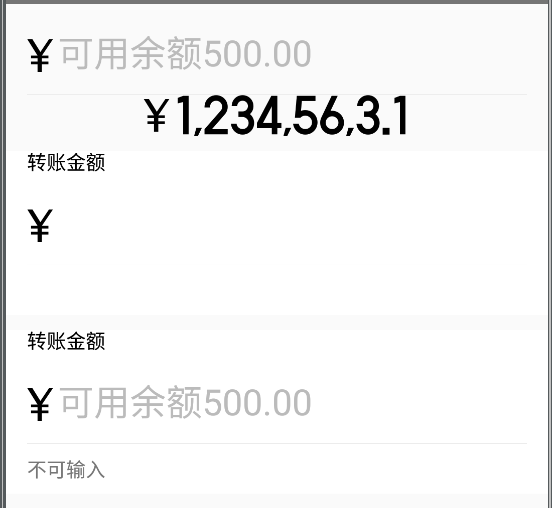
<com.alipay.mobile.antui.amount.AUAmountEditText
    android:id="@+id/edit_text"
    android:layout_width="match_parent"
    android:layout_height="wrap_content"
    app:amountHintText="Available balance: 500.00" />

<com.alipay.mobile.antui.amount.AUAmountLabelText
    android:id="@+id/label_text"
    android:layout_width="wrap_content"
    android:layout_height="wrap_content"
    android:layout_gravity="center_horizontal" />

<com.alipay.mobile.antui.amount.AUAmountInputBox
      android:id="@+id/amount_input_1"
      android:layout_width="match_parent"
      android:layout_height="wrap_content"
      android:layout_marginTop="10dp"
      app:amountTitleText="Transfer Amount" />

<com.alipay.mobile.antui.amount.AUAmountInputBox
      android:id="@+id/amount_input_2"
      android:layout_width="match_parent"
      android:layout_height="wrap_content"
      android:layout_marginTop="10dp"
      app:amountTitleText="Transfer Amount"
      app:amountHintText="Available balance: 500.00"
      app:footStyle="textStyle" />

AUAmountInputBox inputBox1 = (AUAmountInputBox)findViewById(R.id.amount_input_1);
inputBox1.setFootHint("Add transfer description");

AUAmountInputBox inputBox2 = (AUAmountInputBox)findViewById(R.id.amount_input_2);
inputBox2.setFootText("Not editable");
Code example with a numeric keypad
<?xml version="1.0" encoding="utf-8"?>
<com.alipay.mobile.antui.basic.AULinearLayout xmlns:android="http://schemas.android.com/apk/res/android"
    xmlns:app="http://schemas.android.com/apk/res/com.alipay.mobile.antui"
    android:layout_width="match_parent"
    android:layout_height="match_parent"
    android:orientation="vertical">

    <com.alipay.mobile.antui.basic.AUScrollView
        android:id="@+id/scroll"
        android:layout_weight="1"
        android:layout_width="match_parent"
        android:layout_height="match_parent">

        <com.alipay.mobile.antui.basic.AULinearLayout
            android:layout_width="match_parent"
            android:layout_height="match_parent"
            android:orientation="vertical">

            <com.alipay.mobile.antui.amount.AUAmountInputBox
                android:id="@+id/amount_input_1"
                android:layout_width="match_parent"
                android:layout_height="wrap_content"
                android:layout_marginTop="10dp"
                app:amountTitleText="Transfer Amount" />
        </com.alipay.mobile.antui.basic.AULinearLayout>
    </com.alipay.mobile.antui.basic.AUScrollView>

    <com.alipay.mobile.antui.keyboard.AUNumberKeyboardView
        android:id="@+id/keyboard"
        android:layout_width="match_parent"
        android:layout_height="wrap_content"
        android:visibility="gone"/>
</com.alipay.mobile.antui.basic.AULinearLayout>
// Initialize
keyboardView = (AUNumberKeyboardView) findViewById(R.id.keyboard);
inputBox1 = (AUAmountInputBox)findViewById(R.id.amount_input_1);
ScrollView scrollView = (ScrollView) findViewById(R.id.scroll);
// Attach the keyboard
inputBox1.getEditLayout().setKeyBoardView(keyboardView, scrollView);