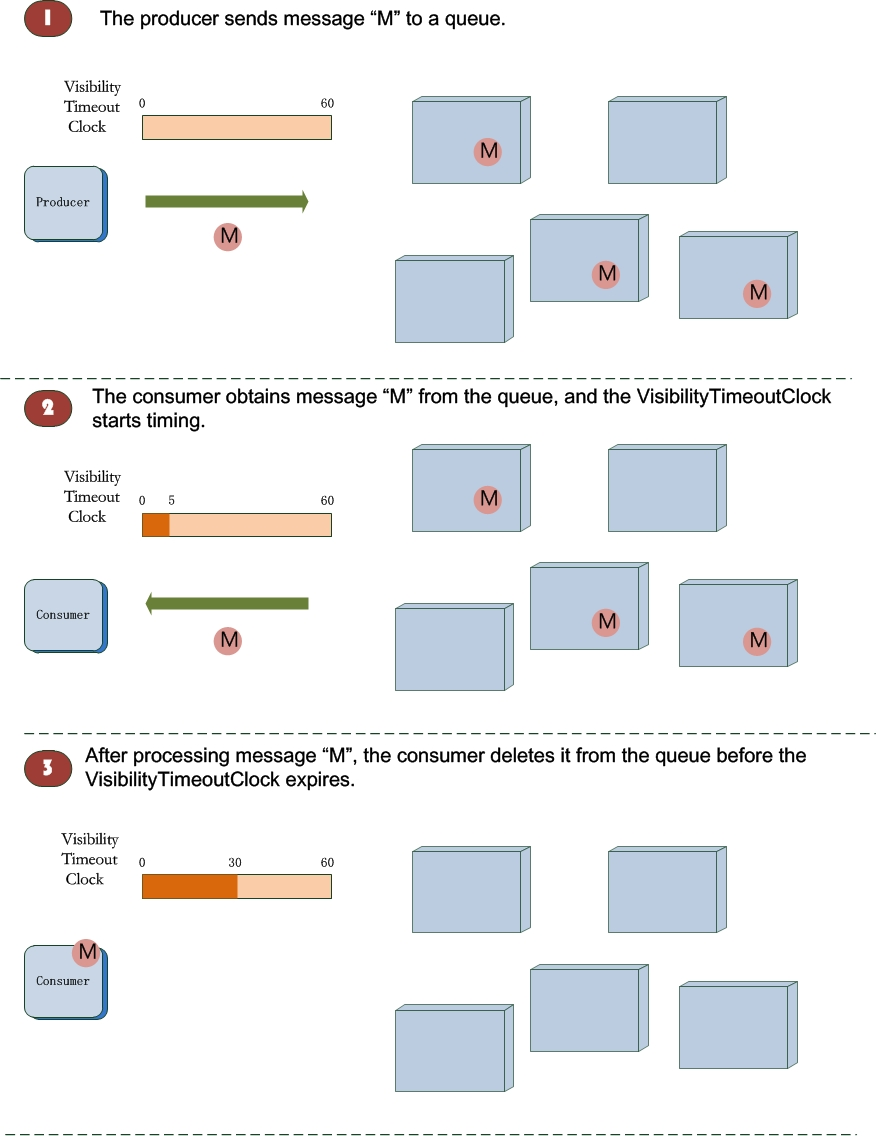
Simple Message Queue (formerly MNS) uses the following terms for queue-based messaging. Familiarize yourself with these terms before you configure queues, send and receive messages, or manage the message lifecycle through the API.
Account
An Alibaba Cloud account ID. The account that creates a queue becomes its owner.
Queue
A destination that stores messages until consumers retrieve them. Producers send messages to a queue, and consumers receive messages from it. Each message in a queue is uniquely identified by a combination of its message ID and receipt handle (ReceiptHandle).
Queue types
| Property | Standard queue | Delayed queue |
|---|---|---|
| Behavior | Messages are available for consumption immediately | Messages remain hidden for a configurable delay period before becoming available |
| Delay configuration | DelaySeconds is not set or is set to 0 | DelaySeconds is set through CreateQueue or SetQueueAttributes |
| When to use | Real-time processing where messages should be consumed immediately | Deferred processing where a cooldown period is needed before consumption |
Queue owner
The Alibaba Cloud account that creates a queue owns it. Queue owners are authorized to perform all operations on the queue. After you activate Simple Message Queue (formerly MNS), call the CreateQueue API operation to create a queue. Find the account ID of a queue owner on the Alibaba Cloud website.
Producer and consumer
Producer: A client that sends messages to a queue.
Consumer: A client that receives messages from a queue.
Endpoint
The access URL for Simple Message Queue (formerly MNS) API calls. The format is:
http://<AccountId>.mns.<Region>.aliyuncs.com| Placeholder | Description |
|---|---|
<AccountId> | Your Alibaba Cloud account ID. Replace with your actual account ID when calling API operations. |
<Region> | The region where Simple Message Queue (formerly MNS) is deployed, such as cn-hangzhou or cn-shanghai. |
Message types
| Property | Standard message | Delayed message |
|---|---|---|
| Behavior | Available for consumption immediately after delivery | Hidden for a specified delay period before becoming available |
| Configuration | Default behavior when no per-message DelaySeconds is set | Set DelaySeconds in the SendMessage request |
A delayed message uses a per-message delay set at send time. A delayed queue applies a queue-level delay to all incoming messages. Both use DelaySeconds, but at different scopes.
Message ID vs. receipt handle
| Property | Message ID | Receipt handle |
|---|---|---|
| Generated when | A message is sent to a queue | A message is consumed from a queue |
| Uniqueness | Unique within a queue, not across queues | Unique per consume operation |
| Lifetime | Permanent and immutable | Temporary; expires when the message status changes |
| Primary use | Track and verify data | Delete a consumed message or modify its VisibilityTimeout |
| Reusability | Valid for the lifetime of the message | Single-use; consume the message again to get a new handle |
To delete a message, use its receipt handle, not its message ID.
Message status
Each message transitions through the following statuses:
| Status | Description |
|---|---|
| Active | Available for consumption. Only messages in this status can be consumed. |
| Inactive | Consumed and temporarily hidden for the VisibilityTimeout duration. |
| Delayed | Waiting for the DelaySeconds period to expire before becoming Active. |
| Deleted | Explicitly deleted by a consumer using its receipt handle. |
| Expired | Exceeded the MessageRetentionPeriod and recycled automatically. |
Status transitions
Standard message in a standard queue
The message arrives in the queue with status Active.
A consumer receives the message. The status changes to Inactive for the duration of the VisibilityTimeout period.
Two outcomes are possible:
The consumer deletes the message within the VisibilityTimeout period. The status changes to Deleted.
The VisibilityTimeout period expires without deletion. The status returns to Active, and the message becomes available for consumption again.
Standard message in a delayed queue
The message arrives in the queue with status Delayed.
After the DelaySeconds period expires, the status changes to Active.
From this point, the message follows the same transitions as a standard message in a standard queue.
Delayed message (per-message delay)
The message is sent with a per-message DelaySeconds value. The initial status is Delayed.
After the DelaySeconds period expires, the status changes to Active.
From this point, the message follows the same transitions as a standard message in a standard queue.
Message expiration
If a message is not deleted before its MessageRetentionPeriod expires, the status changes to Expired regardless of its current status. Expired messages are automatically recycled.
Status transition diagram
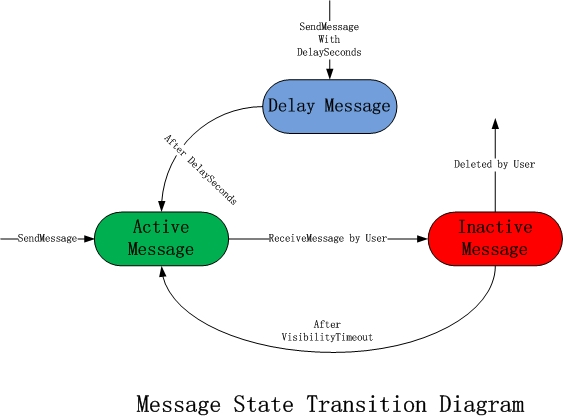
Message lifecycle diagram