The message filtering feature of Message Service (MNS) allows you to route messages from a topic to different subscriptions based on tags. This topic describes how message filtering works and how to set message filtering tags.
Background
By default, a subscription to a topic receives all messages published to it.
If a subscription has a message filtering tag, it receives only the messages whose message tag matches the subscription's message filtering tag.
If a subscription does not have a message filtering tag, it receives all messages from the topic, regardless of whether the messages have a message tag.
How it works
The following figure shows how messages with different message tags are filtered by subscriptions that have message filtering tags and then pushed to destination queues.
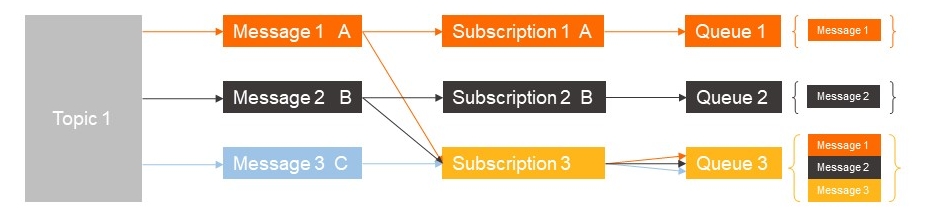
In the figure above, Topic 1 has three subscriptions. Subscriptions 1 and 2 have different message filtering tags, while Subscription 3 does not have a message filtering tag. The endpoints for these subscriptions are Queue 1, Queue 2, and Queue 3, respectively.
-
The message tag matches the subscription's message filtering tag. The filtering process is as follows:
-
Message Service (MNS) pushes Message 1 to Queue 1.
-
Message Service (MNS) pushes Message 2 to Queue 2.
-
-
The subscription has no message filtering tag. The filtering process is as follows:
-
Message Service (MNS) pushes Message 1 to Queue 3.
-
Message Service (MNS) pushes Message 2 to Queue 3.
-
Message Service (MNS) pushes Message 3 to Queue 3.
-
Set a message filtering tag
This example shows how to set a message filtering tag for a subscription to filter messages from TopicA. Only messages that have the tag-a message tag are pushed to QueueB. To learn how to create a topic subscription, see Create a subscription.
-
In the Create Subscription panel, enter
tag-ain the Message Filtering Tag field to filter messages from TopicA and push them to QueueB.Set retry policy to Backoff Retry and message push format to SIMPLIFIED.
-
To filter messages, you must also set a matching message tag when publishing a message by using an SDK. For complete sample code, see Step 5: Publish a message.
The following sample code shows how to set a message tag when you publish a message to a topic:
	TopicMessage message = new Base64TopicMessage();
    // Set the tag to match the subscription's message filtering tag.
    message.setMessageTag("tag-a");