Use Milvus 2.5 to perform full-text search, keyword matching, and hybrid search with BM25. Combine dense and sparse vectors with Reciprocal Rank Fusion (RRF) to improve retrieval precision in RAG applications.
Background information
Milvus 2.5 introduces native full-text search by integrating the Tantivy search engine library with a built-in Sparse-BM25 algorithm. This complements existing semantic search with keyword-based retrieval.
Built-in tokenizer: Milvus tokenizes text input directly into sparse vectors, filtering stop words automatically — no external pre-processing required.
Real-time BM25 statistics: Term frequency (TF) and inverse document frequency (IDF) values update dynamically on data insertion, keeping search results current.
Enhanced hybrid search: ANN-based sparse vector retrieval delivers millisecond-level responses at the hundred-million scale and supports hybrid queries with dense vectors.
Prerequisites
A Milvus instance with a Kernel Version of 2.5 or later is created. Create a Milvus instance.
The service is activated and an API key is obtained.
Limits
Applicable to Milvus instances with a Kernel Version of 2.5 or later.
Requires
pymilvus2.5 or later.Check the installed version:
pip3 show pymilvusUpdate if needed:
pip3 install --upgrade pymilvus
Procedure
Step 1: Install dependency libraries
pip3 install pymilvus langchain dashscopeStep 2: Prepare data
This example chunks the official Milvus documentation with LangChain, generates embeddings using the text-embedding-v2 model, and inserts the results into Milvus.
from langchain_community.document_loaders import WebBaseLoader
from langchain.text_splitter import RecursiveCharacterTextSplitter
from langchain_community.embeddings import DashScopeEmbeddings
from pymilvus import MilvusClient, DataType, Function, FunctionType

dashscope_api_key = "<YOUR_DASHSCOPE_API_KEY>"
milvus_url = "<YOUR_MMILVUS_URL>"
user_name = "root"
password = "<YOUR_PASSWORD>"
collection_name = "milvus_overview"
dense_dim = 1536

loader = WebBaseLoader([
    'https://raw.githubusercontent.com/milvus-io/milvus-docs/refs/heads/v2.5.x/site/en/about/overview.md'
])

docs = loader.load()

text_splitter = RecursiveCharacterTextSplitter(chunk_size=1024, chunk_overlap=256)

# Use LangChain to chunk the input document by chunk_size
all_splits = text_splitter.split_documents(docs)

embeddings = DashScopeEmbeddings(
    model="text-embedding-v2", dashscope_api_key=dashscope_api_key
)

text_contents = [doc.page_content for doc in all_splits]

vectors = embeddings.embed_documents(text_contents)


client = MilvusClient(
    uri=f"http://{milvus_url}:19530",
    token=f"{user_name}:{password}",
)

schema = MilvusClient.create_schema(
    enable_dynamic_field=True,
)

analyzer_params = {
    "type": "english"
}

# Add fields to schema
schema.add_field(field_name="id", datatype=DataType.INT64, is_primary=True, auto_id=True)
schema.add_field(field_name="text", datatype=DataType.VARCHAR, max_length=65535, enable_analyzer=True, analyzer_params=analyzer_params, enable_match=True)
schema.add_field(field_name="sparse_bm25", datatype=DataType.SPARSE_FLOAT_VECTOR)
schema.add_field(field_name="dense", datatype=DataType.FLOAT_VECTOR, dim=dense_dim)

bm25_function = Function(
   name="bm25",
   function_type=FunctionType.BM25,
   input_field_names=["text"],
   output_field_names="sparse_bm25",
)
schema.add_function(bm25_function)

index_params = client.prepare_index_params()

# Add indexes
index_params.add_index(
    field_name="dense",
    index_name="dense_index",
    index_type="IVF_FLAT",
    metric_type="IP",
    params={"nlist": 128},
)

index_params.add_index(
    field_name="sparse_bm25",
    index_name="sparse_bm25_index",
    index_type="SPARSE_WAND",
    metric_type="BM25"
)

# Create collection
client.create_collection(
    collection_name=collection_name,
    schema=schema,
    index_params=index_params
)

data = [
    {"dense": vectors[idx], "text": doc}
    for idx, doc in enumerate(text_contents)
]

# Insert data
res = client.insert(
    collection_name=collection_name,
    data=data
)

print(f"Generated {len(vectors)} vectors, dimension: {len(vectors[0])}")
Replace the following parameters with your actual values.
Parameter | Description |
| The API key for Alibaba Cloud Model Studio. |
| The Internal IP Address or Public IP Address of the Milvus instance, available on the Details page.
|
| The username and password specified when creating the Milvus instance. |
| |
| The collection name. This example uses milvus_overview. |
| The dense vector dimension. Set to 1536 to match the text-embedding-v2 model output. |
The bm25_function object tells Milvus to automatically convert the text column into sparse vectors.
For Chinese documents, specify a chinese analyzer instead.
The analyzer setting is permanent per collection. To change it, create a new collection.
# Define tokenizer parameters
analyzer_params = {
    "type": "chinese"  # Specify the tokenizer type as chinese
}

# Add a text field to the schema and enable the tokenizer
schema.add_field(
    field_name="text",                      # Field name
    datatype=DataType.VARCHAR,              # Data type: string (VARCHAR)
    max_length=65535,                       # Maximum length: 65535 characters
    enable_analyzer=True,                   # Enable the tokenizer
    analyzer_params=analyzer_params         # Tokenizer parameters
)
Step 3: Perform full-text search
The following example performs a full-text search using the BM25 sparse vector field.
from pymilvus import MilvusClient
# Create a Milvus client.
client = MilvusClient(
uri="http://c-xxxx.milvus.aliyuncs.com:19530", # The public network address of the Milvus instance.
token="<yourUsername>:<yourPassword>", # The username and password to log on to the Milvus instance.
db_name="default" # The name of the database to connect to. This example uses the default database.
)
search_params = {
'params': {'drop_ratio_search': 0.2},
}
full_text_search_res = client.search(
collection_name='milvus_overview',
data=['what makes milvus so fast?'],
anns_field='sparse_bm25',
limit=3,
search_params=search_params,
output_fields=["text"],
)
for hits in full_text_search_res:
for hit in hits:
print(hit)
print("\n")
"""
{'id': 456165042536597485, 'distance': 6.128782272338867, 'entity': {'text': '## What Makes Milvus so Fast?\n\nMilvus was designed from day one to be a highly efficient vector database system. In most cases, Milvus outperforms other vector databases by 2-5x (see the VectorDBBench results). This high performance is the result of several key design decisions:\n\n**Hardware-aware Optimization**: To accommodate Milvus in various hardware environments, we have optimized its performance specifically for many hardware architectures and platforms, including AVX512, SIMD, GPUs, and NVMe SSD.\n\n**Advanced Search Algorithms**: Milvus supports a wide range of in-memory and on-disk indexing/search algorithms, including IVF, HNSW, DiskANN, and more, all of which have been deeply optimized. Compared to popular implementations like FAISS and HNSWLib, Milvus delivers 30%-70% better performance.'}}
{'id': 456165042536597487, 'distance': 4.760214805603027, 'entity': {'text': "## What Makes Milvus so Scalable\n\nIn 2022, Milvus supported billion-scale vectors, and in 2023, it scaled up to tens of billions with consistent stability, powering large-scale scenarios for over 300 major enterprises, including Salesforce, PayPal, Shopee, Airbnb, eBay, NVIDIA, IBM, AT&T, LINE, ROBLOX, Inflection, etc.\n\nMilvus's cloud-native and highly decoupled system architecture ensures that the system can continuously expand as data grows:\n\n"}}
"""Step 4: Keyword match
Keyword matching narrows the search scope by filtering on exact terms before vector search. Set enable_analyzer and enable_match to True in the schema definition.
Enabling enable_match creates an inverted index, which consumes additional storage.
Example 1: Keyword match combined with vector search
The filter expression limits results to documents matching 'query' and 'node', then runs vector similarity search on the filtered subset.
filter = "TEXT_MATCH(text, 'query') and TEXT_MATCH(text, 'node')"

text_match_res = client.search(
    collection_name="milvus_overview",
    anns_field="dense",
    data=query_embeddings,
    filter=filter,
    search_params={"params": {"nprobe": 10}},
    limit=2,
    output_fields=["text"]
)
Example 2: Scalar filtering query
Use TEXT_MATCH in query() for scalar filtering. This example retrieves documents matching 'scalable' or 'fast'.
filter = "TEXT_MATCH(text, 'scalable fast')"

text_match_res = client.query(
    collection_name="milvus_overview",
    filter=filter,
    output_fields=["text"]
)
Step 5: Hybrid search and RAG
Combine dense vector search and BM25 full-text search, then merge results with Reciprocal Rank Fusion (RRF) to improve recall and precision.
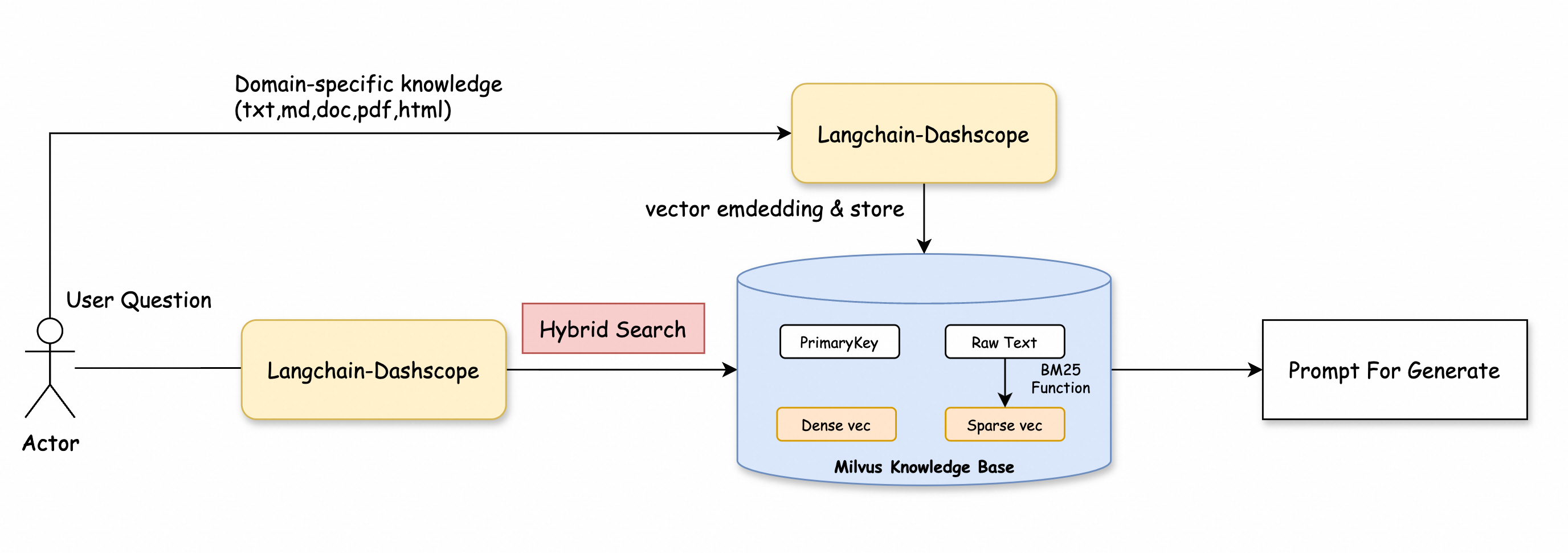
Example:
from pymilvus import MilvusClient
from pymilvus import AnnSearchRequest, RRFRanker
from langchain_community.embeddings import DashScopeEmbeddings
from dashscope import Generation

# Create a Milvus client.
client = MilvusClient(
    uri="http://c-xxxx.milvus.aliyuncs.com:19530",  # The public network address of the Milvus instance.
    token="<yourUsername>:<yourPassword>",  # The username and password to log on to the Milvus instance.
    db_name="default"  # The name of the database to connect to. This example uses the default database.
)

collection_name = "milvus_overview"

# Replace with your DashScope API key
dashscope_api_key = "<YOUR_DASHSCOPE_API_KEY>"

# Initialize the embedding model
embeddings = DashScopeEmbeddings(
    model="text-embedding-v2",  # Use the text-embedding-v2 model.
    dashscope_api_key=dashscope_api_key
)

# Define the query
query = "Why does Milvus run so scalable?"

# Embed the query and generate the corresponding vector representation
query_embeddings = embeddings.embed_documents([query])

# Set the top K result count
top_k = 5  # Get the top 5 docs related to the query

# Define the parameters for the dense vector search
search_params_dense = {
    "metric_type": "IP",
    "params": {"nprobe": 2}
}

# Create a dense vector search request
request_dense = AnnSearchRequest([query_embeddings[0]], "dense", search_params_dense, limit=top_k)

# Define the parameters for the BM25 text search
search_params_bm25 = {
    "metric_type": "BM25"
}

# Create a BM25 text search request
request_bm25 = AnnSearchRequest([query], "sparse_bm25", search_params_bm25, limit=top_k)

# Combine the two requests
reqs = [request_dense, request_bm25]

# Initialize the RRF ranking algorithm
ranker = RRFRanker(100)

# Perform the hybrid search
hybrid_search_res = client.hybrid_search(
    collection_name=collection_name,
    reqs=reqs,
    ranker=ranker,
    limit=top_k,
    output_fields=["text"]
)

# Extract the context from hybrid search results
context = []
print("Top K Results:")
for hits in hybrid_search_res:  # Use the correct variable here
    for hit in hits:
        context.append(hit['entity']['text'])  # Extract text content to the context list
        print(hit['entity']['text'])  # Output each retrieved document


# Define a function to get an answer based on the query and context
def getAnswer(query, context):
    prompt = f'''Please answer my question based on the content within:
    ```
    {context}
    ```
    My question is: {query}.
    '''
    # Call the generation module to get an answer
    rsp = Generation.call(model='qwen-turbo', prompt=prompt)
    return rsp.output.text

# Get the answer
answer = getAnswer(query, context)

print(answer)


# Expected output excerpt
"""
Milvus is highly scalable due to its cloud-native and highly decoupled system architecture. This architecture allows the system to continuously expand as data grows. Additionally, Milvus supports three deployment modes that cover a wide...
"""