Alibaba Cloud Milvus AI Center is a managed model service capability built into Milvus. After activation, you can pass raw text or multi-modal data (images, videos) directly during data ingestion and search. The system automatically generates vectors without the need to deploy a separate embedding inference service.
Feature overview
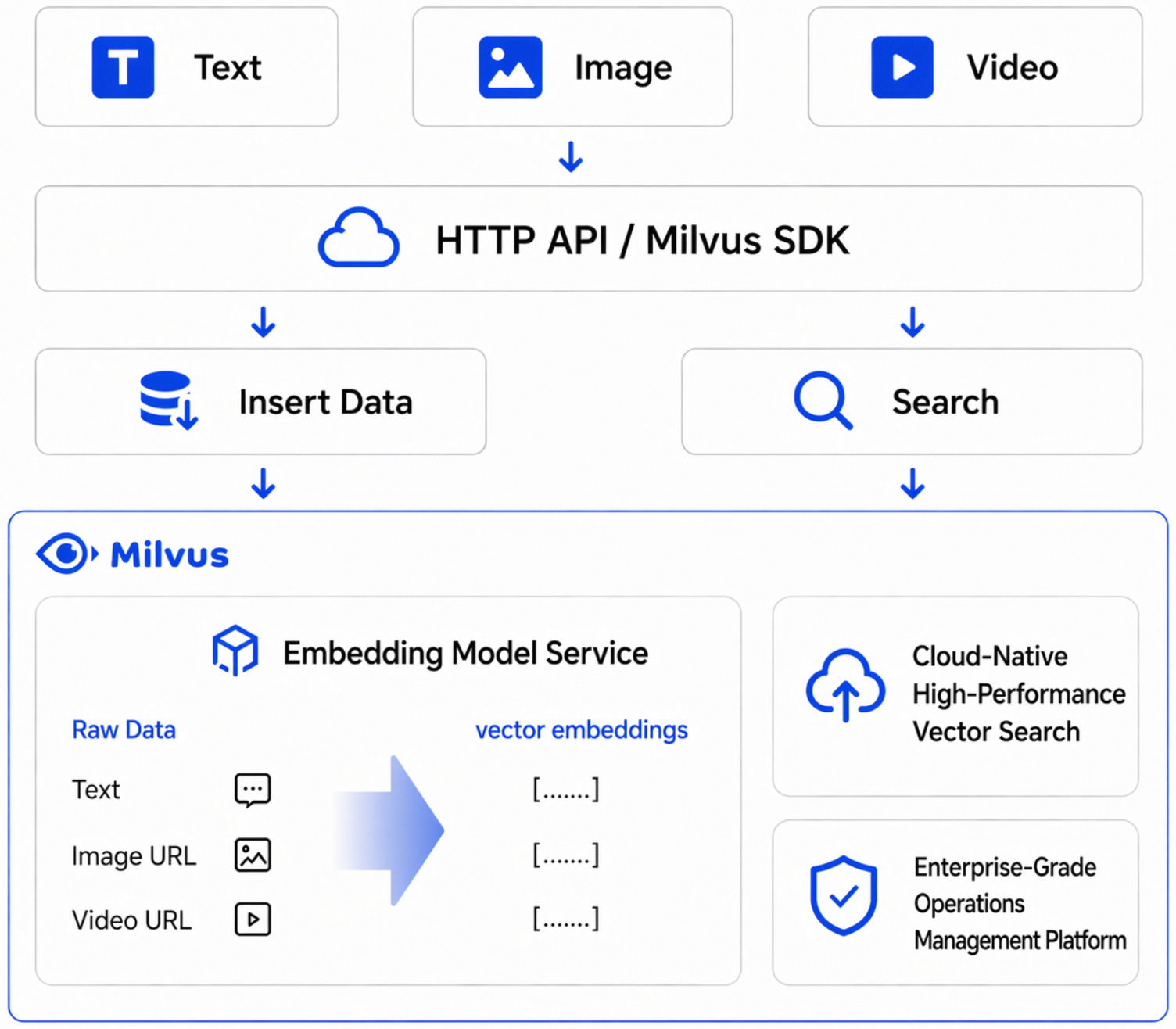
|
Feature |
Description |
|
One-stop console management |
View, configure, and obtain invocation examples for model services in the console without switching between multiple platforms. |
|
Managed model capabilities |
The platform provides a managed model inference service with no need to build your own inference service or maintain infrastructure. |
|
Direct ingestion and search of raw data |
Pass raw text or multi-modal content directly during inserts, updates, and queries. The system automatically completes vectorization. |
|
Flexible multi-model switching |
Multiple vectorization models are available. You can flexibly choose among effectiveness, latency, and cost based on your business scenario. |
|
Invocation and token statistics |
Statistics on token usage and invocation count are available by both cluster and model dimensions. |
|
Invocation monitoring |
View operational metrics such as Success Rate and Average RT (average response time). |
In addition to vectorization, AI Center also provides unified model capabilities such as reranking, text generation, multi-modal understanding, and video editing, which can be directly used for semantic search, RAG knowledge base, enterprise AI chat, content recommendation, and multi-modal search scenarios. This topic uses vectorization as an example to describe the complete integration process for text search and multi-modal search.
Procedure
View available vectorization models
Log in to the Milvus console, and in the left-side navigation pane, choose AI Center. On the Model Service tab, view the Vectorization group to obtain the input types, output dimensions, and API Example for each model.
The following vectorization models are currently available:
|
Model |
Supported input |
Description |
|
|
Text |
Recommended text embedding model. Default dimensions: 1024. |
|
|
Text |
Multilingual text embedding model. Supports custom vector dimensions. |
|
|
Text |
General-purpose text embedding model. |
|
|
Text |
General-purpose text embedding model. Scheduled for deprecation. Not recommended for new workloads. |
|
|
Text, image, video |
Recommended multimodal embedding model. Default dimensions: 2560. You can specify other dimensions by using the |
|
|
Text, image, video |
Multimodal embedding model. |
AI Center provides services independently by region. After you switch to a different region, you must view and configure services again in the new region.
Prepare a Milvus instance
The vectorization capability requires a Milvus 2.6 instance. After you create a 2.6 instance, you can declare a Function directly in a Collection to invoke the model. No separate model-to-instance binding operation is required.
To access the instance over the Internet, go to the instance product page and on the Security Configuration tab, enable Public Network Access and configure the public access whitelist.
View usage and monitoring
Go to AI Center and click the Monitoring tab. You can view invocation details from two perspectives: By Milvus Cluster or By Model.
-
Token usage / Invocation count: Token usage and invocation count details listed by cluster and model.
-
Total tokens / Total text input tokens: Aggregated token consumption within the selected range.
-
Success Rate: The request success rate.
-
Average RT: The average response time.
You can select a cluster or model, set a sampling interval, and filter by quick time ranges such as 1 hour, 3 hours, 6 hours, 12 hours, 1 day, or 7 days, or specify a custom time window.
Example 1: Text-to-text semantic search
Scenario
Ingest a batch of raw text into Milvus without pre-generating vectors. At query time, pass a natural language question directly. Milvus automatically vectorizes the query and returns the most semantically relevant results. Applicable to knowledge base Q&A, document search, and FAQ retrieval scenarios.
Procedure
-
Create a Collection and define a raw text field
documentand a vector fielddense. -
Bind the
qwen3.7-text-embeddingmodel by using aFunction. -
Insert test text data and call
flushto ensure data is searchable. -
Perform a search by using a natural language question and retrieve the most relevant text segments.
After inserting data, you must call flush. Otherwise, a search executed immediately after insertion may return empty results.
Sample code
from pymilvus import MilvusClient, DataType, Function, FunctionType

client = MilvusClient(
    uri="http://c-xxxx.milvus.aliyuncs.com:19530",
    token='root:xxx',
)

# ========== Create a Collection ==========
collection_name = 'demo1'
schema = client.create_schema()

schema.add_field("id", DataType.INT64, is_primary=True, auto_id=False)
schema.add_field("document", DataType.VARCHAR, max_length=9000)
schema.add_field("dense", DataType.FLOAT_VECTOR, dim=1024)
text_embedding_function = Function(
    name="dashscope_api_test123",
    function_type=FunctionType.TEXTEMBEDDING,
    input_field_names=["document"],
    output_field_names=["dense"],
    params={
        "provider": "aliyun_milvus",
        "model_name": "qwen3.7-text-embedding"
    }
)

schema.add_function(text_embedding_function)
index_params = client.prepare_index_params()

index_params.add_index(
    field_name="dense",
    index_type="AUTOINDEX",
    metric_type="COSINE"
)
client.drop_collection(collection_name)
client.create_collection(
    collection_name=collection_name,
    schema=schema,
    index_params=index_params
)

insert_data = []
record_id = 1

mock_texts = [
    "A vector database converts text into high-dimensional vectors for semantic search, understanding the true intent of queries.",
    "Deep learning models learn feature representations from large image datasets for tasks such as image classification and object detection.",
    "Retrieval augmented generation recalls relevant documents to provide external knowledge for large language models, reducing hallucinations and improving answer reliability.",
    "In customer service scenarios, semantic search can quickly locate historical tickets, improving first-response efficiency and resolution rates.",
    "Similarity search commonly uses cosine distance to measure vector direction proximity, suitable for text semantic matching tasks.",
    "Data cleaning is a critical step before vectorization. Denoising and format standardization significantly improve recall quality.",
    "Higher embedding dimensions are not always better. You need to balance effectiveness, latency, and storage cost.",
    "Chunking strategies that split long documents into small segments can improve search hit rates and reduce context redundancy.",
    "Adding a source field to each piece of knowledge aids result explainability, making it easy to display citation evidence on the frontend.",
    "Multilingual search leverages a unified vector space for cross-language matching, enhancing the experience of internationalized systems.",
    "Index parameters such as ef and M affect the recall rate and query performance of HNSW and need to be tuned based on your business requirements.",
    "Running offline evaluations before going live can quantify differences in search quality across different models and parameter combinations.",
    "Metadata filtering in a vector database can be combined with semantic recall for more precise scoped search.",
    "For high-frequency queries, caching search results briefly can reduce backend computation pressure and response time.",
    "A semantic search pipeline should log queries to facilitate analysis of zero-result queries and continuous optimization of the knowledge base.",
    "When knowledge content updates frequently, incremental indexing strategies can reduce the resource consumption of full rebuilds.",
    "Adding a reranking model in a Q&A system can improve the relevance and readability of the top results.",
    "Establishing access control policies for sensitive data is a fundamental security requirement for enterprise-grade vector search systems.",
    "Setting topK appropriately balances coverage and noise, avoiding the return of too many low-relevance results.",
    "Feeding user feedback back into the training and evaluation pipeline can continuously improve overall search and Q&A performance.",
]

for text in mock_texts:
    insert_data.append({
        "id": record_id,
        "document": text,
    })
    record_id += 1

BATCH_SIZE = 30
print(f"Preparing to insert {len(insert_data)} records, batch_size={BATCH_SIZE}...")
for batch_start in range(0, len(insert_data), BATCH_SIZE):
    batch = insert_data[batch_start:batch_start + BATCH_SIZE]
    client.insert(collection_name, batch)
    print(f"  Inserted {min(batch_start + BATCH_SIZE, len(insert_data))}/{len(insert_data)} records")
client.flush(collection_name)
print("Data insertion complete!\n")

# ========== Test 1: Text-to-text search (semantic search via the dense field) ==========
print("=" * 60)
print("Test 1: Text-to-text search - query content related to vector databases")
print("=" * 60)
results = client.search(
    collection_name=collection_name,
    data=['What is semantic search? How does a vector database work?'],
    anns_field='dense',
    limit=3,
    output_fields=['document'],
)
for hits in results:
    for hit in hits:
        print(f"  id={hit['id']}, distance={hit['distance']:.4f}, document={hit['entity']['document'][:50]}")
Output
Preparing to insert 20 records, batch_size=30...
  Inserted 20/20 records
Data insertion complete!

============================================================
Test 1: Text-to-text search - query content related to vector databases
============================================================
  id=1, distance=0.8668, document=A vector database converts text into high-d
  id=13, distance=0.5989, document=Metadata filtering in a vector database can
  id=15, distance=0.5414, document=A semantic search pipeline should log queri
Search results are ranked by semantic relevance, with the text closest to the query intent ranked first. Actual similarity scores vary depending on the model version and data content.
Example 2: Multimodal search
Scenario
In retail, e-commerce, and content platform scenarios, search targets include images and videos in addition to text. The multi-modal embedding models in AI Center support unifying text and visual content in a single vectorization and search pipeline, enabling cross-modal search capabilities such as text-to-image/video and image-to-image/video.
This example defines two vector fields in the same Collection: dense is generated by a text model for text semantic search, and dense_mm is generated by a multi-modal model for cross-modal search.
Procedure
-
Upload images or videos to OSS or another object storage service and generate urls that are accessible by the model service.
-
Create a Collection and define a text field
document, a multimedia URL fieldurl, a text vector fielddense, and a multimodal vector fielddense_mm. -
Bind
qwen3.7-text-embeddingandqwen3-vl-embeddingto the text field and the multimedia field, respectively. -
Insert test assets and their corresponding text descriptions.
-
Perform search verification for text-to-text, text-to-image/video, and image-to-image/video searches.
When binding a multi-modal model to a multimedia field, you must set params with is_multimodal set to true. Otherwise, Collection creation will fail because the model cannot parse the input. The dim value must match the dimension declared in the vector field.
The multimedia field can also accept plain text directly. The multi-modal model generates a text vector in the same vector space, enabling mixed image-text search.
Sample code
from pymilvus import MilvusClient, DataType, Function, FunctionType

client = MilvusClient(
    uri="http://c-xxxx.milvus.aliyuncs.com:19530",
    token='root:xxx',
)

# Replace with your own image or video urls that are accessible by the model service
IMAGE_URL = "https://example.com/your-image.jpg"
VIDEO_URL = "https://example.com/your-video.mp4"

# ========== Create a Collection ==========
collection_name = 'demo11'
schema = client.create_schema()

schema.add_field("id", DataType.INT64, is_primary=True, auto_id=False)
schema.add_field("document", DataType.VARCHAR, max_length=9000)
schema.add_field("url", DataType.VARCHAR, max_length=9000)
schema.add_field("dense", DataType.FLOAT_VECTOR, dim=1024)
schema.add_field("dense_mm", DataType.FLOAT_VECTOR, dim=1024)

text_embedding_function = Function(
    name="dashscope_api_test123",
    function_type=FunctionType.TEXTEMBEDDING,
    input_field_names=["document"],
    output_field_names=["dense"],
    params={
        "provider": "aliyun_milvus",
        "model_name": "qwen3.7-text-embedding"
    }
)
mm_embedding_function = Function(
    name="dashscope_api_mm123",
    function_type=FunctionType.TEXTEMBEDDING,
    input_field_names=["url"],
    output_field_names=["dense_mm"],
    params={
        "provider": "aliyun_milvus",
        "model_name": "qwen3-vl-embedding",
        "dim": "1024",
        "is_multimodal": "true"
    }
)

schema.add_function(text_embedding_function)
schema.add_function(mm_embedding_function)
index_params = client.prepare_index_params()

index_params.add_index(
    field_name="dense",
    index_type="AUTOINDEX",
    metric_type="COSINE"
)
index_params.add_index(
    field_name="dense_mm",
    index_type="AUTOINDEX",
    metric_type="COSINE"
)
client.drop_collection(collection_name)
client.create_collection(
    collection_name=collection_name,
    schema=schema,
    index_params=index_params
)

# ========== Insert data: multimedia assets use urls, plain text is passed directly ==========
insert_data = [
    {"id": 1, "document": "A clothing product image showing the appearance details of an upper garment worn by a person.", "url": IMAGE_URL},
    {"id": 2, "document": "A short clothing showcase video showing the dynamic wearing effect of the garment.", "url": VIDEO_URL},
    {"id": 3,
     "document": "A vector database converts text into high-dimensional vectors for semantic search, understanding the true intent of queries.",
     "url": "A vector database converts text into high-dimensional vectors for semantic search, understanding the true intent of queries."},
    {"id": 4,
     "document": "Deep learning models learn feature representations from large image datasets for tasks such as image classification and object detection.",
     "url": "Deep learning models learn feature representations from large image datasets for tasks such as image classification and object detection."},
    {"id": 5,
     "document": "Clothing e-commerce platforms typically need to search product images by style, color, and material.",
     "url": "Clothing e-commerce platforms typically need to search product images by style, color, and material."},
]

print(f"Preparing to insert {len(insert_data)} records...")
client.insert(collection_name, insert_data)
client.flush(collection_name)
print("Data insertion complete!\n")

# ========== Test 1: Text-to-text search (semantic search via the dense field) ==========
print("=" * 60)
print("Test 1: Text-to-text search - query content related to clothing products")
print("=" * 60)
results = client.search(
    collection_name=collection_name,
    data=['Clothing product appearance showcase'],
    anns_field='dense',
    limit=3,
    output_fields=['document', 'url'],
)
for hits in results:
    for hit in hits:
        print(f"  id={hit['id']}, distance={hit['distance']:.4f}, document={hit['entity']['document'][:40]}")

# ========== Test 2: Text-to-image/video search (query multimedia content using text, filter for URL records) ==========
print("\n" + "=" * 60)
print("Test 2: Text-to-image/video search - search for clothing-related assets using a text description")
print("=" * 60)
results = client.search(
    collection_name=collection_name,
    data=['A garment being worn for display'],
    anns_field='dense_mm',
    limit=3,
    filter='url like "http%"',
    output_fields=['document', 'url'],
)
for hits in results:
    for hit in hits:
        is_media = "media" if str(hit['entity']['url']).startswith('http') else "text"
        print(f"  id={hit['id']}, distance={hit['distance']:.4f}, [{is_media}] document={hit['entity']['document'][:40]}")

# ========== Test 3: Image-to-image/video search (query multimedia content using an image URL) ==========
print("\n" + "=" * 60)
print("Test 3: Image-to-image/video search - search for similar assets using an image URL")
print("=" * 60)
results = client.search(
    collection_name=collection_name,
    data=[IMAGE_URL],
    anns_field='dense_mm',
    limit=3,
    output_fields=['document', 'url'],
)
for hits in results:
    for hit in hits:
        is_media = "media" if str(hit['entity']['url']).startswith('http') else "text"
        print(f"  id={hit['id']}, distance={hit['distance']:.4f}, [{is_media}] document={hit['entity']['document'][:40]}")
Output
Preparing to insert 5 records...
Data insertion complete!

============================================================
Test 1: Text-to-text search - query content related to clothing products
============================================================
  id=1, distance=0.6412, document=A clothing product image showing the appea
  id=5, distance=0.5901, document=Clothing e-commerce platforms typically nee
  id=2, distance=0.5689, document=A short clothing showcase video showing the

============================================================
Test 2: Text-to-image/video search - search for clothing-related assets using a text description
============================================================
  id=2, distance=0.1861, [media] document=A short clothing showcase video showing the
  id=1, distance=0.1153, [media] document=A clothing product image showing the appea

============================================================
Test 3: Image-to-image/video search - search for similar assets using an image URL
============================================================
  id=1, distance=1.0000, [media] document=A clothing product image showing the appea
  id=2, distance=0.0732, [media] document=A short clothing showcase video showing the
  id=3, distance=0.0294, [text] document=A vector database converts text into high-di
In Test 3, the query image has a similarity of 1.0000 with the same image in the database, confirming that the image-to-image search pipeline is functioning correctly. Cross-modal search (text querying multimedia) typically produces lower similarity scores than same-modal search. This is normal behavior. Evaluate effectiveness based on relative ranking within the same search scenario rather than comparing absolute scores across scenarios.