MaxCompute Spark accesses Alibaba Cloud Object Storage Service (OSS) through the Jindo software development kit (SDK). The Jindo SDK is a high-performance OSS client designed for the Hadoop and Spark ecosystem. It provides a Hadoop FileSystem implementation that is highly optimized for Alibaba Cloud OSS.
Step 1: Configure the OSS implementation class and endpoint
Use the public endpoint for the corresponding region in local mode. In cluster mode, use the internal endpoint. For more information, see Regions and endpoints.
Spark 3.5+ (integrates JindoSDK 6.5 by default). Add the following configurations:
spark.hadoop.fs.AbstractFileSystem.oss.impl=com.aliyun.jindodata.oss.JindoOSS
spark.hadoop.fs.oss.impl=com.aliyun.jindodata.oss.JindoOssFileSystem
spark.hadoop.fs.oss.endpoint=oss-${RegionId}-internal.aliyuncs.com
Other versions (if using JindoSDK 3.7). Add the following configurations:
spark.hadoop.fs.AbstractFileSystem.oss.impl=com.aliyun.emr.fs.oss.OSS
spark.hadoop.fs.oss.impl=com.aliyun.emr.fs.oss.JindoOssFileSystem
spark.hadoop.fs.oss.endpoint=oss-${RegionId}-internal.aliyuncs.com
Step 2: Configure authentication information
Choose one of the following two authentication methods.
Method 1: Use an AccessKey ID and AccessKey secret
Add the following configuration items to the spark-defaults.conf file or your DataWorks configuration:
spark.hadoop.fs.oss.accessKeyId=${AccessId}
spark.hadoop.fs.oss.accessKeySecret=${AccessKey}
Method 2: Use a Security Token Service token
For more information, see Authorize access in STS mode. Then, add the following configuration items.
Spark 3.5+ configuration
## Add the following configuration items to the spark-defaults.conf file or your DataWorks configuration:
spark.hadoop.fs.oss.credentials.provider=com.aliyun.jindodata.oss.auth.CustomCredentialsProvider
spark.hadoop.aliyun.oss.provider.url=http://localhost:10011/sts-token-info?user_id=${AliyunUid}&role=${RoleName}
Configuration for other versions
## Add the following configuration items to the spark-defaults.conf file or your DataWorks configuration:
spark.hadoop.odps.cupid.http.server.enable=true
spark.hadoop.fs.jfs.cache.oss.credentials.provider=com.aliyun.emr.fs.auth.CustomCredentialsProvider
spark.hadoop.aliyun.oss.provider.url=http://localhost:10011/sts-token-info?user_id=${AliyunUid}&role=${RoleName}
Step 3: Reference the JindoSDK dependency (skip this step for Spark 3.5+)
Local mode
In local mode, download the JindoSDK and add it to the classpath.
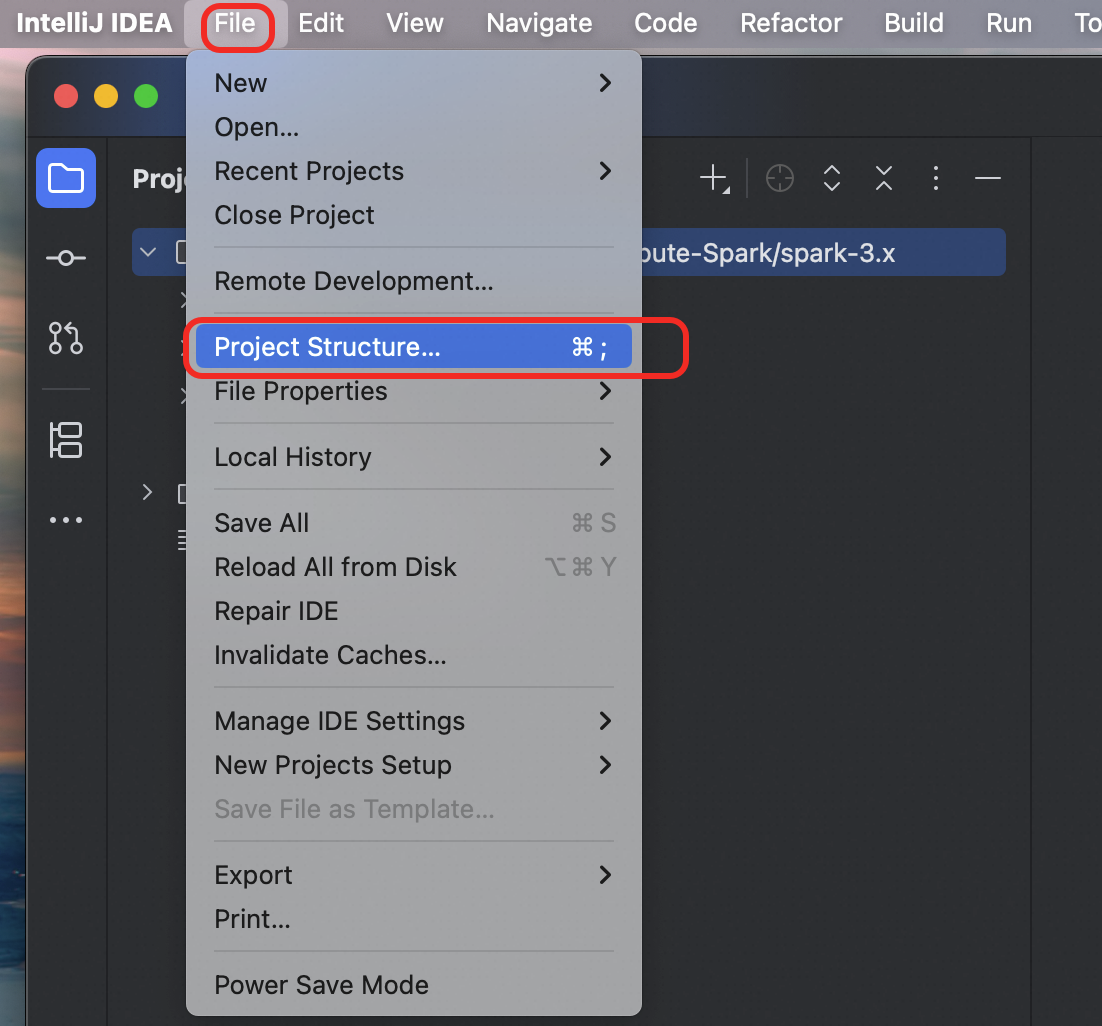
Go to File > Project Structure.
In the left navigation pane, select
Modules. Click the plus sign (+) and selectJARs or Directories.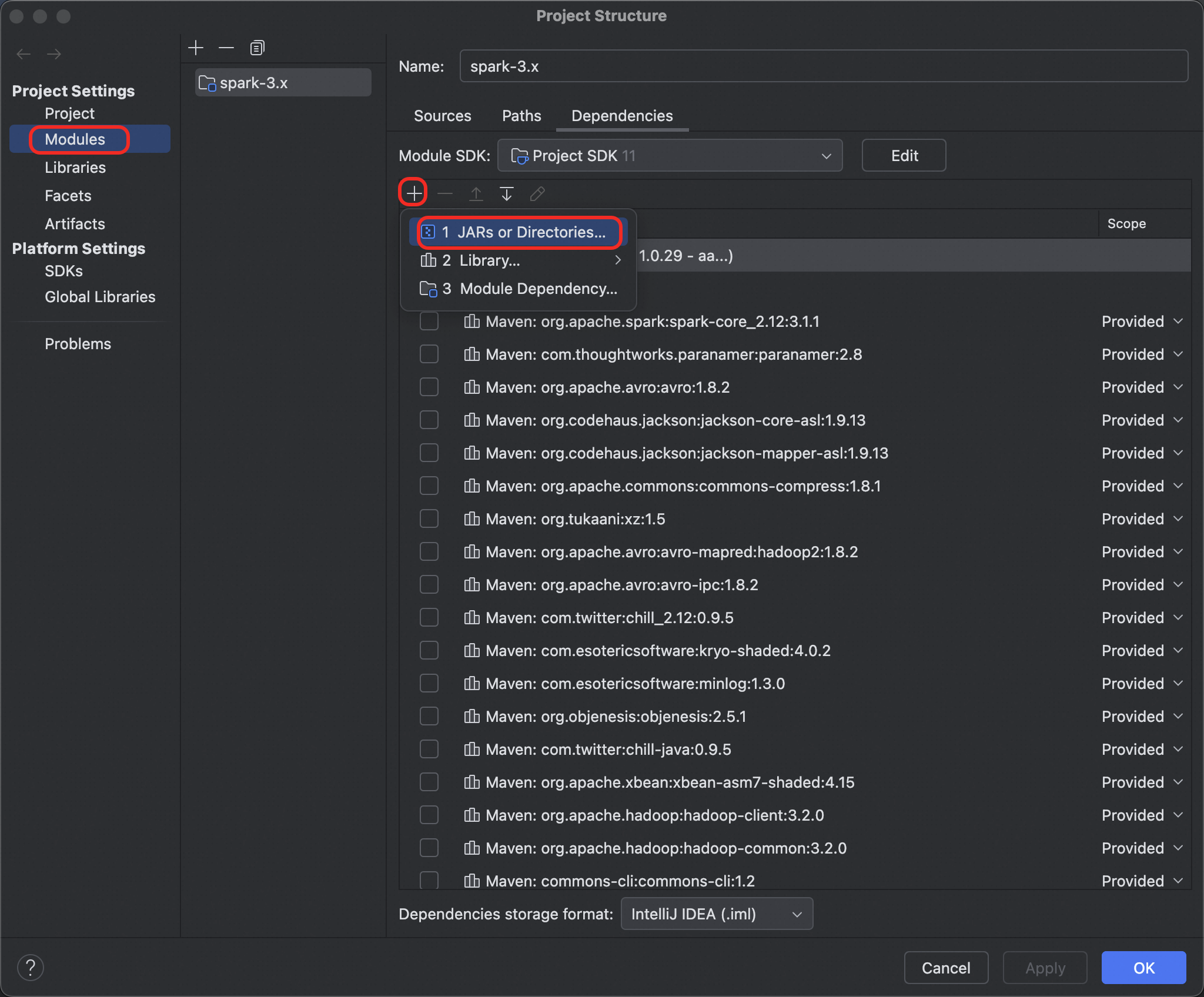
Add all JAR files from the JindoSDK
libfolder.In IDEA, click OK.
Cluster mode
For Spark 3.5, the Jindo SDK is included on the server-side. No action is required.
For other versions, modify the
spark-defaults.conffile. Add the following configuration item to use the public resources:spark.hadoop.odps.cupid.resources = public.jindofs-sdk-3.7.2.jar ## Note: To use a different version of the JindoSDK, download the corresponding SDK version, upload it to your project, and then reference it using spark.hadoop.odps.cupid.resources.
Step 4: Configure the network whitelist
By default, you can access it directly without any configuration.
In cluster mode, if you cannot access OSS, add the target bucket's domain name to the job whitelist by adding the following configuration item to the
spark-defaults.conffile or your DataWorks configuration:spark.hadoop.odps.cupid.trusted.services.access.list=${BucketName}.oss-${RegionId}-internal.aliyuncs.com
Step 5: Submit the job
./bin/spark-submit --class xxx spark-app.jar