User-defined join (UDJ) extends the MaxCompute user-defined function (UDF) framework with the ability to apply custom join logic across two tables. Built on the MaxCompute V2.0 compute engine, UDJ lets you express cross-table operations that standard JOIN types and UDF/UDTF/UDAF frameworks cannot handle, without dropping down to a custom MapReduce implementation.
When to use UDJ
MaxCompute provides six built-in join types: INNER JOIN, LEFT JOIN, RIGHT JOIN, FULL JOIN, SEMI JOIN, and ANTI-SEMI JOIN. The existing UDF, user-defined table-valued function (UDTF), and user-defined aggregate function (UDAF) frameworks each operate on a single table at a time.
To join multiple tables with custom logic, you currently have two options, both with significant drawbacks:
Built-in JOIN with complex SQL: Combining multiple JOIN types with UDFs in a single SQL statement creates a logical black box that makes it difficult to generate an optimal execution plan.
Custom MapReduce: Execution plans are hard to optimize. Most MapReduce code is written in Java, and its execution is less efficient than MaxCompute native code generated by the Low Level Virtual Machine (LLVM) code generator.
UDJ addresses both limitations. The join logic runs inside MaxCompute's native runtime, and the data exchange between the UDJ runtime engine and your Java code is optimized — making UDJ's join logic more efficient than the equivalent MapReduce reducer.
With UDJ, you can:
Apply custom merge logic to co-grouped records from two tables
Handle asymmetric cases (empty left group, empty right group) explicitly
Use
SORT BYpre-sorting to process large groups efficiently without loading all records into memoryReplace complex MapReduce reducer logic with SQL-callable Java code
Limitations
You cannot use UDFs, UDAFs, or UDTFs to read data from the following types of tables:
Table on which schema evolution is applied
Table that contains complex data types
Table that contains JSON data types
Transactional table
Performance
To validate UDJ performance, a real-world MapReduce job running a complex algorithm was rewritten using UDJ. The two approaches ran against the same dataset under the same concurrency. The figure below shows the results.
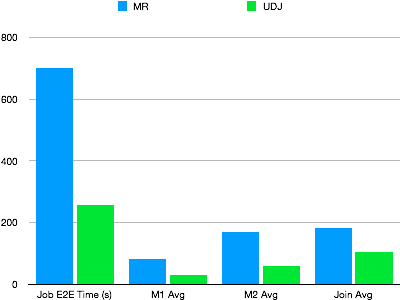
UDJ significantly outperforms the MapReduce version. The entire mapper logic runs in MaxCompute's native runtime. The data exchange logic between the MaxCompute UDJ runtime engine and Java interfaces is optimized in Java code. The join logic is more efficient than the equivalent reducer.
Implement UDJ: cross-table join example
This section walks through a complete example: for each record in a client activity log, find the payment record with the closest timestamp and merge the two.
Sample tables
payment — stores user payment records
| user_id | time | pay_info |
|---|---|---|
| 2656199 | 2018-02-13 22:30:00 | gZhvdySOQb |
| 8881237 | 2018-02-13 08:30:00 | pYvotuLDIT |
| 8881237 | 2018-02-13 10:32:00 | KBuMzRpsko |
user_client_log — stores client activity logs
| user_id | time | content |
|---|---|---|
| 8881237 | 2018-02-13 00:30:00 | click MpkvilgWSmhUuPn |
| 8881237 | 2018-02-13 06:14:00 | click OkTYNUHMqZzlDyL |
| 8881237 | 2018-02-13 10:30:00 | click OkTYNUHMqZzlDyL |
Goal: For each user_client_log record, find the payment record with the closest time value for the same user_id, then merge the two records.
A standard JOIN cannot accomplish this — the condition ABS(p.time - u.time) = MIN(ABS(p.time - u.time)) requires an aggregate function inside the JOIN predicate, which SQL does not allow.
Step 1: Configure the SDK
Add the UDF SDK to your Maven project:
<dependency>
  <groupId>com.aliyun.odps</groupId>
  <artifactId>odps-sdk-udf</artifactId>
  <version>0.29.10-public</version>
  <scope>provided</scope>
</dependency>
Step 2: Write the UDJ class
The UDJ class implements three lifecycle methods:
setup()— called once before processing begins; initialize output schema and shared state herejoin()— called once per join key; receives iterators over the left and right record groupsclose()— called after all groups are processed; release resources here
The example below implements nearest-time matching. All payment records for a given user_id are loaded into an ArrayList so the right-side iterator can compare each log record against all of them.
package com.aliyun.odps.udf.example.udj;

import com.aliyun.odps.Column;
import com.aliyun.odps.OdpsType;
import com.aliyun.odps.Yieldable;
import com.aliyun.odps.data.ArrayRecord;
import com.aliyun.odps.data.Record;
import com.aliyun.odps.udf.DataAttributes;
import com.aliyun.odps.udf.ExecutionContext;
import com.aliyun.odps.udf.UDJ;
import com.aliyun.odps.udf.annotation.Resolve;
import java.util.ArrayList;
import java.util.Iterator;

// Output schema: (user_id STRING, time BIGINT, content STRING)
@Resolve("->string,bigint,string")
public class PayUserLogMergeJoin extends UDJ {

  private Record outputRecord;

  // Initialize the output record schema before processing starts.
  @Override
  public void setup(ExecutionContext executionContext, DataAttributes dataAttributes) {
    outputRecord = new ArrayRecord(new Column[]{
      new Column("user_id", OdpsType.STRING),
      new Column("time", OdpsType.BIGINT),
      new Column("content", OdpsType.STRING)
    });
  }

  // Called once per join key (user_id).
  // left  = payment records for this user_id
  // right = log records for this user_id
  @Override
  public void join(Record key, Iterator<Record> left, Iterator<Record> right, Yieldable<Record> output) {
    outputRecord.setString(0, key.getString(0));

    if (!right.hasNext()) {
      // No log records for this user — nothing to output.
      return;
    } else if (!left.hasNext()) {
      // No payment records — output log records unmerged.
      while (right.hasNext()) {
        Record logRecord = right.next();
        outputRecord.setBigint(1, logRecord.getDatetime(0).getTime());
        outputRecord.setString(2, logRecord.getString(1));
        output.yield(outputRecord);
      }
      return;
    }

    // Load all payment records into memory so each log record
    // can be compared against the full set.
    ArrayList<Record> pays = new ArrayList<>();
    left.forEachRemaining(pay -> pays.add(pay.clone()));

    while (right.hasNext()) {
      Record log = right.next();
      long logTime = log.getDatetime(0).getTime();
      long minDelta = Long.MAX_VALUE;
      Record nearestPay = null;

      // Find the payment record with the smallest time difference.
      for (Record pay : pays) {
        long delta = Math.abs(logTime - pay.getDatetime(0).getTime());
        if (delta < minDelta) {
          minDelta = delta;
          nearestPay = pay;
        }
      }

      // Merge the log record with its nearest payment record.
      outputRecord.setBigint(1, log.getDatetime(0).getTime());
      outputRecord.setString(2, mergeLog(nearestPay.getString(1), log.getString(1)));
      output.yield(outputRecord);
    }
  }

  String mergeLog(String payInfo, String logContent) {
    return logContent + ", pay " + payInfo;
  }

  @Override
  public void close() {}
}
Package this class as odps-udj-example.jar.
Step 3: Register the UDJ function
Upload the JAR file and register the function:
ADD jar odps-udj-example.jar;

CREATE FUNCTION pay_user_log_merge_join
  AS 'com.aliyun.odps.udf.example.udj.PayUserLogMergeJoin'
  USING 'odps-udj-example.jar';
Step 4: Prepare sample data
CREATE TABLE payment(user_id STRING, time DATETIME, pay_info STRING);
CREATE TABLE user_client_log(user_id STRING, time DATETIME, content STRING);

-- Insert payment records
INSERT OVERWRITE TABLE payment VALUES
('1335656', datetime '2018-02-13 19:54:00', 'PEqMSHyktn'),
('2656199', datetime '2018-02-13 12:21:00', 'pYvotuLDIT'),
('2656199', datetime '2018-02-13 20:50:00', 'PEqMSHyktn'),
('2656199', datetime '2018-02-13 22:30:00', 'gZhvdySOQb'),
('8881237', datetime '2018-02-13 08:30:00', 'pYvotuLDIT'),
('8881237', datetime '2018-02-13 10:32:00', 'KBuMzRpsko'),
('9890100', datetime '2018-02-13 16:01:00', 'gZhvdySOQb'),
('9890100', datetime '2018-02-13 16:26:00', 'MxONdLckwa');

-- Insert log records
INSERT OVERWRITE TABLE user_client_log VALUES
('1000235', datetime '2018-02-13 00:25:36', 'click FNOXAibRjkIaQPB'),
('1000235', datetime '2018-02-13 22:30:00', 'click GczrYaxvkiPultZ'),
('1335656', datetime '2018-02-13 18:30:00', 'click MxONdLckpAFUHRS'),
('1335656', datetime '2018-02-13 19:54:00', 'click mKRPGOciFDyzTgM'),
('2656199', datetime '2018-02-13 08:30:00', 'click CZwafHsbJOPNitL'),
('2656199', datetime '2018-02-13 09:14:00', 'click nYHJqIpjevkKToy'),
('2656199', datetime '2018-02-13 21:05:00', 'click gbAfPCwrGXvEjpI'),
('2656199', datetime '2018-02-13 21:08:00', 'click dhpZyWMuGjBOTJP'),
('2656199', datetime '2018-02-13 22:29:00', 'click bAsxnUdDhvfqaBr'),
('2656199', datetime '2018-02-13 22:30:00', 'click XIhZdLaOocQRmrY'),
('4356142', datetime '2018-02-13 18:30:00', 'click DYqShmGbIoWKier'),
('4356142', datetime '2018-02-13 19:54:00', 'click DYqShmGbIoWKier'),
('8881237', datetime '2018-02-13 00:30:00', 'click MpkvilgWSmhUuPn'),
('8881237', datetime '2018-02-13 06:14:00', 'click OkTYNUHMqZzlDyL'),
('8881237', datetime '2018-02-13 10:30:00', 'click OkTYNUHMqZzlDyL'),
('9890100', datetime '2018-02-13 16:01:00', 'click vOTQfBFjcgXisYU'),
('9890100', datetime '2018-02-13 16:20:00', 'click WxaLgOCcVEvhiFJ');
Step 5: Run the UDJ in SQL
The USING clause identifies the UDJ function and maps columns from each table:
SELECT r.user_id, FROM_UNIXTIME(time/1000) AS time, content
FROM (
  SELECT user_id, time AS time, pay_info FROM payment
) p
JOIN (
  SELECT user_id, time AS time, content FROM user_client_log
) u
ON p.user_id = u.user_id
USING pay_user_log_merge_join(p.time, p.pay_info, u.time, u.content)
r
AS (user_id, time, content);
USING clause parameters:
| Parameter | Description |
|---|---|
pay_user_log_merge_join | Name of the registered UDJ function |
(p.time, p.pay_info, u.time, u.content) | Columns from the left and right tables passed to the UDJ |
r | Alias for the UDJ result set, referenceable in the outer query |
(user_id, time, content) | Column names for the UDJ output |
Expected output:
+---------+---------------------+-----------------------------------------------+
| user_id | time                | content                                       |
+---------+---------------------+-----------------------------------------------+
| 1000235 | 2018-02-13 00:25:36 | click FNOXAibRjkIaQPB                         |
| 1000235 | 2018-02-13 22:30:00 | click GczrYaxvkiPultZ                         |
| 1335656 | 2018-02-13 18:30:00 | click MxONdLckpAFUHRS, pay PEqMSHyktn         |
| 1335656 | 2018-02-13 19:54:00 | click mKRPGOciFDyzTgM, pay PEqMSHyktn         |
| 2656199 | 2018-02-13 08:30:00 | click CZwafHsbJOPNitL, pay pYvotuLDIT         |
| 2656199 | 2018-02-13 09:14:00 | click nYHJqIpjevkKToy, pay pYvotuLDIT         |
| 2656199 | 2018-02-13 21:05:00 | click gbAfPCwrGXvEjpI, pay PEqMSHyktn         |
| 2656199 | 2018-02-13 21:08:00 | click dhpZyWMuGjBOTJP, pay PEqMSHyktn         |
| 2656199 | 2018-02-13 22:29:00 | click bAsxnUdDhvfqaBr, pay gZhvdySOQb         |
| 2656199 | 2018-02-13 22:30:00 | click XIhZdLaOocQRmrY, pay gZhvdySOQb         |
| 4356142 | 2018-02-13 18:30:00 | click DYqShmGbIoWKier                         |
| 4356142 | 2018-02-13 19:54:00 | click DYqShmGbIoWKier                         |
| 8881237 | 2018-02-13 00:30:00 | click MpkvilgWSmhUuPn, pay pYvotuLDIT         |
| 8881237 | 2018-02-13 06:14:00 | click OkTYNUHMqZzlDyL, pay pYvotuLDIT         |
| 8881237 | 2018-02-13 10:30:00 | click OkTYNUHMqZzlDyL, pay KBuMzRpsko         |
| 9890100 | 2018-02-13 16:01:00 | click vOTQfBFjcgXisYU, pay gZhvdySOQb         |
| 9890100 | 2018-02-13 16:20:00 | click WxaLgOCcVEvhiFJ, pay MxONdLckwa         |
+---------+---------------------+-----------------------------------------------+
Optimize memory usage with SORT BY pre-sorting
The implementation above loads all payment records for each user_id into an ArrayList. This works when a user has a small number of payment records, but breaks down when a group is too large to fit in memory.
If the data is sorted by time, you only need to track a few records at a time instead of the full group.
SQL change
Add a SORT BY clause to sort both tables within each join group:
SELECT r.user_id, from_unixtime(time/1000) AS time, content
FROM (
  SELECT user_id, time AS time, pay_info FROM payment
) p
JOIN (
  SELECT user_id, time AS time, content FROM user_client_log
) u
ON p.user_id = u.user_id
USING pay_user_log_merge_join(p.time, p.pay_info, u.time, u.content)
r
AS (user_id, time, content)
SORT BY p.time, u.time;
Updated join() method
With both sides sorted by time, you can find the nearest payment record using a single linear scan — comparing a sliding window of at most three records rather than iterating the entire left group for each right record. Update the join() method to implement this logic:
@Override
public void join(Record key, Iterator<Record> left, Iterator<Record> right, Yieldable<Record> output) {
  outputRecord.setString(0, key.getString(0));

  if (!right.hasNext()) {
    return;
  } else if (!left.hasNext()) {
    while (right.hasNext()) {
      Record logRecord = right.next();
      outputRecord.setBigint(1, logRecord.getDatetime(0).getTime());
      outputRecord.setString(2, logRecord.getString(1));
      output.yield(outputRecord);
    }
    return;
  }

  long prevDelta = Long.MAX_VALUE;
  Record logRecord = right.next();
  Record payRecord = left.next();
  Record lastPayRecord = payRecord.clone();

  while (true) {
    long delta = logRecord.getDatetime(0).getTime() - payRecord.getDatetime(0).getTime();

    if (left.hasNext() && delta > 0) {
      // The time gap is still shrinking — advance the left iterator.
      lastPayRecord = payRecord.clone();
      prevDelta = delta;
      payRecord = left.next();
    } else {
      // Minimum delta reached. Output the merged record and advance the right iterator.
      Record nearestPay = Math.abs(delta) < prevDelta ? payRecord : lastPayRecord;
      outputRecord.setBigint(1, logRecord.getDatetime(0).getTime());
      outputRecord.setString(2, mergeLog(nearestPay.getString(1), logRecord.getString(1)));
      output.yield(outputRecord);

      if (right.hasNext()) {
        logRecord = right.next();
        prevDelta = Math.abs(
          logRecord.getDatetime(0).getTime() - lastPayRecord.getDatetime(0).getTime()
        );
      } else {
        break;
      }
    }
  }
}
This version caches at most three records at a time and produces the same output as the ArrayList approach.
After modifying the Java UDJ class, rebuild the JAR file and re-add it to MaxCompute for the changes to take effect.