This topic describes the resource allocation parameters for MaxCompute Spark jobs, explains how to set them appropriately, and provides guidance on how to troubleshoot resource wait issues.
Resource Parameter Descriptions
When you submit a Spark job, consider the following resource parameters:
Number of Executors
Executor memory
Executor cores
Driver memory
Driver cores
Local disk
Executor-related parameters
spark.executor.instances:The total number of Executors to request. For typical jobs, 10 to 100 Executors are sufficient. For large-scale data processing, you can request 100 to 2,000 or more Executors.
spark.executor.cores:The number of CPU cores per Executor. This parameter also determines the maximum number of tasks that can run concurrently in one Executor.
Maximum Spark parallelism = Number of Executors × Number of Executor cores.
spark.executor.memory:The heap memory for each Executor. This value sets the JVM
-Xmxparameter when the JVM process starts.spark.executor.memoryOverhead:The off-heap memory for each Executor. The default unit is MB. This memory is used for JVM overhead, strings, NIO buffers, and other native memory purposes.
The default value is
executor.memory × 0.1, with a minimum of 384 MB.If a
Cannot allocate memoryerror occurs, increase the value ofspark.executor.memoryOverhead. The total memory per Executor is calculated as:spark.executor.memory+spark.executor.memoryOverhead.
Driver-related parameters
spark.driver.cores: The number of CPU cores for the Driver.spark.driver.memory: The heap memory for the Driver.spark.driver.memoryOverhead: The off-heap memory for the Driver.spark.driver.maxResultSize: The default value is 1 GB. This parameter controls the maximum size of data that can be sent from Workers to the Driver. If this limit is exceeded, the Driver stops the execution.
Local disk parameters
spark.hadoop.odps.cupid.disk.driver.device_size:The local disk size. The default value is 20 GB. You can set this parameter in the
spark-defaults.conffile or in the DataWorks configuration items. Do not set this parameter in your code.Spark uses local disks for temporary storage. Each Driver and Executor is allocated its own local disk. Shuffle data and BlockManager overflow data are stored on these disks.
If a
No space left on deviceerror occurs, increase this value. The maximum supported size is 100 GB. If the error persists after you set the value to 100 GB, investigate the following possible causes:Data skew: Data is concentrated on a few blocks during the Shuffle or Cache process.
Reduce the number of concurrent tasks per Executor by lowering the value of
spark.executor.cores.Increase the total number of Executors using
spark.executor.instances.
How to Set Resource Parameters Appropriately
Request resources with a memory-to-CPU ratio of 4 GB to 1 core. We recommend that you configure a maximum of 8 cores per Worker.
You can check the memory and CPU usage at runtime using the Sensor metrics for the Master or Worker in LogView.
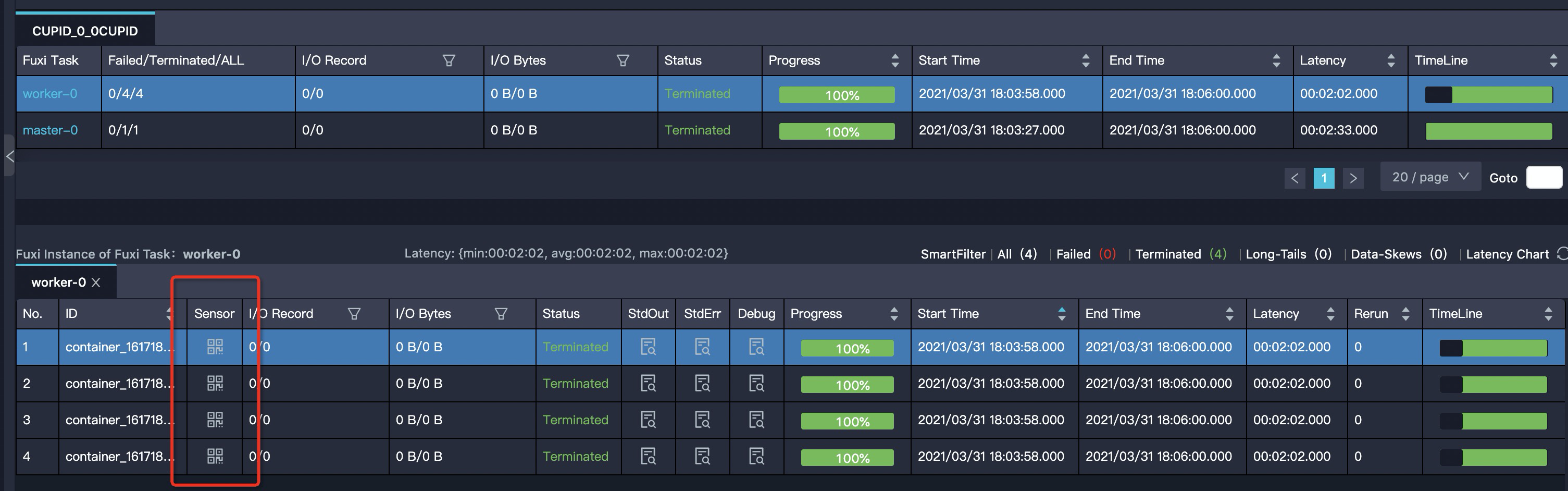
Monitor the
mem_rssmetric. This metric shows the actual memory usage curve for an Executor or Driver. You can use this metric to determine whether to increase or decrease the allocated memory.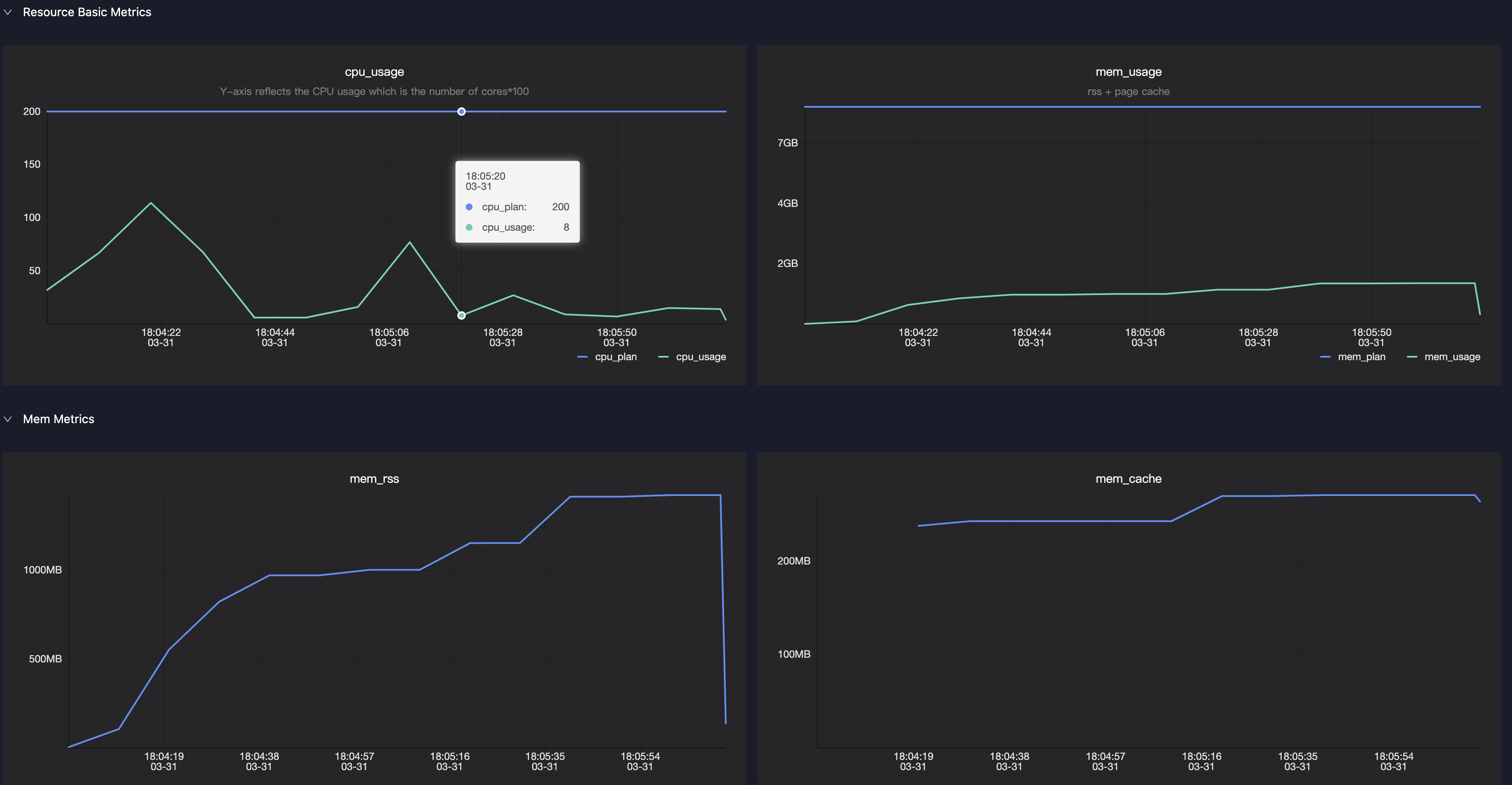
Resource Wait Issues
Do not set spark.master in your code. After you debug in local mode, remove the spark.master=local setting from your code.
Submit Jobs After Resources Are Allocated
Resource allocation is a dynamic process, and you may be allocated fewer resources than you requested. By default, Spark does not wait for all Executors to be ready before it starts running tasks. You can use the following parameters to control when Spark submits tasks:
spark.scheduler.maxRegisteredResourcesWaitingTime: The maximum time to wait for resources before the execution starts. The default value is 30 seconds.spark.scheduler.minRegisteredResourcesRatio: The minimum ratio of registered resources to requested resources. The default value is 0.8.
Common Causes of Failed Resource Allocation
If you are a subscription user, you typically request more resources than the resource count included in your subscription.
For pay-as-you-go users: The resources are oversubscribed, and you must compete with other users for them.
Solutions for Failed Resource Allocation
Adjust job resources: You can change the total number of Executors or the resources allocated to each Executor, which is usually memory.
Schedule jobs during off-peak hours.
Typical Signs of Unallocated Resources
The driver prints the following log:
WARN YarnClusterScheduler: Initial job has not accepted any resources; check your cluster UI to ensure that workers are registered and have sufficient resourcesIn LogView, only the Driver is displayed, and the Worker count is 0.
In the Spark UI, only the Driver is displayed, and the Worker count is 0.