Scenarios
This topic describes how to use MaxLake for data ingestion into data lakes and warehouses and to orchestrate multi-scenario analytics. Using Internet of Vehicles (IoV) data as an example, this topic shows how you can analyze mileage and speed from GPS location data reported by vehicles. You can also orchestrate multiple engines to support various application scenarios, such as real-time queries and reports, secure data sharing for cross-team collaboration using data masking, and AI training. This process helps you derive value from a single data source in multiple ways. The overall process is shown in the following figure:
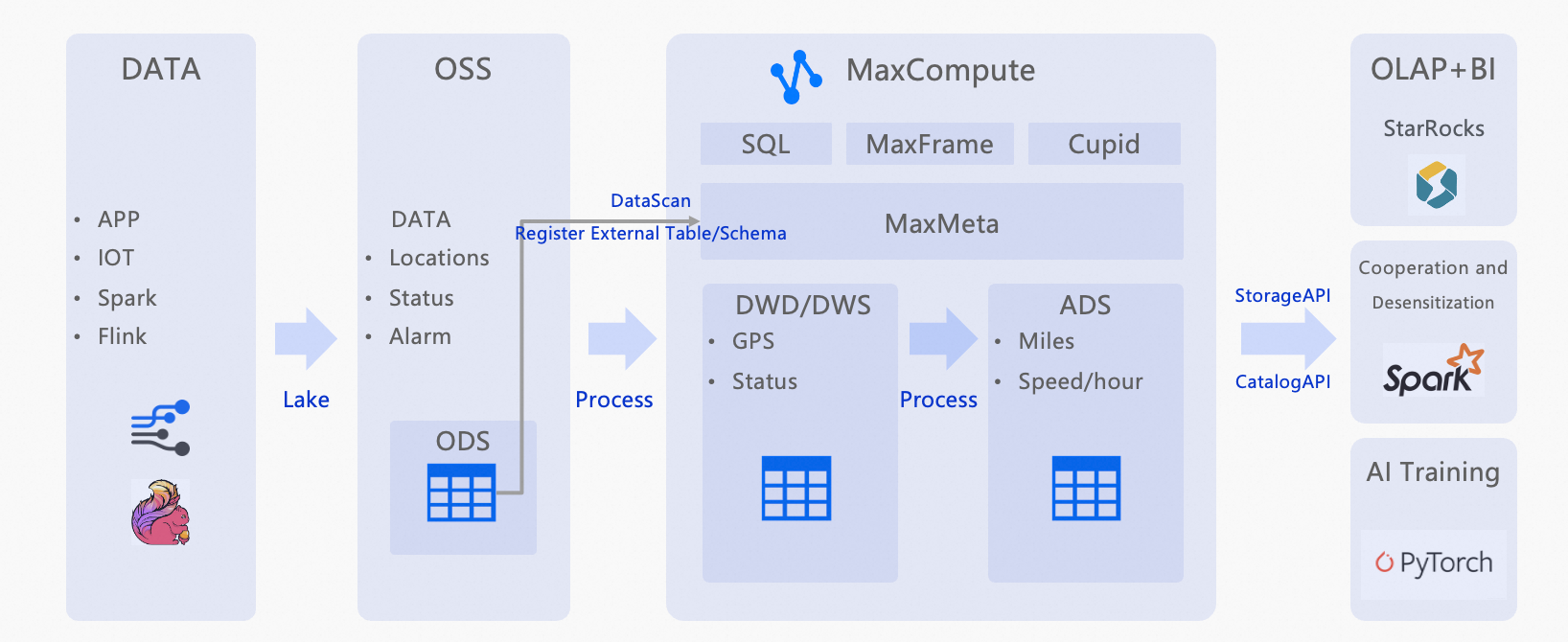
Automatically discover raw data and build the ODS layer
The Operational Data Store (ODS) layer is stored in Object Storage Service (OSS). In this example, the data is a raw IoV data table that contains raw location information and is partitioned by hour.
In MaxCompute, create a Data lake connections (CONNECTION) to manage access credentials for external storage.
Create a Data discovery (DataScan) task to access OSS through the CONNECTION and automatically register data files, such as
parquetandorcfiles, as structured external tables.
Perform incremental data transformation to output DWD and ADS layers
Filter invalid data from the ODS layer and unify field formats. Examples include formatting time values and validating longitude and latitude coordinates.
Use multi-engine computing to meet specific application scenarios
Online Analytical Processing (OLAP) + AI: Use the StarRocks engine for real-time queries and reports, such as querying the total mileage and average speed of vehicles.
Cross-team collaboration and secure data sharing: Enable dynamic data masking for third-party teams that use the Spark engine for data analytics.
AI training: Use the processed data for model training.
De-identify the total vehicle mileage table. Mask the unique vehicle ID by retaining only the first and last characters and replacing the other characters with asterisks (*). Use the masked data to calculate the daily maximum speed.
Procedure
Upload test data
Log in to the OSS console.
In the left-side navigation pane, click Buckets.
On the Buckets page, click Create Bucket.
In this example, the bucket name is
vehicle-raw.On the Buckets page, click the target Bucket Name to open its Objects page.
Click Upload Object to upload the unzipped test data file Maxlake_example_parquet.zip.
Grant permissions
If you use a RAM user to create and manage CONNECTIONs, you must first be granted the tenant-level Connection_Admin role. For more information, see Tenant-level role authorization.
An Alibaba Cloud account or a user with the tenant-level Super_Administrator and Admin roles can grant the Connection_Admin role.
Log in to the MaxCompute console and select a region in the upper-left corner.
In the left-side navigation pane, choose .
On the Tenants page, click the Roles tab.
On the Roles tab, select
Connection_AdminandDatascan_Admin, and click Create Authorization in the Actions column.In the Create Authorization dialog box, add the desired users, and then click OK.
In MaxCompute, create Data lake connections (CONNECTION)
Log in to the MaxCompute console and select a region in the upper-left corner.
In the left-side navigation pane, choose .
On the Data Lake Connection (CONNECTION) page, click Create Data Lake Connection.
In the Create Data Lake Connection dialog box, configure the parameters and click OK.
Parameter
Description
Data lake connection parameter
The name of the data lake connection. The name must be unique within the tenant.
RAMRoleARN
Select the RAMRoleARN of a RAM role that has permissions to access OSS.
You can create a custom role and specify its RAMRoleARN. For more information, see Authorization for external data sources.
Data lake connection description
The description of the data lake connection.
Create a Data discovery (DataScan) job
Log in to the MaxCompute console and select a region in the upper-left corner.
In the left-side navigation pane, choose .
On the Data Discovery page, click Create Data Discovery Job.
In the Create Job dialog box, set the following parameters and click Create.
Basic Configuration
Parameter
Description
Job Name
The name of the task. The name must be unique within the tenant.
Task cycle
5 minutes
Lake Data Configuration
Parameter
Description
Data Lake Connection
Select Data lake connections (CONNECTION) as the external storage access credential.
Location
Enter the OSS path where the data files are stored.
Format:
oss://<Bucket name>/<OSS path>/The OSS bucket must be in the same region and belong to the same Alibaba Cloud account as the MaxCompute DataScan task.
Example:
oss://vehicle-raw/Maxlake_example_parquet
Catalog Configuration
Parameter
Description
Project
Select a project for which schema-level syntax is enabled.
Schema
Select a schema.
Select a schema whose name does not conflict with the names of the foreign tables to be discovered. If a newly discovered foreign table has the same name as a user-created table in the schema, the discovery task does not create the foreign table.
The data discovery task runs every 5 minutes. After the task runs, you can view the discovery results. The results show that three IoV tables have been found and that new partitions are continuously being appended.
NoteIf parsing fails, check for
.DS_Storefiles. You must manually delete these files. This type of dirty data does not meet data requirements and causes the scan to fail.A future service release will automatically ignore
.DS_Storefiles and user-defined ignore files.
SQL data query scripts
ODS: Raw reported data table
-- Business scenario design
-- Scenario: An IoV platform obtains real-time vehicle location data (GPS) and calculates the hourly mileage and average speed for each vehicle.

-- Data source: In-vehicle terminals report location, speed, and other data every few seconds.
-- ODS: Stores the raw reported data directly.
-- DWD: Cleanses, parses, and transforms the data into individual report records.
-- ADS: Calculates the total hourly mileage and average speed for each vehicle.

-- ODS: Raw reported data table
-- Stores raw IoV location data, partitioned by hour.

SHOW PARTITIONS ods_vehicle_gps_raw;
SET odps.sql.allow.fullscan=true;

SELECT  * FROM ods_vehicle_gps_raw WHERE dt='2025-09-17' AND hh='23';

-- Sample results
+------------+------------+-------------+------------+------------+------------+-------------+------------+------------+
| vin        | device_id  | report_time | lng        | lat        | speed      | raw_payload | dt         | hh         |
+------------+------------+-------------+------------+------------+------------+-------------+------------+------------+
| VIN001     | DEV001     | 2025-09-16 00:00:00 | 120.00023573730152 | 30.39975989605289 | 73.3843581906447 | mock_payload | 2025-09-17 | 23         |
| VIN002     | DEV002     | 2025-09-16 00:00:00 | 120.00517998985256 | 30.33811818824062 | 67.43035716350673 | mock_payload | 2025-09-17 | 23         |
| VIN003     | DEV003     | 2025-09-16 00:00:00 | 120.24295999679852 | 30.143229002199707 | 40.8918776553552 | mock_payload | 2025-09-17 | 23         |
| VIN001     | DEV001     | 2025-09-16 00:30:00 | 120.24754980497414 | 30.373484773735274 | 49.50436236779409 | mock_payload | 2025-09-17 | 23         |
| VIN002     | DEV002     | 2025-09-16 00:30:00 | 120.00510501582413 | 30.42486370328109 | 55.8400627485663 | mock_payload | 2025-09-17 | 23         |
| VIN003     | DEV003     | 2025-09-16 00:30:00 | 120.36073125682805 | 30.065016013833237 | 61.82996654036919 | mock_payload | 2025-09-17 | 23         |
| VIN002     | DEV002     | 2025-09-16 19:30:00 | 120.29488938268968 | 30.12474152125639 | 66.48209032904454 | mock_payload | 2025-09-17 | 23         |
| VIN002     | DEV002     | 2025-09-16 19:00:00 | 120.35157954057287 | 30.459823299646295 | 76.36574370617315 | mock_payload | 2025-09-17 | 23         |
| VIN001     | DEV001     | 2025-09-16 19:30:00 | 120.3113710027241 | 30.33402715522518 | 62.601762741153024 | mock_payload | 2025-09-17 | 23         |
+------------+------------+-------------+------------+------------+------------+-------------+------------+------------+
DWD layer
-- DWD layer (dwd_vehicle_gps)
-- Based on the ODS layer, this layer filters invalid data and unifies field formats, such as time formatting and longitude and latitude validation.
CREATE TABLE IF NOT EXISTS dwd_vehicle_gps (
  vin          STRING COMMENT 'Unique vehicle identifier',
  event_time   DATETIME COMMENT 'Report time',
  lng          DOUBLE COMMENT 'Longitude',
  lat          DOUBLE COMMENT 'Latitude',
  speed        DOUBLE COMMENT 'Speed (km/h)',
  loc_valid    BOOLEAN COMMENT 'Indicates whether the location is valid'
)
PARTITIONED BY (dt STRING, hh STRING);

-- Transformation SQL
INSERT OVERWRITE TABLE dwd_vehicle_gps PARTITION (dt='2025-09-17', hh='23')
SELECT
vin,
TO_DATE(report_time,'yyyy-MM-dd HH:mi:ss') AS event_time,
lng, lat,
speed,
CASE WHEN lng BETWEEN 70 AND 140 AND lat BETWEEN 10 AND 60 THEN TRUE ELSE FALSE END AS loc_valid
FROM ods_vehicle_gps_raw
WHERE dt='2025-09-17' AND hh='23'
AND speed >= 0
AND vin IS NOT NULL;

SELECT  * FROM dwd_vehicle_gps WHERE dt='2025-09-17' AND hh='23';

-- Sample results
+------------+------------+------------+------------+------------+-----------+------------+------------+
| vin        | event_time | lng        | lat        | speed      | loc_valid | dt         | hh         |
+------------+------------+------------+------------+------------+-----------+------------+------------+
| VIN001     | 2025-09-16 00:00:00 | 120.00023573730152 | 30.39975989605289 | 73.3843581906447 | true      | 2025-09-17 | 23         |
| VIN002     | 2025-09-16 00:00:00 | 120.00517998985256 | 30.33811818824062 | 67.43035716350673 | true      | 2025-09-17 | 23         |
| VIN003     | 2025-09-16 00:00:00 | 120.24295999679852 | 30.143229002199707 | 40.8918776553552 | true      | 2025-09-17 | 23         |
| VIN001     | 2025-09-16 00:30:00 | 120.24754980497414 | 30.373484773735274 | 49.50436236779409 | true      | 2025-09-17 | 23         |
| VIN003     | 2025-09-16 00:30:00 | 120.36073125682805 | 30.065016013833237 | 61.82996654036919 | true      | 2025-09-17 | 23         |
| VIN001     | 2025-09-16 05:00:00 | 120.13891993725622 | 30.39267490566367 | 53.99676876794396 | true      | 2025-09-17 | 23         |
| VIN003     | 2025-09-16 05:30:00 | 120.04798104849084 | 30.012209889484666 | 65.01092831837522 | true      | 2025-09-17 | 23         |
| VIN002     | 2025-09-16 20:00:00 | 120.42721760246307 | 30.051330581564144 | 79.73892066615583 | true      | 2025-09-17 | 23         |
| VIN003     | 2025-09-16 20:00:00 | 120.47715870033818 | 30.302941456112517 | 58.61057150112957 | true      | 2025-09-17 | 23         |
| VIN001     | 2025-09-16 20:30:00 | 120.3067564206695 | 30.179763514166588 | 47.77533756931095 | true      | 2025-09-17 | 23         |
+------------+------------+-------------+------------+------------+------------+-------------+------------+------------+
ADS layer
-- ADS layer (ads_vehicle_hourly_stat)
-- Calculates the total hourly mileage (using a simple location difference calculation) and average speed for each vehicle.
CREATE TABLE IF NOT EXISTS ads_vehicle_hourly_stat (
  vin           STRING COMMENT 'Unique vehicle identifier',
  stat_hour     STRING COMMENT 'Statistics hour (yyyy-MM-dd HH)',
  total_distance DOUBLE COMMENT 'Total mileage (km)',
  avg_speed     DOUBLE COMMENT 'Average speed (km/h)'
)
PARTITIONED BY (dt STRING, hh STRING);

-- Statistical transformation SQL
-- Note: A simplified formula is used here to calculate the distance for demonstration purposes. You can use the haversine formula in a real-world scenario.
-- A simple approximation of distance based on the difference in longitude and latitude (for demonstration).
SET odps.sql.type.system.odps2=true;

WITH ordered AS (
  SELECT
  vin, event_time, lng, lat, speed,
  ROW_NUMBER() OVER (PARTITION BY vin ORDER BY event_time) AS rn
  FROM dwd_vehicle_gps
  WHERE dt='2025-09-17' AND hh='23' AND loc_valid = TRUE
),
with_prev AS (
  SELECT
  a.vin, a.event_time, a.speed,
  -- A simple approximation using Euclidean distance. Here, a 1-degree difference in longitude or latitude is about 111 km. This is not precise but is sufficient for this demo.
  ABS(a.lng - b.lng)*111 AS dx,
  ABS(a.lat - b.lat)*111 AS dy
  FROM ordered a
  LEFT JOIN ordered b
  ON a.vin = b.vin AND a.rn = b.rn + 1
)
INSERT OVERWRITE TABLE ads_vehicle_hourly_stat PARTITION (dt='2025-09-17', hh='23')
  SELECT
  vin,
  '2025-09-17 23' AS stat_hour,
  SUM( SQRT( COALESCE(dx,0)*COALESCE(dx,0) + COALESCE(dy,0)*COALESCE(dy,0) ) ) AS total_distance,
  AVG(speed) AS avg_speed
  FROM with_prev
  GROUP BY vin;

-- Query the mileage and average speed for vehicle VIN001.
SET odps.sql.allow.fullscan=true;
SELECT * FROM ads_vehicle_hourly_stat WHERE vin='VIN001'
  ORDER BY stat_hour DESC;

-- Results.
+------------+---------------+--------------------+-------------------+------------+------------+
| vin        | stat_hour     | total_distance     | avg_speed         | dt         | hh         |
+------------+---------------+--------------------+-------------------+------------+------------+
| VIN001     | 2025-09-17 23 | 1510.7384548492398 | 59.33624859907179 | 2025-09-17 | 23         |
+------------+---------------+--------------------+-------------------+------------+------------+

SET odps.sql.allow.fullscan=true;
SELECT
vin AS vehicle_id,
stat_hour AS stat_time,
CONCAT(CAST(ROUND(total_distance, 2) AS STRING), ' km') AS mileage,
CONCAT(CAST(ROUND(avg_speed, 2) AS STRING), ' km/h') AS avg_speed
FROM ads_vehicle_hourly_stat WHERE vin='VIN001'
  ORDER BY stat_hour DESC;

-- Results.
+------------+---------------+------------+------------+
| vehicle_id | stat_time     | mileage    | avg_speed  |
+------------+---------------+------------+------------+
| VIN001     | 2025-09-17 23 | 1510.74 km | 59.34 km/h |
+------------+---------------+------------+------------+
Enable dynamic data masking for a third-party team that uses the Spark engine for data analytics. This enables cross-team collaboration and secure data sharing.
-- Cross-team collaboration and secure data sharing. Enable dynamic data masking for a third-party team that uses the Spark engine for data analytics.
CREATE role thirdparty;
GRANT CreateInstance, List ON project <project_name> TO ROLE thirdparty;
GRANT SELECT ON TABLE ods_vehicle_gps_raw TO ROLE thirdparty;

ADD USER RAM$<your Alibaba Cloud account>;
GRANT thirdparty TO RAM$<your Alibaba Cloud account>;
De-identify the total vehicle mileage table. Mask the unique vehicle ID by retaining only the first and last characters and replacing the other characters with asterisks (*).
-- Enable the data masking feature for the project.
setproject odps.data.masking.policy.enable=true;

-- De-identify the total vehicle mileage table. Mask the unique vehicle ID by retaining only the first and last characters and replacing the other characters with asterisks (*).
CREATE data masking policy IF NOT EXISTS masking_vin
TO role (thirdparty)
USING MASKED_STRING_UNMASKED_BA(1, 1);

apply data masking policy masking_vin bind TO
TABLE ads_vehicle_hourly_stat COLUMN vin;