MaxCompute supports real-time data writes and primary key updates within minutes using Delta tables, reducing the latency from data ingestion to query availability to 5–10 minutes.
Traditional batch pipelines surface data only on the following day, which is too slow for time-sensitive events such as customer behavior logs, comments, ratings, or likes around viral content. Near-real-time ingestion synchronizes incremental data to a Delta table within minutes. If you already have a production task writing to the operational data store (ODS) layer in MaxCompute, you can use the UPSERT feature of Delta tables to ingest data without modifying that task. UPSERT prevents duplicate records, improves storage efficiency, and reduces storage costs.
How near-real-time ingestion works
The solution uses the Flink connector to write streaming data to a MaxCompute Delta table through an upsert session managed by the tunnel service.

Write Flink data to a Delta table
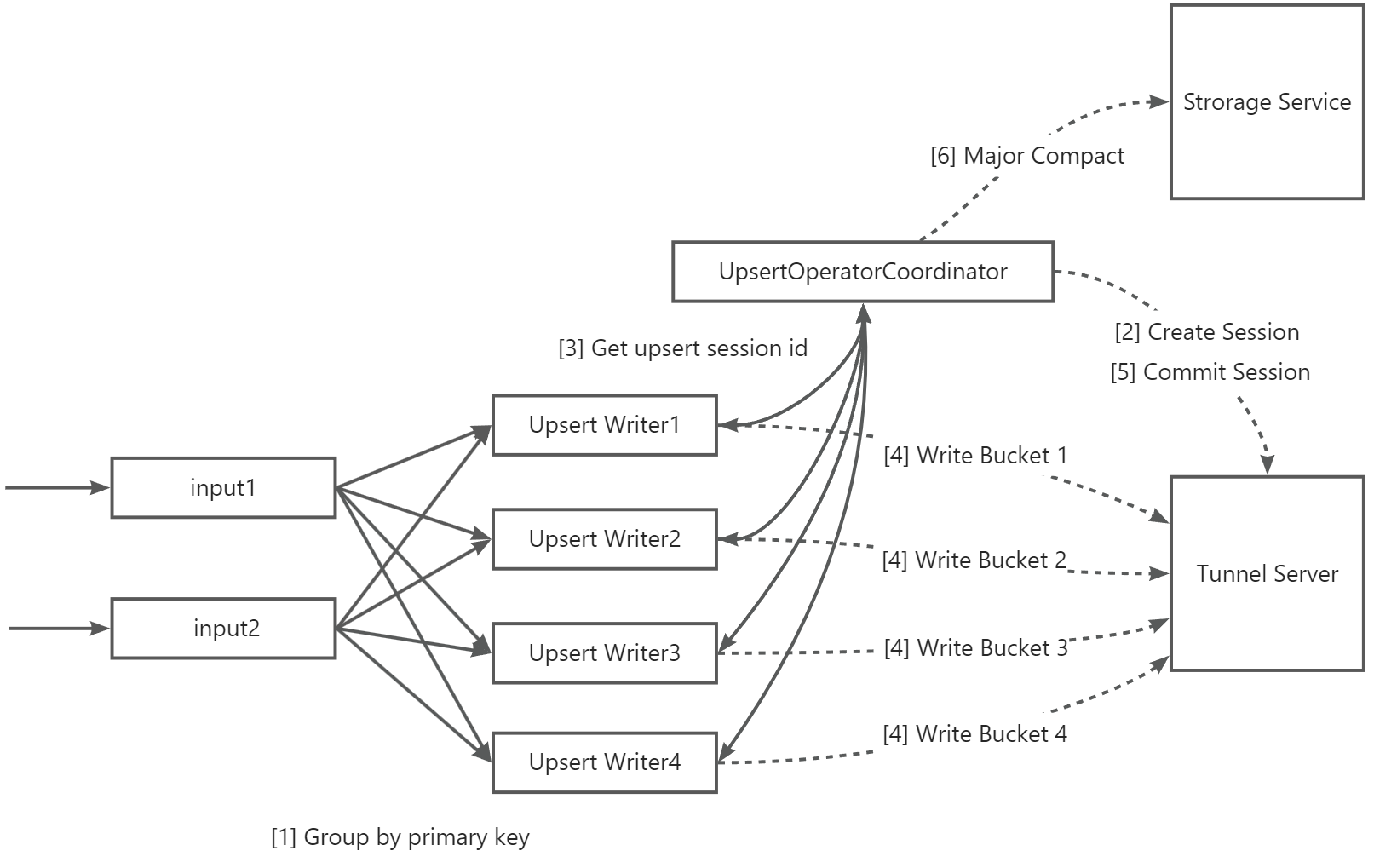
The Flink connector writes data to a MaxCompute Delta table through the following six-step process.
| Step | Description |
|---|---|
| 1 | Data is grouped by primary key and concurrently written to the table. As an alternative, group data by partition key column when: data is written concurrently to a large number of partitions, the data is evenly distributed across partitions, and the table has fewer than 10 buckets. |
| 2 | UpsertWriterTask parses the partitions the data belongs to and sends a request to UpsertOperatorCoordinator. UpsertOperatorCoordinator creates an upsert session for real-time writes to those partitions. |
| 3 | UpsertOperatorCoordinator returns the upsert session ID to UpsertWriterTask. |
| 4 | UpsertWriterTask creates an Upsert Writer based on the session and connects to the MaxCompute Tunnel Server to continuously write data. In file cache mode, data is buffered to the local disk of the Flink node and transmitted to the Tunnel Server when the file size reaches a threshold or a checkpoint starts. |
| 5 | When a checkpoint starts, Upsert Writer submits all data to the Tunnel Server and triggers a commit. Data becomes visible after the commit succeeds. |
| 6 | If automatic major compaction is enabled, UpsertOperatorCoordinator initiates a major compaction operation to Storage Service when the number of partition commits exceeds a threshold. Warning
Major compaction may increase latency for real-time data import depending on table data size. Use automatic major compaction with caution. |
For a full walkthrough, see Use Flink to write data to a Delta table.
Tune UPSERT parameters for throughput
The default UPSERT parameters work for most workloads, but you can adjust them to hit specific throughput targets or stabilize performance under high partition counts. For a complete parameter reference, see Parameters for the UPSERT statement.
Baseline: buckets and sink parallelism
Two parameters govern your ceiling throughput:
-
Number of buckets: Estimated maximum write throughput is 1 MB/s × number of buckets. Set this based on your sustained ingestion rate.
-
`sink.parallelism`: Set this to the same value as the number of buckets for optimal performance. At minimum, the number of buckets must be an integral multiple of
sink.parallelism.
The number of buckets assigned to each sink node is: number of buckets ÷ sink.parallelism.
Non-partitioned tables
When to use: Your data does not have partition key columns, or you are writing to a single logical partition.
If increasing sink.parallelism does not improve throughput, the bottleneck is likely upstream of the sink node. Optimize the upstream data processing pipeline first.
If upsert.writer.buffer-size ÷ buckets-per-sink-node falls below 128 KB, network transmission efficiency drops. Increase upsert.writer.buffer-size to recover performance.
To increase throughput, raise upsert.flush.concurrent (default: 2). Monitor performance as you increase it — too high a value causes multiple buckets to flush simultaneously, leading to network congestion and reduced overall throughput.
Few partitions
When to use: You are writing to a small number of partitions concurrently.
Apply the non-partitioned table guidance above, and also consider:
-
During a checkpoint, writes to each partition are committed independently, which can limit overall throughput.
-
Maximum buffer memory per sink node is
upsert.writer.buffer-size × number of partitions. If an out-of-memory (OOM) error occurs, decreaseupsert.writer.buffer-size. -
Increase
upsert.commit.thread-num(default:16) to parallelize commits during a checkpoint. Do not exceed32— above that threshold, issues caused by excessive concurrency degrade performance.
Many partitions (file cache mode)
When to use: You are writing to a large number of partitions concurrently and checkpoint commit time is the bottleneck.
Apply the few-partitions guidance above, and also consider:
-
Data for each partition is cached to a local file and written to MaxCompute concurrently during a checkpoint.
-
sink.file-cached.writer.num(default:16) controls how many partitions a single sink node writes concurrently. Do not set this above32. -
The effective concurrent write bucket count is
sink.file-cached.writer.num × upsert.flush.concurrent. Tune both parameters together, but keep the product low enough to avoid network congestion.
For the full list of file cache mode parameters, see Parameters for data writing in file cache mode.
Key parameter reference
| Parameter | Default | Max recommended | Description |
|---|---|---|---|
sink.parallelism |
— | — | Parallelism of sink nodes; set equal to the number of buckets |
upsert.writer.buffer-size |
— | — | Per-bucket buffer size; increase if throughput drops below 128 KB per bucket |
upsert.flush.concurrent |
2 | — | Buckets flushed concurrently; increase gradually and monitor for network congestion |
upsert.commit.thread-num |
16 | 32 | Threads for parallel partition commits during checkpoint; above 32, issues caused by excessive concurrency reduce throughput |
sink.file-cached.writer.num |
16 | 32 | Concurrent partition writers in file cache mode; above 32, network congestion reduces throughput |
When adjustments do not help
If throughput targets are still not met after tuning:
-
The public Tunnel resource group quota for each project has a cap. When that cap is reached, writes are rejected, reducing effective throughput. Switch to an exclusive Tunnel resource group or reduce concurrency.
-
The upstream data processing pipeline feeding the connector may be the bottleneck. Profile and optimize the upstream pipeline.
Resilience and error handling
Design your pipeline to handle the following failure modes before going to production.
Checkpoint expires before completing
Error: Checkpoint xxx expired before completing
Too many partitions are being written during a single checkpoint interval, causing the commit phase to exceed the checkpoint timeout.
To resolve this:
-
Increase the Flink checkpoint interval to give the commit phase more time to complete.
-
Enable file cache mode by setting
sink.file-cached.enabletotrue.
For file cache mode parameters, see Appendix: Parameters of the Flink connector of the new version.
OperatorEvent lost, task failover triggered
Error: org.apache.flink.util.FlinkException: An OperatorEvent from an OperatorCoordinator to a task was lost. Triggering task failover to ensure consistency.
The JobManager–TaskManager communication was interrupted. The task retries automatically. If this recurs, increase task resources to stabilize the connection.
Eight-hour timestamp offset after writing TIMESTAMP data
Flink's TIMESTAMP type carries no time zone information. MaxCompute treats incoming TIMESTAMP values as UTC+0, then converts them to the project's configured time zone when reading — producing an apparent 8-hour offset for UTC+8 projects.
Replace TIMESTAMP columns in your MaxCompute sink table with TIMESTAMP_LTZ. TIMESTAMP_LTZ carries time zone context through the pipeline, so no conversion offset occurs on read.
Tengine error during data write
Error: An HTML page from Tengine with Sorry, the page you are looking for is currently unavailable.
The Tunnel service is temporarily unavailable. Wait for the service to recover — the Flink task retries automatically and resumes writing once the Tunnel is restored.
SlotExceeded: write quota exceeded
Error: java.io.IOException: RequestId=xxxxxx, ErrorCode=SlotExceeded, ErrorMessage=Your slot quota is exceeded.
The number of concurrent write slots has exceeded the project quota. Either decrease write concurrency (lower sink.parallelism) or increase the parallelism of exclusive Tunnel resource groups to expand the available quota.