Hash Clustering tables use shuffle and sort properties to organize data. MaxCompute uses these properties to optimize execution plans, improving efficiency and saving resources. This topic describes how to use Hash Clustering tables in MaxCompute.
Background information
Joining tables is a common scenario in MaxCompute queries. For example, the following query performs a simple inner join. It joins table t1 and table t2 on the id column.
SELECT t1.a, t2.b FROM t1 JOIN t2 ON t1.id = t2.id;MaxCompute uses three main methods to implement joins:
Broadcast Hash Join
When one of the tables in a join is small, MaxCompute uses this method to broadcast the small table to all join task instances. Then, it performs a hash join with the large table.
Shuffle Hash Join
If the join tables are large, they cannot be broadcast. Instead, MaxCompute performs a hash shuffle on both tables based on the join key. Records with the same key value produce the same hash result, which ensures that records with the same key are sent to the same join task instance. Each instance then builds a hash table for the smaller dataset and performs a sequential read join with the larger dataset.
Sort Merge Join
The Shuffle Hash Join method cannot be used if the join tables are too large, because there is not enough memory to build a hash table. This method first performs a hash shuffle on the join key, sorts the data by the join key, and then merges the two sides of the join. The following figure shows this process.
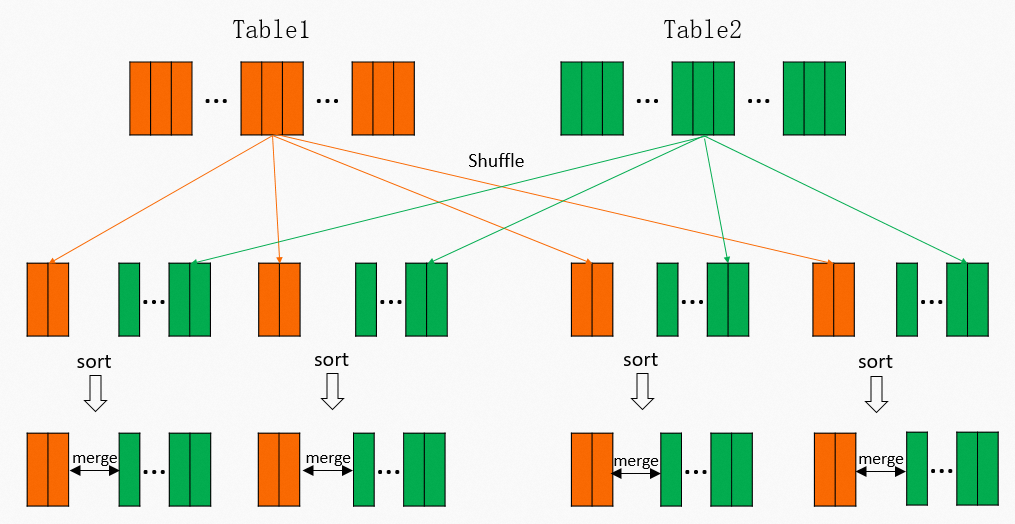 For the data volumes and scale common in MaxCompute, Sort Merge Join is used in most cases. However, this is a very expensive operation. As shown in the figure, the shuffle operation requires a calculation, and the intermediate results must be written to disk. The subsequent reducer must then read and sort this data. For a scenario with
 Mmappers andRreducers, this results inM × RI/O read operations. The corresponding Fuxi physical execution plan is shown below. It requires two Mapper stages and one Join stage. The red parts indicate the shuffle and sort operations.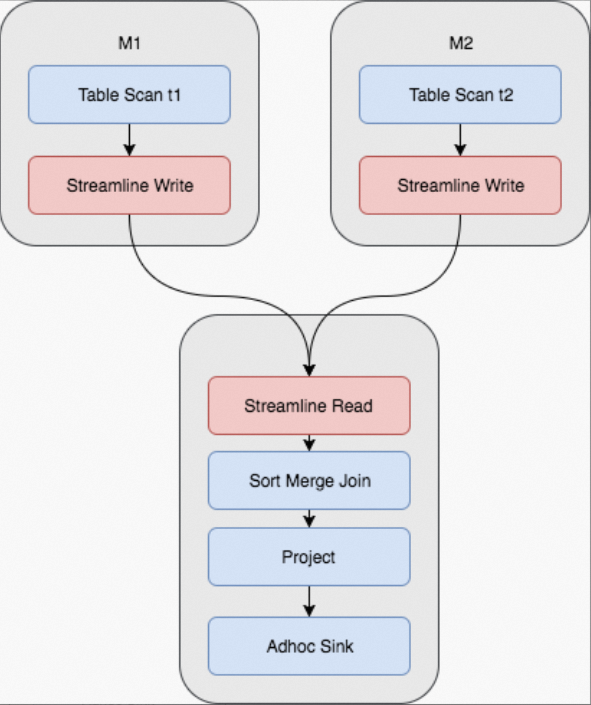 In addition, some joins may occur repeatedly. For example, if the query is changed to:
SELECT t1.c, t2.d FROM t1 JOIN t2 ON t1.id = t2.id;Although the selected columns are different, the join operation is identical. The entire shuffle and sort process is also the same.
Or, if the query is changed to:
SELECT t1.c, t3.d FROM t1 JOIN t3 ON t1.id = t3.id;This joins table t1 and table t3. For table t1, the entire shuffle and sort process is still the same.
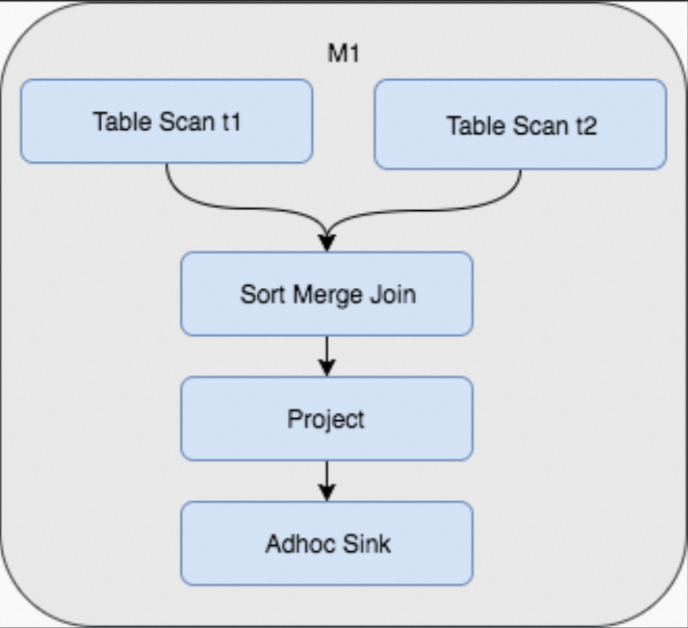
Therefore, if the initial table data is stored using a hash shuffle and sort method, subsequent queries can avoid shuffling and sorting the data again. The benefit is that a one-time cost during table creation saves repeated shuffle and join costs in subsequent queries. The Fuxi physical execution plan for the join then changes as shown in the following figure. This change not only saves the shuffle and sort operations but also reduces the query from three stages to one.
Usage notes
Create a Hash Clustering table
You can use the following statement to create a Hash Clustering table. You must specify a cluster key, which is the hash key, and the number of hash buckets. Sorting is optional. However, for optimal performance, you should set the sort key to be the same as the cluster key in most cases.
Syntax
CREATE TABLE [IF NOT EXISTS] <table_name>
             [(<col_name> <data_type> [comment <col_comment>], ...)]
             [comment <table_comment>]
             [PARTITIONED BY (<col_name> <data_type> [comment <col_comment>], ...)]
             [CLUSTERED BY (<col_name> [, <col_name>, ...])
             [SORTED BY (<col_name> [ASC | DESC] [, <col_name> [ASC | DESC] ...])]
             INTO <number_of_buckets> BUCKETS] [AS <select_statement>]
Examples
Non-partitioned table
CREATE TABLE T1 (a string, b string, c bigint)
             CLUSTERED BY (c)
             SORTED by (c) INTO 1024 BUCKETS;
Partitioned table
CREATE TABLE T1 (a string, b string, c bigint)
       PARTITIONED BY (dt string)
       CLUSTERED BY (c)
       SORTED by (c) INTO 1024 BUCKETS;
Properties
CLUSTERED BY
Specifies the hash key. MaxCompute performs a hash operation on the specified columns and distributes the data into buckets based on the hash values. To avoid data skew, prevent hot spots, and achieve good parallel execution, select columns with a large value range and few duplicate key values for the `CLUSTERED BY` clause. To optimize joins, you can also select frequently used join or aggregation keys, which are similar to primary keys in traditional databases.
SORTED BY
Specifies the sort order of fields within a bucket. For better performance, set the `SORTED BY` key to be the same as the `CLUSTERED BY` key. When the `SORTED BY` clause is specified, MaxCompute automatically creates an index and uses it to accelerate queries.
INTO number_of_buckets BUCKETS
Specifies the number of hash buckets. This number is required and depends on the data volume. A larger number of buckets increases concurrency and can shorten job runtimes. However, too many buckets can create an excessive number of small files, and high concurrency can increase CPU time. You should set the number of buckets so that each bucket is 500 MB to 1 GB in size. For very large tables, this number can be larger. To optimize joins by removing the shuffle and sort steps, the number of buckets for the two tables must be multiples of each other, such as
256and512. You should use a power of 2 for the number of buckets, such as 512, 1024, 2048, or 4096. This allows the system to automatically split and merge hash buckets and remove the shuffle and sort steps.
Change the Hash Clustering properties of a table
You can use the ALTER TABLE statement to add or remove Hash Clustering properties for a partitioned table.
Statements
-- Change the table to a Hash Clustering table
ALTER TABLE <table_name> [CLUSTERED BY (<col_name> [, <col_name>, ...])
                       [SORTED BY (<col_name> [ASC | DESC] [, <col_name> [ASC | DESC] ...])]
                       INTO <number_of_buckets> BUCKETS];
-- Change a Hash Clustering table to a non-Hash Clustering table
ALTER TABLE <table_name> NOT CLUSTERED;
Notes
The `ALTER TABLE` statement changes clustering properties only for partitioned tables. For non-partitioned tables, clustering properties cannot be changed after they are set.
The `ALTER TABLE` statement affects only new partitions of a partitioned table, including partitions that are generated by `INSERT OVERWRITE`. New partitions are stored with the new clustering properties. Existing data partitions remain unchanged.
Do not specify the `PARTITION` clause in the statement because the statement affects only new partitions.
The `ALTER TABLE` statement is suitable for existing tables. After you add new clustering properties, new partitions are stored using Hash Clustering.
Verify table properties
After you create a Hash Clustering table, you can run the following command to view its properties. The Hash Clustering properties are displayed in the Extended Info section.
DESC EXTENDED <table_name>;An example of the returned result is as follows.
| Owner: ALIYUN$                          | Project:
| TableComment:
|
| CreateTime:               2017-06-19 14:10:55
| LastDDLTime:              2017-06-19 14:10:55
| LastModifiedTime:         2017-06-19 14:13:13
|
| InternalTable: YES    | Size: 21680295746
|
| Native Columns:
|
| Field           | Type    | Label | Comment
|
| l_orderkey      | bigint  |       |
| l_partkey       | bigint  |       |
| l_suppkey       | bigint  |       |
| l_linenumber    | bigint  |       |
| l_quantity      | double  |       |
| l_extendedprice | double  |       |
| l_discount      | double  |       |
| l_tax           | double  |       |
| l_returnflag    | string  |       |
| l_linestatus    | string  |       |
| l_shipdate      | string  |       |
| l_commitdate    | string  |       |
| l_receiptdate   | string  |       |
| l_shipinstruct  | string  |       |
| l_shipmode      | string  |       |
| l_comment       | string  |       |
|
| Extended Info:
|
| TableID:
| IsArchived:          false
| PhysicalSize:        65040887238
| FileNum:             1001
| ClusterType:         hash
| BucketNum:           1000
| ClusterColumns:      [l_orderkey]
| SortColumns:         [l_orderkey ASC]
For a partitioned table, after you view the table properties, you can run the following command to view the partition properties.
DESC EXTENDED <table_name> partition(<pt_spec>);An example of the returned result is as follows.
| PartitionSize: 754

| CreateTime:               2017-07-07 14:01:03
| LastDDLTime:              2017-07-07 14:01:03
| LastModifiedTime:         2017-07-07 14:01:03

| IsExstore:                false
| IsArchived:               false
| PhysicalSize:             2262
| FileNum:                  2
| ClusterType:              hash
| BucketNum:                500
| ClusterColumns:           [c1]
| SortColumns:              [c1 ASC]
Benefits of Hash Clustering
Bucket pruning and index optimization
CREATE TABLE t1 (id bigint,
                 a string,
                 b string)
             CLUSTERED BY (id)
             SORTED BY (id) into 1000 BUCKETS;
...
SELECT t1.a, t1.b FROM t1 WHERE t1.id=12345;idid
The query finds the corresponding hash bucket for the value
12345. This requires scanning only one bucket instead of all 1,000 buckets. This process is known as bucket pruning.Because the data within the bucket is sorted by
id, MaxCompute automatically creates an index. MaxCompute then uses an index lookup to directly locate the relevant records.
This optimization not only greatly reduces the number of mappers but also allows mappers to directly locate the data page using the index. This significantly reduces the amount of data that is loaded and read.
For example, a big data task started 1,111 mappers and read 42.7 billion records to find 26 matching records. The total runtime was 1 minute and 48 seconds. With a Hash Clustering table, the same query on the same data can directly locate a single bucket and use an index to read only the pages that contain the query data. This process uses only 4 mappers, reads 10,000 records, and takes only 6 seconds.
Aggregation optimization
For the following query:
SELECT department, SUM(salary) FROM employee GROUP BY (department);Typically, this query shuffles and sorts the data in the department column and then performs a stream aggregation to count each department group. However, if the table data is already clustered and sorted by `department`, the shuffle and sort operations are no longer required.
Storage optimization
Even without considering computational optimizations, simply shuffling and sorting the table data for storage can significantly save space. MaxCompute uses a column store at the underlying layer. Sorting places records with the same or similar key values together. This improves the effectiveness of compression and encoding, which leads to higher compression ratios. In tests, a sorted table can use up to 50% less storage space than an unsorted table in some extreme cases. For tables with a long lifecycle, using Hash Clustering for storage is a worthwhile optimization.
The following experiment uses the 100 GB lineitem table from the TPC-H dataset. The table contains various data types, such as int, double, and string. With the same data and compression method, we compared the storage size of a table with and without Hash Clustering. The table with Hash Clustering used approximately 10% less storage, as shown in the following figures.
Without Hash Clustering
odps@xxx>desc tpch_lineitem;
+------------------------------------------------------------------------------------+
| Owner:                 xxx             | Project:      xxx                       |
| TableComment:                                                                      |
+------------------------------------------------------------------------------------+
| CreateTime:            2016-04-17 21:48:08                                          |
| LastDDLTime:           2016-04-17 21:48:08                                          |
| LastModifiedTime:      2016-04-17 21:50:10                                          |
+------------------------------------------------------------------------------------+
| InternalTable: YES     | Size: 23573055432                                          |
+------------------------------------------------------------------------------------+
| Native Columns:                                                                     |
+------------------------------------------------------------------------------------+
| Field             | Type       | Label  | Comment                                  |
+------------------------------------------------------------------------------------+
| l_orderkey        | bigint     |        |                                          |
| l_partkey         | bigint     |        |                                          |
| l_suppkey         | bigint     |        |                                          |
| l_linenumber      | bigint     |        |                                          |
| l_quantity        | double     |        |                                          |
| l_extendedprice   | double     |        |                                          |
| l_discount        | double     |        |                                          |
| l_tax             | double     |        |                                          |
| l_returnflag      | string     |        |                                          |
| l_linestatus      | string     |        |                                          |
| l_shipdate        | string     |        |                                          |
| l_commitdate      | string     |        |                                          |
| l_receiptdate     | string     |        |                                          |
| l_shipinstruct    | string     |        |                                          |
| l_shipmode        | string     |        |                                          |
| l_comment         | string     |        |                                          |
+------------------------------------------------------------------------------------+
With Hash Clustering
odps@ xxx      >desc tpch_lineitem_hash_500;

| Owner:          xxx               | Project:    xxx
| TableComment:

| CreateTime:          2017-07-13 14:40:11
| LastDDLTime:         2017-07-13 14:40:11
| LastModifiedTime:    2017-07-13 15:05:04

| InternalTable: YES  | Size: 21658913950

| Native Columns:

| Field            | Type      | Label | Comment

| l_orderkey       | bigint    |       |
| l_partkey        | bigint    |       |
| l_suppkey        | bigint    |       |
| l_linenumber     | bigint    |       |
| l_quantity       | double    |       |
| l_extendedprice  | double    |       |
| l_discount       | double    |       |
| l_tax            | double    |       |
| l_returnflag     | string    |       |
| l_linestatus     | string    |       |
| l_shipdate       | string    |       |
| l_commitdate     | string    |       |
| l_receiptdate    | string    |       |
| l_shipinstruct   | string    |       |
| l_shipmode       | string    |       |
| l_comment        | string    |       |
Test data and analysis
The overall performance benefits of Hash Clustering were measured using the standard TPC-H test set. The test used 1 TB of data and 500 buckets for all tables. Except for the two small tables, nation and region, all other tables used the first column as the cluster and sort key. The overall test results show that after Hash Clustering was used, the total CPU time was reduced by approximately 17.3%, and the total job runtime was reduced by approximately 12.8%.
Note that not all queries in TPC-H can use the clustering property. In particular, the two longest-running queries cannot use this property. Therefore, the overall efficiency improvement is not dramatic. However, for queries that can use the clustering property, the benefits are significant. For example, Q4 was approximately 68% faster, Q12 was approximately 62% faster, and Q10 was approximately 47% faster.
The following figure shows the Fuxi execution plan for TPC-H Q4 on a standard table: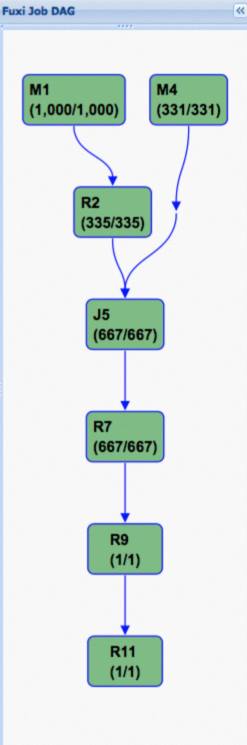 The following figure shows the execution plan after Hash Clustering is used. As you can see, the Directed Acyclic Graph (DAG) is greatly simplified. This is the key reason for the significant performance improvement.