JOIN operations are common in distributed systems but can be slow and resource-intensive. The required shuffle operation, especially with large datasets, consumes significant resources and time. MaxCompute can optimize the shuffle operation by leveraging the properties of equi-joins.
How it works
Consider a typical SQL statement that contains a JOIN clause:
SELECT * FROM (table1) A JOIN (table2) B ON A.a = B.b;For small datasets, dynamic filtering is effective only with a merge join. To ensure this behavior, set the following flags:
set odps.optimizer.enable.conditional.mapjoin=false;set odps.optimizer.cbo.rule.filter.black=hj;
Using the properties of equi-joins, MaxCompute can generate a filter from the data in table A to pre-filter data in table B before the shuffle or JOIN operation. The system can even push the filter down to the underlying storage to filter data at the source. This technique of generating filters dynamically at runtime is known as dynamic filtering.
The following figure shows the execution plan before and after dynamic filtering is enabled for the SQL statement.

Use cases
Dynamic filtering uses equi-join properties to generate filters at runtime. This process filters data before the shuffle or JOIN operation, accelerating query execution. This feature is particularly effective when joining a dimension table with a fact table.
Dynamic range and bloom filters
As shown in the preceding figure, the original execution plan does not contain a filter. The system automatically generates a filter based on the JOIN characteristics. The filter checks whether elements from table B exist in the set generated from table A and filters out any non-matching elements.
For space and time efficiency, a bloom filter is an effective choice. In practice, dynamic filtering can use several filter types, including a bloom filter, a range filter based on [min, max] values, and an IN predicate.
Dynamic filtering follows a typical producer-consumer pattern, as shown in the following figure.
DFP (Dynamic Filter Producer) operator: The producer of the dynamic filter. It uses data from the small table to generate a Bloom Filter and obtain the
minandmaxvalues (Range Filter) for the join key. It then sends these filters to the DFC.DFC (Dynamic Filter Consumer) operator: The consumer of the dynamic filter. It uses the bloom filter and range filter to filter data from the larger table (probe side). The range filter pushes filter conditions down to the underlying storage whenever possible to filter data at the source.
The roles of the JOIN objects vary depending on the JOIN semantics:
A JOIN B: Either A or B can be the producer or the consumer.
A LEFT JOIN B: A can only be the producer, and B can only be the consumer.
A RIGHT JOIN B: A can only be the consumer, and B can only be the producer.
A FULL OUTER JOIN B: Dynamic filtering is not supported.
For information about how to use dynamic filtering, see Enable dynamic filtering.
Dynamic partition pruning
The bloom filter and range filter examples described above apply to optimizations on a non-partitioned table, where the join key is not a partition key column. When the join key is a partition key column, dynamic range and bloom filters are still applicable. However, MaxCompute reads all data from a partition before filtering it. Pruning unnecessary partitions before data is read further optimizes this process. This technique is known as dynamic partition pruning (DPP).
For example, consider the following SQL statement that contains a JOIN clause:
-- Table A is a non-partitioned table. The value of column 'a' is 20200701.
-- Table B is a partitioned table. The partition key column 'ds' contains three partitions: 20200701, 20200702, and 20200703.
SELECT * FROM (table1) A JOIN (table2) B ON A.a = B.ds;
After you enable dynamic partition pruning, the optimizer decides whether to use this feature based on whether the table is a partitioned table. If dynamic partition pruning is active, MaxCompute collects data from the smaller table to generate a bloom filter. This filter is then used to prune the partition list of the larger table. The system aggregates the required partitions and prunes the unnecessary ones. If all of a running process's target partitions are pruned, that process is not scheduled.
In the preceding example, because the value of column 'a' in table A is only 20200701, dynamic partition pruning prunes partitions 20200702 and 20200703 in table B. This saves resources and reduces the job runtime.
For information about how to use dynamic partition pruning, see Enable dynamic partition pruning.
Enable dynamic filtering
MaxCompute provides the following methods to enable dynamic filtering:
Method 1: Force dynamic filtering at the session level. Submit the command along with your SQL statement.
set odps.optimizer.force.dynamic.filter=true;NoteYou can also set this property at the project level, but we recommend setting it at the session level. If you enable it at the project level, dynamic filtering is applied to all JOIN jobs. This can reduce performance for jobs that do not benefit from filtering.
This method inserts dynamic filters for all JOIN operations that support dynamic filtering.
Method 2: Enable intelligent dynamic filtering at the session level.
set odps.optimizer.enable.dynamic.filter=true;When this method is used, the optimizer intelligently estimates whether inserting a dynamic filter provides sufficient resource or time benefits. If it does, the optimizer inserts the dynamic filter. Otherwise, it does not.
NoteThese statistics are optimizer estimates and can be inaccurate, which may prevent a dynamic filter from being inserted as expected. For more information about metadata statistics, see Collect optimizer statistics.
Method 3: Use a hint in the SQL statement for a specific join.
The HINT format is
/*+dynamicfilter(Producer, Consumer1[, Consumer2,...])*/, which allows a producer to filter multiple consumers. The following is an example command:select /*+dynamicfilter(A, B)*/ * from (table1) A join (table2) B on A.a= B.b;
Enable dynamic partition pruning
Enable dynamic partition pruning at the session level. Submit the command along with your SQL statement.
set odps.optimizer.dynamic.filter.dpp.enable=true;You can also set this property at the project level, but we recommend setting it at the session level. If you enable it at the project level, dynamic partition pruning is applied to all JOIN jobs that involve a partitioned table. This can reduce performance for jobs that do not benefit from partition pruning.
Verification
After you enable dynamic filtering or dynamic partition pruning as described in Enable dynamic filtering or Enable dynamic partition pruning, you can use the following methods to verify that the optimization is active:
Dynamic filtering
After the SQL job runs, check the job's LogView. If an operator with a name like DynamicFilterConsumer1 appears in the LogView, dynamic filtering is active.
Dynamic partition pruning
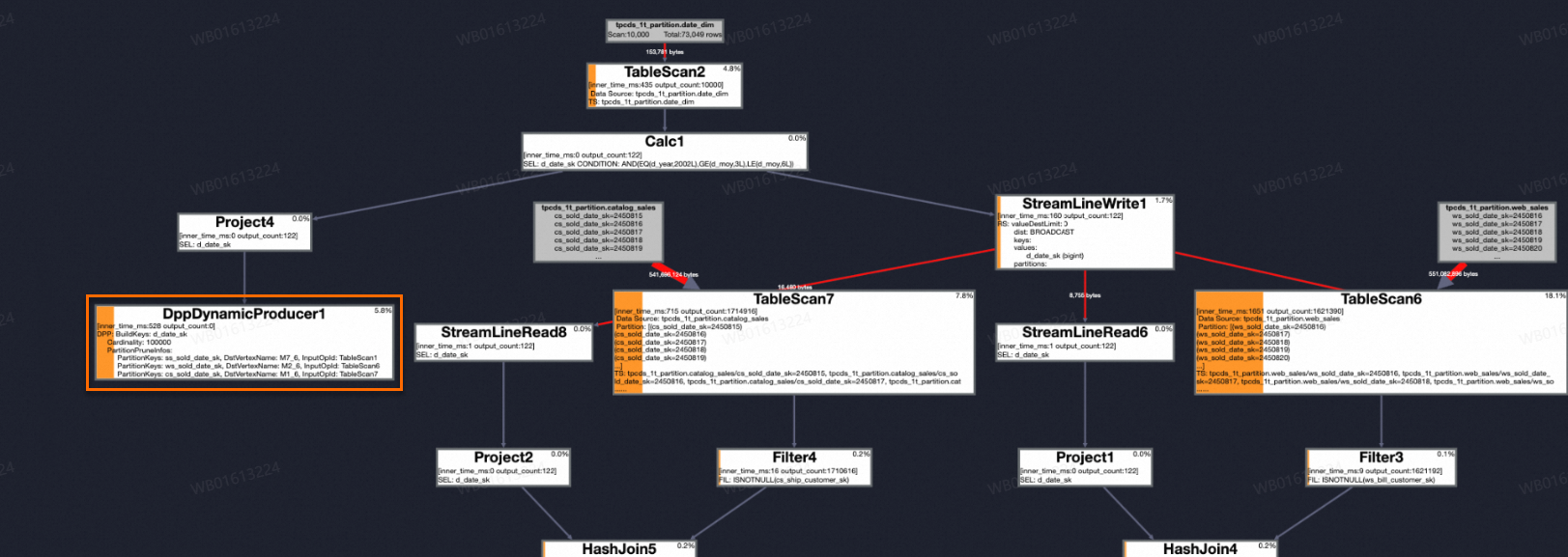
After the SQL job runs, check the job's LogView. If the LogView shows a DppDynamicProducer operator that contains PartitionPruneInfos, dynamic partition pruning is active.