A Delta Live Materialized View (Delta Live MV) allows you to build simple incremental update pipelines. This topic describes how to use Delta Live MVs in MaxCompute.
Overview
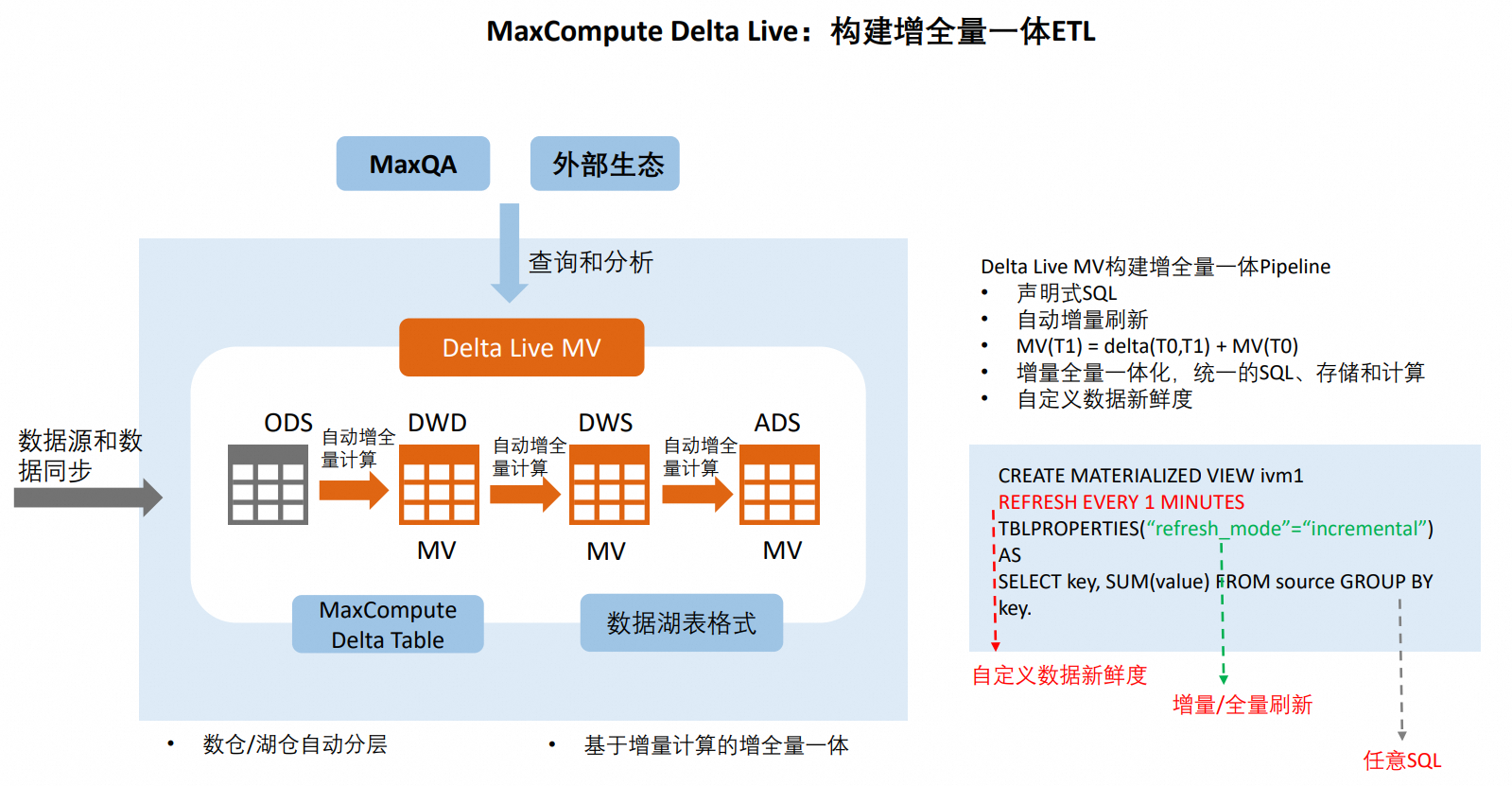
Compared to a materialized view that requires a full refresh, a Delta Live MV balances data freshness and compute cost. It intelligently reuses existing computation results and applies incremental computation algorithms to reduce compute costs and improve data freshness.
Architecture
Key advantages
MaxCompute Delta Live MVs provide the following advantages:
Enables data warehouse layering with declarative, fully managed, and automated processes.
Simplified data warehouse architecture: A single set of compute logic and one engine supports both incremental and full computation, meeting demands for both low latency and high throughput.
Cost-effective: Balances data freshness and compute cost, and efficiently handles unified incremental and full processing.
Use cases
The Delta Live MV feature is suitable for the following use cases:
Near-real-time data warehouse
Enables the evolution from a T+1 data warehouse to a near-real-time data warehouse with minute-level latency.
Unified incremental and full processing
Near-real-time incremental computation on the current day's partition for high data freshness and cost-effectiveness.
(Optional) Backfill historical partitions for data archiving, correction, and large-scale data analysis.
Comprehensive support for incremental computation with various SQL constructs, including the following common SQL operators:
Two-stream INNER JOIN
Two-stream LEFT/RIGHT OUTER JOIN
All AGGREGATE functions (except UDAFs), including those without GROUP BY or AGG.
WINDOW
TableFunctionScan
UNION ALL
FILTER/Project
SUBQUERY
Prerequisites
You have a MaxCompute project.
The source table must have Change Data Capture (CDC) enabled. The following source table types are supported:
A Delta Table with the CDC feature explicitly enabled.
Another Delta Live MV. CDC is enabled by default for Delta Live MVs.
A Delta Live MV cannot contain non-deterministic computations, such as the RAND function or UDFs.
Create a Delta Live MV
Syntax
CREATE MATERIALIZED VIEW [IF NOT EXISTS][<project_name>.]<mv_name>
[LIFECYCLE <days>]    --Specify the lifecycle.
[BUILD DEFERRED]    --Create only the table schema without populating data.
[(<col_name> [COMMENT <col_comment>],...)]    --Column comment.
[DISABLE REWRITE]    --Disables query rewrite for this view.
[COMMENT <table comment>]    --Table comment.
[PARTITIONED ON/BY (<col_name> [, <col_name>, ...])    --Create the materialized view as a partitioned table.
[REFRESH EVERY <num> MINUTES/HOURS/DAYS] --Set the scheduled refresh interval for the materialized view.
TBLPROPERTIES(
  "refresh_mode"="incremental"
  [,"enable_auto_refresh"="true"]    --Specify whether to enable auto-refresh.
  [,"refresh_cron"="xx"]             --Configure scheduled interval, point-in-time, or combined refreshes by using a cron expression.
  [,"refresh_job_settings"="xx"]
              )
AS <select_statement>;
The syntax for a Delta Live MV is compatible with that of a standard materialized view, with the following differences:
A Delta Live MV cannot be created as a clustered table.
The
enable_auto_substituteparameter cannot be set to true for a Delta Live MV. A Delta Live MV is an asynchronous materialized view, so the data from the base table might not be the latest version. This conflicts with the behavior whenenable_auto_substituteis set to true.
Parameters
Parameter | Required | Description |
project_name | No | The project name. |
mv_name | Yes | The name of the Delta Live MV. |
LIFECYCLE <days> | No | The data lifecycle in days. |
BUILD DEFERRED | No | Creates the table schema without generating data. |
col_name | No | The column name. |
col_comment | No | The column comment. |
DISABLE REWRITE | No | Disables query rewrite for the view. |
table comment | No | The table comment. |
REFRESH EVERY <num> MINUTES/HOURS/DAYS | No | Specifies the scheduled refresh interval. The minimum value is 1 minute. |
enable_auto_refresh | No | Specifies whether to enable auto-refresh.
|
refresh_mode | No | The refresh mode.
|
refresh_cron | No | A QUARTZ Cron expression to set the refresh frequency. You can configure interval-based, point-in-time, or a combination of refresh schedules. The value is a string in QUARTZ Cron format. For more information, see Cron expression examples. The following is an example: |
refresh_job_settings | No |
|
select_statement | Yes | The SQL query statement. |
Examples
Example 1: Create a simple Delta Live MV
Define a Delta Live MV named mv1 that performs an incremental refresh automatically every 5 minutes. The source table is a Delta Table with CDC enabled.
CREATE MATERIALIZED VIEW IF NOT EXISTS mv1
REFRESH EVERY 5 MINUTES
TBLPROPERTIES("enable_auto_refresh"="true", "refresh_mode"="incremental")
AS
SELECT name, COUNT(*) FROM source GROUP BY name;
Example 2: Create a view with tuning parameters
SET odps.task.major.version=sql_flighting_dlmv;

CREATE MATERIALIZED VIEW IF NOT EXISTS part_dlmv_department
PRIMARY KEY(dept_id) -- The primary key can be inferred from the SQL logic. However, because partitioned MVs only support BUILD DEFERRED mode, which requires an explicitly declared primary key, you must declare it here.
LIFECYCLE 10
BUILD DEFERRED
PARTITIONED BY (pt)
TBLPROPERTIES('refresh_mode'='incremental',
  'refresh_job_settings'='set odps.task.major.version=sql_flighting_dlmv;')
AS
SELECT *, get_setting('odps.custom.setting.department.pt') AS pt FROM t_department;
Primary key requirements for MV refresh:
To support refreshes, a Delta Live MV must have a primary key (PK). Whether you must explicitly declare a PK depends on the situation:
When the primary key can be automatically inferred from the SQL logic
For example, if the SQL contains a GROUP BY key, the MV's primary key is automatically inferred as key, and you do not need to explicitly declare it. You can view the inferred primary key column by running the
DESC EXTENDED mvName;command.When the primary key cannot be automatically inferred from the SQL logic
Method 1: Modify the MV's SQL logic by adding a GROUP BY clause to meet the automatic inference condition.
Method 2: Explicitly declare the primary key. The data itself must satisfy the uniqueness constraint. The system attempts to verify data uniqueness for each incremental refresh. The uniqueness check for the initial data load is being optimized and will be available in a future release.
Special requirements for partitioned MVs
A partitioned MV currently supports only the BUILD DEFERRED mode, which does not support automatic primary key inference. Therefore, you must explicitly declare the primary key.
Partitioned Delta Live MV
Scenario 1: Use a partitioned Delta Live MV to represent incremental data for the current day and full data for historical records.
SET odps.task.major.version=sql_flighting_dlmv;

CREATE MATERIALIZED VIEW IF NOT EXISTS part_dlmv_department
PRIMARY KEY(dept_id) -- The primary key can be inferred from the SQL logic. However, because partitioned MVs only support BUILD DEFERRED mode, which requires an explicitly declared primary key, you must declare it here.
LIFECYCLE 10
BUILD DEFERRED
PARTITIONED BY (pt)
TBLPROPERTIES('refresh_mode'='incremental',
  'refresh_job_settings'='set odps.task.major.version=sql_flighting_dlmv;')
AS
-- t_department is a near-real-time ingestion table that mainly contains incremental data for the current day.
SELECT *, get_setting('odps.custom.setting.department.pt') AS pt FROM t_department;
UNION ALL
-- history_t_department is a historical partitioned table containing all historical data.
SELECT * FROM history_t_department;
Scenario 2: Use group by key to derive the PK column of a dlmv.
// pk delta table
CREATE TABLE dlmv_base_table(
    key    STRING NOT NULL PRIMARY KEY,
    value  BIGINT,
    value2 BIGINT
)
STORED AS ALIORC
TBLPROPERTIES (
    'transactional'                    = 'true',
    'cdc.insert.into.passthrough.enable' = 'true',
    'acid.cdc.mode.enable'             = 'true',
    'acid.cdc.build.async'             = 'false'
);

CREATE MATERIALIZED VIEW dlmv_pt
PRIMARY KEY(value) -- The primary key can be inferred from the SQL logic. However, because partitioned MVs only support BUILD DEFERRED mode, which requires an explicitly declared primary key, you must declare it here.
build deferred
partitioned BY (pt)
TBLPROPERTIES (
    'refresh_mode'        = 'incremental',
    'enable_auto_refresh' = 'true'
)
AS SELECT *, get_setting('odps.custom.setting.dlmv_pt.pt') AS pt FROM (SELECT value, MAX(value2)  FROM dlmv_base_table GROUP BY value) t;
Scenario 3: Infer the Delta Live MV primary key column from the primary key of the base table.
// pk delta table
CREATE TABLE dlmv_base_table(
    key    STRING NOT NULL PRIMARY KEY,
    value  BIGINT,
    value2 BIGINT
)
STORED AS ALIORC
TBLPROPERTIES (
    'transactional'                    = 'true',
    'cdc.insert.into.passthrough.enable' = 'true',
    'acid.cdc.mode.enable'             = 'true',
    'acid.cdc.build.async'             = 'false'
);

CREATE MATERIALIZED VIEW dlmv_pt
PRIMARY KEY(key) --The primary key can be inferred from the SQL logic. However, because partitioned MVs only support BUILD DEFERRED mode, which requires an explicitly declared primary key, you must declare it here.
build deferred
partitioned BY (pt)
TBLPROPERTIES (
    'refresh_mode'        = 'incremental',
    'enable_auto_refresh' = 'true'
)
AS
SELECT key, value, value2, get_setting('odps.custom.setting.dlmv_pt.pt') as pt FROM dlmv_base_table;
Scenario 4: The Delta Live MV primary key column cannot be inferred.
// pk delta table
CREATE TABLE dlmv_base_table(
    key    STRING NOT NULL PRIMARY KEY,
    value  BIGINT,
    value2 BIGINT
)
STORED AS ALIORC
TBLPROPERTIES (
    'transactional'                    = 'true',
    'cdc.insert.into.passthrough.enable' = 'true',
    'acid.cdc.mode.enable'             = 'true',
    'acid.cdc.build.async'             = 'false'
);

# 1. Explicitly declare the primary key column
CREATE MATERIALIZED VIEW dlmv_pt
primary key(value) -- The primary key column cannot be inferred as 'value' from the SQL logic, but the user knows the data itself satisfies the primary key uniqueness. The primary key must be explicitly declared.
build deferred
partitioned BY (pt)
TBLPROPERTIES (
    'refresh_mode'        = 'incremental',
    'enable_auto_refresh' = 'true'
)
AS
SELECT value, value2, get_setting('odps.custom.setting.dlmv_pt.pt') as pt FROM dlmv_base_table;

# 2. Modify the SQL logic to allow primary key inference.
-- If the uniqueness of the 'value' column cannot be guaranteed, the logic can be modified with a group by clause, as shown below:
CREATE MATERIALIZED VIEW dlmv_pt
primary key(value) -- The primary key can be inferred from the SQL logic. However, because partitioned MVs only support BUILD DEFERRED mode, which requires an explicitly declared primary key, you must declare it here.
build deferred
partitioned BY (pt)
TBLPROPERTIES (
    'refresh_mode'        = 'incremental',
    'enable_auto_refresh' = 'true'
)
AS SELECT value, MAX(value2), get_setting('odps.custom.setting.dlmv_pt.pt') as pt FROM dlmv_base_table GROUP BY value;
Non-partitioned Delta Live MV
Scenario 1: By using group by key, you can derive the PK column of the DLMV.
// pk delta table
CREATE TABLE dlmv_base_table(
    key    STRING NOT NULL PRIMARY KEY,
    value  BIGINT,
    value2 BIGINT
)
STORED AS ALIORC
TBLPROPERTIES (
    'transactional'                    = 'true',
    'cdc.insert.into.passthrough.enable' = 'true',
    'acid.cdc.mode.enable'             = 'true',
    'acid.cdc.build.async'             = 'false'
);

CREATE MATERIALIZED VIEW dlmv
-- primary key(value) can be inferred from the SQL logic (group by value), so explicit declaration is not needed.
TBLPROPERTIES (
    'refresh_mode'        = 'incremental',
    'enable_auto_refresh' = 'true'
)
AS SELECT value, MAX(value2) FROM dlmv_base_table GROUP BY value;
Scenario 2: Infer the Delta Live MV primary key column from the primary key of the base table.
// pk delta table
CREATE TABLE dlmv_base_table(
    key    STRING NOT NULL PRIMARY KEY,
    value  BIGINT,
    value2 BIGINT
)
STORED AS ALIORC
TBLPROPERTIES (
    'transactional'                    = 'true',
    'cdc.insert.into.passthrough.enable' = 'true',
    'acid.cdc.mode.enable'             = 'true',
    'acid.cdc.build.async'             = 'false'
);

CREATE MATERIALIZED VIEW dlmv
-- primary key(key) can be inferred from the SQL logic (derived from the base table's primary key), so explicit declaration is not needed.
TBLPROPERTIES (
    'refresh_mode'        = 'incremental',
    'enable_auto_refresh' = 'true'
)
AS
SELECT key, value, value2 FROM dlmv_base_table;
Scenario 3: The Delta Live MV primary key column cannot be inferred.
// pk delta table
CREATE TABLE dlmv_base_table(
    key    STRING NOT NULL PRIMARY KEY,
    value  BIGINT,
    value2 BIGINT
)
STORED AS ALIORC
TBLPROPERTIES (
    'transactional'                    = 'true',
    'cdc.insert.into.passthrough.enable' = 'true',
    'acid.cdc.mode.enable'             = 'true',
    'acid.cdc.build.async'             = 'false'
);

# 1. Explicitly declare the primary key column
CREATE MATERIALIZED VIEW dlmv
primary key(value) -- The primary key column cannot be inferred as 'value' from the SQL logic, but the user knows the data itself satisfies the primary key uniqueness. The primary key must be explicitly declared.
TBLPROPERTIES (
    'refresh_mode'        = 'incremental',
    'enable_auto_refresh' = 'true'
)
AS
SELECT value, value2 FROM dlmv_base_table;

# 2. Modify the SQL logic to allow primary key inference
-- If the uniqueness of the 'value' column cannot be guaranteed, the logic can be modified with a group by clause, as shown below:
CREATE MATERIALIZED VIEW dlmv
-- primary key(value) can be inferred from the SQL logic (group by value), so explicit declaration is not needed.
TBLPROPERTIES (
    'refresh_mode'        = 'incremental',
    'enable_auto_refresh' = 'true'
)
AS SELECT value, MAX(value2) FROM dlmv_base_table GROUP BY value;
Example 3: Refresh a single partition
When you create a partitioned Delta Live MV, you must add the BUILD DEFERRED keyword to indicate that only DDL operations are performed.
-- Create the Delta Live MV.
CREATE MATERIALIZED VIEW dlmv_pt
PRIMARY KEY(value) BUILD DEFERRED PARTITIONED BY (ds) TBLPROPERTIES
('refresh_mode'='incremental', 'enable_auto_refresh'='true')
AS SELECT value, AVG(value2), ds FROM dlmv_pt_src GROUP BY value, ds;

-- Refresh a single partition.
ALTER MATERIALIZED VIEW dlmv_pt REBUILD PARTITION(ds='20250730');For more information about how to refresh a Delta Live MV, see Refresh a Delta Live MV manually.
Example 4: Use parameterized definitions
Using parameterized definitions can help you migrate offline partitioned jobs to incremental ones.
The
get_settingfunction is supported for obtaining the values of parameters set in the session flag. The parameters must be prefixed withdps.custom.setting.Replace
${biz_date}in traditional offline jobs withget_setting(odps.custom.setting.xx)to complete the parameterization.Add the session flag
set odps.custom.setting.xx=yybefore the Delta Live MV refresh statement.At runtime, the MaxCompute optimizer automatically replaces
get_setting(odps.custom.setting.xx)in a Delta Live MV withyy.
Example:
-- Create the Delta Live MV.
CREATE MATERIALIZED VIEW mv1
BUILD DEFERRED -- DDL only; no data is generated.
PARTITIONED BY (ds)
REFRESH EVERY 5 minutes
TBLPROPERTIES("enable_auto_refresh"="true", "refresh_mode"="incremental")
AS
SELECT A.* FROM A JOIN B ON A.c1 = B.c1
  AND A.ds=get_setting('odps.custom.setting.bizdate.a')
  AND B.ds=get_setting('odps.custom.setting.bizdate.b');

-- Refresh logic: DataWorks scheduling automatically replaces ${biz_date} and ${yesterday}.
SET odps.custom.setting.bizdate.a=${biz_date};
SET odps.custom.setting.bizdate.b=${yesterday};
ALTER MATERIALIZED VIEW mv1 REBUILD PARTITION(ds=${biz_date});
Manage a Delta Live MV
Drop a Delta Live MV
DROP MATERIALIZED VIEW [IF EXISTS] [<project_name>.]<mv_name>;Manual refresh
You can refresh a Delta Live MV manually. Manual refreshes support only single partitions.
ALTER MATERIALIZED VIEW [<project_name>.]<mv_name>
      REBUILD [PARTITION(<ds>=max_pt(<table_name>),<expression1>...)];
In this syntax, ds is the partition column.
Disable auto-refresh
To disable the auto-refresh feature, run the following command:
ALTER MATERIALIZED VIEW <mv_name> SET TBLPROPERTIES("enable_auto_refresh"="false");Resume auto-refresh
Run the following command to modify the TBLPROPERTIES of the materialized view to enable or resume auto-refresh.
ALTER MATERIALIZED VIEW <mv_name> SET TBLPROPERTIES("enable_auto_refresh"="true");Change the refresh frequency
Run the following command to change the refresh frequency of a Delta Live MV.
ALTER MATERIALIZED VIEW <mv_name>
SET TBLPROPERTIES("refresh_interval_minutes"="xx");The minimum value for the refresh_interval_minutes parameter is 1. We recommend that you set this value to be less than the CDC lifecycle of the base table.
View a Delta Live MV
View data change history
Run the following command to view the data change records of a Delta Live MV.
SHOW HISTORY FOR TABLE <mv_name>;Sample result:
ObjectType      ObjectId                                ObjectName              VERSION(LSN)            Time                    Operation
TABLE           d95ec7015e8b432e8e0092d01da962a9        incremental_mv          0000000000000001        2024-08-18 21:06:32     CREATE
TABLE           d95ec7015e8b432e8e0092d01da962a9        incremental_mv          0000000000000002        2024-08-18 21:11:13     UPDATE
View refresh history
Run the following command to view the refresh history of a Delta Live MV.
SELECT * FROM
Delta_Live_MV_Refresh_History(['<project_name>', '<schema_name>',]'<table_name>');
Parameters
Parameter | Description |
project_name | The project name. |
schema_name | The schema name. |
table_name | The table name. |
Return values
Field | Description |
project_name | The project that contains the Delta Live MV. |
schema_name | The schema that contains the Delta Live MV. |
name | The name of the Delta Live MV. |
refresh_start_time | The time when the refresh started. |
refresh_end_time | The time when the refresh ended. If the job's |
instance_id | The job ID. You can use this ID to open Logview. |
duration_in_seconds | The refresh duration. |
state | The job state.
|
refresh_trigger | The refresh method.
|
refresh_mode | The refresh mode.
|
error_message | Information about a refresh failure. If the refresh is successful, this value is NULL. |
source_tables | The names and versions of the base tables used for the refresh. |
numInsertedRows | The number of inserted rows. |
numDeletedRows | The number of deleted rows. |
Billing
Delta Live MVs incur fees for both computing and storage. The billing method is the same as that for regular materialized view operations.
Compute fees
When you create or refresh a Delta Live MV, if a job is started to compute data, it consumes compute resources and incurs compute fees. The billing rules are the same as for standard SQL jobs.
If an auto-refresh is triggered but there are no data changes, MaxCompute does not start a refresh job, and you incur no fees.
We recommend that you place Delta Live MVs in a dedicated project to easily track auto-refresh jobs, compute resource usage, and costs.
Storage fees
Delta Live MVs are billed for storage in the same way as standard materialized views and regular tables.
For some operators, a Delta Live MV may use a state-based incremental computation algorithm, which generates internal state tables and consumes additional storage.
A Delta Live MV incurs storage overhead for CDC and Time Travel. This overhead is similar to that of a standard Delta Table.